The Tool Desk
Outbyte PC Repair FREERepair Windows errors before they cause bigger problemsFix Now →Outbyte Driver Updater FREEFix the driver behind crashes, sound loss and screen glitchesFind Drivers →Steam Workshop mods for Starbound are stored in the Steam library’s steamapps/workshop/content/211820 folder. Each item sits in a numeric subfolder, usually matching the ID in its Workshop URL. Manually installed mods go in the game’s separate mods folder.
Find Steam Workshop mods
Open the Steam library where Starbound is installed and follow this path:
<Steam library>/steamapps/workshop/content/211820/<Workshop item ID>/
211820 is Starbound’s Steam app ID. Each Workshop item has its own numeric folder, and its files are commonly named contents.pak. The path prefix depends on the library’s actual location, so a custom Steam library will not necessarily use Steam’s default directory. Chucklefish’s modding tutorial describes the Workshop folder structure.
Match a folder to a Workshop page
- Open the mod’s Steam Workshop page.
- Find the number after
?id=in the page URL. - Look for the folder with that number inside
steamapps/workshop/content/211820.
Workshop downloads and manual mods are different
| Mod source | Folder | How to identify it |
|---|---|---|
| Steam Workshop subscription | <Steam library>/steamapps/workshop/content/211820/<Workshop item ID>/ |
Numeric folder matching the Workshop item ID |
| Manual or repository download | <Starbound install>/mods/, commonly <Steam library>/steamapps/common/Starbound/mods/ |
Folder or file name chosen by the mod author or installer |
The Workshop directory is managed under Steam’s library; the installation mods folder is for locally installed mods. Chucklefish community guidance also distinguishes the Workshop content location from the local mods folder.
Quick wins for a faster PC:
Fix the driver behind crashes, sound loss and screen glitchesFind Drivers →Repair Windows errors before they cause bigger problemsFix Now →#1 Best Overall
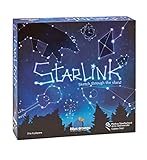
- CREATIVE DRAWING GAME: Starlink is a cosmic themed party game perfect for developing fine motor and drawing skills for both children and adults! This new party game has an amazing table presence with beautiful and high-quality cardboard pieces
- FAMILY OR ADULT GAME: This 3 to 6 players cosmic game can be enjoyed by children, parents, or the whole family! Best recommended for ages 8 & Up
- HOW TO PLAY: Each turn you will be given a new concept that you must represent by drawing lines between the available stars on the board. But watch out! Once a star has been used in one constellation, it can no longer be used for the rest of the game! The player who creates the best constellations is the winner!
- INCLUDES 100 Constellations cards, 1 Dry Erase game board, 2 Dry Erase Markers, 1 Telescope card, 1 Sand timer, Rules
Account for your Steam library and operating system
Use the library containing Starbound, then append steamapps/workshop/content/211820. The start of the path varies with Steam’s installation location, the operating system, and whether you chose a custom library. Chucklefish’s support FAQ gives platform-specific examples for finding Starbound troubleshooting files, but those are not a complete list of Workshop paths.
If the Workshop folder or mod is missing
- Check that you are looking in the Steam library where Starbound is installed.
- Confirm that you subscribed to the mod and Steam has downloaded it.
- Verify the Workshop item ID against the number after
?id=on the mod’s page.
These checks follow from the documented library path and numeric folder structure; they are practical troubleshooting steps, not a guarantee that every missing mod has the same cause.
Rank #2
When launching a copied game folder
Chucklefish’s modding tutorial notes that Workshop mods may not load when the executable is launched directly from a copied game folder. For that specific setup, it describes copying a Workshop .pak file into the local mods folder. This is a workflow-specific workaround, not a step Steam users generally need to perform.
Quick Recap
Rank #3

- package dimensions :3.9 cm L x 10.0 cm W x 20.0 cm H
- Product type :GAMES ACCESSORIES
- After decades of colonization, the spacefaring races have finally come to the moment where even their own colonized space is not enough
- country of origin : China
Product prices and availability are accurate as of the date/time indicated and are subject to change. Any price and availability information displayed on Amazon at the time of purchase will apply.
What’s actually slowing this PC down?
Pick the symptom - the matching free tool is one click away.



