What’s actually slowing this PC down?
Pick the symptom - the matching free tool is one click away.
It depends on which reset option you choose. Reset and keep my games & apps leaves installed game and app packages on the console but removes personal data such as profiles, settings, achievements, and saved games. Reset and remove everything deletes local content more broadly, including games, apps, saves, and other files. A reset is not the same as simply turning the console off and on.
What does “hard reset” mean on Xbox?
People use “hard reset” to mean different things, from restarting a console to resetting it to its factory state. This article covers the console’s reset choices, which can remove data stored locally. The outcomes below are described in TechRadar’s reset guide, checked October 8, 2026; exact menu wording and steps may vary by console model or software version.
What each reset option removes
| Reset choice | Installed games and apps | Accounts and personal data | When it may fit |
|---|---|---|---|
| Reset and keep my games & apps | Installed game and app packages remain on the console. | Personal files are removed, including achievements, saved games, settings, and profiles. You will need to sync again for data that is available to recover from the cloud. | May suit troubleshooting when you want to avoid reinstalling installed games and apps. |
| Reset and remove everything | Games and apps stored locally are deleted. | Deletes local content more broadly, including saves and other files. | May be considered for more extensive troubleshooting or when preparing to transfer the console. |
These outcomes are described in TechRadar’s Xbox reset guide. Neither option should be treated as a guarantee that every item can be restored afterward.
Will your saves and settings come back?
Only data that has synchronized or been backed up can be available to restore. Before resetting, allow the console to finish syncing and make a separate backup of any wanted content or settings that can be backed up. Cloud syncing is not a guarantee that every save or setting will be recoverable; recovery depends on what actually synced, and the available guide does not establish every exception or the timing of recovery.
Do these 3 things before closing this tab:
1Scan for outdated or missing drivers - takes under a minute2Repair Windows errors before they cause bigger problems3Fix the driver behind crashes, sound loss and screen glitches#1 Best Overall

- Compatibility: Compatible with Xbox One controller left button, ensuring a perfect fit and functionality.
- Dimensions: Measuring 32.9x40x54mm, this baffle provides an optimal size for seamless integration into your gaming setup.
- Material: Crafted from plastic, this button lock baffle is built to withstand regular use and resist wear and tear.
- Simple Installation Process: Designed for easy installation, without requiring any specialized tools. Enjoy a hassle-free setup, enabling you to get back to gaming in no time.
- Enhanced Gaming Control: By locking the sync button, this baffle prevents unintentional synchronization issues during gameplay. This feature enhances your control and focus, especially during competitive gaming sessions where precision is crucial.
Before you reset
- Confirm that you mean a console reset, not a simple power cycle.
- Decide whether keeping installed games and apps is important; the keep option still removes personal data.
- Check that synchronization has completed and back up wanted content or settings where possible.
- If you are transferring the console, consider whether a broader local wipe is appropriate.
For exact current steps or recovery guarantees for your particular console, check Xbox Support; menu labels and procedures can vary by model and software version.
Quick Recap
Best Value

- Very Important: Only works with Xbox One console home button. In order to cover all the light so the stickers will be little bigger than the console home button. Note: Don't fit for Xbox One series controllers, for Xbox One S & Xbox One X console
- Easy to install and removal. Leaves Behind No Sticky Residue
- Personalize the console. When you stick the skin, you can find out the power switch easily
- It can project different colors when console working. And the button skin adds the crowning touch to your Console for Xbox One
- It is worth buying. There are available in 8 colors, each color with 2 pcs
Rank #4

- Replace a broken or worn power eject button LED board or flex cable.
- Perfectly fit for mounting positions and easy to install, no modification to the machine.
- Help to repair your machine by replacing the damaged, non-working board.
- Repair the game console and make it work in good condition.
- Applicable Model for Xbox Series X game machine.
Rank #3
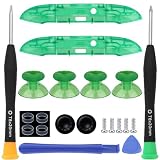
- Compatibility -- Compatible with Xbox Series X & for Xbox Series S controller only (NOT FIT for Xbox one Elite, Xbox One, Xbox One S/X controller).
- Premium Quality -- Made of premium ABS material, durable and wear-resistant, not easy to break.
- Easy to Install -- With full tools, It is easy to replace your broken, worn-out or old Lb Rb Bumper Button.
- Package Include -- 2 x RB LB Shoulder Buttons, 2 x Top Middle Bracket Bars , 4 x Thumbsticks, 4 x Protective Rings, 2 x Thumbstick Caps,5 x T8 Screw, 1x T6 Screwdriver, 1x T8 Screwdriver, 1x Triangle prying tool, 1x Prying tool .
- Customer Service & Warranty -- We provide 6 months warranty for replacement Bumper Button. If you have any problem about the product, please feel free to contact us, we will reply you with 24 hours.
Rank #2

- 【Compatible model】-- Our LB RB Bumpers compatible with Xbox Series X and Xbox Series S controller only (NOT fit for Xbox One Elite, Xbox One and Xbox One S/X controller or any other controller).
- 【What you get】Complete Repair Kit -- 2 x RB LB Bumper Buttons, 2 x Top Middle Bracket Bar , 1 x T6 Screwdriver, 1 x T8 Screwdriver, 1 x Triangle prying tool, 1 x Single-ended prying tool .
- 【Easy to install】-- We provide all the accessories for this repair. With the T6, T8 screwdriver and pry tool included in the package, you can disassemble your controller easily. Follow our installation video, in about 10-15 minutes you can repair the LB RB Bumper button, then your controller can work again.
- 【2 x High quality LB RB Bumpers】Extend the life of the controller -- Made of high quality ABS material, wear-resistant and enduring, not easy to break, exactly the same as the original one. Make it has longer working life and used more accurately. Reduce your replacement frequency and cost.
- 【Please feel free to keep in touch with us】-- Each item is tested by us before delivery. If the product by broken or you have questions on installation, please contact us. We will solve the problem with you.
Product prices and availability are accurate as of the date/time indicated and are subject to change. Any price and availability information displayed on Amazon at the time of purchase will apply.
Independent reader supportYour contribution helps us test, update, and keep practical guides available for everyone.



