Free tools Windows power users keep installed
One-click scans. No signup required.
Bad stick drift is unintended stick movement that is strong or frequent enough to interfere with play or navigation while you are not touching the stick. A cursor creeps, a character walks on its own, or a menu selection jumps. No universal number separates normal from bad. In practice, the question is whether the drift gets in the way of what you are doing.
What stick drift is
Stick drift happens when a controller registers movement even though the stick is at rest. SCUF Gaming, in its support article “Understanding Drift and Jitter” (published July 6, 2026), defines drift as “when your joystick doesn’t return perfectly to center—either physically or digitally.” The same article notes that “even a small offset from true center can cause your controller to register unintended movement.”
That means drift is not always a large, obvious shift. A stick that rests a few degrees off center can still send input to the game.
When drift becomes a real problem
Drift is most noticeable where small unwanted input has the biggest effect:
The Tool Desk
Outbyte Driver Updater FREEFix the driver behind crashes, sound loss and screen glitchesFind Drivers →Outbyte PC Repair FREERepair Windows errors before they cause bigger problemsFix Now →#1 Best Overall
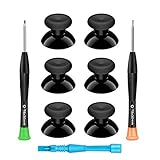
- 🎮 BEST XBOX THUMBSTICKS IN THE MARKET - Don't continue playing with those ratty old Xbox One thumbsticks! Game longer, better and more comfortably with original Xbox thumbsticks. Our inexpensive analog sticks are designed to be direct replacement of the original One/One S/One X Controller joystick, makes your controller stand out from the crowd with a new, fresh look and unique styling unlike any other.
- 🎮 ENJOY YOUR FULLY FUNCTION XBOX ONE CONTROLLER - Personalize and enhance your gaming experience with feedback based rubber design. True rubberized on the top and side, you will no longer have to worry about slipping off the analog stick of your controllers, and provide more accuracy and sensitivity, give you the most complete game pleasures.
- 🎮 UPGRADED PREMIUM QUALITY - Created with the gamer in mind, perfectly fit for your controller with aggressive textured grip. Also all products from us will be put under professional quality inspection before packaging to make sure the joysticks you received are in good condition.
- 🎮 MONEY SAVER & EASY TO INSTALL - There are plenty of YouTube videos that will walk you through the process, T8 T6 screwdrivers included help you open the shell very easily, then just replace the worn out or broken controller thumbsticks which will make your controller look awesome again, everybody is able to save $60 controller with our cheap parts in 10 minutes.
- Aim: the camera or crosshair slowly turns during fights or while lining up a shot.
- Movement: a character walks, drifts, or keeps running after you let go of the stick.
- Menus, maps and inventory screens: the selection moves without input, which SCUF identifies as one of the most noticeable places for the problem.
- Cursor control: pointer movement on consoles or PCs that use a stick to navigate.
Severity therefore depends on the effect. Drift that occasionally nudges a menu is an annoyance. Drift that repeatedly moves your aim or character, or makes menus hard to control, is bad enough to act on. No industry-standard percentage or test score defines the cutoff, so avoid judging a controller by a numerical reading alone.
What causes drift
Manufacturer explanations describe several overlapping causes. None of them diagnoses a specific controller, so treat them as background for narrowing down your own problem.
Rank #2

- Custom designed joysticks to perfectly fit for Xbox Series X/S, for Xbox Core controller (Model 1914) , for Xbox One standard (Model 1537/1697), for Xbox One X/S (Model 1708), for Xbox One Elite V1 (Model 1698) controller; Not compatible with Xbox Elite Series 2 and other controllers. Work exactly like the original thumbsticks
- Unique replacement to add much more personality to your controller. The replacement thumb sticks will make your controller distinct when playing with friends, no more boring standard color
- Made of premium PC & TPE plastic material, durable and practical. Ideal replacement for your broken or cracked controller thumbsticks
- The black color looks great; Would be awesome if you combine it with the custom shell from eXtremeRate (You can find these shells in our store.)
- Easy to install, requires internal fitting, the screwdriver tool included can help you easily open the shell and install the gaming parts
Centering and tolerance
SCUF describes drift as a stick that does not return to center, either physically or in its digital reading. Centering tolerance, the small allowed variation in where a stick rests, can produce a slight offset that the controller reads as movement.
Mechanical wear
Nacon’s general overview of stick drift, published April 1, 2025, lists mechanical wear among the possible causes. Wear builds up with use, which is why drift often appears on controllers that have been used heavily for a long time.
Recommended Free Tools
Rank #3

- HIGH QUALITY: 2 metal thumbsticks are made of high quality stainless steel metal, perfect fit, very durable and not easy to wear out.
- PERFECT COMPATIBILITY: Perfectly compatible with Xbox Elite Series 2 and Elite Series 2 Core controllers. These grips can be remapped to other buttons or functions to enhance the game control experience.
- RUN SMOOTHER: Enhance your gaming experience with our carefully crafted Xbox controller kits. They work perfectly with the official Xbox Elite Series 2 and Elite 2 Core controllers. It improves force, sensitivity and precision with pulse triggers for more feedback and a fully immersive gaming experience.
- GREAT GAMING FEEL: With the joystick, players can more easily trigger specific buttons or commands without taking their finger off the joystick or trigger.
- CONVENIENT AND SIMPLE: You don't need to disassemble the joystick, just place the metal paddle replacement into the correct hole and start gaming without any tools! Every step is very simple and convenient.
Dust and oxidation
Nacon also names dust buildup and oxidation as possible contributors. These can interfere with how the stick sensor reads position. The article does not say how often either occurs or how quickly they progress.
How to check your own controller
These steps help you separate drift from ordinary input or a game setting. They are checks, not a formal test.
Rank #4

- Requires some soldering to install, otherwise it is easy to repair, It's recommended for you to find some video on Youtube about how to fix the Controllers.
- To repair your worn, out of control, insensitive and drift joystick.
- For replacing the joystick of Xbox One S/X Controller; Please Note: You will need basic soldering skills along with soldering tools and other basic tools
- Comes with T6 T8 T10 Cross Screwdriver repair tools,12 Replacement "T6" Screws,7 Replacement "T8" Screws,2 x pry tools, 1 x pry bar ,4 Thumbstick Caps,1 x Brush
- Connect the controller and open a screen where nothing should move, such as a system menu or a title screen.
- Do not touch the stick for at least 30 seconds, then note whether a cursor or selection moves.
- Repeat the check in a game, watching the camera or character with the stick released.
- Note the direction of the unwanted movement. Drift that is consistent in one direction usually points to centering or wear rather than a one-off input.
- Try the same check with a different game or account. If the movement appears everywhere, the controller is the likely source.
Fixes to try first
Increase the dead zone
A dead zone tells the game to ignore small stick inputs around the center. Raising it can hide slight drift. The trade-off is reduced responsiveness near center, so small intentional movements feel softer or are ignored. SCUF describes a larger dead zone as a temporary way to mask jitter while the underlying wear continues. It does not restore worn hardware.
Labels differ by platform and game. Look for a dead zone, stick sensitivity or stick calibration option in the controller’s settings or in the game’s control menu. Make small changes and retest, rather than setting a large value at once.
Best Value
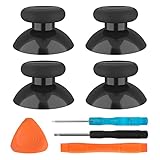
- SAVE MONEY! Perfectly fit for Xbox One/ Xbox One S controllers, replace your broken or worn-out original controller thumbsticks. This repair kit contains everything you need to switch the old analog joysticks out and save you from spending $60 on a new controller
- COMPATIBILITY: Only official orginal controller,compatible for Xbox One, for Xbox One S, for Xbox One X, for PS4 controllers,NOT compatible with PS5,NOT compatible with Nintendo switch pro,Power A controllers.NOT FOR any Third-party Brands controller
- MORE DURABLE THAN THE ORIGINAL - The top and sides are coated with hard rubber, which makes them last longer than the original rubber joystick.
- PACKAGE INCLUDE: 4 x Joystick Thumbsticks, 1 x T8 Screwdriver, 1 x Phillips Screwdriver, 1 x Prying Tool, 1 x Triangle Opening Picks
- At TOMSIN we stand by our products. That's we offer a 1-year warranty for all of our products. Any problems, please feel free to contact us via Amazon Email System and we will do our best to solve it
Replace the joystick module
When drift persists after a dead-zone change, Nacon identifies replacing the joystick module as a longer-term repair. This addresses the stick assembly directly, but it requires opening the controller, and the work varies by model.
Options when drift persists
| Option | What it addresses | Trade-offs | Cost and effort | Warranty and compatibility |
|---|---|---|---|---|
| Dead-zone adjustment | Masks mild drift | Reduces responsiveness near center; does not repair hardware | No cost; a settings change | Available only where the platform or game offers the option |
| DIY analog stick module replacement | Addresses a worn or faulty stick assembly | Requires opening the controller and some technical skill | Not stated in the sources reviewed; depends on model and region | Opening the controller may affect warranty; module must match your exact model |
| Manufacturer or authorized repair service | Repairs or replaces the stick assembly through the maker’s process | Turnaround and coverage vary | Not stated in the sources reviewed; varies by manufacturer and region | Coverage depends on warranty status and manufacturer policy |
Before you open a controller
Check these points first:
- Identify the exact model. Module fit, fasteners and repair steps differ between models of the same brand.
- Check warranty and support options. Warranty terms differ by manufacturer and region, and this article does not cover current policies for any particular brand. Confirm them with the manufacturer before you open a controller.
- Assess your skills. Replacing a stick module can require small screwdrivers, careful handling of ribbon cables, and in some models soldering.
- Use model-specific guides only. iFixit publishes a repair guide for the Xbox One Elite Series 2 controller, model 1797, titled “How to Fix an Analog Stick Drift in an Xbox One Elite Series 2 Controller.” Its steps apply to that model, not to other controllers.
If drift is limited to a dead-zone problem, a settings change may be enough. If it persists, match your controller model to the repair route that applies to it.
Quick Recap
Product prices and availability are accurate as of the date/time indicated and are subject to change. Any price and availability information displayed on Amazon at the time of purchase will apply.



