Quick wins for a faster PC:
Repair Windows errors before they cause bigger problemsFix Now →Scan for outdated or missing drivers - takes under a minuteDriver Scan →Xbox error 0x91D70000 is reported when the console has trouble reading or playing a disc, including 4K UHD Blu-ray playback in the Xbox Blu-ray app. The available reports do not establish a single cause or a guaranteed fix. First identify which kind of disc triggers the error and whether other discs play; if the problem continues, consult Xbox’s official disc troubleshooting page or contact Xbox Support.
What does error 0x91D70000 mean?
The code appears in user reports about disc recognition and playback. One Microsoft Q&A post from April 18, 2018 describes the message appearing while an Xbox One X user tried to play Star Wars: The Last Jedi on 4K Ultra HD Blu-ray. Another reply in the thread described a 4K Blu-ray failing while games, standard Blu-rays, and DVDs played. These are user reports, not a formal technical definition of the code. Microsoft Q&A
A reproduced message in a Microsoft Q&A search listing says the Xbox is having trouble reading the disc, asks the user to verify that it is a Blu-ray or DVD, and says to launch a game from Games & apps instead. That wording describes the reported interface message; it does not confirm what caused the error. Microsoft Q&A
The evidence points to disc playback rather than a network or account problem. It does not determine whether the disc, optical drive, disc format, or Blu-ray app is responsible.
What’s actually slowing this PC down?
Pick the symptom - the matching free tool is one click away.
#1 Best Overall
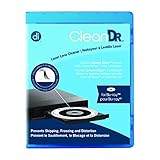
- Laser lens cleaner for Blu-Ray players and Blu-Ray video game systems having issues with discs that load slowly, skip, or freeze during playback
- Patent-pending Zero-Clearance Technology and 10-Brush Cyclone Clean process removes dirt and dust build-up that causes audio and video dropout and distortion
- Cleaning the laser lens can extend the life of the Blu-Ray player while improving sound and image quality
- Includes Image & Sound Calibration Tools and instructions in English, French or Spanish
- Works with Blu-Ray Players, DVD Players, XBOX/XBOX 360/XBOX ONE, PS/2/3/4. Not compatible with CD only players
What to check when the error appears
- Note what you were trying to play. Record whether it was a DVD, standard Blu-ray, 4K UHD Blu-ray, or game disc, and whether the error appeared in the Blu-ray app or while launching a game.
- Compare with other discs and formats. Check whether the error follows one disc or occurs with several discs. The 2018 Xbox One X report, for example, described a UHD Blu-ray issue alongside successful playback of other formats. That pattern is a useful clue, but it does not prove that the UHD disc is defective.
- Use Xbox’s current support guidance. See Troubleshoot problems playing a disc on Xbox One for official disc troubleshooting. If the issue continues, contact Xbox Support with the console model, disc type, and results of your checks.
Is there a confirmed fix?
No universal remedy is established by the available reports. One anonymous reply in the 2018 Q&A says a disc played after repeated attempts, but that is an anecdote—not a reliable procedure or proof of a fix. A 2020 forum post mentions replacing a reader but does not establish a diagnosis, outcome, or compatible part. Do not treat either report as a reason to repeatedly retry a disc or replace the drive without a support diagnosis.
The official Xbox troubleshooting page is the appropriate place to check for current instructions. If multiple discs or formats fail, seek Xbox Support’s diagnosis before pursuing hardware repair.
Quick Recap
Best Value

- 【Why to Use】Laser Lens Cleaner for CD/VCD/DVD players experiencing slow loading, skipping or freezing of discs during playback.
- 【Special Technology】The 2-brush clean process removes dirt and dust deposits that cause audio and video dropouts and distortions.
- 【Usage Effect】Cleaning the laser lens can extend the service life of CD / VCD / DVD player, and improve the sound and image quality at the same time.
- 【Compatible Players】Works with CD/VCD/DVD player. Not compatible with PS1/2/3/4,Xbox/Xbox 360/Xbox One/Xbox X,Wii/Wii U/Bose player.
- 【What You will Get】Cleaner disc*1, A piece of glasses cloth*1,Disc cleaning fluid*2, After Sales Card*1. If any problem, please contact us, we are 24 hours standby to serve you.
Rank #4

- Exclusive 10-brush Cyclone Clean Process removes dust, dirt, and debris from the laser lens of XBOX gaming systems
- Cleaning the laser lens helps maintain the life of the device, as well as improve image and sound playback
- Compatible with all XBOX gaming systems
- Simply play disc and follow instructions in English, French, Spanish or German
- Includes Sound Calibration Tools
Rank #3

- Safe & Effective Disc Cleaning Solution. Gently remove dust, fingerprints, and smudges from Blu-ray, PS3, and Xbox discs using the included non-abrasive cleaning fluid. Specially formulated to clean without scratching, it helps restore clear playback and protect your discs from long-term damage
- Ultra-Soft Microfiber Cloth Included. The included lint-free microfiber cloth is designed for delicate disc surfaces. It lifts away particles and residue without leaving streaks or causing micro-scratches—ideal for Blu-ray movies, PlayStation games, Xbox discs, and other optical media
- Improve Playback & Reduce Skipping. Say goodbye to disc skipping, freezing, or read errors. This cleaning set improves laser readability by ensuring discs are clear and free of debris, helping to restore smooth playback for movies, video games, and data discs across all compatible devices
- Compatible with Multiple Disc Formats. This cleaner set is perfect for Blu-ray, DVD, PS3, Xbox 360, Xbox One, and even some CD formats. Whether you're a gamer or a movie lover, it’s a reliable tool to maintain your media library and keep your discs working like new
- Easy to Use, No Special Tools Needed Just spray the disc with the cleaning solution and wipe gently with the microfiber cloth. No machines, no complicated steps—just quick, safe cleaning at home or on the go. Great for collectors, gamers, and anyone who values their disc collection.
Rank #2

- 【Why to Use】Laser Lens Cleaner for CD/VCD/DVD players experiencing slow loading, skipping or freezing of discs during playback.
- 【Special Technology】The 2-brush clean process removes dirt and dust deposits that cause audio and video dropouts and distortions.
- 【Usage Effect】Cleaning the laser lens can extend the service life of CD / VCD / DVD player, and improve the sound and image quality at the same time.
- 【Compatible Players】Works with CD/VCD/DVD player. Not compatible with PS1/2/3/4,Xbox/Xbox 360/Xbox One/Xbox X,Wii/Wii U/Bose player.
- 【What You will Get】Cleaner disc*1, A piece of glasses cloth*1, User manual*1.
Product prices and availability are accurate as of the date/time indicated and are subject to change. Any price and availability information displayed on Amazon at the time of purchase will apply.
Independent reader supportYour contribution helps us test, update, and keep practical guides available for everyone.



