Minecraft has no single built-in command that removes all hostile mobs at once. The practical method is /kill with a target selector for the specific mob type you want gone. In Bedrock Edition, the documented example is /kill @e[type=minecraft:zombie], which targets zombies. Swap in the entity ID for the mob you need. For a world-wide change to hostile spawning, the closest option is /difficulty peaceful, but that changes the whole world rather than cleaning up particular mobs.
Why there is no universal hostile-mob despawn command
Neither Minecraft’s official guide nor Microsoft’s Bedrock command reference documents a command named /despawnhostiles, or a single selector that means “every hostile mob.” Searches for that phrasing usually lead to /kill, which is the command that actually removes entities. Because /kill works on whatever the selector matches, the choice of selector determines the result.
How to remove one mob type with /kill (Bedrock)
Microsoft’s Bedrock reference documents the syntax as /kill [target: target], where the target can be a selector. The reference describes the command as killing entities such as players and mobs. Use it this way:
- Make sure cheats are enabled in the world. Bedrock requires this for
/kill, and you need the Game Directors permission level to run it. - Open the chat window and type
/to begin a command. - Enter the kill command with a type selector, for example
/kill @e[type=minecraft:zombie]. Replaceminecraft:zombiewith the entity ID of the mob you want to remove. - Check the result. Only entities matching the selector should be affected. If you see other mobs disappear, stop and review the selector before running it again.
Repeat the command once for each mob type you want to clear. Avoid /kill @e as a shortcut. It matches every entity the selector covers, which can include players and neutral mobs, not just hostile ones.
The Tool Desk
Outbyte PC Repair FREEClear out junk files and repair common Windows errorsFree Scan →Outbyte Driver Updater FREEScan for outdated or missing drivers - takes under a minuteDriver Scan →#1 Best Overall

- The Minecraft 3.25-in scale Sniffer action figure has game-authentic sounds!
- Press the Sniffer for grunting sounds -then, press and hold for sniffing sounds!
- The design of the Sniffer -the 2022 Mob Vote winner -stays true to the unique, pixelated world of Minecraft!
- Adventurous fun for kids who love exploration, creativity, and survival -the Minecraft way!
- Makes a great toy for video-game players and fans ages 6 years old and up!
Choosing between the options
The three approaches below differ in scope and side effects. The sources reviewed do not establish a single selector that covers all hostile types, so the table shows that gap explicitly.
| Approach | Scope | Side effects | Edition and version certainty |
|---|---|---|---|
/kill with a mob-type selector (e.g. @e[type=minecraft:zombie]) |
One mob type per command | Limited to the selected type | Bedrock syntax documented by Microsoft Learn; Java syntax must be checked for your version |
/kill @e |
Every entity the selector matches | Can remove players and non-hostile mobs as well | Syntax documented in the Bedrock reference, but the selector is too broad for cleanup |
/difficulty peaceful |
Whole world | Changes difficulty for all gameplay, not only mob removal | Listed as a difficulty argument in Minecraft’s official guide |
| Single selector for all hostile mobs | Would be every hostile type at once | Not stated | Not stated in the Bedrock reference or Minecraft’s official guide reviewed |
Edition and permission requirements
Bedrock Edition
The Bedrock reference states that /kill requires cheats and the Game Directors permission. In single-player, turning on Allow Cheats in a world permanently disables achievement unlocking in that world, even if you later turn cheats off. Plan for this before you use commands in a world where you care about achievements.
Rank #2

- Capture the excitement and adventurous play of Minecraft!
- Each 3.25-inch scale Minecraft action figure comes with an accessory to recreate favorite in-game moments!
- Each also includes 1 Redstone Building Piece -- fans can collect the figures and combine all 6 building pieces to build a working TNT Cannon (each sold separately, subject to availability).
- For even more ways to play and display, the pixelated character figures are posable with movable joints!
- The collectible figures make a great gift for video-game players and fans ages 6 years old and up, who will want them all! (Each sold separately, subject to availability.)
Java Edition
Command access depends on permissions. Minecraft’s official guide says that in single-player you can enable commands in the world settings, and that on a multiplayer server you need a sufficient permission level. Java’s target-selector syntax is not the same as Bedrock’s, so do not copy the Bedrock example unchanged. Check the command reference for your specific Java version before running a selector.
Independent reader supportYour contribution helps us test, update, and keep practical guides available for everyone.Natural despawning works differently
Mobs that spawn naturally can also disappear on their own when they are far from players. That process is separate from /kill, and the figures below come from Mojang’s Bedrock 1.16.0 release notes (2020). They are historical Bedrock rules, not current behavior for both editions:
Outdated Drivers Are Slowing You Down
One free scan finds every outdated or missing driver and matches the right update for your exact hardware.Free scan · exact hardware matchPC Slower Than It Used to Be?
A free scan shows the junk files, broken settings and background clutter dragging Windows down - then fixes them in one click.Free scan · Windows 10 & 11Rank #3

- Capture the excitement and adventurous play of Minecraft
- Each 3.25-inch scale Minecraft action figure comes with accessories to re-create favorite in-game moments
- The character figures are posable with movable joints for even more ways to play
- The designs of the figures and accessories stay true to the unique, pixelated world of Minecraft
- Makes a great toy for video-game players and fans ages 6 years old and up, who will want them all (Each sold separately, subject to availability.)
- At simulation distance 4, almost all naturally spawning mobs despawn at 44 blocks or farther from players.
- At higher simulation distances, the despawn threshold follows the edge of the simulation distance, up to 128 blocks.
- Fish use a 40-block maximum range.
- The release notes list exceptions, including bosses and several other mob types.
If you want mobs gone immediately, use a command. Natural despawning cannot be scheduled or targeted by mob type.
Quick Recap
Rank #4
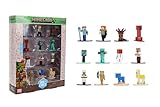
- Epic Minecraft lineup in your hands; features 12 fan-favorite characters including Steve, Alex, and Snow Golem
- Die-cast durability meets blocky style; each figure crafted in solid metal with pixel-perfect detailing for display or play
- Sized for collectors and kids alike; 1.65-inch scale fits easily on shelves, desks, or in toy worlds of their own
- Ready for creative adventures; includes animals, mobs, and heroes like Glow Squid, Yellow Llama, and Wild Axolotl
- Jada Toys – official Minecraft partner; trusted for authentic die-cast figures from the world’s biggest brands
What to confirm before you run a command
- Your edition and version, because selector syntax differs between Bedrock and Java.
- Whether commands and cheats are enabled for the world or server you are in.
- The exact entity ID of the mob type you want to remove.
- Whether the selector matches only the intended entities, particularly if you are working near players or neutral mobs.
“
Product prices and availability are accurate as of the date/time indicated and are subject to change. Any price and availability information displayed on Amazon at the time of purchase will apply.



