The Tool Desk
Outbyte PC Repair FREEClear out junk files and repair common Windows errorsFree Scan →Outbyte Driver Updater FREEFix the driver behind crashes, sound loss and screen glitchesFind Drivers →A standard original Wii Remote (RVL-003) does not include MotionPlus. You can add the separate Wii MotionPlus accessory to its bottom; the later Wii Remote Plus (RVL-036) has MotionPlus built in. MotionPlus adds enhanced motion accuracy only in games designed to use it.
What each name means
Original Wii Remote (RVL-003)
The original Wii Remote is the earlier controller, without MotionPlus integrated. Its External Extension Connector lets you attach the separate Wii MotionPlus accessory at the bottom. Nintendo describes the add-on as providing additional accuracy in games specially designed for MotionPlus. Nintendo’s Wii MotionPlus manual
Wii MotionPlus accessory
This is an attachment for the original Wii Remote, not a separate kind of game or a feature that every Wii game uses. It adds MotionPlus capability when connected to a compatible remote.
Wii Remote Plus (RVL-036)
Wii Remote Plus combines standard Wii Remote functions and MotionPlus technology in one controller. It works with regular Wii games as well as games designed for MotionPlus; attaching a separate MotionPlus accessory to it is unnecessary and provides no extra benefit. Nintendo’s Wii accessories identification guide
#1 Best Overall

- [Compatibility]: The Wii remote controller is compatible with Nintendo Wii and Wii U, supports all Wii games. Please note that the Wii console is not included. Batteries not included.
- [Built-in Motion Plus]: The built-in motion plus, more sensitive than the original Wii remote controller, can track movement more accurately, bringing you a more realistic game experience.
- Th wii nunchuck controller boasts a 3-axis motion sensor, akin to the Wii Remote. Its ergonomic design ensures a comfortable grip, promoting agility during gameplay.
- EASY SYNC STEPS -- Push the small button on the controller (where the batteries go) then push the red button on the Wii console (under the little door), then you’re able to synchronize with Nintendo Wii.
- LED indicators -- LED lights will indicate which player you're.
How to tell which controller you have
- Check the model number on the bottom of the controller: RVL-003 identifies the original Wii Remote; RVL-036 identifies Wii Remote Plus.
- Look below the Wii logo. Wii Remote Plus has the words “Wii MotionPlus INSIDE” there. Nintendo’s identification guide
Which setup do you need for your game?
Check the game packaging for the MotionPlus icon. Nintendo says games with that icon take advantage of MotionPlus; games without it do not. If a game requires or uses MotionPlus features, use either an original Wii Remote with the attachment connected or a Wii Remote Plus. Nintendo Support: identifying MotionPlus-compatible games
| Setup | What it provides | When it fits |
|---|---|---|
| Original Wii Remote (RVL-003) alone | No integrated MotionPlus. | Games that do not use MotionPlus features. |
| Original Wii Remote plus Wii MotionPlus attachment | MotionPlus capability through an add-on connected at the bottom. | A MotionPlus game, when you already have an original remote. |
| Wii Remote Plus (RVL-036) | MotionPlus integrated into the controller. | Standard Wii games and MotionPlus games, without a separate attachment. |
Nintendo’s Wii MotionPlus manual explains connecting the attachment to the original remote’s External Extension Connector and recommends using game software that supports MotionPlus gameplay features.
Rank #2

- It’s a must-try Wii controller if you’re looking for third party Wii remote Nunchuk Controller. All buttons are tested to be correct and match Nintendo Wii/ Wii u console. You’ll find it’s hassle-free shopping with TechKen’s 90-day assurance. -- but only for orders from TechKen.
- High performance with shaking motion plus built-in & nunchuk included. No need to buy extra motion plus or a nunchuk controller, you’ll find TechKen wii controller will shake when you’re hitting something on gaming. When plug Nunchuk, it’s able to function thumb stick and triggers.
- EASY SYNC STEPS -- Push the small button on the controller (where the batteries go) then push the red button on the Wii console (under the little door), then you’re able to synchronize with Nintendo Wii.
- Powered by AA batteries, AA batteries are not included. Silicon case is not included
- IMPORTANT NOTE: Cannot fit in accessories, such as Wii zapper gun.
Can you leave MotionPlus attached?
Yes. The original Wii Remote continues to function normally in games without MotionPlus features, even with the attachment connected. You may need to remove it to fit accessories that attach in a similar way, such as the Wii Zapper or Wii Wheel. Nintendo’s Wii MotionPlus manual
Quick Recap
Best Value
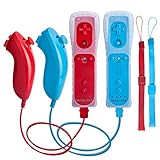
- All buttons are accurate and precise to the clicks. Compatible for all Wii games or Wii sports. Also compatible with Nintendo Wii U consoles.
- Motion Sensor included so it will be perfect for Wii Sports games when sharing with family members.
- High performance replacement controller for Original Nintendo Wii consoles. And also be noted third-party controller.
- Cost-Effective Wii controllers with shaking motion plus built-in & Nunchuk included. No need to buy extra motion plus or a nunchuk controller, you’ll find TechKen wii controller will shake when you’re hitting something on gaming. When plug Nunchuk, it’s able to function thumb stick and triggers.
- EASY SYNC STEPS -- Push the small button on the controller (where the batteries go) then push the red button on the Wii console (under the little door), then you’re able to synchronize with Nintendo Wii.
Rank #4
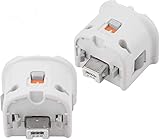
- Brand new and high quality.
- Connect Wii MotionPlus to your Wii Remote controller to increase accuracy and enhance play control on compatible games.
- Contains additional sensors that respond to your wrist's slightest motion for greater results with more economical movement.
- Compatible with a variety of Wii games.Perfect motion plus adapter for your Wii Remote controller.
- Allow it to more accurately capture complex motion and It tracks the player's movements in finer detail and with greater accuracy.
Rank #3

- Experience intuitive motion controls that deliver a unique social activity for the whole family.
- Every remote controller undergoes a rigorous inspection to ensure that each one is unparalleled.
- Easy synchronization by pressing the red sync button on both remote controller and console. Powered by 2 AA batteries(not included).
- Up to 4 remote controller can be connected at once by using built-in wireless technology powered by bluetooth.
- What you get: 2 * remote controller (no motion plus), 2 * nunchuk, 2 * silicone case, 2 * wrist strap.
Which one should you choose?
- You already have an RVL-003 and the game has the MotionPlus icon: use the separate MotionPlus attachment with that remote.
- You want an integrated controller: Wii Remote Plus (RVL-036) has MotionPlus built in and also works with standard Wii games.
- Your game does not have the MotionPlus icon: MotionPlus is not needed for that game.
Product prices and availability are accurate as of the date/time indicated and are subject to change. Any price and availability information displayed on Amazon at the time of purchase will apply.
Do these 3 things before closing this tab:
1Fix the driver behind crashes, sound loss and screen glitches2Repair Windows errors before they cause bigger problems3Scan for outdated or missing drivers - takes under a minute



