The quickest safe fix is to update—or temporarily disable—the exact driver or software named in the EA message, restart Windows, and launch the game again. EA now calls this protection EA Javelin Anti-Cheat. Error #119 means Javelin has detected software on its security denylist. An update may restore compatibility, but if the software itself is denylisted, you must disable or uninstall it before the game will start.
Do not begin by deleting random .sys files, reinstalling the entire game, or turning off Windows security features. Follow the steps below in order.
What the “incompatible driver” message means
The complete EA message usually resembles:
EA Javelin Anti-Cheat has detected an incompatible driver. Please update or disable [driver name] and restart. Error #119.
The name shown in brackets is the most important part of the error. EA has identified a low-level driver or the application that installed it as incompatible with Javelin Anti-Cheat. The reason may be:
What’s actually slowing this PC down?
Pick the symptom - the matching free tool is one click away.
#1 Best Overall

- Release your finger: This phone screen auto clicker supports 2 methods of clicks for various applications. It is very easy to use, just stick the click head on the screen or use the screen clip to simulate automatic finger clicks. Suitable for games, live broadcast likes, and task rewards will save you a lot of time.
- Anti-Cheat Prevention: Many online games have anti-cheat systems that look for automated clickers and other programs. Even if you're using the latest auto-click app, the game may update to detect it. A physical auto-clicker circumvents this problem.
- Adjustable Speed: The automatic tapper for the phone screen has 3 setting buttons with 31-speed gears, the fastest is 33 times a second, which is 5 times faster than the human hand and the slowest is 1 click in 60 seconds. The last used gear parameter will be automatically memorized and saved after power off, one-press start, and stop at any time. Supports imitation finger (irregular) clicks.
- Multi-device compatible: Just connect the USB interface to the power source and you can use the auto clicker immediately. It is compatible with Android and IOS systems, using space mapping click technology instead of the traditional mechanical click method, zero noise, more sensitive and stable click, and longer service life.
- High quality products: Yakboman's automatic screen clicking devices are built to last. Each product is rigorously tested before shipment to ensure that no technical problems occur and that it can adapt to the screen of mobile phones, tablet computers, and laptops with touch screens and support up to 4 screen devices at the same time.
- the installed version is outdated and a compatible update exists;
- the software is currently denylisted even though it is functioning normally in Windows;
- the driver loads a kernel-level component that Javelin does not permit while a protected game is running.
EA’s list of commonly denylisted software is useful for identification, but it is not a complete list. A driver does not have to appear on that list to produce the error.
This is not automatically the same problem as a Windows 11 Core isolation or Memory integrity warning. Both features deal with sensitive low-level drivers, but EA and Windows maintain separate compatibility and security checks. Compare the exact driver filenames before changing anything.
Fix it in this order
1. Copy the exact driver or software name
Read the EA popup carefully and write down the value shown as the driver or software name. If the message shows a filename, record the entire filename, including its .sys extension.
Do not guess based on a partially familiar filename. Do not remove an unfamiliar driver simply because it appears in a search result. A filename may belong to a fan-control utility, hardware-monitoring program, RGB controller, modem, peripheral, virtualization tool, debugger, overlay, or another application that installs a kernel driver.
PC Slower Than It Used to Be?
A free scan shows the junk files, broken settings and background clutter dragging Windows down - then fixes them in one click.Free scan · Windows 10 & 11Outdated Drivers Are Slowing You Down
One free scan finds every outdated or missing driver and matches the right update for your exact hardware.Free scan · exact hardware matchIf the name is unfamiliar, identify the parent application before making changes. Search the filename in EA’s documented list of common denylisted software and in the installed-applications list in Windows. Treat the EA list as a starting point rather than proof that no other software can be involved.
2. Update the named software or driver
Updating is the preferred first solution when the conflict is caused by an old version.
- Go to the hardware or software manufacturer’s official Windows 11 support page.
- Download the newest driver or application version that matches your hardware and Windows edition.
- Install it using the manufacturer’s instructions.
- Restart Windows, even if the installer does not explicitly request a restart.
- Launch the affected game again from its normal supported launcher.
Also check Windows Update:
- Open Settings.
- Go to Windows Update.
- Select Advanced options.
- Open Optional updates.
- Expand relevant driver updates, select the appropriate update, and choose Download and install.
- Restart the PC and test the game.
Windows does not install optional driver updates automatically. Microsoft recommends the manufacturer’s support site when Windows Update cannot find a suitable compatible driver. For a security-sensitive kernel driver, avoid generic third-party driver packs as your first source.
Rank #2
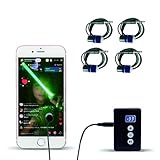
- Release your finger: This phone screen auto clicker supports 2 methods of clicks for various applications. It is very easy to use, just stick the click head on the screen or use the screen clip to simulate automatic finger clicks. Suitable for games, live broadcast likes, and task rewards will save you a lot of time.
- Anti-Cheat Prevention: Many online games have anti-cheat systems that look for automated clickers and other programs. Even if you're using the latest auto-click app, the game may update to detect it. A physical auto-clicker circumvents this problem.
- Adjustable Speed: The automatic tapper for the phone screen has 3 setting buttons with 31-speed gears, the fastest is 33 times a second, which is 5 times faster than the human hand and the slowest is 1 click in 60 seconds. The last used gear parameter will be automatically memorized and saved after power off, one-press start, and stop at any time. Supports imitation finger (irregular) clicks.
- Multi-device compatible: Just connect the USB interface to the power source and you can use the auto clicker immediately. It is compatible with Android and IOS systems, using space mapping click technology instead of the traditional mechanical click method, zero noise, more sensitive and stable click, and longer service life.
- High quality products: Yakboman's automatic screen clicking devices are built to last. Each product is rigorously tested before shipment to ensure that no technical problems occur and that it can adapt to the screen of mobile phones, tablet computers, and laptops with touch screens and support up to 4 screen devices at the same time.
Commonly involved software categories include fan-control and hardware-monitoring utilities, RGB-control software, peripheral or modem tools, virtualization software, debuggers, and overlays. These are categories to investigate—not proof that every program in them is incompatible. The filename in the EA message determines the diagnosis.
Recommended Free Tools
3. Disable or uninstall the parent application
If the same Error #119 returns after updating, the software itself may remain denylisted. For a nonessential utility, completely exit it and prevent it from starting with Windows. If that does not resolve the problem, uninstall the parent application:
- Open Settings > Apps > Installed apps.
- Find the application associated with the named driver.
- Open its three-dot menu and choose Uninstall.
- Complete the vendor’s uninstaller.
- Restart Windows.
- Launch the game and test again.
Uninstalling the parent application is safer than manually deleting a driver file. The uninstaller can remove the related service, registry entries, scheduled components, and driver package together. Manually deleting a .sys file can leave Windows with a broken service or cause the associated hardware or utility to stop working.
The Tool Desk
Outbyte Driver Updater FREEFix the driver behind crashes, sound loss and screen glitchesFind Drivers →Outbyte PC Repair FREEClear out junk files and repair common Windows errorsFree Scan →If the driver belongs to essential hardware or a utility you need, do not remove it blindly. Look for a compatible release from the manufacturer. If none exists, contact the vendor before removing the device or application.
4. Investigate a separate Windows Core Isolation warning
Windows 11 may independently identify an incompatible driver under:
Windows Security > Device security > Core isolation details
Rank #3

- Release your finger: This phone screen auto clicker supports 2 methods of clicks for various applications. It is very easy to use, just stick the click head on the screen or use the screen clip to simulate automatic finger clicks. Suitable for games, live broadcast likes, and task rewards will save you a lot of time.
- Anti-Cheat Prevention: Many online games have anti-cheat systems that look for automated clickers and other programs. Even if you're using the latest auto-click app, the game may update to detect it. A physical auto-clicker circumvents this problem.
- Adjustable Speed: The automatic tapper for the phone screen has 3 setting buttons with 31-speed gears, the fastest is 33 times a second, which is 5 times faster than the human hand and the slowest is 1 click in 60 seconds. The last used gear parameter will be automatically memorized and saved after power off, one-press start, and stop at any time. Supports imitation finger (irregular) clicks.
- Multi-device compatible: Just connect the USB interface to the power source and you can use the auto clicker immediately. It is compatible with Android and IOS systems, using space mapping click technology instead of the traditional mechanical click method, zero noise, more sensitive and stable click, and longer service life.
- High quality products: Annrybo's automatic screen clicking devices are built to last. Each product is rigorously tested before shipment to ensure that no technical problems occur and that it can adapt to the screen of mobile phones, tablet computers, and laptops with touch screens and support up to 4 screen devices at the same time.
Memory integrity—also known as Hypervisor-protected Code Integrity, or HVCI—protects core Windows processes from malicious or unsafe low-level drivers. Windows also maintains a vulnerable-driver blocklist. Microsoft says the blocklist can cover drivers with known vulnerabilities, malware-associated signing certificates, or behavior that attempts to bypass the Windows security model. It is updated through regular Windows servicing and periodic blocklist updates.
If Windows names a driver on this page, compare it with the driver named by EA:
- Same filename: treat the EA and Windows warnings as related, and prioritize a manufacturer update or removal of the associated application.
- Different filename: do not assume the Windows warning explains EA Error #119. Investigate each driver separately.
Microsoft’s preferred remedies are to obtain an updated driver from the manufacturer or remove the device or application that installed the incompatible driver. Do not force Memory integrity on while a known incompatible driver is still installed. Conversely, do not permanently disable Memory integrity or the vulnerable-driver blocklist merely to make a game launch when a compatible update is available.
Removing a confirmed leftover driver package
If you have already uninstalled a program but its driver remains in the Windows driver store, an administrator can inspect installed driver packages with:
pnputil /enum-driversFind the published package name that positively matches the unwanted driver, such as oem42.inf. Only after confirming the match should you remove it from an elevated Command Prompt or Windows Terminal:
pnputil /delete-driver oemXX.inf /uninstall /forceReplace oemXX.inf with the confirmed package name. This is not a general cleanup command. Removing the wrong package can disable hardware, networking, storage, or other software. If you cannot confidently match the package to the unwanted driver, stop and use the manufacturer’s support process instead.
5. Check Secure Boot for unsigned-driver or configuration errors
If EA reports an unsigned or unacceptable system configuration, or an unrecoverable error occurs while the game starts, check Secure Boot. EA’s guidance indicates that expired or unsigned drivers loading during startup can cause this class of failure.
Rank #4

- Release your finger: This phone screen auto clicker supports 2 methods of clicks for various applications. It is very easy to use, just stick the click head on the screen or use the screen clip to simulate automatic finger clicks. Suitable for games, live broadcast likes, and task rewards will save you a lot of time.
- Anti-Cheat Prevention: Many online games have anti-cheat systems that look for automated clickers and other programs. Even if you're using the latest auto-click app, the game may update to detect it. A physical auto-clicker circumvents this problem.
- Adjustable Speed: The automatic tapper for the phone screen has 3 setting buttons with 31-speed gears, the fastest is 33 times a second, which is 5 times faster than the human hand and the slowest is 1 click in 60 seconds. The last used gear parameter will be automatically memorized and saved after power off, one-press start, and stop at any time. Supports imitation finger (irregular) clicks.
- Multi-device compatible: Just connect the USB interface to the power source and you can use the auto clicker immediately. It is compatible with Android and IOS systems, using space mapping click technology instead of the traditional mechanical click method, zero noise, more sensitive and stable click, and longer service life.
- High quality products: Yakboman's automatic screen clicking devices are built to last. Each product is rigorously tested before shipment to ensure that no technical problems occur and that it can adapt to the screen of mobile phones, tablet computers, and laptops with touch screens and support up to 4 screen devices at the same time.
On many Windows 11 systems, the route to firmware settings is:
- Open Settings > System > Recovery.
- Under Advanced startup, select Restart now.
- Choose Troubleshoot > Advanced options > UEFI Firmware Settings > Restart.
- In the firmware interface, enable Secure Boot.
Firmware menus differ by PC and motherboard manufacturer. Some systems use Legacy BIOS or CSM instead of UEFI. Microsoft notes that such systems may need to be changed to UEFI before Secure Boot can be enabled.
Quick wins for a faster PC:
Fix the driver behind crashes, sound loss and screen glitchesFind Drivers →Repair Windows errors before they cause bigger problemsFix Now →Before changing boot mode or firmware settings:
- Confirm that Windows is installed for UEFI rather than Legacy BIOS.
- Have your BitLocker or device-encryption recovery key available.
- Read the instructions for your exact PC or motherboard model.
- Do not leave Secure Boot disabled as a permanent workaround.
A firmware change can trigger a recovery-key prompt or, if performed incorrectly, prevent Windows from booting. If you are unsure whether the system uses UEFI, get manufacturer or professional assistance before changing the boot mode.
6. Reinstall EA Javelin Anti-Cheat only if Javelin itself is broken
Reinstalling EA Javelin Anti-Cheat is appropriate when its service will not start, its installation is corrupted, or the installer reports an installation or configuration error. It is not the first fix for a popup that specifically names a third-party incompatible driver.
To reinstall the anti-cheat component:
- Open
C:Program FilesEAAC. - Run
EAAntiCheat.Installer.exe. - Select the affected game.
- Choose Uninstall if the existing installation is damaged.
- Run the installer again and choose Install.
- Restart Windows and launch the game.
While EA Javelin Anti-Cheat is uninstalled, protected games cannot be played. Reinstalling it will not make a denylisted third-party driver acceptable; that driver still has to be updated, disabled, or removed.
For an EA service-start or installation-folder error, EA also recommends running the EA app as administrator and starting the game directly from the EA app, including games originally obtained through Steam or the Epic Games Store.
Free tools Windows power users keep installed
One-click scans. No signup required.
Use this decision tree
- EA names a driver or software: update the named software, restart, and test.
- The same message returns: disable or uninstall the named parent application, restart, and test.
- Windows Security names a different driver: investigate that driver separately and update or remove its device or application only after confirming its identity.
- EA reports an unsigned driver or unacceptable configuration: verify UEFI and Secure Boot, taking encryption and boot-mode precautions.
- Javelin itself cannot start or is corrupted: reinstall it with
EAAntiCheat.Installer.exe. - The driver is essential and no update exists: contact the hardware or software vendor. Do not force-delete it or permanently weaken Windows security without understanding the consequences.
What not to do
- Do not delete an unidentified
.sysfile manually. - Do not assume every driver in a Core Isolation warning is the driver named by EA.
- Do not reinstall the entire game as your first response to Error #119. A game reinstall generally does not change a denylisted system driver.
- Do not use third-party driver packs before checking Windows Update and the manufacturer’s official support page.
- Do not permanently disable Secure Boot, Memory integrity, or the vulnerable-driver blocklist to bypass the error.
- Do not uninstall an essential hardware driver without confirming what device or application depends on it.
Why updating is better than weakening Windows security
Disabling a conflicting utility may restore access to the game, but it can also remove fan control, monitoring, RGB control, peripheral features, virtualization support, or another function you rely on. Disabling Memory integrity or the vulnerable-driver blocklist reduces protection against malicious low-level drivers.
Best Value

- Product & Compatibility: Plug-and-play back paddle adapter adds 4 ergonomic programmable back buttons to your standard Xbox Series X|S and Xbox One controller - no modifications, no tools, no voided warranty. Wired USB connection for lag-free gaming on Xbox and PC. Controller not included. Firmware 3.1.43 or later required.
- Comfort & Performance: Keep your thumbs on the sticks and fingers on the triggers where they belong. Remappable paddles reduce awkward hand positions, minimize fatigue during long sessions, and give you faster, more natural access to every input without breaking your grip, no need for an expensive Xbox Elite controller alternative.
- Macros & Smarter Inputs: Stop fumbling complex combinations mid-match. Assign custom or prebuilt controller macros to your remappable back buttons with one press. Auto Run, Auto Hold Breath, Drop Shot, and Sniper Assist handle the repetitive inputs so you can focus on playing. Macros are fully recordable, editable, and shareable.
- Recoil, Aim & Fire Modes: Stay on target with adjustable recoil assist macros, Aim Assistance, and FPS fire modes including Dynamic Fire, Tap Burst, and Quickscope. Configure unique recoil assist and macro settings per weapon slot and switch mid-match using LED and companion app confirmation.
- App Control & Dual Modes: Manage all controller mod settings, macros, and weapon slots via the free app-powered iOS and Android companion app. Switch between Tournament Mode for competitive play and Gamepack Mode for full rapid fire, hair trigger, and macro access all over a stable, lag-free wired USB connection.
The durable solution is a compatible release from the vendor. If the vendor has abandoned the software and it is not essential, removing the application is generally safer than leaving an obsolete kernel driver installed. If the driver is essential and no compatible version exists, the right next step is vendor support or carefully considered hardware replacement—not an unexplained forced deletion.
After every change: restart and retest
Restart Windows after updating, disabling, uninstalling, changing firmware settings, or reinstalling Javelin. Launch the game from its supported launcher and change one major variable at a time. This makes it clear which action solved the problem and gives you a straightforward rollback path if a device or utility stops working.
The exact denylisted-driver list and Windows Security interface can change as EA Javelin Anti-Cheat and Windows 11 are updated. If the popup names a new or unfamiliar driver, use the exact filename and the current manufacturer documentation rather than relying on an old list of examples.
Frequently Asked Questions
Will reinstalling the game fix EA Anti-Cheat Error #119?
Usually not. Error #119 normally concerns a driver or parent application already installed in Windows. Update, disable, or uninstall the named software first. Reinstall the game only after addressing the driver and other launcher or installation problems.
Can I delete the incompatible .sys file?
Do not delete it manually. Identify the parent application and use its uninstaller, or obtain a compatible driver from the manufacturer. If a confirmed leftover package must be removed, an administrator can use PnPUtil—but only after positively matching the package to the unwanted driver.
Is the EA error the same as a Windows Memory Integrity warning?
No. EA Javelin Anti-Cheat and Windows Core Isolation use separate checks, although both can reject low-level drivers. Compare the exact filenames shown by EA and Windows Security before treating the warnings as one problem.
Should I turn off Memory integrity or Secure Boot to play?
Not as a permanent workaround. First update or remove the incompatible software. If EA specifically reports an unsigned-driver or unacceptable-configuration problem, check Secure Boot carefully and account for UEFI, Legacy BIOS, and BitLocker recovery implications.
The Bottom Line
Bottom line: Error #119 is usually resolved by dealing with the exact driver EA names—not by reinstalling the game. Update that software from its manufacturer, restart, then disable or uninstall it if the error remains. Treat any separate Windows Security warning independently, use Secure Boot only when the reported configuration requires it, and reinstall EA Javelin Anti-Cheat only when Javelin itself is damaged or cannot start.
Quick Recap
Product prices and availability are accurate as of the date/time indicated and are subject to change. Any price and availability information displayed on Amazon at the time of purchase will apply.



