Yes, the Sony INZONE M10S is genuinely fast. Its 27-inch-class OLED panel combines 2560×1440 resolution, a 480Hz maximum refresh rate, and Sony’s 0.03ms response-time rating. That makes it a compelling premium monitor for competitive PC gaming—provided your system can produce the frame rates needed to exploit it.
The catch is value. Sony now lists a newer 540Hz INZONE M10S II, while the original M10S remains expensive for a 1440p display. At the $899.99 price observed on Sony’s U.S. store, it makes the most sense at a discount, or when its esports features and U.S. burn-in coverage matter more to you than having the newest model.
Check Sony’s current U.S. price and availability before buying; both can change.
Sony INZONE M10S specifications
The M10S is model SDM-27Q10S. The panel’s actual diagonal is 26.5 inches, although Sony markets it as a 27-inch monitor. The figures below are Sony’s manufacturer specifications; they should not be confused with independent measurements of input lag, brightness, or response behavior.
#1 Best Overall

- LIGHTNING-FAST OLED DISPLAY: The INZONE M10S delivers ultra-low latency and 480Hz refresh rate, offering a 0.03ms response time (GtG) in QHD resolution for smooth, responsive FPS gaming.
- LOW PROFILE STAND: The 4mm thin base maximizes desk space, offering more flexible keyboard and mouse setups. Includes height, tilt, and ±180° swivel adjustments, plus 100mmx100mm VESA compatibility.
- TOURNAMENT READY: Developed with Fnatic e-sports team and packed with tournament ready features - Easily swap to a 24.5” mode alongside dedicated First Person Shooter (FPS Pro/plus) modes for enhanced contrasts during fast-paced games.
- HIGH-PERFORMANCE COOLING STRUCTURE: OLED panel includes a fan-less, passive cooling system, with a custom heatsink to prevent burn in and ensure long-term use.
- CUSTOM HEATSINK plus OLED CARE: Fan-less, high-performing cooling structure ensures long term of the panel. OLED care features include pixel/panel refresh, static image detection, pixel shift and screen saver.
| Feature | Sony INZONE M10S |
|---|---|
| Panel | OLED |
| Size | 26.5 inches actual; marketed as 27 inches |
| Resolution | 2560×1440 |
| Maximum refresh rate | 480Hz |
| Rated response time | 0.03ms, Sony-rated |
| Typical brightness | 275 cd/m2 |
| Peak brightness | 1,300 cd/m2 |
| HDR | VESA DisplayHDR True Black 400; HDR10 and HLG |
| Color gamut | 98.5% DCI-P3 coverage |
| VRR | Adaptive-Sync, NVIDIA G-SYNC Compatible, HDMI 2.1 VRR |
| Display inputs | 1× DisplayPort 2.1 UHBR10; 2× HDMI 2.1 |
| USB | 1× USB-B upstream; 2× USB-A downstream; 1× USB-A update port |
| Speakers | None |
| Stand | Height, tilt, and swivel adjustment |
| Included cable | DisplayPort 2.1/DP40 cable |
See Sony’s complete specification sheet.
What makes the M10S so fast?
There are three separate concepts behind the M10S’s speed: refresh rate, pixel response, and total system latency.
480Hz refresh rate
A 480Hz panel can refresh 480 times per second. At 480Hz, each refresh lasts about 2.08 milliseconds, compared with about 4.17ms at 240Hz and 8.33ms at 120Hz. That can make fast camera movement, aiming corrections, and target tracking look more immediate and reduce refresh-related persistence blur.
However, the monitor cannot manufacture frames. A game running at 60fps still supplies only 60 unique frames per second on a 480Hz display. At 240fps, you can use much of the advantage over 120Hz, but you are not using the panel’s full 480Hz capability. The specification is most meaningful when a competitive game can run near 400–480fps with consistent frame times.
0.03ms response time
Sony rates the OLED panel at 0.03ms. This is a manufacturer response-time figure, not a measurement of the complete path from a mouse or controller to a visible result. Input latency also depends on the monitor’s processing, refresh rate, VRR state, game engine, GPU, CPU, peripherals, and network conditions.
Quick wins for a faster PC:
Repair Windows errors before they cause bigger problemsFix Now →Scan for outdated or missing drivers - takes under a minuteDriver Scan →Clear out junk files and repair common Windows errorsFree Scan →OLED’s rapid pixel transitions are still important: they can avoid the visible smearing associated with slower LCD transitions. But “0.03ms” does not mean the entire system responds in 0.03ms, nor does it eliminate all motion blur. OLED remains a sample-and-hold display, so higher refresh rates and stable frame delivery still matter.
Is 1440p at 480Hz realistic?
For esports games, yes. For modern cinematic games, usually not. Titles such as Counter-Strike 2, Valorant, Overwatch 2, Apex Legends, and Fortnite are the natural use cases because competitive players often lower visual settings to maximize frame rate and reduce latency.
A powerful GPU alone is not enough. CPU performance, game-engine limits, memory configuration, drivers, and in-game settings can all determine whether you reach 480fps. If your usual frame rate is closer to 144–200fps, the M10S can still deliver OLED contrast and fast response, but much of what you are paying for is unused.
Rank #2

- QD-OLED technology enables stunningly rich color and clarity, while QHD resolution (2560x1440) provides high level of detail.
- 360Hz refresh rate translates to superb motion clarity, empowering players to see and react to in-game situations at high speed.
- 0.03 ms gray-to-gray minimum response time** virtually eliminates blurring and ghosting and keeps latency to an absolute minimum.
- Infinite contrast ratio and VESA DisplayHDR True Black 400 make for deep blacks and stunning brights, all in the same scene.
- Excellent color performance with DCI-P3 99.3% color coverage and Delta E<2 accuracy for true-to-life visuals.
OLED image quality and its compromises
OLED pixels can switch off individually, producing exceptionally deep blacks and very high perceived contrast. That is valuable in dark games, films, and any scene with bright objects against a dark background. The wide color gamut also makes the M10S more versatile than a narrowly focused tournament display.
Sony lists 275 cd/m2 typical brightness and 1,300 cd/m2 peak brightness. The peak figure describes small HDR highlights under specified conditions, not sustained full-screen brightness. Large white areas may look less intense than they do on a powerful LCD or mini-LED display. HDR can still look excellent because OLED combines highlights with genuine near-black detail, but this is not automatically a class-leading HDR monitor.
OLED also brings two practical concerns. Text can look less clean than on a conventional RGB-stripe LCD, depending on the panel structure, font, and operating-system scaling. And permanent image retention, commonly called burn-in, remains possible when static elements are displayed repeatedly for long periods.
Esports features that distinguish it
The M10S is more than a fast OLED panel. Sony developed it with esports organization Fnatic, and its gaming controls target players who want a tournament-style setup.
- 24.5-inch mode: Reduces the active image area for players accustomed to standard 24.5-inch esports monitors. It can make the transition from a 24.5-inch display feel familiar, but you are no longer using the full 27-inch panel.
- FPS Pro+: A Sony/Fnatic-developed picture mode intended to improve target visibility. Its usefulness is subjective and game-dependent.
- Crosshair overlay: Adds an on-screen aiming reticle.
- Timer and frame-rate counter: Useful for training, benchmarking, and checking whether a game is actually delivering the expected performance.
- Black equalizer: Raises visibility in darker areas, potentially at the expense of contrast or image accuracy.
- Game-specific presets: Let you save or switch settings for different titles.
- Adjustable stand: Height, tilt, and swivel adjustments help position the display for long sessions.
These features are useful conveniences, not guarantees of better competitive results. Your sensitivity, frame-time consistency, game settings, and practice will matter more than a built-in crosshair or picture preset.
Do these 3 things before closing this tab:
1Repair Windows errors before they cause bigger problems2Fix the driver behind crashes, sound loss and screen glitches3Clear out junk files and repair common Windows errorsConnectivity and setup
The M10S has one DisplayPort 2.1 UHBR10 input and two HDMI 2.1 inputs, plus a USB-B upstream connection, two USB-A downstream ports, a dedicated USB update port, and a headphone output. It has no built-in speakers.
UHBR10 is a DisplayPort 2.1 tier, but it is not the highest-bandwidth version of DisplayPort 2.1. Use the included DP40 cable initially, connect the graphics card directly to the monitor, and avoid putting a dock, KVM, receiver, adapter, or AV receiver between them while troubleshooting.
Rank #3

- LIGHTNING FAST OLED DISPLAY: The INZONE M10S is ready for competitive FPS games with extremely low latency paired with a 480Hz refresh rate to quickly spot and track enemy movements.
- QHD RESOLUTION: 2560 x 1440p resolution offers stunning motion clarity and delivers exceptional detail.
- UP TO 0.03 MS RESPONSE TIME: Self-illuminating OLED pixels react instantaneously for up to 0.03ms GtG blur-free response time.
- HIGH-PERFORMANCE COOLING STRUCTURE: The INZONE M10S has a fanless, passive cooling system, with a custom heatsink to prevent burn in and ensure long-term use.
- TOURNAMENT READY: Developed with Fnatic, the INZONE M10S is packed with tournament ready features. Easily swap to a 24.5 inch mode and dedicated First Person Shooter (FPS Pro/+) modes for enhanced contrasts for fast-paced gaming.
After connecting the display, confirm that 2560×1440 and 480Hz are selected in Windows or your GPU control panel. Do not assume that the monitor is running at 480Hz simply because it supports it.
Updating the M10S firmware
Sony’s M006 firmware addresses a standby-start issue involving a specific cable, improves general performance, and includes an HDR brightness-related improvement. Sony lists M006 as released on November 18, 2025. Support software can change, so check the current M10S downloads page before starting.
Recommended Free Tools
- Download the M006 package from Sony’s firmware page.
- Extract the ZIP file.
- Confirm that the file is named
SDM-27Q10S.bin. - Use a USB drive formatted as FAT32 or NTFS.
- Copy only
SDM-27Q10S.binto the drive’s root level, not inside a folder. - Insert the drive into the monitor’s dedicated UPDATE USB port.
- Open the monitor menu and choose Others → USB software update.
- Keep the monitor powered on, and leave the USB drive and video cable connected.
- Wait for the roughly one-minute update and automatic restart.
- Check the version at Others → DDC/CI → Software version.
If the update fails, check the filename, file location, drive format, and UPDATE-port connection. Do not unplug the monitor during the process.
When the monitor is stuck at 240Hz
Work through these checks:
- Connect the GPU directly to the M10S.
- Use the included DisplayPort DP40 cable.
- Select 2560×1440 at 480Hz in the operating system or GPU control panel.
- Update the monitor to M006.
- Try another input or certified cable.
- Remove docks, KVMs, adapters, and receivers from the signal path.
- Confirm that the GPU, laptop, and output port support the desired mode.
A laptop dock or older adapter may limit refresh rate even when the monitor and desktop GPU can handle 480Hz.
Independent reader supportYour contribution helps us test, update, and keep practical guides available for everyone.Burn-in and warranty
Burn-in is a real OLED risk, especially with repeated static taskbars, browser interfaces, scoreboards, HUDs, or desktop windows. Temporary image retention and permanent burn-in are not the same thing: temporary retention can disappear after the image changes, while permanent uneven wear may not.
Leave the monitor’s OLED-care functions enabled. Use screen blanking or sleep settings, avoid leaving static images displayed unnecessarily, and vary the content when practical. These measures reduce risk; they do not make the panel burn-in-proof.
Free tools Windows power users keep installed
One-click scans. No signup required.
Sony’s U.S. warranty notice says the M10S has a three-year warranty that includes OLED burn-in coverage. That does not establish worldwide coverage or guarantee replacement in every circumstance. Check the applicable regional warranty for exclusions, proof-of-purchase rules, and other conditions. Read Sony’s U.S. M10S warranty notice.
Rank #4
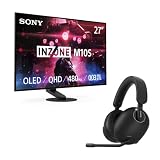
- IMMERSIVE GAMING: Immerse yourself in a new level of gaming with the Sony-INZONE H9, a wireless headset with mic that offers 360 Spatial Sound feature. This wireless headphones with microphone provides a personalized audio experience, allowing you to detect rivals with precision and enhancing your gaming experience.
- NOISE CANCELING: Sony-INZONE H9 helps you maintain your focus with its Dual Sensor Noise Canceling Technology. This gaming headsets wireless feature blocks out surrounding noise, allowing you to concentrate on your game while the Ambient Sound Mode keeps you aware of your surroundings.
- CLEAR COMMUNICATION: Communicate effectively with your team using the Sony-INZONE H9, a PS5 gaming headset with a flip-to-mute mic. This headset for PS5 ensures crystal-clear communications for Discord calls, making it a crucial tool for teamwork and strategy in multiplayer games.
- LIGHTNING FAST OLED DISPLAY: The INZONE M10S is ready for competitive FPS games with extremely low latency paired with a 480Hz refresh rate to quickly spot and track enemy movements.
- QHD RESOLUTION: 2560 x 1440p resolution offers stunning motion clarity and delivers exceptional detail.
PC gaming, console gaming, and productivity
Competitive PC gaming
This is the M10S’s strongest case. A high-end PC running competitive games at several hundred frames per second can make meaningful use of 480Hz, while OLED transitions and 1440p resolution provide a better image than a typical 1080p tournament monitor.
General PC gaming
The M10S is excellent for dark games, action titles, and mixed gaming if you appreciate OLED contrast. But if your games usually run at 60–144fps, a less expensive high-refresh OLED or a brighter LCD may offer better value.
PS5 and other consoles
Do not buy the M10S for 480Hz PlayStation gaming. The PS5 cannot deliver 480Hz gameplay in practical use. Its console appeal is the OLED image, HDMI 2.1 connectivity, VRR support, and compatibility with high-refresh console modes—not the headline PC refresh rate.
Outdated Drivers Are Slowing You Down
One free scan finds every outdated or missing driver and matches the right update for your exact hardware.Free scan · exact hardware matchPC Slower Than It Used to Be?
A free scan shows the junk files, broken settings and background clutter dragging Windows down - then fixes them in one click.Free scan · Windows 10 & 11Productivity
1440p is more comfortable for desktop work than 1080p at this size, but text clarity and static-content wear deserve consideration. If the monitor will show documents, browser windows, or spreadsheets for most of every day, a conventional LCD may be a safer fit.
M10S versus the M10S II and competing OLED monitors
The original M10S is no longer Sony’s only relevant option. Sony’s support listings identify the INZONE M10S II as a 27-inch QHD OLED monitor with a 540Hz maximum refresh rate. A current verified U.S. buying price was not established in the supplied material, so compare the live price directly rather than assuming the successor is a bargain—or assuming it is overpriced.
The newer model should be your first comparison if its price is reasonably close. The original M10S becomes more attractive when it is substantially cheaper and you do not need 540Hz. Also compare independent measurements rather than relying only on response-time or peak-brightness claims.
Relevant 1440p/480Hz OLED alternatives identified by RTINGS’ M10S review and comparison coverage include the ASUS ROG Swift OLED PG27AQDP, Acer Predator X27U F3, and LG 27GX790A-B. Confirm current U.S. availability, pricing, measured performance, and warranty terms before choosing among them.
Quick Recap
Who should buy the Sony INZONE M10S?
- Serious esports player: Buy if you can sustain very high frame rates and value the 24.5-inch mode, FPS Pro+, and OLED motion performance.
- High-end enthusiast: Consider it if you want 1440p OLED and 480Hz, but compare the M10S II first.
- General PC gamer: Buy only if OLED contrast matters more to you than maximum HDR brightness or value.
- PS5 owner: Choose it for OLED image quality and HDMI 2.1, not for 480Hz.
- Productivity-heavy OLED buyer: Proceed only if you accept text and burn-in considerations and will use the panel-care features.
- Value-conscious buyer: Wait for a substantial discount or choose another monitor if the M10S II is available for a modest premium.
Product prices and availability are accurate as of the date/time indicated and are subject to change. Any price and availability information displayed on Amazon at the time of purchase will apply.



