“ep0lvr13.dll” error messages
Windows may display one of these messages:
- “The program can’t start because ep0lvr13.dll is missing from your computer.”
- “The code execution cannot proceed because ep0lvr13.dll was not found.”
- “There was a problem starting ep0lvr13.dll. The specified module could not be found.”
- “Error loading ep0lvr13.dll. The specified module could not be found.”
- “ep0lvr13.dll is either not designed to run on Windows or it contains an error.”
- “ep0lvr13.dll is corrupted.”
- “Cannot register ep0lvr13.dll.”
Recommended Free Tools
ep0lvr13.dll is an Epson printer-driver component, not a standard Microsoft runtime. If the error appeared after removing, reinstalling, updating, or cleaning up an Epson printer, repair the complete Epson driver package rather than downloading this DLL separately.
The 60-second answer
Remove the affected Epson printer from Windows, restart the computer, then install the exact driver package for that printer from Epson’s official support or Download Center. Select the precise model and your Windows version.
If the printer is no longer used, remove the printer and its obsolete driver package instead of restoring ep0lvr13.dll.
Do not copy the file into System32, SysWOW64, or a random application folder. Do not run regsvr32 unless the software vendor specifically confirms that this DLL is a self-registering component. It is identified as a printer-driver file, so registration is generally not the repair.
#1 Best Overall

- Epson printing system is designed to be used exclusively with Epson genuine cartridges. Use of non-genuine ink could cause damage not covered under the printer’s ltd. wnty.
- Sharp text and brilliant color for high-quality results; fast-drying ink
- Brilliant prints on both plain and glossy paper
- Convenient individual ink cartridges
- Compatible Printers: XP-4200, XP-4205, WF-2930, WF-2950
What ep0lvr13.dll is
Public file metadata identifies EP0LVR13.DLL as “EPSON Printer Driver,” with SEIKO EPSON CORPORATION listed as the company. The cataloged file is a 32-bit component associated with legacy Epson Windows printer packages.
Driver records connect related Epson packages using prnep00l.inf with older printers including the Epson EPL-6200, EPL-6200L, EPL-N3000, and AL-C1100. The filename alone cannot identify the exact printer model on your computer. Several Epson driver packages can coexist, and the same component may be present in a Windows DriverStore package.
Reported version and size information varies between third-party catalogs, so it should not be used as a target for manual replacement. Epson does not appear to publish ep0lvr13.dll as a standalone download.
This is not:
- A core Windows system DLL
- A Visual C++ Redistributable file
- A DirectX component
- A general-purpose .NET runtime
- Proof that a particular game requires the file
A 32-bit Epson component can still be used on 64-bit Windows. Choose the driver package for the exact printer and Windows installation, not an arbitrary DLL based on its bitness.
Free tools Windows power users keep installed
One-click scans. No signup required.
Why the error appeared
The common causes are:
- A damaged, incomplete, or removed Epson printer driver
- Antivirus quarantine or security cleanup
- A Windows update or DriverStore cleanup
- An incompatible legacy driver
- A stale Epson utility still launching at startup
- A missing dependency beside the DLL
- Broader Windows component corruption
“The specified module could not be found” does not always mean the named DLL is absent. The file may exist while another dependency required by it is missing.
Fix 1: Remove and reinstall the exact Epson driver
This is the most reliable repair when you still use the printer.
Rank #2
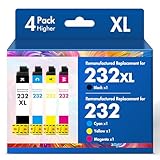
- Product Model: Cool Toner 4 Pack Compatible for 232XL Ink Cartridges for Epson Printer and Compatible for 232 Ink Cartridges
- Package Contents: Compatible for 232XL Ink Cartridges Combo Pack (1×Black, 1×Cyan, 1×Magenta, 1×Yellow)
- Compatible for Epson Printers: XP-4200 XP-4205 Workforce WF-2930 WF-2950
- Please Note: This is not an OEM Ink Cartridge
- High Page Yield: 380 Pages for Each Black Ink, 140 Pages for Each Color Ink at 5% Coverage (A4/Letter)
Remove the printer
- Disconnect the printer or turn it off.
- Open Settings.
- Select Bluetooth & devices.
- Select Printers & scanners.
- Choose the Epson printer associated with the error.
- Select Remove and confirm.
- Restart Windows.
Do not remove a similarly named Epson printer unless you have confirmed that it is the affected device.
Remove the old driver package if necessary
After restarting:
- Press Windows key + R.
- Type
control printers. - Press Enter.
- Select any printer, then choose Print server properties from the toolbar or menu.
- Open the Drivers tab.
- Select the obsolete Epson driver.
- Choose Remove.
- Select Remove driver and driver package when Windows offers that choice.
- Restart Windows again.
The Print server properties dialog is not shown in every modern Settings screen. The classic control printers command usually provides access to it.
Install the correct package
- Open Epson’s official printer-driver support page or Download Center manually in your browser.
- Search for the exact printer model shown on its label.
- Select your Windows version and system architecture when requested.
- Download the complete printer-driver package.
- Run the Epson installer.
- Reconnect or turn on the printer only when the installer requests it.
- Print a test page from Settings > Bluetooth & devices > Printers & scanners > your printer > Printer properties.
The repair worked if the Epson printer installs without an ep0lvr13.dll message and the test page prints. If the installer reports that the operating system is unsupported, do not substitute a nearby model’s package. Check whether Epson provides a compatible driver or use a Microsoft-compatible class driver where appropriate.
When identifying outdated hardware drivers across several office PCs, manually checking every Epson package can mean hunting through model names, Windows architectures, and old versions. Outbyte Driver Updater can scan for driver problems and show what needs attention; its repair or driver installation is completed by the full version, and the exact Epson package remains the preferred source for this printer-specific file.
Fix 2: Check antivirus quarantine
Security software may have quarantined a legitimate legacy driver, or it may have flagged a damaged copy.
Check Windows Security
- Open Windows Security from the Start menu.
- Select Virus & threat protection.
- Select Protection history.
- Review entries mentioning Epson, the printer driver, or
ep0lvr13.dll. - Check the reported file location and detection details.
Restore the file only when it is clearly part of a known Epson installation and its location and digital signature are trustworthy. Do not disable antivirus protection just to obtain a DLL.
Quick wins for a faster PC:
Scan for outdated or missing drivers - takes under a minuteDriver Scan →Repair Windows errors before they cause bigger problemsFix Now →Fix the driver behind crashes, sound loss and screen glitchesFind Drivers →The safer path is to reinstall the complete driver from Epson, then run Virus & threat protection > Scan options > Full scan. If the file was detected in a temporary folder, a download directory, or an unrelated application folder, treat it as untrusted and do not restore it.
Rank #3

- Epson printing system is designed to be used exclusively with Epson genuine cartridges. Use of non-genuine ink could cause damage not covered under the printer’s ltd. wnty.
- Sharp text and brilliant color for high-quality results; fast-drying ink
- Brilliant prints on both plain and glossy paper
- Convenient individual ink cartridges
- Compatible Printers: XP-4200, XP-4205, WF-2930, WF-2950
Fix 3: Inspect Device Manager for a broken printer device
Device Manager can reveal whether Windows still has a damaged printer-driver entry.
- Right-click Start.
- Select Device Manager.
- Expand Print queues.
- Expand Printers if that category is present.
- Look for the Epson printer, an unknown device, or a warning icon.
- Right-click the affected entry and select Uninstall device.
- Confirm the removal.
- Restart Windows.
- Reinstall the exact Epson package.
If Windows offers Attempt to remove the driver for this device, select it only when you intend to remove that old package and have the correct replacement available.
If no Epson device appears but the error continues at every boot, a stale Epson utility may still be starting. Open Settings > Apps > Startup and disable an Epson startup item that clearly belongs to the removed printer. You can also inspect Task Manager > Startup apps. Do not disable an unknown process solely because its name looks unfamiliar.
Fix 4: Install Windows updates and check optional features
A pending Windows update can leave printer components in an incomplete state.
- Open Settings.
- Select Windows Update.
- Select Check for updates.
- Install available updates.
- Restart Windows, including when no update explicitly requests a restart.
- Test the printer again.
Windows Features are not normally the source of ep0lvr13.dll. To verify that no relevant optional component is pending:
- Press Windows key + R.
- Type
optionalfeatures. - Press Enter.
- Review the available features.
- Leave unrelated features unchanged.
- Select Cancel unless a specific Epson or Windows instruction requires a feature.
Installing .NET, DirectX, or Visual C++ merely because a DLL error appeared is not the default remedy. ep0lvr13.dll is identified as an Epson printer-driver component, not a Microsoft runtime. Install a Microsoft runtime only when the complete error identifies a separate missing runtime used by another application.
Rank #4

- Epson printing system is designed to be used exclusively with Epson Genuine Cartridges. Use of non-genuine ink could cause damage not covered under the printer’s ltd. wnty.
- Hassle free ― High-capacity Black ink cartridge for fewer interventions
- Sharp text and brilliant colors for print-shop-quality results
- Fast-drying pigment ink designed for high-speed print jobs
- Compatible Printers: WF-3820, WF-3823, WF-4820, WF-4830, WF-4833, WF-4834
Fix 5: Repair Windows components with DISM and SFC
Use these commands when Windows itself shows broader corruption, Windows Update is failing, or System File Checker identifies damaged protected components. They are not substitutes for reinstalling a third-party Epson driver that was simply removed.
- Open Start.
- Type
Command Prompt. - Right-click Command Prompt.
- Select Run as administrator.
- Run:
DISM.exe /Online /Cleanup-Image /RestoreHealth
- Wait for the command to complete.
- Then run:
sfc /scannow
- Restart Windows.
- Test the printer and the application that displayed the error.
Microsoft recommends running DISM before SFC. If SFC reports that it repaired files, restart and test again. If it reports that it could not repair some files, do not copy ep0lvr13.dll into a protected directory. Review the CBS log or return to the Epson driver reinstall path.
Repeatedly running SFC and DISM will not recreate every third-party printer file. These commands repair Windows component corruption, while the Epson installer restores the Epson driver package.
If you want an automated scan instead of repeatedly interpreting repair output and deciding which Windows component changed, Outbyte PC Repair can show detected system issues; repairs are performed by the full version, and it does not replace the need for the correct Epson installer.
Fix 6: Use System Restore after a recent change
System Restore is useful when the printer worked before a driver removal, cleanup, or Windows change.
Do these 3 things before closing this tab:
1Fix the driver behind crashes, sound loss and screen glitches2Repair Windows errors before they cause bigger problems3Scan for outdated or missing drivers - takes under a minute- Press Windows key + R.
- Type
rstrui.exe. - Press Enter.
- Select Next.
- Choose a restore point from before the error began.
- Select Scan for affected programs.
- Review the drivers and applications that may be changed.
- Select Close, then Next.
- Confirm the restore.
System Restore rolls back system files, settings, drivers, and installed programs without normally affecting personal files. It may not restore a complete third-party driver package, so reinstall the Epson driver afterward if the printer remains unavailable.
Independent reader supportYour contribution helps us test, update, and keep practical guides available for everyone.Why you should not download the DLL separately
Random DLL download pages can provide malware, the wrong version, or the wrong architecture. A loose replacement may also fail because the actual problem is a missing dependency, an incomplete INF package, a stale printer entry, or an Epson utility launching from an old path.
Best Value

- Epson printing system is designed to be used exclusively with Epson Genuine Cartridges. Use of non-genuine ink could cause damage not covered under the printer’s ltd. wnty.
- Sharp text and brilliant colors for print-shop-quality results
- Fast-drying pigment ink designed for high-speed print jobs
- Compatible Printers: WF-3820, WF-3823, WF-4820, WF-4830, WF-4833, WF-4834
Do not place ep0lvr13.dll in:
C:WindowsSystem32C:WindowsSysWOW64- The Windows root directory
- A random application folder
- A printer utility directory copied from another PC
The safe sources are Epson’s official support and Download Center for the exact printer, plus Windows Update or Microsoft’s built-in recovery tools where the problem is Windows-wide.
Should you run regsvr32?
Usually, no.
regsvr32 is intended for self-registering COM or ActiveX DLLs that export DllRegisterServer. A printer-driver component does not become usable merely because it was registered. Running the command can produce “not self-registerable” or architecture-related errors and distract from the real package repair.
What’s actually slowing this PC down?
Pick the symptom - the matching free tool is one click away.
Use the Epson installer to register and place its components correctly. Use regsvr32 only if Epson or the specific software documentation explicitly instructs you to do so for this file.
If the Epson printer is obsolete
If you no longer use the printer:
- Remove it under Settings > Bluetooth & devices > Printers & scanners.
- Uninstall related Epson software under Settings > Apps > Installed apps.
- Use
control printersto open Print server properties. - Remove the obsolete Epson driver package from the Drivers tab.
- Restart Windows.
- Check Task Manager > Startup apps for a remaining Epson utility.
If the printer is unsupported by the current Windows release, replacing it or using a compatible class driver may be more practical than restoring a legacy package.
FAQ
Does the filename identify my Epson printer?
No. It identifies an Epson printer-driver component, but the exact printer model cannot be determined from ep0lvr13.dll alone.
Is ep0lvr13.dll a Microsoft file?
No. Public metadata attributes it to SEIKO EPSON CORPORATION. It may reside inside a Windows DriverStore package without being a core Windows DLL.
Can 64-bit Windows use this 32-bit file?
Yes. A 64-bit Windows installation can use 32-bit printer components. Install the Epson package matched to the printer and Windows installation rather than choosing a loose file.
What if the error names an application instead of a printer?
The application may be an Epson utility, installer, print monitor, or a stale startup process. Note the executable name, then repair or remove the Epson package associated with that process. No reliable public evidence ties this DLL to one particular game or application.
What information is useful if the error remains?
Record the full error message, the executable name shown in the message or Task Manager, the Epson printer model, your Windows version, and the DLL’s actual file path. That information distinguishes a missing printer package from a missing dependency or an untrusted copy.
Quick Recap
Product prices and availability are accurate as of the date/time indicated and are subject to change. Any price and availability information displayed on Amazon at the time of purchase will apply.
The Tool Desk
Outbyte Driver Updater FREEScan for outdated or missing drivers - takes under a minuteDriver Scan →Outbyte PC Repair FREERepair Windows errors before they cause bigger problemsFix Now →



