Yes—a healthy, reputable 500 W power supply is comfortably sufficient for a standard GeForce GTX 1650 in most single-GPU desktop PCs. NVIDIA lists the card in a 75 W power class and gives a 300 W minimum system-power recommendation. But the exact card matters: some GTX 1650 models draw power from the PCIe slot alone, while others require a 6-pin cable. The GTX 1650 Super is a different, more power-hungry model and needs its own compatibility check.
GTX 1650 power requirements at a glance
| Specification | Standard GTX 1650 |
|---|---|
| Graphics-card power class | 75 W, per NVIDIA’s specifications |
| Minimum system-power recommendation | 300 W, per NVIDIA; this is a system recommendation, not the GPU’s draw |
| Is 500 W enough? | Yes, for most normal single-GPU systems if the PSU is suitable and in good condition |
| External PCIe power connector | Model-dependent; check the exact card |
| Typical gaming target | 1080p, with settings adjusted to the game and the card’s 4 GB of VRAM |
The 75 W figure describes the graphics card, not the whole computer. The processor, motherboard, drives, fans and connected devices also use power. Conversely, a 500 W PSU does not push 500 W into the PC: components draw the power they need, and the PSU’s rating is its available capacity.
NVIDIA’s 300 W minimum system recommendation is a useful baseline, not a guarantee for every possible build. A high-power CPU, extensive expansion hardware or an unusually poor PSU can change the decision. For an ordinary desktop with one GTX 1650, 500 W leaves comfortable capacity beyond that baseline.
Why 500 W is enough—and when the label is not
For a GTX 1650 system, 500 W is more than necessary in many configurations, but having spare capacity is not harmful. A sound 300–450 W unit may also be enough, depending on the complete system. There is no need to buy an unusually large PSU just to run this card.
#1 Best Overall

- Delivers 500 Watt Continuous output at plus 40 degree. Compliance with Intel ATX 12 Volt 2.31 and EPS 12V 2.92 standards
- 80 PLUS Certified, 80 percentage efficiency under typical load
- Supports (2) PCI E 6plus2pin Connectors. Active (PFC) Power Factor Correction, MTBF: 100,000 hours
- Industry Grade Protections: (OPP) Over Power Protection, (OVP) Over Voltage Protection, (SCP) Short Circuit Protection
- High Quality Components
Independent historical tests illustrate the card’s relatively modest demand, though their results are specific to their test systems. TechSpot measured about 184–192 W of total system consumption across its GTX 1650 test configurations. That is not a universal maximum or a specification for every PC. In a separate test, Tom’s Hardware measured a factory-overclocked Gigabyte model at roughly 77.1 W average GPU power and just over 81 W peak. Processor, board, workload and measurement method all affect results.
The wattage printed on a PSU is only one part of suitability. Check its continuous output on the +12 V rail, condition, connectors and physical compatibility. A reputable 400 W unit can be a better choice than an unreliable generic model marked 500 W.
- Check the +12 V rating: Look at the PSU label for its +12 V amperage or wattage and confirm that it can provide adequate continuous output.
- Check condition and age: A unit with a history of overheating, electrical odor, damaged wiring, fan trouble or system instability deserves replacement or professional evaluation. Age alone does not prove failure, but a very old unit is less reassuring.
- Check native cables: If the card needs a PCIe connector, the PSU should have the matching native cable.
- Check form factor and wiring: An ATX PSU may not fit an SFX or slim case, and some OEM desktops use proprietary connections.
- Do not treat an efficiency badge as a quality guarantee: 80 PLUS ratings describe efficiency; by themselves they do not establish component quality, protections, transient behavior or lifespan.
Check the exact GTX 1650 model and its power connector
There is no single connector rule for every GTX 1650. Board partners sell cards with different coolers, clocks, memory and layouts. The GPU name alone cannot tell you whether a particular card needs an external cable.
Rank #2

- ATX PSU. Delivers 500 Watt Continuous output
- 80 PLUS Bronze certified, with 85% efficiency or higher under typical loads
- 5 Year Warranty and heavy protection including OVP/UVP/OPP/SCP
- All cables are black and not ketchup and mustard colored
- 120mm ultra quiet fan with excellent cooling performance
For example, MSI lists its GTX 1650 4GT LP OC as a 75 W low-profile model with a 300 W recommended PSU and no supplementary connector listed. MSI’s GTX 1650 D6 AERO ITX OCV1 also lists 75 W and a 300 W PSU recommendation, but specifies one 6-pin connector. Both can have the same nominal power class while requiring different cabling.
Free tools Windows power users keep installed
One-click scans. No signup required.
- Find the full manufacturer name and model number on the card, box or product listing.
- Check the manufacturer’s specification page and inspect a clear photo of the card for a power socket.
- If it has a socket, confirm that the PSU has the required native PCIe cable; a common PSU lead is 6+2-pin, which can serve a 6-pin socket.
- For an OEM desktop, confirm that its PSU wiring is compatible and that the card fits the case before buying.
Do not assume a SATA-to-PCIe or Molex-to-PCIe adapter is a safe substitute. If the card requires a connector that the PSU does not provide, replacing the PSU with a compatible unit is the safer course.
What gaming performance should you expect?
The GTX 1650 is a budget 1080p card, not a promise of a particular frame rate. Older or well-optimized esports games may run comfortably at medium or higher settings, while newer, demanding games can require low-to-medium settings to maintain smooth play. Results vary with the game, resolution, graphics settings, processor, drivers, cooling and whether the card uses GDDR5 or GDDR6 memory.
Rank #3

- Delivers 600W Continuous output at plus 40℃. Compliance with Intel ATX 12V 2. 31 and EPS 12V 2. 92 standards
- 80 PLUS Certified – 80% efficiency under typical load. Power good signal is 100-500 millisecond
- Supports (2) PCI-E 6 plus 2pin Connectors. Active (PFC) Power Factor Correction, MTBF: 100, 000 hours
- Industry Grade Protections: (OPP) Over Power Protection, (OVP) Over Voltage Protection, (SCP) Short Circuit Protection
- Hold up time is 16 millisecond minimum within 60 percent load. Input frequency range 50 - 60 in Hz
Its 4 GB of VRAM is an important limit. In games that use more memory than the card can comfortably provide, lowering texture quality and other demanding settings can help avoid stutter or texture compromises. Do not expect ultra textures or modern intensive effects to work well in every game; ray tracing is not a realistic reason to choose this older budget card.
A larger PSU does not raise frame rates on its own. If both a 500 W and a 650 W PSU provide stable, adequate power, the GTX 1650 does not gain extra performance just because the second unit has a higher capacity. Performance depends on the GPU and the rest of the system; an inadequate or unstable PSU can cause problems, but extra wattage does not add GPU capability.
Recommended Free Tools
Power and performance can also vary between board designs. In testing of specific slot-powered and externally powered cards, TechSpot found that the externally powered version could perform better, particularly with overclocking. One reported result was roughly a 12% gain for the tested 6-pin card with an overclock in that test’s conditions. It is not a general performance uplift for every GTX 1650 or game.
Rank #4
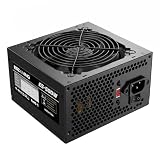
- ESGAMING ValuPref 500W ATX Power Supply.
- Pre installed Connectors:1 x 24pin Main Power, 1 x 4+4pin CPU 12V, 1 x PCI 6+2pin, 3 x SATA, 3 x PATA, 1 x FDD
- Auto-Thermally Controlled Black 120mm Fan virtually silent operation at low loads, keep your system cool
- All Protection:Heavy duty protections, including OVP/UVP/OPP/SCP/OCP/OTP
- No Risk Of Purchase - Any problem with your case, please feel free to contact us by clicking "S0ld-by-ESGAMING”
Factory overclocking and manual overclocking
A factory-overclocked model may use a different board design or connector from a reference-style card; follow its own specifications rather than assuming the GPU name determines power needs. A 500 W PSU generally has ample total capacity for modest GTX 1650 overclocking in a normal system, but only if the unit is healthy and has the required cables.
Manual GPU or memory overclocking, a higher power limit where the card allows it, and CPU overclocking can all affect system demand and heat. A 6-pin card may have more power flexibility than a slot-powered version, depending on its board and BIOS. Overclocking is not a reason to use a low-quality PSU, and added power can mean added heat that the case and cooler must handle.
Independent reader supportYour contribution helps us test, update, and keep practical guides available for everyone.GTX 1650 is not GTX 1650 Super
Do not apply the standard GTX 1650 recommendation automatically to the GTX 1650 Super. The Super is a higher-power card with different requirements. Check the exact Super model’s PSU recommendation and PCIe connector specifications before installing it; the 75 W and 300 W figures discussed here apply to the standard GTX 1650, not as a blanket rule for the Super.
Do these 3 things before closing this tab:
1Repair Windows errors before they cause bigger problems2Scan for outdated or missing drivers - takes under a minute3Clear out junk files and repair common Windows errorsBest Value

- Power Supply Specifications: Apevia Venus 500W ATX Power Supply delivers reliable power for your computer system
- Comprehensive Connector Options: 1 x 20/24pin Main Power, 1 x 4+4pin 12V, 1 x 6+2 PCI Express, 3 x SATA, 3 x Peripheral, 1 x Floppy connectors for versatile component compatibility
- Advanced Cooling System: Auto-Thermally Controlled Black 120mm Fan with 115/230V Switch for efficient temperature management
- Precise Voltage Regulation: 5% Tolerance of 5V, 3.3V & 12V Output ensures stable power delivery to all components
- Complete Protection Suite: Short-Circuit/Over-Current/Over-Voltage/Over-Power/Under-Voltage/Over-Temperature Protections safeguard your system from electrical damage
Installing a GTX 1650 in a prebuilt or office PC
A 500 W figure may look reassuring on a prebuilt PC, but the main obstacle can be the system’s design rather than raw capacity. This is particularly relevant to Dell, HP, Lenovo and other office desktops, which may use proprietary PSU connections, compact cases or low-profile expansion slots.
- Case and bracket: Confirm whether the system needs a low-profile card, and check card length, height and slot width.
- Power supply: Identify whether it is standard ATX, SFX or proprietary, and check for the exact connector required by the card.
- Motherboard and firmware: Confirm that the system has a suitable PCIe slot and that its BIOS supports the card.
- Cooling: Make sure the case has enough airflow for the card and its cooler.
- Whole-system balance: A powerful or heavily overclocked CPU and extensive additional hardware require more careful power assessment than a basic office configuration.
Low-profile GTX 1650 versions can suit compact systems, but not every card sold under the GTX 1650 name is low-profile. Verify the specific bracket and dimensions rather than relying on a listing title.
Troubleshooting shutdowns, black screens or failed starts
Sudden shutdowns, black screens, restarts or driver crashes under gaming load can be consistent with a power problem, but they do not prove that the PSU is at fault. Drivers, temperatures, memory, firmware, the graphics card and other components can produce similar symptoms.
- Confirm the exact GTX 1650 model and whether it needs a 6-pin PCIe connector.
- If required, connect the PSU’s native PCIe cable securely.
- Make sure the card is fully seated in the PCIe slot and the monitor is connected to the graphics card, not the motherboard video output.
- Install the appropriate NVIDIA driver, then check GPU temperatures and clock behavior during use.
- If the problem persists, test with a known-good, compatible PSU and check system memory and CPU stability.
- Inspect the card, motherboard and cables for physical damage; stop using a PSU that smells burnt, overheats or shows electrical damage.
A PC that will not boot after installation may have a card that is not seated properly, a missing or loose power lead, a low-profile or clearance mismatch, a proprietary OEM power connection, a BIOS compatibility issue or a defective PSU. Diagnose these possibilities rather than assuming the 500 W label rules them out.
Quick wins for a faster PC:
Fix the driver behind crashes, sound loss and screen glitchesFind Drivers →Clear out junk files and repair common Windows errorsFree Scan →Scan for outdated or missing drivers - takes under a minuteDriver Scan →Quick Recap
Quick compatibility verdict
| System or card situation | Verdict |
|---|---|
| Healthy, reputable 500 W PSU and standard GTX 1650 in an ordinary desktop | Suitable for most single-GPU builds |
| Generic, damaged or unstable PSU marked 500 W | Do not rely on the rating alone; replace or test with a known-good unit |
| Card requires 6-pin power but PSU lacks a native PCIe cable | Not directly compatible; choose a compatible PSU rather than defaulting to adapters |
| Compact or OEM desktop | Verify PSU wiring, card height and length, bracket, slot and firmware compatibility |
| GTX 1650 Super | Check that model’s separate power and connector requirements |
| High-power CPU or extensive expansion hardware | Assess the complete system rather than relying on the GPU’s 75 W class alone |
Product prices and availability are accurate as of the date/time indicated and are subject to change. Any price and availability information displayed on Amazon at the time of purchase will apply.




