Do these 3 things before closing this tab:
1Fix the driver behind crashes, sound loss and screen glitches2Repair Windows errors before they cause bigger problems3Scan for outdated or missing drivers - takes under a minuteYes—official Sony PS3 controllers have Bluetooth. The original SIXAXIS and DUALSHOCK 3 use Bluetooth for wireless play and USB for wired connection. On a PS3, the dependable first-time setup is to connect the controller with a data-capable USB A-to-Mini-B cable and press the PS button. After it is assigned, you can unplug the cable and play wirelessly.
The harder question is compatibility elsewhere. A Bluetooth radio does not guarantee plug-and-play support on a Windows PC, phone, tablet, Raspberry Pi, Steam Deck, or another console. Drivers, pairing tools, adapters and game input standards determine whether the controller actually works—and which features survive.

Which PS3 controllers have Bluetooth?
SIXAXIS
Sony’s original SIXAXIS is an official wireless PS3 controller using Bluetooth, with USB available for wired connection. Sony also stated that Bluetooth allowed up to seven players simultaneously without a multitap in its 2006 announcement: Sony’s SIXAXIS announcement.
DUALSHOCK 3
The DUALSHOCK 3 retains Bluetooth and USB connectivity and adds vibration feedback to the SIXAXIS design. Its manual specifies a USB A-to-Mini-B cable for connecting and charging, and identifies a built-in 3.7 V, 610 mAh lithium-ion battery: DUALSHOCK 3 instruction manual.
#1 Best Overall

- 🎮【Compatible with Playstation3 】The wireless controller is fully compatible with PS3/Slim.
- 🎮【Double Vibration and Shock& Motion Sensor Supported】 Feel every hit, crash, and explosion with PS3 controller dual vibration response. Truly intuitive game play through the 6-axis motion sensing technology
- 🎮【Long Battery Life & Long Bluetooth Connection Distance】The controller is design with perfect sensitive buttons and product shape, more comfortable playing feeling to press the buttons with suitable hand-held size and with a large battery capacity,allowing you to have great fun in games for longer time.
- 🎮【Upgraded Version】The buttons are with high sensitivity and provide an accurate gaming experience. The layout of controller buttons is optimized with excellent dual analog gamepad design.
- 🎮【Package Content /What You Get】wireless controller * 2, USB charging cable * 2, User Manual * 1 (NOTE: Please activate device with USB charging cable for the first match connection).
Third-party and counterfeit controllers
Do not assume that every product sold as “PS3 compatible” has Bluetooth. Some third-party models are USB-only; others use a proprietary 2.4 GHz receiver. Clone DUALSHOCK 3 units can differ in Bluetooth behavior, battery quality, motion sensing, rumble and pairing. Appearance alone is not proof of authenticity.
How to connect a PS3 controller wirelessly to a PS3
The controller normally uses USB-assisted pairing rather than the modern “hold two buttons to pair” process found on newer gamepads.
- Turn on the PS3.
- Connect the controller directly to the console with a data-capable USB A-to-Mini-B cable. A charging-only cable cannot transfer the information needed for pairing.
- Press the controller’s PS button.
- Wait for one player-number light to remain lit. That light identifies the assigned player.
- Disconnect the cable and press the PS button again. The controller should reconnect wirelessly.
To view or manage Bluetooth devices on the console, open Settings → Accessory Settings → Manage Bluetooth Devices → Register New Device. Sony documents this menu in the PS3 user guide. The menu is useful for other Bluetooth accessories; a normal DUALSHOCK 3 pairing is usually simplest through the USB-and-PS-button procedure above.
Sony’s original capacity claim was up to seven Bluetooth players, but the number that works in practice depends on the game, accessories and PS3 software environment. When the console has reached its wireless-device limit, the user guide says unused registered devices may need to be deleted before adding another.
Quick wins for a faster PC:
Scan for outdated or missing drivers - takes under a minuteDriver Scan →Repair Windows errors before they cause bigger problemsFix Now →Fix the driver behind crashes, sound loss and screen glitchesFind Drivers →Does working over USB mean the controller has no Bluetooth?
No. USB may be required for initial pairing, assigning the controller to another PS3, recovering from a previous pairing, charging, or troubleshooting a weak battery. A controller that works wired but not wirelessly may have a depleted battery, damaged Bluetooth hardware, a failed Mini-B port, or a pairing problem. Wired operation alone does not identify the wireless hardware.
Rank #2

- 【Compatible with Sony Playstation 3 and PC Windows 7/8/10】Controller wireless for Sony PlayStation 3/PS3. Plug and Play. No installation is required. To use it on a PC, a USB cable is required (included).
- 【Double Shock 3 & Motion Sensor Supported】The controller wireless for Sony PS3 supports the double shock 3 function. The grips vibrate with each explosion, shocking, firing in supported games, giving you more fun and a more immersive gaming experience. 6-axis motion sensing function is also supported for the remote controller for PS3 so that you can control the games freely with the moving of your hands.
- 【Long Battery Life & Long Bluetooth Connection Distance】Remote for PS3 with a large battery capacity of 600mAh, providing 5~8h long playtime (auto-sleep function is provided for saving power).
- 【Sensitive Buttons Passed 10,000,000 Strokes Test】The high-quality controllers 2 pack for PS3 are upgraded to be close to the original. It has a zero-delay quick response. The control for PS3 uses first-class material and is of first-class craftsmanship. It has passed a strict durability test of 10,000,000 times of strokes. The two 360 degree analog joysticks of the controller wireless for PS3 enable you to control the games effortlessly and precisely. No dead zone.
- 【Package Content & Lifetime Carefree After-sales Service】The delivery package includes 2 Controllers Wireless for PS3, 2 USB Charging Cables (2.5 feet), 1 User Manual; The wireless controllers for Sony PlayStation 3 offer a lifetime unconditional return and refund service.
Can a PS3 controller connect directly to a PC?
Sometimes, but not as a universal plug-and-play Bluetooth gamepad. A generic Bluetooth dongle supplies radio hardware; it does not necessarily provide the driver, pairing method or input translation that a DUALSHOCK 3 needs.
Windows
Windows commonly needs a specialized driver, compatibility layer or an adapter that explicitly supports DUALSHOCK 3 pairing and translates its legacy input. One documented option is 8BitDo’s Wireless USB Adapter 2. Its PS3 instructions require Windows 10 version 1903 or later. In that configuration, 8BitDo says motion control and the player indicator are unsupported: 8BitDo Windows instructions.
That adapter setup also uses 8BitDo’s separate PS3 Pairing Tool to associate the controller with the receiver. The tool’s download page lists Windows 7 and later and macOS 10.13 and later: PS3 Pairing Tool. It is not a universal driver for every Bluetooth dongle.
Outdated Drivers Are Slowing You Down
One free scan finds every outdated or missing driver and matches the right update for your exact hardware.Free scan · exact hardware matchPC Slower Than It Used to Be?
A free scan shows the junk files, broken settings and background clutter dragging Windows down - then fixes them in one click.Free scan · Windows 10 & 11macOS, Linux, Steam Deck and Raspberry Pi
Support varies with the operating-system version, Bluetooth stack, kernel or driver, game and input layer. Adapter-based setups are often easier to reproduce than legacy driver installations, but they can still expose the controller as an older DirectInput-style device rather than XInput. Games that require XInput may need Steam Input or another remapper, and virtual-controller conflicts can prevent input from registering.
Can it connect to an Android phone or tablet?
There is no universal direct-pairing guarantee. The device must expose a compatible Bluetooth profile, the game must recognize the controller’s layout, and the operating system must retain support for this older controller protocol. Android may instead require USB OTG and an adapter.
Rank #3

- The 2 pack wireless controller is fully compatible with PS3/Slim.
- Feel every hit, crash, and explosion with controller dual vibration response. Truly intuitive game play through the 6-axis motion sensing technology.
- Our controller has undergone a comprehensive upgrade to close to the original version. It has refined thumbsticks, precise triggers, responsive action buttons and a 4-way directional pad.
- The controller uses high-quality materials and exquisite craftsmanship, and passed 12,000,000 durability tests.
- What You Get: wireless controller * 2, USB charging cable * 2, User Manual * 1 (NOTE: Please activate device with USB charging cable for the first match connection).
8BitDo documents DUALSHOCK 3 use on Android 9 or later with OTG support through its adapter. In that configuration, rumble, motion control and the player indicator are not supported: 8BitDo Android and other-device instructions. A newer Android update, a phone without OTG, or a game with no controller support can still prevent use.
Can it work with Nintendo Switch or another console?
Bluetooth in the controller does not make it natively compatible with every console. A console-specific receiver is usually required.
For Nintendo Switch, 8BitDo documents DUALSHOCK 3 support through the Wireless USB Adapter 2. The Switch must be on system version 3.0.0 or later, and Pro Controller Wired Communication must be enabled. The documented limitations are no motion controls, NFC, IR camera, HD rumble, notification LED or player indicator: 8BitDo Switch instructions.
What features work outside the PS3?
Basic buttons and analog sticks are the most portable features. Depending on the host and adapter, you may lose:
- Sixaxis motion sensing
- Vibration or rumble
- Player-number LEDs
- Pressure-sensitive button data
- Headset or microphone functions
- Correct PlayStation button prompts
- Reliable reconnection or support for multiple controllers
Input can also be affected by Bluetooth interference, adapter quality, battery age, driver conflicts and games that only accept XInput. Treat every non-PS3 setup as a compatibility project, not as a guaranteed consequence of the controller containing Bluetooth.
Rank #4
Bluetooth versus USB: which connection is better?
| Connection | Advantages | Disadvantages |
|---|---|---|
| Bluetooth | Wireless play; no cable during use | Pairing can be difficult; host and game compatibility varies; battery must be charged |
| USB | Simple, stable input; charges the controller; useful for pairing and recovery | Restricts movement; cable must carry data, not just power |
Why is my PS3 controller not connecting?
It charges but will not pair
- Replace the cable with a known-good USB data cable.
- Connect directly to the PS3, not through a hub.
- Charge the controller for a reasonable period, then press PS while it remains connected.
- Try another USB port, cable or controller.
- Use the small reset button on the controller if normal pairing still fails.
If it works only over USB, suspect the battery, Bluetooth radio, a damaged Mini-B port or a counterfeit unit.
Recommended Free Tools
The PC’s Bluetooth scan finds nothing useful
A DUALSHOCK 3 may not advertise or behave like a modern Bluetooth gamepad. Repeatedly buying generic dongles is unlikely to fix a missing driver or incompatible pairing method. Use a receiver with documented PS3 support, or choose a newer controller.
The controller connects but games ignore it
- The game expects XInput while the controller is exposed through another input API.
- Steam Input or another remapper is intercepting it.
- Duplicate virtual controllers are installed.
- Button labels or mappings are wrong.
- The chosen driver or adapter does not implement rumble or motion.
Wireless works briefly and then disconnects
Check battery age, nearby Bluetooth interference, adapter quality, driver conflicts and pairing-memory limits. Intermittent behavior is also common with counterfeit or repaired controllers.
A replacement controller is not recognized by the PS3
“Wireless” may mean a proprietary receiver rather than Bluetooth, and some third-party models are USB-only or use a special pairing procedure. Test the exact model’s manual instead of assuming it behaves like a genuine SIXAXIS or DUALSHOCK 3.
Independent reader supportYour contribution helps us test, update, and keep practical guides available for everyone.Should you use an adapter or buy a newer controller?
Keep the DUALSHOCK 3 and add an adapter
This makes sense when you already own a functioning genuine controller and want to use it on a supported PC, Android device, Switch, Steam Deck or Raspberry Pi. Expect setup work and feature loss. 8BitDo’s Wireless USB Adapter 2 is one documented route; its official product page is 8bitdo.com/wireless-usb-adapter-2. Check current stock and compatibility before buying.
Best Value
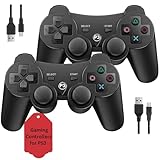
- Two Controllers, Ready to Play: Get two wireless PS3 controllers plus two USB charging cables in the box - everything two players need, at a low cost per controller. Designed for Sony PlayStation 3 and Windows PC (7/8/10); it does not support PS4, PS5, or Mac.
- Wireless on PS3, Wired PC: Connect once with the USB cable to pair, then play wirelessly on PS3 up to 33 feet via Bluetooth. On PC, use the USB cable for instant plug-and-play (wireless on PC needs built-in Bluetooth). The PS button powers on your console.
- Responsive Buttons and Sticks: Dual analog sticks and tactile buttons are built and tested for responsive, low-lag play, with anti-slip grips for control. Components are endurance-tested, and every controller is backed by our lifetime warranty if anything wears out.
- Familiar, Comfortable Design: A classic 3-inspired layout with dual vibration and 6-axis motion means no learning curve and a comfortable grip for long sessions. Lightweight by design as an affordable replacement; it is a solid budget controller, not an OEM clone.
- Rechargeable, Backed for Life: A 600mAh battery delivers about 5-8 hours per charge over the included USB cables, with an auto-sleep mode that conserves power when idle. If a controller ever fails to charge or wears out, our lifetime hassle-free return and refund has you covered.
Buy a modern controller
Choose a newer model when you need native Windows/XInput support, current firmware, USB-C charging, dependable reconnection, or full modern rumble and motion features. The adapter cost and configuration effort can approach the value of a better-supported controller, especially if you do not already own a working DUALSHOCK 3.
Buy a used genuine DUALSHOCK 3 for PS3 use
For original PS3 games and features, authenticity matters more than modern-PC convenience. Before buying, verify:
- Sony branding and model markings
- USB recognition and wireless reconnection after unplugging
- Battery runtime and charging behavior
- Analog-stick drift and every button, trigger and direction
- Sixaxis motion and rumble
- Condition of the Mini-B port
- A seller return policy
Used units can have worn batteries, drift, damaged ports or counterfeit electronics, so a low price is not proof of value.
Frequently Asked Questions
Does every PS3 controller have Bluetooth?
No. Official SIXAXIS and DUALSHOCK 3 controllers do; third-party models may be USB-only or use a proprietary wireless receiver.
Can I use a PS3 controller without a cable?
Yes, after USB-assisted pairing to the PS3. A cable may still be needed for reassignment, charging or recovery.
Can I charge it with any Mini-B cable?
Only a cable that fits and is in good condition will charge reliably, and pairing requires a data-capable cable rather than a power-only cable.
Why does my PC see the controller but not accept inputs?
The operating system may expose it through an input format the game does not support, such as DirectInput instead of XInput, or a driver, remapper or virtual-controller conflict may be interfering.
Can one controller be paired with both a PS3 and a PC?
It can be reassigned, but changing hosts may require the host’s pairing procedure and a USB connection. An adapter’s pairing is not automatically the PS3’s pairing.
What’s actually slowing this PC down?
Pick the symptom - the matching free tool is one click away.
Quick Recap
Product prices and availability are accurate as of the date/time indicated and are subject to change. Any price and availability information displayed on Amazon at the time of purchase will apply.




