Free tools Windows power users keep installed
One-click scans. No signup required.
Usually, you cannot plug an Xbox 360 directly into an ordinary PC or laptop HDMI port and use the computer as the screen. The Xbox 360 sends video through its HDMI output, while nearly all computer HDMI ports also send video out. To play on a computer screen, use a monitor with a compatible input, a computer that explicitly has HDMI-in, or a capture card. A capture card is the practical choice when you also want to record or stream.
Why a normal HDMI connection fails
HDMI is directional in this setup. The Xbox 360 HDMI socket is an output intended for a television, monitor, or AV receiver; Microsoft’s instructions show it connected to a television’s HDMI input (Microsoft HDMI instructions). A desktop or laptop HDMI socket is normally an output for sending the computer’s picture to another display.
Therefore, this connection does not work on a typical computer:
Xbox 360 HDMI OUT → ordinary PC/laptop HDMI OUT
An HDMI cable cannot create a missing video-input circuit. Many “HDMI-to-USB” adapters are output adapters rather than capture devices, so check that a product explicitly says it captures HDMI input. A port labeled only “HDMI” is not proof that it accepts video.
#1 Best Overall
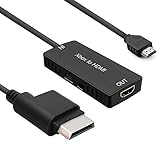
- 🎮 HD Link: Convert the native component signals from Xbox 360 to digital HDMI signals for modern HDTVs/monitors/projectors.
- 🎮Awesome Image: Provide the best signal processing with great precision, colors, resolution and details at this price.
- 🎮HD Ready: maximum possible video quality from our HDMI converter cable. Xbox 360 games that are native 720p will run in their respective resolutions.
- 🎮Compatible with: Microsoft Xbox 360 / XBOX 360 Slim.
- 🎮High Definition Connection; Plug and play; Need External Power Required; Won't affect the sound quality!
Fastest solution: connect the Xbox 360 to a monitor
If your goal is simply to play, connect the console directly to a display. This avoids capture software and preview delay.
HDMI
Use the Xbox 360’s HDMI output and the monitor’s HDMI input. HDMI carries both video and audio, provided the monitor has speakers or an audio output.
VGA
Some Xbox 360 VGA HD AV cables connect to a PC monitor’s VGA input; Microsoft documents this use in its VGA cable instructions. VGA carries video only, so connect the cable’s analog audio leads to powered speakers, headphones, or a suitable audio device.
Component or composite
Older Xbox 360 revisions may require component or composite AV cables. Component generally provides a better picture than composite, while composite is a lower-quality fallback. Your display or adapter must support the specific connection, and separate analog audio may be necessary.
Xbox 360 revisions do not all have identical ports. Inspect the rear of your console before buying a cable; a model without HDMI needs a compatible AV cable and a display or capture device with the matching input.
Rank #2
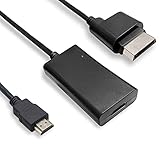
- COMPATIBILITY* Supports all versions of Xbox 360, especially the 1st version. Convert the component signals from Xbox 360 to digital HDMI signals for HDTVs/monitors.
- AWESOME IMAGE * Provide the best signal processing with great precision, colors, resolution and details at this price.
- EASY TO USE* Convert Xbox signal to HDMI signal, connect game console to HDMI TV, let you relive classic games. No power supply needed, plug and play, meet your daily needs.
- PACKAGE INCLUDE* HDMI Adapter for Original Xbox 360*1, HDMI Cable*1, Instruction*1
- 1 Year Warranty
Using a capture card with a PC or laptop
A capture card receives the Xbox signal, sends it to software on the computer, and often provides a direct HDMI passthrough to a television or monitor. Elgato’s documented signal chain is:
Xbox 360 HDMI OUT → capture-card HDMI IN → USB or PCIe → PC
With passthrough, add:
capture-card HDMI OUT → TV or monitor
External USB setup
- Turn off the Xbox 360 and computer.
- Connect the console to the capture card’s HDMI IN (or the appropriate component/composite input for a non-HDMI console).
- Connect the capture card to the computer by USB. Use the manufacturer’s required USB port and avoid unreliable hubs.
- Install the card’s driver or application.
- Open the vendor software or OBS Studio and add the card as a video-capture source.
- Select the capture device’s audio input and confirm that its audio meter moves.
- Turn on the Xbox 360 and select a supported resolution and frame rate.
- Make a short test recording. If the card has passthrough, use that output for playing.
Elgato provides Xbox 360 setup diagrams for the Game Capture HD (Game Capture HD), HD60 (HD60), HD60 S (HD60 S), and HD60 Pro (HD60 Pro).
Do these 3 things before closing this tab:
1Clear out junk files and repair common Windows errors2Scan for outdated or missing drivers - takes under a minute3Repair Windows errors before they cause bigger problemsInternal PCIe setup
- Install the card in a compatible desktop PCIe slot.
- Connect the Xbox 360 to the card’s HDMI or analog input.
- Connect the card’s output to a display if you want passthrough.
- Install drivers and capture software, then select the card as the source.
PCIe is a permanent desktop solution; it is not practical for most laptops.
Preview delay versus passthrough
You can play from the capture preview, but the computer must process the signal first. Elgato describes the older HD60 preview as delayed by several seconds, while its HD60 S documentation describes an Instant Gameview preview of approximately 50–100 milliseconds. Actual behavior depends on the hardware, software, and system.
Rank #3

- Composite to HDMI Converter: Converts analog AV composite (Yellow, White, Red) input to HDMI 720P/1080P (60HZ) output, displayed on smart TV, Projector or HD Display, which bring back your old and cherish memories.
- Plug to Play: This HDMI Converter no extra drivers need, just plug and play,easy to use. Please hook up the USB Power Cable (included) to 5V power source during use. Note: The Video Converters only support converts AV to HDMI, can't converts HDMI to AV.
- Widely Used: This composite to hdmi adapter is widely applied to PS1, PS2, PS3, Xbox, N64, Wii, STB, VHS, VCR, DVD Players and other devices with standard composite AV input. Note: It can only be used when PS2 is set to RGB output.
- Wide Compatibility: This Video Audio Converter Adapter supports source formats of PAL, NTSC3.58, NTSC4.43, SECAM, PAL/M, PAL/N standard TV. Provide advanced signal processing with great precision, colors, resolutions, and details. Important Note: This converter can't improve video quality!
- Attention & Package: Please ensure to connect this av hdmi converter to power source to make it work. Package include: 1*AV to HDMI Adaptor, 1*USB Power Cable(adapter not included), 1*User Manual.
Passthrough follows a more direct path from console to display and is preferable for rhythm, fighting, music, and competitive games. A direct monitor connection is simpler still. “Low-latency preview” and “lag-free passthrough” are different features.
Recording and streaming Xbox 360 gameplay
A capture card can deliver the Xbox 360’s video and audio to recording or streaming software for gameplay videos, screenshots, microphone commentary, Twitch, or YouTube. Elgato explains the general capture-card workflow at its capture-card guide.
OBS Studio is optional, not mandatory. In OBS, create a scene, add Video Capture Device, select the card, match the console’s resolution and frame rate, verify audio, and make a short test recording. Vendor software may offer a simpler one-click workflow. OBS Studio is available at obsproject.com.
Do not buy a 4K card solely because it advertises 4K. Xbox 360 output is older HD or standard-definition video, so input compatibility, passthrough, audio handling, drivers, and latency matter more. For example, Elgato’s HD60 X lists support for 1080p60, 1080i, 720p60, 576p, and 480p, but its product page currently labels the model discontinued: HD60 X specifications. The page displayed $179.99 on August 18, 2026, but that is a page-listed signal, not a guaranteed price or indication of stock.
What if the computer has HDMI-in?
This is a legitimate exception. An all-in-one, multimedia PC, or specialized video system may include a physical HDMI input. To use it, the computer needs:
Rank #4
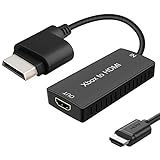
- 🎮 HD Link: Xbox 360 adapter Convert the native component signals from Xbox 360 to digital HDMI signals for modern HDTVs/monitors/projectors.
- 🎮Awesome Image: Provide the best signal processing with great precision, colors, resolution and details at this price.Xbox 360 converter is specifically designed to provide the sharpest video and sound for your Microsoft xBox 360 gaming system.
- 🎮HD Ready: maximum possible video quality from our HDMI converter cable. Xbox 360 and Xbox360 Slim games that are native 720p will run in their respective resolutions.
- 🎮Compatible with: Xbox 360 and XBOX 360 Slim.
- 🎮High Definition Connection; Plug and play; Won't affect the sound and video quality!
- A port explicitly labeled HDMI IN or documentation identifying it as an input.
- Working drivers or manufacturer software.
- A source-selection control.
- Support for the Xbox 360’s selected resolution and refresh rate.
Search the exact model’s manual for “HDMI input,” “video input,” or “external source.” Ordinary laptop HDMI ports are almost always outputs, and even a genuine HDMI-in system may add latency or fail to expose the signal as a standard capture source.
Troubleshooting a black screen, no signal, or missing audio
Check the signal direction
- Xbox 360 goes to the capture card’s HDMI IN, not HDMI OUT.
- The computer connects by USB or PCIe; do not connect the console to the computer’s normal HDMI output.
- For direct play, connect the console to the display’s input.
Check resolution compatibility
Older displays and capture cards may accept 720p or 1080i but reject 1080p. If passthrough is blank, connect the Xbox 360 to a known-compatible television, change its display setting, and try 720p or 1080i. Elgato documents this resolution issue in its HD60 troubleshooting guidance (HD60 setup).
Check the cable and console output
An Xbox 360 without HDMI needs the correct component, composite, or VGA cable, and the capture device must support that input. Remove unnecessary adapters and splitters while testing.
Check software, drivers, and USB
- Select the capture card explicitly in the application.
- Install the manufacturer’s compatible driver.
- Use the required USB standard and a direct port rather than a poor-quality hub.
- Close other applications that may be claiming the device.
Check protected signals
Capture devices may refuse HDMI signals protected by HDCP. Do not attempt to bypass copy protection. For ordinary gameplay, concentrate first on ports, resolution, cable choice, drivers, and source selection.
Check audio separately
- Confirm that HDMI audio is enabled and that the capture source is not muted.
- With VGA or some component setups, connect separate analog audio.
- Verify the application’s selected audio device and system volume.
- Remember that video can work even when the audio path is incomplete.
Can an Xbox 360 share media with a PC over the network?
Historically, yes—but this is not game display or game streaming. Microsoft’s Xbox 360 guide describes accessing music and pictures shared by a Windows PC on the same home network (Xbox 360 guide). It does not turn the PC into a live Xbox monitor, provide normal Xbox 360 remote play, or run Xbox 360 games natively in Windows.
The Tool Desk
Outbyte Driver Updater FREEFix the driver behind crashes, sound loss and screen glitchesFind Drivers →Outbyte PC Repair FREERepair Windows errors before they cause bigger problemsFix Now →Best Value
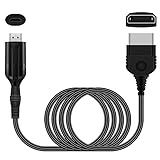
- The HD Link Cable for Xbox Convert Original Xbox signal to HDMI signal, the game console is connected to a new HDMI TV.
- HDMI signals to 1080p (60HZ)/720p(60hz) output(with the switch buttom)
- The Original Xbox to HDMI converter powers via a USB cable. (the package has not the power adapter)
- Don't need to install a driver,do not need a hdmi/x box cable, convenient and flexible, plug and play.
- if you have any question,please contact us at first . thank you
Does the PC control the Xbox 360?
A capture card normally sends video and audio to the PC; it does not send keyboard or mouse commands back to the console. Use an Xbox 360 wired controller or a compatible Xbox 360 wireless controller and receiver. Do not assume that a generic PC controller will control the game through the capture connection.
Should you use an HDMI splitter?
A splitter can duplicate the Xbox signal to a TV and capture card:
Xbox 360 HDMI OUT → splitter → TV/monitor and capture card → PC
It is unnecessary when the capture card has passthrough and can introduce resolution-negotiation problems or another failure point. It is not a universal fix for a black screen.
Quick Recap
Which connection should you choose?
| Goal | Best option |
|---|---|
| Play with minimum delay | Direct monitor or TV connection |
| Use a laptop screen | External USB capture card |
| Record gameplay | USB or PCIe capture card |
| Stream gameplay | Capture card plus OBS or equivalent |
| Console lacks HDMI | Compatible VGA, component, or composite display/capture input |
| Already own a computer with HDMI-in | Manufacturer’s input software, after verifying the exact model |
| Share music or pictures | Xbox 360 network media sharing |
Buying checklist
- Confirm the device has a genuine HDMI input, not only an output.
- Verify support for the Xbox 360 format you will use: 480p, 576p, 720p, 1080i, or 1080p.
- Prefer passthrough when you need responsive gameplay.
- Check current Windows drivers, software support, USB requirements, and audio handling.
- For used hardware, verify included cables, operating-system compatibility, and manufacturer support.
- If considering discontinued hardware such as the HD60 X, treat availability and the displayed price as uncertain rather than as a current recommendation.
Product prices and availability are accurate as of the date/time indicated and are subject to change. Any price and availability information displayed on Amazon at the time of purchase will apply.




