Choose the RX 480 8GB when the price gap is small. Its extra VRAM gives modern games more headroom at 1080p, but it does not make the GPU twice as fast or guarantee 144 frames per second. Choose a 4GB card when it is substantially cheaper and you mainly play older or lighter games with settings you are willing to tune. FreeSync can smooth variable frame rates; it cannot increase the frames the RX 480 renders.
What the 4GB and 8GB versions actually change
AMD sold the Radeon RX 480 with both 4GB and 8GB of graphics memory. The underlying GPU remains the same RX 480 family design; the 8GB model simply has more VRAM available for textures, render targets and other game data.
More VRAM helps prevent texture-quality reductions, streaming pauses or sudden stutter when a game exceeds a 4GB budget. It does not automatically raise the GPU’s shader performance. A Bit-tech comparison found its Sapphire Nitro+ 8GB card averaging about 5% faster than the tested 4GB comparison at 1080p and 1440p, but the 8GB card also used higher core and memory clocks. That result therefore cannot be treated as a 5% VRAM-only advantage.
Can an RX 480 deliver 144Hz at 1080p?
A 144Hz monitor can refresh up to 144 times per second, but the game, settings, CPU and exact board determine how many frames the RX 480 can render. Some older esports titles may approach or exceed 144 fps with competitive settings; demanding games may run well below it. Historical RX 480 reviews tested selected games and configurations, not every current workload, so no universal 144-fps claim is reliable.
Do these 3 things before closing this tab:
1Clear out junk files and repair common Windows errors2Fix the driver behind crashes, sound loss and screen glitches3Repair Windows errors before they cause bigger problems#1 Best Overall
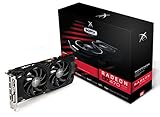
- Powerful Graphics Performance: Features the AMD Radeon RX 470 GPU with 4GB DDR5 memory, delivering smooth gaming experiences and excellent performance for modern titles at 1080p resolution with high graphics settings
- Enhanced Clock Speed: Operates at an impressive 1226MHz core clock speed, providing fast rendering capabilities and responsive gameplay for demanding applications and graphics-intensive tasks
- Triple X Cooling: Equipped with XFX's signature Triple X cooling system featuring a red fan design that efficiently dissipates heat while maintaining optimal operating temperatures during extended gaming sessions
- High-Speed Memory: Utilizes DDR5 video memory technology with 4GB capacity, ensuring rapid data transfer rates and seamless texture loading for enhanced visual quality and reduced stuttering
- Multiple Display Support: Supports multiple monitor configurations allowing you to expand your workspace or create immersive multi-screen gaming setups with ease
FreeSync changes how those frames are displayed. Within the monitor’s supported variable-refresh range, it adjusts refresh timing to the GPU’s output, reducing tearing and uneven pacing. AMD also describes Low Framerate Compensation for supported displays: when output falls below the monitor’s minimum range, refreshes can repeat frames to remain inside the usable range. Neither feature creates additional frames.
4GB versus 8GB: practical trade-offs
| Factor | RX 480 4GB | RX 480 8GB |
|---|---|---|
| VRAM capacity | 4GB | 8GB |
| GPU identity | RX 480 | RX 480 |
| Best fit | Lower-cost builds, older or lighter games, tuned settings | Texture-heavy games and greater 1080p headroom |
| Expected speed difference from capacity alone | Not established | Not established |
| Historical AMD launch suggested price (2016) | $199 | $239 |
| Current price, stock and condition | Not established; most listings are dependent on the used market | |
The 2016 prices are launch figures, not sensible targets for a used card today. Compare the actual listing price, condition, return policy and warranty instead.
Rank #2

- AMD Radeon RX 550 Chipset, Silver plated PCB & all solid capacitors provide lower temperature, higher efficiency & stability
- 9CM unique fan provide low noise and huge airflow for your GPU
- GPU Boost Clock / Memory Speed : up to 1183 MHz / 4GB GDDR5 / 6000 MHz Memory, Stream Processors 512, Perfect for 3D CAD/CAM working, video and photo editing, Video Games @1080p
- Support: DirectX 12, Shader Model 5.0, OpenGL 4.6/4.5, 4K Video Decode
Which one should you buy?
Pick the 8GB model when
- The two cards are in similar condition and the price difference is modest.
- You want higher texture settings or expect to keep the card through newer, more memory-demanding games.
- You would rather avoid troubleshooting texture-quality limits or VRAM-related stutter.
Pick the 4GB model when
- It is substantially cheaper after accounting for shipping and seller risk.
- You primarily play older games, esports titles or indie games.
- You are comfortable lowering texture quality, shadows or other settings when a game exceeds the available VRAM.
When neither is a good 144Hz solution
If your goal is a consistent 144 fps in demanding modern games at high settings, the RX 480 itself—not just its memory capacity—is the limiting factor. A faster GPU is the appropriate upgrade; moving from 4GB to 8GB does not transform the RX 480 into a 144-fps card.
Check the exact board before buying
“RX 480” does not identify one universal physical card. Board partners changed coolers, dimensions, power connectors and video outputs. MSI’s GAMING 4G and 8G listings, for example, show different output arrangements; one example has two DisplayPort, two HDMI and DVI-D, while another lists a different combination. Verify the precise model number and photographs.
Recommended Free Tools
Rank #3

- Chipset: AMD RX 7600
- Memory: 8GB GDDR6
- XFX SWFT Dual Fan Cooling Solution
- Boost Clock: Up to 2655 MHz
- Confirm the monitor input and the card’s available HDMI or DisplayPort connector.
- Check the monitor’s maximum refresh rate and FreeSync range on that input.
- Check the required PCIe power connector, case clearance and your power supply.
- For used hardware, inspect fan noise, visible damage, seller feedback, return terms and warranty.
AMD’s RX 480 launch materials cite HDMI 2.0b and DisplayPort 1.3/1.4 capabilities, but those capabilities do not mean every partner board exposes the same connectors.
Independent reader supportYour contribution helps us test, update, and keep practical guides available for everyone.How to set up 1080p FreeSync at 144Hz
- Connect the monitor to a port supported by both the card and the monitor for 1080p at 144Hz. DisplayPort is common, but HDMI can work when the specific devices support the required mode.
- Open the monitor’s on-screen menu and enable its FreeSync or adaptive-sync option.
- Install the appropriate AMD Software driver for the RX 480.
- In AMD Software, open the Gaming or Display controls and enable AMD FreeSync.
- In Windows display settings or your operating system’s display panel, select 1920×1080 and 144Hz.
- Test a game and check whether its frame rate stays within the monitor’s FreeSync range. If it regularly exceeds 144 fps, use an in-game frame cap near the display limit to avoid running beyond the synchronization ceiling.
The exact menu names can vary by AMD Software release and monitor firmware. FreeSync only operates when the chosen input, cable mode and monitor range all support it.
Quick Recap
Rank #4

- Performance redefined
- Features for a truly immersive experience
- Bus Type: PCI Express 3.0 x16
A simple comparison checklist for two listings
- Calculate the complete price difference, including delivery and any return costs.
- Compare the exact manufacturer and model, not only the VRAM label.
- Check independent game results for your own titles and settings; do not use the historical 5% figure as a capacity-only rule.
- Verify outputs, refresh support and the monitor’s FreeSync range.
- Confirm power requirements, physical dimensions and included accessories.
- Prefer the card with the better condition, seller protection and warranty when prices are close.
Product prices and availability are accurate as of the date/time indicated and are subject to change. Any price and availability information displayed on Amazon at the time of purchase will apply.




