There is no single GPU that the Ryzen 7 5800X3D bottlenecks. The practical question is whether the CPU can feed a particular graphics card fast enough for your game, settings, resolution, and frame-rate target. It remains a strong match for high-end 1440p and 4K gaming; CPU limits are most likely with powerful GPUs at 1080p, high refresh rates, and in CPU-heavy games.
What does “bottleneck” mean?
A bottleneck is a limit in a particular workload, not a fixed percentage attached to a CPU-and-GPU pairing. A system can be GPU-limited in one game or setting and CPU-limited in another.
- GPU-limited: The graphics card is doing most of the work. Lowering resolution or graphics settings usually raises FPS substantially.
- CPU-limited: The game cannot prepare frames quickly enough, often because a main thread or a small number of CPU threads is limiting performance. Lowering resolution may do little to increase FPS.
- Mixed: The limiting part changes between scenes, or both components are heavily loaded.
- Limited by a cap or synchronization: V-sync, an in-game frame limiter, a driver cap, or the display refresh limit can hold back FPS and lower GPU utilization even when neither component is too slow.
A calculator’s “bottleneck percentage” cannot describe all these cases. Unless a figure identifies the game, scene, resolution, settings, upscaling and frame-generation state, and whether it refers to average FPS or 1% lows, it is not a dependable prediction for your system. For example, a calculator-style estimate for this pairing is shown at PC Bottleneck Calculator; a result from it should not be treated as a universal benchmark.
Why the 5800X3D is still a capable gaming CPU
AMD lists the Ryzen 7 5800X3D with 8 cores, 16 threads, a boost clock up to 4.5 GHz, 100 MB total cache, PCIe 4.0 support, and a 105 W TDP in its Ryzen 5000-series specifications. Its Zen 3 architecture and 3D V-Cache help in many games that are sensitive to game-state data, asset access, simulation, or draw-call workloads.
The Tool Desk
Outbyte PC Repair FREERepair Windows errors before they cause bigger problemsFix Now →Outbyte Driver Updater FREEScan for outdated or missing drivers - takes under a minuteDriver Scan →#1 Best Overall

- The Geforce 210 is with a 589MHz core clock,up to 1066Mbps effective,perfect for working,video and photo editing,allows good fluency,which can effectively meet your needs.
- PCI Express 2.0 interface,offers compatibility with a range of systems. Also includes VGA and HDMI outputs for expanded connectivity,supports up to 2 monitors.Good for adding a simple low profile gpu to a small form factor pc.
- The computer graphics cards is small in size and saves more space,easy to install,plug and play,you can build a compact PC system easily for slim/ITX chassis.
- This low profile video card is good value option for entry level, if you just want basic upgrade graphics and daily simple work for your computer, or not be AAA gamer.(include low profile bracket)
- No external power supply and the all-solid-state capacitor keeps low power consumption and high performance,supports Windows 10/8/7/Vista/XP(not compatible with windows 11).
That cache does not make the processor equivalent to newer CPU generations. Newer architectures and higher clocks can improve performance where a game depends heavily on CPU throughput. Very high FPS targets, background processes, poor frame pacing, or a misconfigured memory profile can also affect results. The 5800X3D is capable, but its performance depends on the workload.
How the pairing changes with resolution and GPU class
These are practical expectations, not guaranteed benchmark outcomes. The game, graphics settings, frame cap, memory configuration, drivers, and use of upscaling or frame generation all matter.
| GPU class | 1080p | 1440p | 4K |
|---|---|---|---|
| Entry-level or mainstream | Usually GPU-limited | GPU-limited | GPU-limited |
| Upper-midrange | May become CPU-limited at high FPS | Usually balanced | GPU-limited |
| High-end, such as RX 9070 XT or RX 7900 XTX | CPU limits are possible in high-FPS games | Generally a good pairing, with game-dependent limits | Usually GPU-limited |
| RTX 4090- or RTX 5090-class | CPU limits are common at high frame rates | CPU limits can appear in some games and targets | Usually GPU-limited at native resolution |
1080p: the greatest risk of a CPU limit
At 1080p, a fast GPU can render each frame quickly, leaving the CPU responsible for delivering frames at a very high rate. This makes CPU limits more likely with a flagship card, especially when targeting 240 Hz or higher. It does not mean every 1080p game will be CPU-limited: a demanding game at ultra settings or with ray tracing can still push the GPU to its limit.
CPU limits are more likely in games and settings that emphasize simulation, large numbers of players or NPCs, or high frame rates. Examples include Counter-Strike 2, Valorant, Rainbow Six Siege, Fortnite in performance modes, Microsoft Flight Simulator, large strategy games, MMO raids, and busy open-world scenes. Competitive presets can reduce graphics workload enough to expose the CPU even when the same game is GPU-limited at high visual settings.
What’s actually slowing this PC down?
Pick the symptom - the matching free tool is one click away.
1440p: a strong general-purpose match
For most 1440p gaming, the 5800X3D is a sensible partner for upper-midrange and high-end graphics cards, including the Radeon RX 9070 XT and RX 7900 XTX classes. Limits still depend on the game: CPU-heavy titles and very high frame-rate targets can expose the processor, while ray tracing or demanding image-quality settings shift more of the work to the GPU.
Rank #2
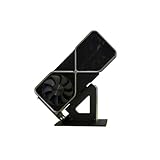
- Display your graphics cards as you would trophies using this display stand. This is a great way to show off your older graphics cards and give them an appreciation for their service. Great for shelving and display cases!
- Display your graphics cards as you would trophies using this display stand. This is a great way to show off your older graphics cards and give them an appreciation for their service. Great for shelving and display cases!
- You can watch the display of the last image in our picture description.
The display target matters. CPU limits become more visible as you aim beyond roughly 144–200 FPS, though the point varies by title and settings. A 240 Hz monitor makes CPU throughput more relevant than a 144 Hz target. Upscaling in a performance mode can also reduce GPU work and reveal a CPU limit.
Ultrawide 3440×1440: between 1440p and 4K
Ultrawide 3440×1440 places more rendering work on the GPU than standard 2560×1440. Treat it as a more demanding GPU workload, while remembering that high refresh rates and CPU-heavy games can still make the 5800X3D the limiting part.
4K: usually a GPU-bound experience
At native 4K, the graphics card typically has much more work to do per frame, so GPU performance usually matters more than CPU differences. In TechSpot’s 5800X3D CPU-and-GPU scaling test, CPU differences largely disappeared at native 4K with maximum settings within the tested range. With the slower RX 9070, the tested CPUs also leveled out because the GPU was the limit.
Recommended Free Tools
A 5800X3D can therefore remain adequate with a very powerful GPU for high-quality 4K gaming, even if it would hold that GPU back in some 1080p high-FPS scenarios. A CPU upgrade becomes more compelling if you prioritize exceptionally high frame rates, play CPU-heavy games, have poor 1% lows despite low GPU utilization, or use frame generation but need a stronger base frame rate.
How specific GPUs pair with the 5800X3D
Radeon RX 9070 XT
The RX 9070 XT is a strong 1440p option and can serve for 4K gaming depending on the game and settings. AMD’s product specifications list 16 GB of GDDR6, a 256-bit memory interface, up to 640 GB/s of memory bandwidth, and 304 W total board power; AMD also lists a 750 W recommended system power supply for reference specifications. These describe the card, not a guaranteed CPU limitation. The 5800X3D is generally a sensible match, with the main risk of underuse at 1080p high refresh rates or in CPU-heavy games.
Rank #3

- Robust 4GB Memory & Quad Display Ready: Equipped with 4GB of fast GDDR5 memory to smoothly handle daily graphics tasks. Features four built-in HDMI ports, enabling a seamless quad-monitor setup directly out of the box—perfect for multi-tasking offices, digital signage, or trading desks.
- Plug-and-Play Installation & Wide Compatibility: Utilizes a standard PCI Express interface for broad compatibility with most desktop PCs. Offers straightforward plug-and-play installation and stable driver support for modern Windows and Linux operating systems, ensuring a hassle-free setup.
- Quiet, Cool & Compact Design: Engineered with a silent fan and efficient cooling system for near-silent operation, making it ideal for noise-sensitive environments. Its low-profile design fits easily into small form factor cases, with both half-height and full-height brackets included for flexible installation.
- Enhanced Multimedia & Everyday Performance: Delivers smooth 1080P video playback and supports hardware-accelerated decoding, offering an excellent experience for home theater PCs (HTPC). Provides capable performance for everyday applications, multimedia tasks.
- Complete Package & Reliable Support: Includes the graphics card, both low-profile and standard brackets, a quick start guide, and screwdriver, which make it simple and quick setup process.
Radeon RX 7900 XTX
The RX 7900 XTX remains a plausible pairing for 1440p and 4K. It can be more GPU than a basic 1080p/60 setup needs, though it may make sense for high refresh, demanding settings, or a planned platform upgrade. Tom’s Hardware notes that 1080p is not the primary target for this class of card and recommends at least a 1440p display in its RX 7900 XTX review.
GeForce RTX 4090
An RTX 4090 will work with the 5800X3D and can be worthwhile, particularly for 4K gaming. At 1080p with a high frame-rate target, the processor can limit how much of the card’s performance a game can use. That is a workload-specific limit, not evidence that the combination is unusable.
GeForce RTX 5090
The RTX 5090 is an extreme example of why resolution and test conditions matter. In TechSpot’s four-game 1080p medium test, the 5800X3D was only a few percent behind newer CPUs, but it remained slower in CPU-sensitive situations and was notably behind at 1440p in the broader comparison. With an RX 9070, CPU differences largely disappeared as the GPU became the limit. Read those results in the context of the tested games and settings, rather than as a single universal percentage. NVIDIA’s RTX 5090 listing identifies the product.
An RTX 5090 and 5800X3D are not automatically a bad combination. It is a less compelling fit for competitive 1080p gaming when maximum FPS is the priority, but can make sense for 4K or if you plan to carry the GPU into a newer platform later. A newer CPU can improve performance in CPU-limited games and help minimum frame rates.
Settings and workloads that can change the limit
Upscaling
DLSS, FSR, XeSS, and in-game resolution scaling reduce the GPU’s rendering workload. In aggressive performance modes, the GPU may finish frames faster and expose a CPU limit. A native-4K result therefore does not directly predict performance when the game renders internally at a lower resolution.
Rank #4

- NVIDIA GT 730 graphics cards offer basic display capabilities for office work and light multimedia,which with 1000 MHz Memory Clock 4GB DDR3 on Kepler architecture, support multiple monitors and HD video playback,easily upgrading for convenient usage to save your budget for your old pc
- The low-profile design of the PC graphics card saves installation space, easy to install,plug &play,making it easy to build a compact computer system, even compatible with ITX chassis.
- The 4x outputs enables multi-monitor productivity on up to 4 monitors simultaneously,including 2x HDMI,VGA,DP.Designed for full-size chassis and small case installations.
- PCI Express based PC is required with one X8 lane graphics slot available on the motherboard. 300 Watt or greater power supply. This video card can automatically install new drivers and support Win11,DirectX 12.
- 30W low power,no external power supply and the all-solid-state capacitor keeps low power consumption and high performance.If you have any problems about this card,please contact us via amazon messages.
Frame generation
Frame generation can increase displayed FPS without proportionally increasing the game-simulation frames produced by the CPU. Keep base or rendered FPS distinct from generated displayed FPS: frame generation does not fix CPU-side simulation limits or guarantee responsive input. Frame pacing and input latency remain relevant alongside the displayed counter.
Ray tracing and competitive settings
Ray tracing often adds enough GPU work to make a game GPU-limited, particularly at higher resolutions. Lowering ray-tracing quality or using aggressive upscaling can shift the limit back toward the CPU. The same game can therefore be GPU-limited at ultra settings and CPU-limited on a low competitive preset.
Independent reader supportYour contribution helps us test, update, and keep practical guides available for everyone.How to find the limit in your own game
Use an overlay or capture tool to compare the same scene at the settings and resolution you actually play. Options include MSI Afterburner with RivaTuner Statistics Server, AMD Software: Adrenalin Edition, NVIDIA’s overlay, and CapFrameX for frame-time capture.
Track GPU utilization, power draw and clocks; per-core CPU utilization as well as total usage; average FPS and 1% lows; frame times; VRAM and system RAM use; and temperatures. Total CPU utilization alone can mislead: a game limited by one or two threads may show moderate overall usage. Likewise, low GPU utilization alone does not prove a CPU limit; a frame cap, menu, power constraint, or engine behavior may explain it.
- Record your baseline. In a repeatable game scene or benchmark pass, note average FPS, 1% lows, frame times, GPU load, clocks, power, and CPU activity. Record any frame cap or synchronization setting.
- Check for caps and synchronization. Temporarily disable or document V-sync, the game’s frame limiter, driver-level caps, and other FPS limits so they do not distort the comparison.
- Repeat at lower resolution or render scale. Keep the scene and other settings as consistent as possible. If FPS rises substantially as resolution falls, the system was likely GPU-limited. If GPU load falls but FPS barely changes, a CPU limit is more likely.
- Inspect individual CPU threads and frame times. A main-thread limit may be hidden by moderate total CPU usage. Check whether low 1% lows or spikes in frame time coincide with CPU, streaming, or background-process activity.
- Test without upscaling or frame generation first. Establish base rendering performance before using those features to interpret the limit; they change the workload and the relationship between displayed and rendered FPS.
- Rule out system issues. Check temperatures, clocks, power limits, memory configuration, background processes, and drivers before concluding the hardware pairing itself is the cause.
Should you upgrade the GPU or the platform?
Start with the games and display target that matter to you, not the relative prices of the CPU and GPU. A GPU upgrade is the more direct choice when the card is near full utilization and lowering resolution or graphics quality raises FPS significantly. It is also the likely priority if your goal is better ray tracing, VRAM capacity, or image quality at 1440p or 4K.
Free tools Windows power users keep installed
One-click scans. No signup required.
Consider a platform upgrade when the GPU is underused in the games you care about, your FPS target is unmet despite adequate GPU performance, or poor 1% lows persist alongside low GPU load. That case is stronger for CPU-heavy games and high-refresh 1080p or 1440p. If the GPU is already fully occupied at your target settings, a newer CPU may do little for average FPS until the GPU limit changes.
| Display and use | Practical priority |
|---|---|
| 1080p, 60–144 Hz | A midrange GPU is usually a more balanced choice than a flagship bought solely for this setup. |
| 1080p, 240 Hz | A high-end GPU may be appropriate, but expect CPU limits in esports and CPU-heavy games. |
| 1440p, 144–165 Hz | The 5800X3D is generally well matched to upper-midrange and high-end GPUs. |
| 1440p, 240 Hz | Depending on the game, a newer CPU may help more than moving from one high-end GPU to a faster one. |
| 4K, 60–144 Hz | Prioritize GPU performance, VRAM, ray tracing, and upscaling support; the 5800X3D is usually adequate. |
| Competitive games | Give extra weight to CPU frame-time consistency and 1% lows. |
| Single-player AAA games | GPU performance and image quality are generally the priorities. |
A GPU somewhat beyond the 5800X3D’s ideal 1080p match can still be a rational purchase if you plan to upgrade the platform later. It may leave performance unused in some games today, but can remain useful with a future CPU.
Quick Recap
Check the rest of the system before blaming the CPU
- Memory: Use dual-channel memory and enable its rated profile, such as DOCP or XMP where supported. An unsuitable memory setup can affect performance.
- BIOS and drivers: Confirm the motherboard BIOS supports the 5800X3D and keep chipset and graphics drivers current. A driver update can help resolve software issues, but will not remove a genuine CPU limit. Radeon owners can obtain drivers from AMD’s RX 9070 XT driver page.
- Cooling and clocks: If CPU clocks are unexpectedly low alongside low GPU use, check temperature, cooling, power behavior, and BIOS settings. Thermal constraint can resemble a weak CPU/GPU pairing.
- Installation and background load: Verify the GPU is in the primary full-length PCIe slot and close unnecessary background software before comparing results.
- PCIe generation: The 5800X3D supports PCIe 4.0. A PCIe 5.0 graphics card is backward-compatible and operates according to the platform’s available generation; PCIe 4.0 is not, by itself, a reason to reject current full-bandwidth x16 cards.
- Power and case fit: Check the exact graphics card’s power-supply, connector, and physical-clearance requirements against your system. For the RX 9070 XT, AMD lists a 750 W recommended system power supply for reference specifications; board-partner cards and the rest of the PC can affect what is appropriate.
Product prices and availability are accurate as of the date/time indicated and are subject to change. Any price and availability information displayed on Amazon at the time of purchase will apply.




