Crashes, No Sound, or Screen Glitches?
Random freezes, missing sound and display glitches usually trace back to one bad driver. Find and replace yours safely.Free scan · under a minuteWindows Errors? Fix Them Before They Spread
Repair common Windows errors and clear accumulated junk for a smoother, more stable PC - no reinstall needed.Free scan · no reinstallShort answer: ASUS and XREAL’s ROG XREAL R1 are wired AR display glasses that put a large private gaming screen in front of your eyes. They use 1,920 × 1,080 Sony Micro-OLED panels per eye, run at 120Hz natively or up to 240Hz with Frame Rate Boost, and connect to consoles through the included ROG Control Dock. The $849.99 product is most convincing for handheld-PC owners and travelers; it is not a standalone headset, a literal 171-inch television, or a way to make a 60Hz console output 240Hz.
ASUS announced U.S. preorders for May 15, 2026, and global shipping from June 1, 2026. The current ASUS listing and Best Buy listings show a $849.99 price for both narrow- and broad-IPD versions.
What the ROG XREAL R1 actually is
The ROG XREAL R1 Gaming AR Glasses are a co-branded ASUS ROG/XREAL product. They are display glasses, not a self-contained VR headset: games still run on a PC, handheld, phone or console, while the glasses act as the wired display.
Native 3DoF features provide two viewing behaviors. Anchor Mode keeps the virtual screen positioned in space, while Follow Mode lets it move with your head. An Instant 3D mode can give ordinary 2D content a 3D-style effect, but it does not turn every game into native stereoscopic 3D.
What’s actually slowing this PC down?
Pick the symptom - the matching free tool is one click away.
#1 Best Overall

- Immersive Display Experience: Up to a 100-inch display with 1,100 nits brightness and 95% DCI-P3 color gamut for vivid, lifelike details.
- Productivity on the Go: Multi-screen work anywhere with Type-C notebook compatibility in a versatile, lightweight design.
- Enhanced Gaming Integration: Seamlessly integrate with ROG Ally for superior visuals and gaming performance.
- Versatile Functionality: The AirVision App supports multi-screen setups, screen distance adjustment, and pupil distance customization.
- Versatile and Lightweight Design: Weighing just 87g with built-in speakers, noise-canceling mic, and high transparency for safety.
Product details and compatibility are listed by ASUS at the official R1 product page.
How a 171-inch screen fits inside glasses
The glasses contain two small Micro-OLED panels. Their optics magnify those panels so the image occupies a wide viewing angle. ASUS describes that experience as equivalent to viewing a screen up to 171 inches from four meters away, with a 57-degree field of view covering approximately 95% of the focused viewing area.
That is a perspective comparison, not a physical 171-inch panel. Resolution remains 1,920 × 1,080 per eye, with a rated 40 pixels per degree. The R1 therefore offers an immersive, private viewing angle rather than the pixel density of a 171-inch 4K television or a 4K desktop monitor.
What “240Hz” means in practice
The Sony Micro-OLED panels support a native 120Hz mode and up to 240Hz when Frame Rate Boost is enabled. ASUS also specifies a 0.01ms panel response time, approximately 3ms motion-to-photon latency, up to 700 nits brightness and 106% sRGB coverage. These are different measurements: response time describes panel pixel transition, motion-to-photon latency describes the delay from movement or input to a visible update, and neither guarantees that a game is rendering 240 frames per second.
Quick wins for a faster PC:
Repair Windows errors before they cause bigger problemsFix Now →Scan for outdated or missing drivers - takes under a minuteDriver Scan →Clear out junk files and repair common Windows errorsFree Scan →The source device, game, cable path and dock all have to support the desired signal. A 60Hz console or a game running at 60fps remains a 60Hz/60fps experience. ASUS specifically notes that Nintendo Switch systems are capped at 60Hz. The company also warns that 240Hz processing can slightly reduce text clarity, so 120Hz may be preferable for reading or desktop work.
Rank #2

- Gunnar produces the only Blue light blocking computer and gaming glasses with patented lens (#9417460) technology that is recommended by Doctors to protect and enhance your vision. Gunnar improves performance while viewing tablets, smartphones, TV & computers to reduce digital eye strain, fatigue and headaches.
- Unlike other blue light blocking glasses, GUNNAR developed the blue light protection factor, telling you exactly how much of the peak Blue light spectrum (450nm) We're blocking. Not all Blue light glasses in the market protects you from the strongest high-energy visible light.
- The preferred gaming glass for men and women, GUNNAR protects against symptoms stemming from prolonged screen-staring including migraines, headaches, dry eyes, blurry vision, negative effects of blue light exposure, cataracts and macular degeneration.
- Specs: lens width: 54 mm | nose: 16 mm | frame width: 136 mm | Temple: 135 mm | Weight: 22 grams. Gunnar produces ergonomically designed gaming Eyewear with a lightweight frame to give you a full day of comfortable screen viewing.
- Gunnar gaming glasses enhance performance and provide a competitive edge. Play better with styles designed for panoramic viewing and audio headset compatibility.
See ASUS’s detailed specifications at the R1 specification page.
Console and handheld connections
The included ROG Control Dock is central to console use. It provides two HDMI 2.0 inputs, one DisplayPort 1.4 input and a USB-C display output for the glasses, plus power and data connections. It supports HDR10, input switching, GamePlus and GameVisual functions, and ASUS DisplayWidget Center software.
| Device | Connection | What to expect |
|---|---|---|
| ROG Ally or compatible handheld PC | Direct USB-C with DisplayPort Alt Mode | Most convenient setup; output resolution, power and refresh still depend on the handheld. |
| Gaming PC | DisplayPort or HDMI through the Control Dock | The GPU, game and selected output mode determine whether high refresh is possible. |
| PlayStation 5 | Console HDMI to a dock HDMI input, then USB-C to the glasses | Compatible, but console and game output limits apply; the dock requires power. |
| Xbox | Console HDMI to a dock HDMI input, then USB-C to the glasses | Compatible through the same dock-based chain; do not assume 240Hz in every title. |
| Nintendo Switch or Switch 2 | Switch dock HDMI to the Control Dock, with external power | Useful as a large private screen, but generally limited to the source’s 60Hz output. |
A USB-C socket that only handles charging and data will not produce an image. The host must provide DisplayPort Alt Mode or Thunderbolt 4; otherwise use the Control Dock’s HDMI or DisplayPort inputs. ASUS’s connection guidance is at its USB-C display FAQ.
Free tools Windows power users keep installed
One-click scans. No signup required.
Console audio caveat
ASUS notes that PlayStation, Xbox and other HDMI sources may require switching to DP audio for normal sound output. If video appears but audio does not, check the console’s audio-output setting and the dock’s connection before assuming the glasses are defective. Further guidance is available in ASUS’s console audio and Switch FAQ.
Key specifications and features
| Feature | R1 specification |
|---|---|
| Panel | Sony Micro-OLED |
| Resolution | 1,920 × 1,080 per eye |
| Refresh rate | 120Hz native; up to 240Hz with Frame Rate Boost |
| Response and latency | 0.01ms panel response; approximately 3ms motion-to-photon latency |
| Brightness and color | Up to 700 nits; 106% sRGB claim |
| Field of view and density | 57 degrees; 40 pixels per degree |
| Spatial features | Anchor Mode, Follow Mode and Instant 3D |
| Dimming | Three electrochromic tint levels; automatic transparency in Anchor Mode |
| Audio | Sound by Bose directional speakers and built-in microphone |
| Weight | Approximately 90–91 grams |
| IPD versions | Narrow 57–66mm; broad 66–75mm |
| Dock inputs | Two HDMI 2.0 and one DisplayPort 1.4 |
Fit, comfort and prescription lenses
Choose the IPD version from a measurement, not from face shape alone. The narrow model covers 57–66mm and the broad model 66–75mm. An incorrect range can leave the image soft or misaligned and may cause eye strain.
Rank #3
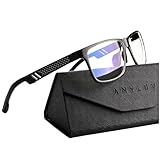
- Overal Blue Block Rate: 45% - ANYLUV blue light glasses protects your eyes by filtering out most of harmful high energy blue light rays while letting through the less harmful portion of the blue light spectrum
- Low Color Distortion Lens- Unlike other bluelight glasses mens on the market with heavily tinted lens. ANYLUV's low color distortion lens is optimised to provides the perfect balance between eye protection and viewing quality
- Improved Performance and Productivity- Extended exposure to blue light rays may cause fatigue and stress. Filtering out the high energy blue light allows you to focus on your game or task at hand
- Protect Your Eyes- High energy blue Light emitted by electronic devices (such as computers, TV, smartphones) have shown to increase the risk of sight conditions from sore dry eyes to macular degeneration. This computer glasses maintain healthy eyes by reducing exposure to high energy blue light
- Brand Customer Service & Gift Package - This type of blue ray glasses come with an exquisite triangular folding box, which will be a great gift for your family and friends! ANYLUV attaches great importance to product quality and customer satisfaction.Each ANYLUV customer can enjoy after-sale brand service for our blue screen glasses.
Adjustable nose pads and three temple-angle positions help with alignment. Three electrochromic tint levels control how much of the outside world is visible, while Anchor Mode can switch to automatic transparency. At roughly 90–91 grams, the R1 is far lighter than a conventional VR headset but substantially heavier than ordinary glasses, so long-session comfort will depend on fit and nose pressure.
The box includes a detachable prescription-lens frame, not prescription lenses. Anyone who needs correction must arrange custom lenses with an optician or specialty lens provider.
Audio and privacy
The built-in speakers are marketed as Sound by Bose and use directional audio and phase-cancellation technology intended to reduce leakage. That does not make them active-noise-cancelling headphones or fully private in a quiet room. Use headphones when sound privacy matters.
What comes in the box
- ROG XREAL R1 glasses
- ROG Control Dock
- Carrying case
- USB-C cable
- Two USB-A-to-USB-C cables
- Detachable prescription-lens frame
- Additional nose pads
- Cleaning cloth
- Warranty card and quick-start guide
ASUS lists the included glasses cable as fixed at 1.2 meters, which can affect seating and cable management when the dock or a console is several feet away.
Independent reader supportYour contribution helps us test, update, and keep practical guides available for everyone.Software and setup
On supported computers, ASUS uses DisplayWidget Center for display adjustments. Armoury Crate is not the control path for the glasses. The dock also provides hardware controls such as source switching and GamePlus/GameVisual functions.
Rank #4

- BLUE LIGHT BLOCKING: Our blue light glasses for men and women boast UV400 protection, blocking harmful blue rays from electronic screens.
- DESIGNED FOR COMPUTER WORK: Prolonged blue light exposure from computers, phones, TV, and tablets can cause eye strain, but with our stylish blue light glasses, you can work online worry-free.
- COMFORT MEETS DURABILITY: Made with high-quality material, these glasses combine durability with all-day comfort for extended wear.
- LIGHTWEIGHT: Featuring a lightweight frame and polycarbonate HD lenses, these clear blue light glasses provide anti-reflective properties while preserving true colors.
- BETTER SLEEP & COSTUME READY: Wearing blue light glasses while scrolling on your phone at night can help encourage melatonin production, supporting your sleep schedule. Their stylish clear-frame design also makes them a great accessory for costumes.
- Measure your interpupillary distance and select the narrow or broad R1 version.
- For a handheld PC, connect the glasses to a USB-C port that explicitly supports DisplayPort Alt Mode, then supply power as the device requires.
- For a console, connect the console to an HDMI input on the powered Control Dock and connect the dock’s USB-C display output to the glasses.
- Select the source and confirm video, audio and refresh settings on the host device.
- Use 120Hz first for general use; enable Frame Rate Boost only when the source and game can benefit from it.
Price and value
ASUS lists a U.S. MSRP and current support-store price of $849.99. Best Buy lists the same price for the narrow-IPD and broad-IPD versions. The U.S. preorder announcement was dated May 15, 2026, with shipping announced for June 1, 2026; availability can vary by region.
At that price, the R1 is not the cheapest way to obtain a large gaming image. A conventional monitor or television is generally better for desk use, shared viewing, text-heavy work and long sessions. The R1’s premium pays for a private, head-mounted display that can travel with you and, with the dock, switch among several sources.
Compare the current listing at ASUS support/store, or check the two IPD options at Best Buy’s narrow-IPD page and broad-IPD page.
Who should buy the R1?
Strong fit
- ROG Ally and other handheld-PC owners with USB-C DisplayPort output.
- Travelers who want a private screen without carrying a monitor or television.
- PC players who can actually render high frame rates at the glasses’ output resolution.
- Gamers with multiple HDMI or DisplayPort sources who will use the dock’s switching.
- Buyers whose measured IPD falls clearly within 57–75mm and who accept wearing heavier-than-normal glasses.
Poor fit
- Console owners buying primarily for 240Hz gaming.
- People expecting a literal 171-inch physical display or 4K image.
- Anyone needing crisp, dense text for a primary productivity monitor.
- Users without a DP Alt Mode/Thunderbolt host and unwilling to use the powered dock.
- People who want a standalone headset that runs games without another device.
- Buyers seeking the lowest cost per inch for stationary couch or desk gaming.
Verdict
The ROG XREAL R1 is an unusually fast and gaming-focused pair of display glasses. Its strongest case is a handheld-PC or travel setup where a private, immersive screen matters more than 4K sharpness. The Control Dock broadens compatibility to PS5, Xbox, Switch and multiple PC sources, but it also adds cables, power requirements and setup complexity.
Buy it for the viewing experience, portability and potential high-refresh PC play—not for the headline numbers alone. Confirm your IPD, verify the host’s video output, and treat 171 inches and 240Hz as qualified capabilities rather than guarantees.
Quick Recap
Product prices and availability are accurate as of the date/time indicated and are subject to change. Any price and availability information displayed on Amazon at the time of purchase will apply.




