No—not as a directly connected Xbox headset. Logitech does not list the G733 as compatible with Xbox One or Xbox Series X|S, and it provides no supported Xbox setup. The G733 uses a LIGHTSPEED USB receiver; its USB-C port is for charging, not a documented wired audio connection. Logitech’s G733 specifications describe its connection and charging features.
G733 compatibility at a glance
| Device or use | What to expect |
|---|---|
| Xbox Series X | Not officially supported as a directly connected headset. |
| Xbox Series S | Not officially supported as a directly connected headset. |
| Xbox One | Not officially supported as a directly connected headset. |
| Windows PC or Mac | Designed for USB LIGHTSPEED use; the computer must recognize the receiver and route audio to it. |
| PlayStation | Logitech’s G733 product materials list PlayStation compatibility. Check the exact console and product listing for supported features. |
| Xbox Cloud Gaming on a PC | Can work as a PC headset when the computer recognizes it and the game or app uses it for audio and microphone. This is not a connection to the Xbox console. |
For the Xbox consoles, the careful distinction is “not officially supported,” rather than a claim that no third-party workaround could ever produce any sound. Logitech’s published G733 specifications do not provide a supported Xbox connection path.
Why plugging in the USB receiver is not enough
The G733 uses Logitech LIGHTSPEED wireless through its USB-A receiver. A USB connector describes the plug; it does not guarantee that the Xbox supports the receiver as a headset for game audio and microphone chat. The console would need to support the device and its audio protocol, and the receiver and headset would still need to connect successfully.
Those are separate stages: a console port may power a USB device, Xbox may or may not recognize it as a usable audio peripheral, and the receiver must communicate with the headset. Seeing a light on the receiver—or simply being able to insert it—does not establish headset compatibility.
Do these 3 things before closing this tab:
1Scan for outdated or missing drivers - takes under a minute2Repair Windows errors before they cause bigger problems3Fix the driver behind crashes, sound loss and screen glitches#1 Best Overall

- Personalize your Logitech wireless gaming headset lighting with 16.8M vibrant colors. Enjoy front-facing, dual-zone Lightsync RGB with preset animations—or create your own using G HUB software.
- Total freedom - 20 meter range and Lightspeed wireless audio transmission. Keep playing for up to 29 hours. Play in stereo on PS4. Note: Change earbud tips for optimal sound quality. Uses: Gaming, Personal, Streaming, gaming headphones wireless.
- Hear every audio cue with breathtaking clarity and get immersed in your game. PRO-G drivers in this wireless gaming headset with mic reduces distortion and delivers precise, consistent, and rich sound quality.
- Advanced Blue VO CE mic filters make your voice sound richer, cleaner, and more professional. Perfect for use with a wireless headset on PC and other devices—customize your audio with G HUB.
- Enjoy all-day comfort with a colorful, reversible suspension headband designed for long play sessions. This wireless gaming headset is built for gamers on PC, PS5, PS4, and Nintendo Switch.
Do USB-C, Bluetooth, or the controller offer another route?
USB-C cable
Logitech documents the G733’s USB-C port as its charging connection. It does not document a wired audio mode through that port, so connecting a USB-C cable to the Xbox should not be treated as a way to get headset sound or chat.
Bluetooth
The G733 is specified as a LIGHTSPEED wireless headset, not a Bluetooth headset. A separate Bluetooth transmitter would not make the G733 a supported Xbox headset, and microphone and chat behavior would not be assured.
Xbox controller
The G733 has no documented 3.5-mm analog headset input. It therefore has no ordinary cable route to the controller’s headset jack.
Rank #2

- Total freedom with up to 20 m wireless range and LIGHTSPEED wireless audio transmission. Keep playing for up to 29 hours of battery life.1 Play in stereo on PlayStation(R) 4..2
- Personalize your headset lighting across the full spectrum, ~16.8M colors. Play in colors with front-facing, dual-zone LIGHTSYNC RGB lighting and choose from preset animations or create your own with G HUB software.3
- Colorful, reversible suspension headbands are designed for comfort during long play sessions.
- Advanced mic filters that make your voice sound richer, cleaner, and more professional. Customize with G HUB and find your sound.
- Hear every audio cue with breathtaking clarity and get immerse in your game. PRO-G drivers are designed to significantly reduce distortion and reproduce precise, consistent, rich sound quality.
Xbox Wireless Adapter for Windows
This adapter is for compatible Xbox Wireless devices on Windows; it is not a converter that turns the G733’s LIGHTSPEED receiver into an Xbox accessory.
What to expect if you try the receiver anyway
Because this is not a supported setup, exact behavior can vary with console firmware and connected equipment. Likely outcomes include no headset audio, no microphone option, or the Xbox continuing to send sound to the TV, HDMI device, or another connected headset. The receiver may receive power without becoming a usable audio device.
If you already own the G733, first check that the headset and receiver work on a PC or Mac: connect the receiver, turn on the headset, and test playback and microphone. That can help identify a headset or receiver issue, but it does not change Xbox compatibility. Avoid treating the USB-C charging cable as an audio test.
Rank #3
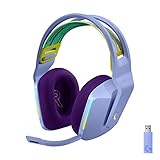
- Total freedom with up to 20 m wireless range and LIGHTSPEED wireless audio transmission. Keep playing for up to 29 hours of battery life.1 Play in stereo on PlayStation(R) 4..2
- Personalize your headset lighting across the full spectrum, ~16.8M colors. Play in colors with front-facing, dual-zone LIGHTSYNC RGB lighting and choose from preset animations or create your own with G HUB software.3
- Colorful, reversible suspension headbands are designed for comfort during long play sessions.
- Advanced mic filters that make your voice sound richer, cleaner, and more professional. Customize with G HUB and find your sound.
- Hear every audio cue with breathtaking clarity and get immerse in your game. PRO-G drivers are designed to significantly reduce distortion and reproduce precise, consistent, rich sound quality.
Using the G733 for Xbox games on a computer
Xbox console compatibility and Xbox gaming on a computer are different. For Xbox Cloud Gaming in a supported PC setup, or Xbox Remote Play through a computer, the computer handles the headset connection. Connect the G733 receiver to the computer, select the G733 for Windows input and output, then check that the game or Xbox app is using those devices. The headset is not receiving audio directly from the Xbox console in this arrangement.
Independent reader supportYour contribution helps us test, update, and keep practical guides available for everyone.What to choose if you need Xbox audio and chat
Keep the G733 for PC and use a separate Xbox headset
This is the straightforward choice if you already own the G733 and also play on an Xbox console. It preserves the G733 for compatible computer use, but means using a second headset or audio solution for Xbox.
Free tools Windows power users keep installed
One-click scans. No signup required.
Choose a headset explicitly listed for your Xbox
Check the exact model and platform version before buying: similar names can refer to different console variants. Confirm Xbox One or Xbox Series X|S compatibility, microphone support, game/chat mixing, and whether the transmitter must be switched to an Xbox mode. Microsoft’s Xbox gaming-headsets page is a useful starting point for platform-specific options.
Rank #4

- Lightweight Design: Weighing in at only 8.5 oz (240 g), G335 is smaller and lighter than the G733, features a suspension headband to help distribute weight and is adjustable for a customized fit.
- All-day Comfort: Soft memory foam ear pads and sports mesh material are comfortable for extended use so you can take your gaming to the next level in style and comfort.
- Plug and Play: Quickly jump into your game and simply connect with the 3.5 mm audio jack; these colorful headphones are compatible with PC, laptop, gaming consoles, and select mobile devices.
- Headset Controls: The volume roller is located directly on the ear cup to quickly turn up your game or music, while the mic can be easily flipped up to mute and move it out of the way.
- Impressive Sound: With 40 mm neodymium drivers, the G335 computer gaming headset delivers crisp, clear stereo sound that makes your game come alive.
Consider Logitech and ASTRO options
These Logitech G U.S. prices were observed on August 18, 2026; prices, stock, and configurations can change. Compare the exact model’s current listing and connection requirements before purchase.
| Model | Xbox and platform details | U.S. price observed Aug. 18, 2026 | Best fit |
|---|---|---|---|
| ASTRO A20 Gen 2 Xbox configuration | Xbox-specific versions use a transmitter. Logitech’s setup for the Xbox configuration says to connect the transmitter to USB-A, switch it to Xbox mode until its LED is green, power on the headset, and follow the Xbox USB headset setup instructions. Confirm the generation and platform variant before buying. A20 Gen 2 Xbox support; Xbox Series X|S setup. | Not established on the cited official support pages. | A simpler Xbox-oriented wireless setup, provided the exact Xbox model is available. |
| ASTRO A50 Gen 5 | Positioned for Xbox, PlayStation, PC, Nintendo Switch, and other platforms; PLAYSYNC Audio supports switching among three systems. See Logitech G’s A50 Gen 5 listing for current platform and setup details. | $299.99 | Someone seeking one headset for multiple platforms and willing to pay more for switching features. |
| ASTRO A50 X | Supports Xbox and other listed platforms. Logitech describes HDMI 2.1 as part of its full Xbox Series X|S passthrough experience; do not assume that setup is required for every possible audio use. See Logitech G’s A50 X listing. | $399.99 | High-end multi-console use, including the base-station and cabling setup. |
Logitech’s G733 specification page describes the headset’s supported connection; Logitech’s G733 FAQs provide additional product support. The G733’s RGB and voice-customization features use Logitech G HUB on compatible computers; software does not add a console connection the headset and Xbox do not support. Logitech also warns on the specification page that its older Firmware Update Tool is no longer supported or maintained; no verified G733 firmware update is established as adding Xbox compatibility.
Quick Recap
Product prices and availability are accurate as of the date/time indicated and are subject to change. Any price and availability information displayed on Amazon at the time of purchase will apply.



