Quick wins for a faster PC:
Repair Windows errors before they cause bigger problemsFix Now →Scan for outdated or missing drivers - takes under a minuteDriver Scan →You can use a Wii Remote with a PC in two different ways: connect it to Dolphin for Wii games, or map it to Windows inputs such as keyboard, mouse, or Xbox 360 controller controls. For Dolphin, set a Wii Remote slot to Real Wii Remote in Options → Controller Settings, choose Refresh, then press 1 + 2 on a standard remote or its Sync button on a -TR Wii Remote Plus. Don’t pair it first through Windows’ Bluetooth settings.
Choose the setup that matches what you want to play
| Goal | Use this setup | What it does |
|---|---|---|
| Play Wii games in Dolphin with a physical Wii Remote | Real Wii Remote | Connects the actual remote, including supported attached peripherals. |
| Play Wii games in Dolphin without a physical Wii Remote | Emulated Wii Remote | Maps a PC controller or keyboard to Wii Remote controls. |
| Use a Wii Remote with a Windows game or application | Touchmote | Can map remote inputs to keyboard, mouse, multitouch, or Xbox 360 controller inputs. |
These are distinct routes. Dolphin’s emulated Wii Remote is for controlling Wii games inside Dolphin; it does not make a physical Wii Remote work as a controller in every Windows game. Touchmote is the Windows-mapping route, but its project page lists an older beta release, so check that it supports your Windows version and remote before relying on it.
Connect a real Wii Remote to Dolphin
- Make sure the PC has Bluetooth. A desktop may need a USB or PCIe Bluetooth adapter if it has no usable Bluetooth interface. Dolphin’s ordinary real-remote setup does not require a special Wii Remote adapter when compatible Bluetooth is available.
- Open Dolphin’s controller settings. Choose Options → Controller Settings.
- Set a Wii Remote slot to Real Wii Remote. Do not leave the slot configured as an emulated remote.
- Start the scan. Select Refresh, then press 1 + 2 together on a standard Wii Remote. For a Wii Remote Plus marked RVL-CNT-01-TR or -TR, press the remote’s Sync button instead.
- Keep scanning if needed. Enable Continuous Scanning if you want Dolphin to keep looking for the remote while a game is running or the controller configuration window is open.
Dolphin specifically advises against pairing the remote through the computer’s native Bluetooth settings first: the operating system may interfere with Dolphin’s connection. Pair from Dolphin’s controller settings instead.
If Dolphin does not connect
- Check that the slot is set to Real Wii Remote and is not already claimed by another remote.
- Turn off nearby Wii or Wii U consoles while pairing.
- Repeat the scan and use the correct pairing control: 1 + 2 for a standard remote, or Sync for a -TR Wii Remote Plus.
- If the PC’s Bluetooth stack still fails, Touchmote identifies the Mayflash DolphinBar as an option for some newer remotes that do not work with the Microsoft Bluetooth Stack. It is not a universal requirement or guaranteed fix; verify that the current DolphinBar model and software support your operating system and remote.
Reconnect during play and manage battery use
Dolphin supports up to four real Wii Remotes at once, including attached peripherals. After a Wii game has been idle for several minutes, it may treat the remote as disconnected even while Dolphin remains connected. Press a button on the remote or choose Tools → Connect Wii Remotes to reconnect it. Dolphin recommends turning the remote off manually to save battery.
Free tools Windows power users keep installed
One-click scans. No signup required.
#1 Best Overall
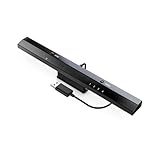
- Wireless sensor dolphin bar can connect your Wii remote plus controller to your PC by Bluetooth.
- Supports cursor anti-shake function, works as a normal keyboard and mouse.
- Allows you to play more quickly and precisely with your GC controllers, Light guns or Racing wheels.
- You can return or skip to the beginning of the current, previous or next chapter and supports Fast reverse, Fast forward, Pause playing, etc.
- Supports the G-sensor function that is the best choice for the Racing Games. Supports the Vibration Feedback.
Use a PC controller or keyboard as an emulated Wii Remote
If you do not need the physical remote, choose an Emulated Wii Remote in Dolphin’s controller settings and map a connected PC controller or keyboard to its buttons and axes. Dolphin’s configuration also supports extensions such as a Nunchuk or Guitar and MotionPlus settings. This approach can be simpler for games that work well with ordinary inputs, but it will not reproduce the physical remote’s motion and pointing experience automatically.
Map a physical Wii Remote to Windows controls
Touchmote documents a Windows setup for mapping a Wii Remote to keyboard, mouse, multitouch, or Xbox 360 controller inputs, with layouts configurable for applications. Its project page lists Windows 7 or later, a Wii Remote, a sensor bar, and a supported Bluetooth dongle or Mayflash DolphinBar among the prerequisites. It lists version 1.0 beta 15 downloads for 32-bit and 64-bit systems and warns that some newer remotes do not work with the Microsoft Bluetooth Stack. Because the listed release and compatibility information are dated, check the project’s current documentation and compatibility before installing or depending on it.
Rank #2

- 《NOTICE》This adapter is only compatible with Windows PCs equipped with a USB interface. Use with other models is not guaranteed. Supported OS are Windows 10, Windows 8-8.1, Windows 7 (SP1), Windows Vista (SP2), and Windows XP (SP3). This converter has been verified to be compatible only with the Wii Game Classic Controller / Classic Controller Pro. Other controllers have not been tested and cannot be guaranteed.
- 《CLASSIC CONTROLLER / CLASSIC CONTROLLER PRO TO USB》Wii Game Classic Controller or Classic Controller Pro can be connected to your Windows PCs. With a fast response model that allows you to input up to 60 times per second, you can play comfortably without missing button operations. You can set the continuous shooting mode by pressing each button while pressing the HOME button. Perfect for a fast shooter!!
- 《PLUG AND PLAY - NO SOFTWARE or DRIVER INSTALLATION IS NECESSARY》 No need to install any software or driver. Simply just connect the adapter to the USB port to you desktop or laptop computer and ready to go!! It works for Windows OS PCs.
- 《ADAPTER COMPATIBILITY》 Compatible with Windows 10 / Windows 8 / Windows 7 (SP1) / Windows Vista (SP2) / Windows XP (SP3)
- 《PRODUCT DETAILS》 Size: 2.4" X 1" X 0.6" (62mm X 26mm X 17mm). Cable length: 39" (1m). Weight: 32g. Adapter from Wii Classic Controller (RVL-005) / Wii Classic Controller Pro (RVL-005 / RVL-005-02) to USB port. Compatible with Windows 10 / Windows 8 / Windows 7 (SP1) / Windows Vista (SP2) / Windows XP (SP3). The adapter is for only one player.
Which accessories do you actually need?
- Bluetooth adapter: Needed only if the PC lacks a usable Bluetooth interface. Dolphin says desktop PCs may need a USB or PCIe adapter, but compatibility varies by adapter, driver, operating system, and remote revision; no generic dongle is guaranteed to work.
- Sensor bar: Needed for infrared pointer control, not for ordinary button-only use. Touchmote lists a USB-powered or wireless sensor bar for its pointer workflow.
- Mayflash DolphinBar: An optional option named by Touchmote for its Windows workflow and for some newer remotes that fail with Microsoft’s Bluetooth Stack. Do not treat it as mandatory for Dolphin’s standard setup, and check the exact model’s current compatibility.
Know which Wii Remote model you have
The label on the remote matters. WiiBrew distinguishes the older RVL-CNT-01 from the newer RVL-CNT-01-TR Wii Remote Plus. The older model may be usable without Bluetooth pairing, but that behavior is not supported on the -TR revision. Dolphin’s documented flow avoids that ambiguity by using 1 + 2 for standard remotes and Sync for -TR models. Wii Remotes use legacy Bluetooth pairing and do not support Secure Simple Pairing, so results can vary with the adapter and software stack.
Independent reader supportYour contribution helps us test, update, and keep practical guides available for everyone.Using real Wii Remotes in Dolphin netplay
Dolphin’s netplay guide says the Real Wii Remote option itself is not supported for netplay. For a physical remote, use Connect Wii Remotes for Emulated Controllers instead. Dolphin describes Wii Remote netplay as experimental and especially sensitive to desynchronization; when a game supports a GameCube controller, Dolphin recommends using one if possible.
Do these 3 things before closing this tab:
1Clear out junk files and repair common Windows errors2Scan for outdated or missing drivers - takes under a minute3Repair Windows errors before they cause bigger problemsQuick Recap
Best Value
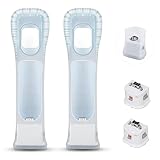
- Better Gaming Experience: Without the obsession of any delay, one of the greatest pleasures you can get from these wii motion plus adapters is that they can the most accurately find your guesture even the slightest twist of the wrist, it can enhance the induction strength ofthe remotes and allows you to become even more immersed in Wii game play
- Compatibility: Still worried about game compatibility? This wii motion plus can work with the wii sensor bar and the accelerometer, it is compatible with all original and third party remotes and can be easily attached to Wii controllers. This is 3rd party's product
- High-quality Product: This wii accelerator is made of imported materials with updated production technology, the included additional sensors that respond to your slightest motion for greater results with more economical movement. No need to spend much more on a whole new remote
- More Games: Connect the motion plus adapter, you can play more fun games, sports resorts and other dynamic games; games include: table tennis, tennis, golf, entertainment, etc.
- Quality Guarantee & Warrant: Each product undergoes rigorous testing before shipment and is trustworthy. And we provide a two-month warranty, if the product is defective, we can replace it for you or provide a free return service within 30 days
Rank #4

- Wirelessly connects your Wii u pro controllers to your pc by usb
- Bluetooth v2.1 with EDR (enhanced data rate) for superior wireless performance
- Supports turbo or auto fire function
- Supports the built-in vibration feedback with no delays
Rank #3
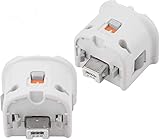
- Brand new and high quality.
- Connect Wii MotionPlus to your Wii Remote controller to increase accuracy and enhance play control on compatible games.
- Contains additional sensors that respond to your wrist's slightest motion for greater results with more economical movement.
- Compatible with a variety of Wii games.Perfect motion plus adapter for your Wii Remote controller.
- Allow it to more accurately capture complex motion and It tracks the player's movements in finer detail and with greater accuracy.
Product prices and availability are accurate as of the date/time indicated and are subject to change. Any price and availability information displayed on Amazon at the time of purchase will apply.



