Outdated Drivers Are Slowing You Down
One free scan finds every outdated or missing driver and matches the right update for your exact hardware.Free scan · exact hardware matchWindows Errors? Fix Them Before They Spread
Repair common Windows errors and clear accumulated junk for a smoother, more stable PC - no reinstall needed.Free scan · no reinstallFor most PCs, start Hearth and Hamlet in its Normal launch mode and keep the game updated. If you encounter crashes or graphical glitches, try Vulkan: the developer recommends it for those problems and reports improved stability in most cases. There is no verified graphics preset, resolution, or frame-rate tweak that is proven best across systems.
Start with the safest settings
Update the game and use Normal mode first
Install the latest available build before changing settings. Patch 1.0.07 reduced video memory (VRAM) use by about 1.1 GB, according to Phorust Studios, with the stated aim of improving stability, particularly on lower-spec hardware. (Developer updates on Steam)
A third-party settings guide recommends Normal as the first launch choice for most systems. Treat that as secondary guidance rather than a tested universal rule; the official developer advice specifically singles out Vulkan as a troubleshooting option for crashes and graphical glitches. (Hearth and Hamlet Guide)
Choose a renderer based on the problem
| Launch choice | When to use it | What is established |
|---|---|---|
| Normal | First launch or ordinary play | A third-party guide recommends it for most systems; official guidance reviewed here does not establish it as the fastest option. |
| Vulkan | Crashes or graphical glitches | The developer recommends trying it for stability problems and reports that it resolves or greatly improves stability in 95% of cases. This is the developer’s reported figure, not an independent test or an FPS result. |
| DirectX 12 | Only if you want to compare it on your own system | The third-party guide lists it as an option, but the developer guidance reviewed here does not single it out. |
To try Vulkan, select it in the game’s launch-mode prompt if that choice appears. If the game is already open, exit fully and relaunch so the selection takes effect. The developer’s pinned Steam notice addresses stability, not a guaranteed frame-rate increase. (Developer troubleshooting guidance)
#1 Best Overall
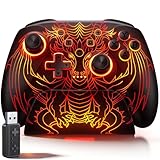
- 🎮 【Multi-Platform Wireless Controller for PC/Switch 2/Switch】 – No more switching between multiple controllers! This gaming controller works seamlessly with Windows PC (via included 2.4G adapter, ultra-low latency & plug-and-play), Switch/Switch 2, Android, and iOS (via Bluetooth). The dedicated PC adapter delivers tournament-grade responsiveness, while one-click shortcuts let you switch devices in seconds. Perfect for PC gaming, Switch titles, and mobile games – one controller, all platforms.
- 🎮 【Hall Effect Joysticks PC Controller with 1000Hz Polling Rate】 – Experience pro-level precision! Hall Effect joysticks eliminate drift permanently, with dual-mode toggle (0% raw deadzone for competitive play / factory-tuned anti-drift for daily use). 1000Hz high polling rate ensures instant input registration (no lag) in fast-paced PC games, while Hall Effect triggers provide smooth, accurate pressure-sensitive control for racing/shooting games.
- 🎮 【Programmable PC Controller with Keylinker App】 – Unlock full customization via the Keylinker App: remap buttons, create complex macros, or assign 21 functions to each of the 2 back paddles (M1/M2). No software? No problem – program directly on the controller! Press M + M1/M2 to enter programming mode, and M + Minus to clear mappings. Get a competitive edge in PC multiplayer games with one-tap combos and shortcut actions.
- 🎮 【RGB Light PC Controller with Charging Dock】 – Personalize your wireless PC controller with 7 RGB lighting modes and 4 brightness levels (25%-100%). The included charging dock serves as a charging station and storage stand – simply place the controller down to charge, and it auto-connects when you pick it up. The iconic dragon design glows from controller to dock, creating a stunning look gamers love.
- 🎮 【Long-Lasting 1000mAh Battery – 10+ Hours of Gaming】 Powered by a 1000mAh rechargeable battery, enjoy 10+ hours of gameplay with RGB lights on. Fully recharges in just 3 hours via USB-C. Auto-sleep after 20 minutes of inactivity saves power when you forget to turn it off. Game longer, charge less – this wireless PC controller keeps up with your longest sessions.
Set expectations for RAM and VRAM
Patch 1.0.06 raised the developer’s recommended system memory from 8 GB to 16 GB. The same August 28, 2026 post says 8 GB can still work, but leaves less room for multitasking. That makes 16 GB a recommendation, not a stated minimum or a guarantee of smoother performance. (Patch 1.0.06)
The later Patch 1.0.07, dated September 5, 2026, reports about 1.1 GB less VRAM use. This is a developer-reported change to the game’s memory footprint, not a promise that every GPU will gain a fixed amount of free memory or a specific number of frames. (Patch 1.0.07)
Optional: test an FPS cap change cautiously
A third-party guide reports that the game uses a 60 FPS cap and suggests the launch argument --max-fps 0 to remove it on a high-refresh-rate display. The guide does not independently verify the result across other GPUs, and the official developer information reviewed here does not confirm that the argument works on every platform or version. (Hearth and Hamlet Guide)
Rank #2

- Package Contents: Included in the package are 1*Duall Hall Effect Game Controller, 1*2.4G USB Adapter, 1*Phone Clip, 1*Type-C Cable, and 1*English Manual
- Hall Effect Joystick & Speed Down: This Hall effect joystick ensures precise and consistent control, no stick drift, no dead zone, no delay. This PC controller features a speed-down button to fine-tune the right joystick's movement for precise aiming
- Hall Effect Trigger: Linear Hall effect triggers with 256 levels of changes ensure precise throttle control, great for racing games; LT/RT mechanical trigger buttons with a 0.3 mm travel distance deliver rapid response, great for shooting games
- 4 Programmable Buttons: You can remap the Gyro Aim button and the Joystick Speed Down button as programmable buttons, providing you with a total of 4 programmable buttons. These can record up to 30 seconds of gameplay for instant replay
- Wide Compatibility: This gaming controller works with PC (Windows 7 8 10 11), Android (phones, tablets, TV, and TV boxes), for Apple (iPhone, iPad, Mac, and Apple TV), Switch (Switch, Switch Lite, Switch OLED), and Steam Deck, Tesla, and Cloud Games
- Keep the default cap for ordinary or idle play unless you have a specific reason to experiment.
- If you choose to test the argument, add
--max-fps 0to the game’s launch options in Steam, then relaunch. - Check whether the game behaves as expected on your hardware. If it does not launch or becomes less stable, remove the argument and return to the default.
Uncapping is an experiment, not a proven performance fix. A higher frame-rate ceiling may also increase system load; no game-specific test here establishes a benefit for every PC.
What to change when performance is poor
There are no controlled comparisons in the cited material establishing a best resolution or graphics-quality preset. If you suspect your PC is struggling, changing resolution or visual options one at a time is a general troubleshooting experiment—not a tested Hearth and Hamlet recommendation. Record the original setting so you can restore it if the change makes no difference.
Likewise, the available evidence does not support a blanket GPU upgrade recommendation. Check the current Steam system-requirements panel against your PC before considering hardware changes; requirements and recommendations can change with updates. (Hearth and Hamlet on Steam)
Quick Recap
If the game crashes or shows graphical glitches
- Update to the latest game build.
- Relaunch using Vulkan and see whether the specific stability problem improves. The developer reports this helps in 95% of cases, but that figure is not independently verified.
- If you previously added
--max-fps 0or changed other options, remove the launch argument or restore the original settings before testing again. - If the issue continues, use the game’s Steam community page to check current developer troubleshooting guidance and report the problem with details about your system and the steps that reproduce it.
Product prices and availability are accurate as of the date/time indicated and are subject to change. Any price and availability information displayed on Amazon at the time of purchase will apply.




