The Tool Desk
Outbyte PC Repair FREERepair Windows errors before they cause bigger problemsFix Now →Outbyte Driver Updater FREEFix the driver behind crashes, sound loss and screen glitchesFind Drivers →For a Steam Machine front panel that shows mostly static, glanceable information, E-Ink is the better fit; choose an LCD-style display when frequent live updates, color, or animation matter more. JSAUX lists both a Steam Machine-specific E-Ink faceplate and a full-color Pixel Matrix alternative, while a cited USB LCD build is a DIY example for different SteamOS hardware—not a verified Steam Machine accessory.
At a glance: E-Ink, LCD, and JSAUX’s color option
| What matters | E-Ink | Small LCD-style display | JSAUX Pixel Matrix |
|---|---|---|---|
| Best suited to | Mostly static or slowly changing status, artwork, clocks, and calendars | Frequent updates, color, and motion; performance depends on the specific panel | Color visuals and animated GIFs, according to JSAUX |
| Connection and power | JSAUX lists Bluetooth 5.0 and a built-in 500mAh battery; it says static content uses virtually no power to maintain | The cited 3.5-inch USB example connects over USB; its power draw is not established | JSAUX lists USB-C for power and data |
| Update behavior | JSAUX lists approximately 500–800 ms refresh for its panel | The cited DIY panel can be configured to update every second; other panels vary | JSAUX describes real-time updates |
| Color and motion | JSAUX specifies grayscale and static image uploads | Depends on the panel and its software support | 64 × 54 full-color RGB matrix; supports static images and GIF uploads |
| Steam Machine fit | JSAUX says its magnetic faceplate is designed for Steam Machine and SteamOS | No Steam Machine compatibility is established for the cited DIY example | JSAUX says it is designed for Steam Machine and SteamOS |
The Pixel Matrix is a useful color-and-motion alternative, but JSAUX describes it as a pixel matrix, not an LCD. The LCD column refers to the display category, not to that product. Screen behavior and compatibility are product-specific, so the comparison is not a claim that all E-Ink or LCD panels perform alike.
JSAUX’s listed Steam Machine faceplates
5.83-inch E-Ink faceplate
JSAUX lists a 640 × 480 panel with Bluetooth 5.0, a 500mAh battery, and a magnetic mount. Its product page describes modes for weather, clock, calendar, performance, and game time, along with uploads of static images. The listed price is $99.99. JSAUX estimates up to 22 days of runtime at one display refresh per minute (1,440 refreshes per day); that is a manufacturer estimate tied to that refresh schedule, not an independently tested result. JSAUX says the display itself uses virtually no power to maintain a static image, with power primarily used during refreshes or updates.
7-inch Pixel Matrix faceplate
JSAUX lists a 64 × 54 full-color RGB matrix with USB-C power and data, real-time updates, and support for static images and GIFs. The listed price is $89.99. That makes it a color-and-motion option from the same manufacturer, but it is not accurate to call it a small LCD based on the available product description.
#1 Best Overall

- [6,86-Zoll-LCD-Display] Der Vollfarb-IPS-Panel-Bildschirm stellt die wahre Zartheit der Farben präzise wieder her und bietet eine gute Betrachtungswinkelstabilität
- [Auflösung 1280x480] verwendet TRCC-Software, um die Anzeige verschiedener Parameter des Systems frei zu überwachen, unterstützt eine Vielzahl von statischen/dynamischen Bildumschaltungen und personalisierten DIY-Themen
- [Produktparameter] Die Bildschirmgröße beträgt 6,86 Zoll, die Produktgröße: 187,2 x 72,1 x 21 mm, die Auflösung: 1280 x 480, der Anschluss: USB Typ-C, die Bildschirmstromversorgung, die Datenkommunikation erfolgt über die 9-polige USB-Schnittstelle des Motherboards, vor der Softwareinstallation bestätigen Sie bitte die Vollständigkeit der Verkabelung
- [Kompatibilität] Unterstützt das magnetische Gehäuse mit festem Bildschirmpanel oder kann mit dem Wasserkühlungskühler der Trofeo Vision-Serie gekoppelt werden, die Position des LCD-Bildschirms ist nicht begrenzt,Die magnetische Anziehungskraft dieses Produkts ist mit der Chassis-Installation kompatibel und kann sich frei in verschiedenen Positionen des Chassis bewegen, ohne eine feste Position zu haben
- [TRCC-Software] kann von der offiziellen Website heruntergeladen, entpackt und doppelt geklickt werden, um das Installationsprogramm zu installieren, die Überwachungs-/Öffnungs- und Schließfunktionen dieses Bildschirms werden von der Software gesteuert, und nachdem die Installation abgeschlossen ist, kann es standardmäßig mit dem Computer gestartet werden und befindet sich immer im Hintergrund der Taskleiste
Prices, stock, ordering windows, shipping, software features, and manufacturer compatibility statements can change. Check the current JSAUX product information before buying.
What a small LCD can do—and what the example proves
A compact LCD-style screen is the more natural choice when the display needs to change often or show motion. One community-documented SteamOS build uses a 3.5-inch Turing Smart Screen USB panel for live system statistics on an AMD BC-250. It lists 320 × 480 native resolution and a configurable one-second update interval. That demonstrates a possible DIY status-monitor use in a SteamOS environment; it does not establish plug-and-play support, a suitable front-panel fit, or tested compatibility with Valve’s Steam Machine.
Rank #2
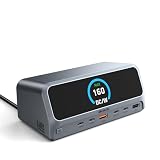
- 【13-in-1 High-Spec Expansion with Smart LCD Display】 MOKiN laptop docking station delivers a true all-in-one solution. This 13-in-1 USB C hub features a 2.26-inch LCD smart display that shows real-time connection status and power delivery wattage. Combined with a dedicated physical button press, you can monitor all active ports and instantly cut off data/video transmission for ultimate privacy—no software needed
- 【Ultra-Fast 160W Total Power with Quad-Device Charging】 Built-in AC power supply eliminates bulky external power bricks—simply connect this USB C docking station directly to a wall outlet using the included cable. It delivers 160W total output, providing up to 100W Power Delivery to your laptop through the host USB-C port, while two additional USB-C ports (100W max each) and one USB-A port (12W max) charge your phone, tablet, and accessories simultaneously. Enjoy a clutter-free desk and stable multi-device charging. (𝐍𝐨𝐭𝐞: 𝐃𝐞𝐝𝐢𝐜𝐚𝐭𝐞𝐝 𝐜𝐡𝐚𝐫𝐠𝐢𝐧𝐠 𝐩𝐨𝐫𝐭𝐬 𝐝𝐨 𝐧𝐨𝐭 𝐬𝐮𝐩𝐩𝐨𝐫𝐭 𝐝𝐚𝐭𝐚 𝐭𝐫𝐚𝐧𝐬𝐟𝐞𝐫 𝐨𝐫 𝐯𝐢𝐝𝐞𝐨 𝐞𝐱𝐩𝐚𝐧𝐬𝐢𝐨𝐧.)
- 【Dual HDMI 4K@60Hz – Windows Extend/Mirror, macOS Mirror Only】 Equipped with 2 HDMI ports, this USB C docking station supports dual external monitors at stunning 4K@60Hz resolution. Windows laptops can enjoy true extended or mirrored displays for split-screen multitasking, ideal for data analysis, programming, or financial trading. Please note: Due to macOS system limitations, MacBook only supports mirroring mode; both monitors will display the same content
- 【10Gbps Data Transmission, 20GB Files in 20 Seconds】 Achieve blazing-fast data transfer via USB 3.2 Gen 2 ports (2 USB-C and 1 USB-A). Transfer 20GB files in just 20 seconds, ensuring a fast and secure transfer experience. A dedicated USB-A 2.0 port is optimized for lag-free wireless mouse and keyboard connectivity. (𝐍𝐨𝐭𝐞: 𝐃𝐚𝐭𝐚 𝐭𝐫𝐚𝐧𝐬𝐟𝐞𝐫 𝐩𝐨𝐫𝐭𝐬 𝐝𝐨 𝐧𝐨𝐭 𝐬𝐮𝐩𝐩𝐨𝐫𝐭 𝐏𝐃 𝐟𝐚𝐬𝐭 𝐜𝐡𝐚𝐫𝐠𝐢𝐧𝐠 𝐨𝐫 𝐯𝐢𝐝𝐞𝐨 𝐞𝐱𝐩𝐚𝐧𝐬𝐢𝐨𝐧.)
- 【Gigabit Ethernet & Universal Compatibility】 Built-in Gigabit Ethernet port guarantees lag-proof network stability for remote work and cloud computing. This USB C charging station works seamlessly with MacBook Pro/Air, Dell, HP, Lenovo, and more, significantly enhancing work efficiency with a single cable
If you are shopping for this route, the accurate product category is “3.5 inch USB LCD system monitor display.” Before choosing a unit, confirm:
- Connector type and whether USB carries data as well as power
- Power requirements and whether the Steam Machine can supply them
- Panel dimensions and a workable mounting method
- Display-driver and monitoring-software compatibility
- Operating-system support for the exact Steam Machine setup
The cited example is documented at the community SteamOS project; its hardware is an AMD BC-250 system, not a Steam Machine.
Recommended Free Tools
Rank #3

- 2.4" LCD DISPLAY MODULE Embedded ILI9341 Driver, Using SPI Bus
- 240×320 resolution, 65K RGB colors, clear and colorful displaying effect
- SPI interface, minimizes required IO pins, supports controller boards like Raspberry Pi//STM32
- Comes with development resources (examples for Raspberry Pi//STM32)
How refresh behavior affects the choice
E-Ink is strongest when the image can remain on screen between updates. Its refresh behavior is not uniform: JSAUX lists approximately 500–800 ms for its specific faceplate, while a separate e-paper monitor manufacturer cites roughly 5 Hz in one mode and cautions against high-refresh entertainment use. That separate monitor is not a benchmark for the JSAUX panel; it illustrates why a buyer should check the exact screen’s refresh characteristics rather than treating “E-Ink” as a single performance specification.
For moving graphics or frequent visual feedback, a suitable LCD-style display is generally the more appropriate category. Check the individual panel’s refresh, brightness, contrast, and software support; the cited material does not establish comparable brightness, power draw, latency, or image-quality measurements across these options.
Rank #4

- Parameters: This is a new type of mini computer chassis screen. There is no need to install AIDA64, and only a USB cable is required to detect whether the running parameters are normal. Display area: 49X74 (mm), overall size: 55X85 (mm), resolution: 320X480, thickness: 7~ 8 (mm), viewing angle: IPS full viewing angle, interface: USB-TYPEC, shell material: metal
- FAQ: Unable to download URL and unzip, use tutorial, what system is supported? Please don't worry, we will upload video tutorial in the link, which will be reflected in the video. At the same time, we will have product instructions. Finally, our products are compatible and easy to operate
- Features: Support horizontal and vertical screen switching, 0°and 180°two options, energy saving and environmental protection, automatic screen off after shutdown, eye comfort, stepless brightness adjustment
- Function: Displays various data of CPU, memory, hard disk and other hardware, so that users can grasp the computer operation status in time. Through special customized chips, it supports dynamic wallpaper and other forms, can add visual effects, and only takes up a small amount of CPU resources. Compared with the traditional HDMI secondary screen, it only needs a USB data cable to connect, avoiding various problems such as cable clutter
- Packing list: 1 x 3.5-inch screen; 1 x USB data cable; 1 x adjustable bracket; 1 x product manual; 1x Acrylic double-sided tape;1 x packaging box. If you encounter the above problems or other problems about the product, the information we provide cannot solve them for you. Please contact us. We are online 24 hours a day and will serve you as soon as possible
Which one should you choose?
- Choose the JSAUX E-Ink faceplate if you want a Steam Machine-specific magnetic panel for status, a clock, calendar, or static artwork, and prefer its listed Bluetooth-and-battery setup.
- Consider the JSAUX Pixel Matrix if color, GIFs, and real-time updates are more important than an E-Ink image, while recognizing that it is a pixel matrix rather than a conventional LCD.
- Choose a small USB LCD-style monitor for a DIY build if frequent updates and motion are the priority and you are prepared to verify fit, power, drivers, and software for your exact hardware.
JSAUX lists the first two products as designed for Steam Machine and SteamOS. The community LCD build is only evidence for a different SteamOS machine. The available information does not provide an independent head-to-head test of these display options.
Quick Recap
Best Value

- 8 Ports USB Charger Station: Armed with up to 8-ports, slitinto USB Charging Station supports charging all your family devices at once. Not only free yourself from looking for extra outlets when you are in a family party, but also make your multi usb charger cables organized and get your desktop clean and tidy.
- Ultra Powerful: Eight ports pump out total 60 watts of power equipped with auto detect technology, maximizing the highest charging speed and energy efficiency for each port, provide the optimal current and the quickest charge. It’s your best travel/family companion.
- LCD Display & Type C Port: Intelligently detect and deliver the appropriate charging current for each device, with high-resolution LCD Digital Display screen, now you can visually monitor the current and the charging status through your naked eyes. The extra Type C Port allows more possibilities of charging cables to be connected to this multi port usb charging station.
- Superior Protection: Overcharge, overcurrent, overload, surge, short circuit protection in the multiple usb charger, completely ensures your devices' safety and offers them full-scale protection.
- Compact Size & Portable Design: Small Pocket Size (Dimensions: 4.9*2.7*1 inches) can easily put into your pocket/suitcase or backpack and its lightweight makes it the best to carry wherever you go. Compact and tight design makes it the best for home, office and destop and travel use.
Product prices and availability are accurate as of the date/time indicated and are subject to change. Any price and availability information displayed on Amazon at the time of purchase will apply.




