Official Hogwarts Legacy mods are available on the PC versions through Steam and the Epic Games Store. Link your storefront account to a Warner Bros. Games account, then use Play Mods in the game to install mods and enable them on a Mod Save. Console versions are not currently supported.
What you need before installing
- A PC copy of Hogwarts Legacy on Steam or the Epic Games Store. Official mods are not currently supported on console, according to the Hogwarts Legacy Mods – Player FAQ.
- A Steam or Epic Games Store account linked to a Warner Bros. Games account. The same FAQ explains that account linkage is required to access official mods.
- An existing character save you can copy, or a new character for modded play. Mods can only be applied to Mod Saves.
The free Creator Kit on the Epic Games Store is for people making mods; players do not need it to install them. Install mods from the game itself.
| # | Preview | Product | Price | |
|---|---|---|---|---|
| 1 |

|
Hogwarts Legacy - Nintendo Switch | $37.49 | Buy on Amazon |
| 2 |

|
Warner Games Video Game for Switch Hogwarts Legacy: The Legacy of Hogwarts | $43.69 | Buy on Amazon |
| 3 |

|
Hogwarts Legacy - Nintendo Switch 2 | $31.99 | Buy on Amazon |
| 4 |
|
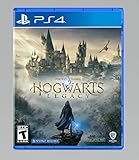
Hogwarts Legacy - PlayStation 4 | $24.99 | Buy on Amazon |
Install a mod through the in-game browser
- Launch Hogwarts Legacy and select Play Mods from the main menu.
- In the Mods browser, find a mod under Discover or Browse. Select Install in the listing or open the mod’s detail page and choose Install.
- Wait for the installation completion notification before moving on.
The current PC control guide lists U for Install. Xbox and PlayStation prompts differ and appear in the game. Controls and labels may change with updates; see Portkey Games Support’s How To: Install and Enable a Mod on PC for its current guide.
Create or choose a Mod Save
Installing a mod does not by itself activate it on an ordinary save. Open Enable Mods, then prepare a save for modded play.
#1 Best Overall
- EXPLORE AN OPEN WORLD. The wizarding world awaits you. Freely roam Hogwarts, Hogsmeade, the Forbidden Forest, and the surrounding Overland area.
- BE THE WITCH OR WIZARD YOU WANT TO BE. Learn spells, brew potions, grow plants, and tend to magical beasts along your journey. Get sorted into your house, forge relationships, and master skills to become the witch or wizard you want to be.
- EXPERIENCE A NEW WIZARDING WORLD ADVENTURE. Experience the wizarding world in an unexplored era to uncover a hidden truth from its past. Battle against trolls, Dark Wizards, goblins, and more as you face a dangerous villain threatening the fate of the wizarding world.
- Select an existing character and copy its save, then confirm the copy to create a Mod Save; or create a new character for mods.
- Select the Mod Save you want to use.
- Enable the installed mods for that save. The interface displays enabled mods in numeric load order.
- Choose Apply Changes to save the selection and remain in the menu, or Apply & Continue to save it and enter the Mod Save.
The PC control guide lists G for Enable, B for Apply Changes, Spacebar to confirm Apply Changes, and Enter to confirm Apply & Continue. Use the on-screen prompts if your platform or game update shows different controls.
What to expect when playing with mods
- The game must load shaders before you play after enabling new mods.
- Achievements are disabled while playing a Mod Enabled save.
- Compatibility between mods is not guaranteed. The game displays enabled mods in load order, but that does not ensure that every combination will work.
These limits are described in the official player FAQ.
Rank #2
- Video game for Switch from the brand Warner Games
- Color: Multicolor
- Dimensions: 10.5 x 16.8 x 1.2 cm
- Reference: S7830090
- If what you want is quality at the best price do not keep looking!
Why you cannot install through CurseForge or on console
CurseForge is the official mod platform, but the CurseForge app does not support Hogwarts Legacy. Its support notice says mods can only be downloaded in-game. You may browse listings online, but access and installation happen through the game’s Mods browser. See CurseForge’s Hogwarts Legacy FAQ.
That in-game route is for the supported PC versions. The official player FAQ says console versions are not currently supported for mods; it does not provide a console installation path.
Rank #3
- This edition of Hogwarts Legacy has been enhanced for Nintendo Switch 2, including Joy-Con 2 mouse sensor support, improved graphics, audio, load times, and controls.
- Hogwarts Legacy is an immersive, open-world action RPG set in the world first introduced in the Harry Potter books. Take control of the action and be at the center of your own adventure in the wizarding world.
- Experience Hogwarts in the 1800s. Make allies, battle Dark wizards, and ultimately decide the fate of the wizarding world. Your legacy is what you make of it. Live the Unwritten.
Troubleshoot a mod that will not work
- It will not install or appear: confirm you are using a supported PC storefront version, have linked the required account, and are using the in-game Mods browser.
- It installs but does not take effect: open Enable Mods, select a Mod Save, enable the mod for that save, and apply the changes.
- A mod causes a problem: check whether it is up to date, look at its Issues tab if available, and contact its author for mod-specific help. The official FAQ also recommends changing load order or disabling recently installed mods.
- You are diagnosing a general game issue: disable mods first to see whether the issue remains. Warner Bros. Games support does not troubleshoot user-created mods; the FAQ directs mod-specific questions to the mod author or CurseForge support.
For steps and controls, consult Portkey Games Support’s PC installation guide and the official player FAQ.
Quick Recap
Rank #4
- We’re overwhelmed with gratitude for the response to Hogwarts Legacy from fans around the globe. The team is working hard to deliver the best possible experience on all platforms and we need more time to do this. Hogwarts Legacy will launch for PS4 and Xbox One May 5, 2023.
- EXPLORE AN OPEN WORLD. The wizarding world awaits you. Freely roam Hogwarts, Hogsmeade, the Forbidden Forest, and the surrounding Overland area.
- BE THE WITCH OR WIZARD YOU WANT TO BE. Learn spells, brew potions, grow plants, and tend to magical beasts along your journey. Get sorted into your house, forge relationships, and master skills to become the witch or wizard you want to be.
- EXPERIENCE A NEW WIZARDING WORLD ADVENTURE. Experience the wizarding world in an unexplored era to uncover a hidden truth from its past. Battle against trolls, Dark Wizards, goblins, and more as you face a dangerous villain threatening the fate of the wizarding world.
Product prices and availability are accurate as of the date/time indicated and are subject to change. Any price and availability information displayed on Amazon at the time of purchase will apply.



