Free tools Windows power users keep installed
One-click scans. No signup required.
FCEUX is an open-source emulator for playing NES and Famicom software on a computer. It also includes documented tools for save states, Lua scripting, movie recording and playback, cheats, memory inspection, and 6502 debugging. It is emulator software, not a game library: the project overview does not say that game files are included.
What is FCEUX?
The FCEUX project describes the program as “An open source NES Emulator for Windows and Unix that features solid emulation accuracy and state of the art tools for power users.” Its stated audience spans casual players and people who want more advanced tools. The project describes NES and Famicom play; the available sources do not establish a separate Dendy-specific compatibility guarantee.
FCEUX is the software that emulates the console hardware. You need compatible game files separately, and the sources do not establish that every dump, mapper, or game will work correctly. File formats supported by the program do not determine whether a particular file is complete or compatible. The project materials cited here also do not address the legality of obtaining or using game files.
Where to get it and which version is listed
The FCEUX README directs users to SourceForge for releases and also lists interim builds for Win32, Win64, Win64 Qt/SDL, Ubuntu, and macOS. The official release page accessed for this article lists version 2.6.6 and characterizes it as primarily maintenance to mappers and the emulation core, with some Qt/SDL-specific features. Because release and package availability can change, check the project’s official repository and release page for the current download and version.
#1 Best Overall

- HD audio and video (720p) with 16: 9/4: 3 Switch (HD cable only); 3 ft. HD cable; includes AV ports with AV cable
- High compatibility with (NTSC/PAL) NES, Super NES, and Super Famicom cartridges
- Hyperkin-engineered perfect pin (patent pending) Technology sets a new standard for state-of-the-art, high-quality pins
- Comes with a “Cadet” and a “Scout” Premium classic-style Controller; Controller ports support two compatible controllers for each Console
- Includes 6 ft. Micro charge cable and AC Adapter. If AC adapter is not included, We strongly recommend that you use a USB wall AC adapter that has a minimum output of 5V 1A.
Homebrew Formulae also listed 2.6.6 as stable in the accessed snapshot, describing FCEUX as an all-in-one NES/Famicom emulator. That is a package-manager listing, not a statement that every platform uses the same build or release channel. Check the Homebrew listing if you use macOS package management.
What game files does FCEUX support?
The manual lists iNES, FDS, UNIF, and NSF formats, along with certain gzip and PKZIP archives. FDS refers to Famicom Disk System software. Archive loading can depend on build features; the Qt/SDL build notes, for example, identify libarchive as an optional dependency for 7z support. Consult the supported file types manual for the documented formats.
Rank #2
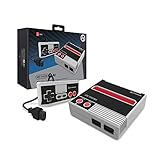
- Compatible with NES cartridges and controllers
- Includes AV ports with AV cable
- Includes 5 ft. Micro cable.
- Comes with "Cadet" Premium classic-style Controller (5 ft. Cable)
- Note: No power supply included. Please use a 5V 1A USB power supply via the micro port.
A supported extension is not a guarantee that every file will load or play correctly. Compatibility can depend on the specific dump, mapper, and build. The documentation cited here does not provide a compatibility percentage or a current game-by-game test result.
What can FCEUX do beyond loading a game?
The Qt GUI feature matrix documents a set of tools useful for different kinds of play and analysis. Availability differs across its GUI/build columns, so treat these as documented capabilities rather than a promise that each download includes every feature.
Quick wins for a faster PC:
Fix the driver behind crashes, sound loss and screen glitchesFind Drivers →Clear out junk files and repair common Windows errorsFree Scan →Rank #3

- The system comes bundled with: an HDMI cable
- an AC adapter
- one NES Classic Controller
- and all 30 games, installed and ready-to-play.
- E10+ w/ Mild Violence
- Save states: save and restore an emulator state, separately from a game’s own save mechanism.
- Input mapping: map gamepad buttons through the virtual gamepad controls.
- Movie recording and playback: record and replay gameplay input, including workflows used in tool-assisted speedruns.
- Lua execution: run scripts for in-game automation or analysis. The Qt/SDL README describes an integrated Lua 5.1 engine.
- Cheat and memory tools: inspect or alter values for testing and experimentation.
- 6502 debugger: inspect execution using the CPU debugger, a capability aimed more at technical users than casual play.
The project’s Qt GUI feature matrix distinguishes availability among builds. A feature’s presence in the matrix should not be read as confirmation that it is enabled in every binary.
How to start playing
- Choose a build for your operating system. Use the FCEUX release page or the platform’s package manager, and check the build notes if you need a specific feature such as Lua or recording.
- Open a compatible game file. Use the program’s game-loading controls to select a file in a documented format; the manual covers iNES, FDS, UNIF, NSF, and certain archives.
- Configure controls if needed. Map keyboard or gamepad input in the GUI. FCEUX documents virtual gamepad mapping, but no particular retail controller is established as tested or guaranteed. Check that a controller supports your operating system and connection type.
- Use advanced tools only if they fit your purpose. Start Lua, movie, cheat, memory, or debugger features from the relevant GUI controls; exact availability depends on the build.
Building FCEUX versus installing a prebuilt version
The Qt/SDL README describes compiling the program, not the minimum requirements for running a prebuilt installer. Its build workflow uses CMake; it says the old SCons build system is no longer supported and the Qt GUI is the default. It identifies SDL2 and Qt 5 or Qt 6 among the build dependencies, with recording and archive libraries optional. The notes are dated April 30, 2023, so check the current README before following them as current build instructions.
Rank #4

- 🎮 CLASSIC RETRO GAME CONSOLE - Retro game console, built-in 620 kinds of classic game get you and your family back to childhood happiness. Action, Sports, Puzzles, Fighting, and Racing,the best games of the past few decades are on this console, and many adults may be nostalgic. These games are challenging, engaging, and full of fun.
- 🎮 BEST HOME ACTIVITY FOR KIDS - Classic game console can enhance the communication between parents and children by let your children experience your growing experience and happines. Equipped with 2 sensitive controller, plug and play, comfortable hand feel, you can better share your fun with family or friends, along with original sound for a better playing experience.
- 🎮PLUG AND PLAY - This console has an AV output. Make sure your TV/monitor has AV input connectors. Simply connect the game console to the power supply with the charger, then connect it to the TV using an AV cable and connect the controllers. Turn on, start playing now. Tips: it does not go back to the menu when you press “select + start” together. So you have to press RESET on the machine every time you want to switch a game.
- 🎮NOTES - This is a GameNext original console. These classic games do not have the same clear image as today’s games on the big screen, and may not be compatible with some 4K monitor (HDMI & Wireless is not supported), but they are still so exciting and challenging to play!
- 🎮MONEY BACK GUARANTEE - We are confident that you and your kids will love this retro game console. This is why we are offering you 30 days no-hassle, money-back guarantee, if anything gets damaged or requires replacement, pls feel free to contact us. We also provide warranty on parts and accessories for 1 year.
For build details, see the Qt/SDL README. If you only want to play, use an available prebuilt release rather than treating compiler dependencies as prerequisites for ordinary installation.
Independent reader supportYour contribution helps us test, update, and keep practical guides available for everyone.Who is FCEUX for?
- Players: a desktop emulator for NES and Famicom play, with input mapping and save states documented in the Qt GUI feature matrix.
- Researchers and developers: Lua, memory tools, cheats, and a 6502 debugger can support inspection and experimentation.
- Tool-assisted speedrun creators: movie recording and playback are documented, though the exact tools available depend on the build.
The documentation supports describing these features, but it does not provide an independent accuracy benchmark or a tested compatibility ranking against other emulators.
Quick Recap
Best Value

- Comes with console, 1 controller, power cord, video cord
- Controller is original OEM (not 3rd party)
- Tested and works well. Nice condition
Product prices and availability are accurate as of the date/time indicated and are subject to change. Any price and availability information displayed on Amazon at the time of purchase will apply.



