The best PS4 stand is the one made for your console’s exact CUH model. Sony’s CUH-ZST2 fits the documented PS4 Slim CUH-2000 and PS4 Pro CUH-7000 series; the original CUH-1000A series has a different stand, CUH-ZST1. Check the model number before you buy. Sony’s PS4 Pro safety guide specifically calls for a vertical stand when that model is placed upright.
Which Sony stand fits your PS4?
Use the CUH series—not just the console’s appearance or the words “PS4 stand” in a listing—to check compatibility. Sony’s cited product information documents these pairings:
| PS4 family | Documented Sony stand | Fit note |
|---|---|---|
| Original PS4 CUH-1000A series | CUH-ZST1 | Sony’s 2013 announcement lists the CUH-1000A series. Sony announcement, August 21, 2013. |
| PS4 Slim CUH-2000 series | CUH-ZST2 | The package includes an attachment for the CUH-2000 series. Sony announcement, September 8, 2016. |
| PS4 Pro CUH-7000 series | CUH-ZST2 | A separate attachment is included for the CUH-7000 series. Sony announcement, September 8, 2016. |
| Other revisions or suffixes | Not established here | Compare the full CUH model with the stand maker’s compatibility list; do not assume a documented series covers every revision. Sony explains where to find the model number in its PS4 model-number guide. |
These are the Sony stands supported by the cited product information, not a ranking of every third-party accessory. A third-party listing should name your CUH series explicitly. No independent fit, reliability, or cooling test is established for a particular third-party stand here.
How to identify your PS4 model
Look for the CUH model number on the console or its original packaging. Sony gives these locations for the listed families:
#1 Best Overall

- Specially designed for P4 Slim Console
- Allows you to store your P4 System in its upright vertical position.
- Smooth gloss and matt textured finish to compliment your P4 Slim.
- ABS engineering materials.
- Customer Guarantee: All Products of Younik are Backed by Our 100% Satisfaction Guarantee! Buy with Confidence!
- CUH-10xx, CUH-11xx, and CUH-12xx: rear or bottom area of the console.
- CUH-20xx: on the spine to the right of the power port.
- CUH-70xx: on the spine above the ports.
Use the number to match the series in the compatibility table, then check the listing for any more specific restrictions.
Do you need a stand to place a PS4 vertically?
Sony’s North American PS4 FAQ says the console can be used horizontally or vertically. The instruction is not the same for every model: Sony’s CUH-72XXB PS4 Pro safety guide tells users to use a vertical stand when placing that model upright. Follow the safety guidance and accessory instructions for your own CUH model rather than extending that Pro-specific direction to every PS4 revision.
Rank #2
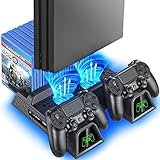
- Multi-functional Design stand for Regular PS4/ PS4 Slim/ PS4 Pro Console: This ps4 stand can cooling & storage your Playstation 4 console, with dual ps4 controller charger station and 12 game slots.
- LED Indicators & Fast Charging Speed: Let you know the charging status at a glance, the red indicator means charging, green light means charging is completed; Say goodbye to USB dongles which take 4 hours when charging, charged through the EXT port would provids just 2-hours.
- Upgraded PS4 Fan Cooler: Turn on the ps4 fan, and Cooling down your Playstation 4 console efficiently, the noise was decreased as low as 50dB, metal bottom helps you to keep your console cool and clam through playing games all the day and night.
- Compatible with PS4/Slim/Pro Console: Put your Playstation 4 Consols on the ps4 cooling stand, more tight design for the PS4 Pro, much reliable to secure your console. (Note: need to use the extra horder included for PS4 slim.)
- Power Supply Devices: PS4 stand comes with a USB cable, support powered by various devices, USB Adapter, USB HUB, Wall adapter, or your ps4 console.
A stand is for upright placement; it is not needed for horizontal placement. Choose a stable location with enough clearance and avoid treating a stand as a handle. Sony warns in the CUH-ZST2 manual: “Do not lift the system by the stand only when the stand is attached.” See the CUH-ZST2 instruction manual.
What to compare before buying
- Exact compatibility: The product listing should specify your CUH series, not merely say it fits “PS4.”
- Attachment and stability: Check how it secures to the console and whether the required attachment or screw is included.
- Footprint and clearance: Compare the stand’s dimensions with your shelf space and leave room around the console.
- Extra features: Controller charging may be useful if you need it, but verify what is included and how it connects.
- Cooling claims: A built-in fan alone does not establish better cooling, lower noise, or longer console life. No comparative test results are established here, so treat those as unverified claims.
Sony stand dimensions and historical price
Sony announced these specifications for its own stands. The CUH-ZST2 figure was a US MSRP at its 2016 announcement, not a current price; the cited 2013 CUH-ZST1 announcement does not establish current availability or pricing.
Rank #3
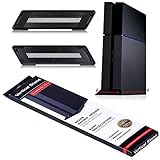
- SPACE SAVING: This stand is specifically designed to clear up space on your tv stand or entertainment center - so you can fill the space with more accessories and games.
- SIMPLICITY AND SAFETY: We don't suggest going berserk, but if you do, your console will be just fine because the sturdy design of this stand keeps your console safe from tipping over.
- QUALITY DESIGN: Made of high-quality material, this stand is built to last and is one of the top accessories on the market.
- EASY TO INSTALL: This stand is so easy to install that your grandma could do it!
- GREAT VENTILATION: Worried about your console overheating? No problem. The vertical stand has vents that allow the air to flow better than the Hudson River.
| Stand | Announced dimensions | Announced mass | Price information |
|---|---|---|---|
| CUH-ZST1, for original CUH-1000A series | Approximately 337 × 28 × 72 mm | Approximately 200 g | Current price not stated by the cited source. Sony announcement, August 21, 2013. |
| CUH-ZST2, for CUH-2000 and CUH-7000 series | Approximately 295 × 9.5 × 116 mm | Approximately 129 g | US MSRP was $24 at the September 2016 announcement; this is historical, not a current price. Sony announcement, September 8, 2016. |
The dimensions can help with shelf planning, but they do not establish how much clearance your particular console setup needs.
Independent reader supportYour contribution helps us test, update, and keep practical guides available for everyone.How to attach the CUH-ZST2
Sony’s manual specifies the following procedure for the CUH-ZST2. Use the attachment marked for your console family.
Rank #4

- Integrated Design Dock-PlayStation4/PS4Slim Console Stand + 2 Cooling Fans + 2 Controller Charging Docks + 3 USB Hub Ports
- Dual Controller Charging Dock Station-This charging dock is a dual controller charging dock station for PlayStation4/PS4Slim/PS4Pro controllers, which can charge 2 controllers at the same time.saving your time when need to charge the controllers.
- Dual Cooling Fans Design-This PlayStation4/ PS4Slim vertical stand has 2 built-in fans to dissipate heat from the PlayStation4/ Slim console and keep it working properly. No need to worry about your PlayStation4/ PS4Slim overheating or burning out when playing games for long periods of time.
- LED Indicator-The LED light on the charging dock station will light up when charging. The blue light is for charging PlayStation4 controller, and the green light is for a fully charged controller.
- Packaging- PlayStation4/ PS4Slim vertical stand *1
- Select the attachment labeled for CUH-2000 or CUH-7000, as appropriate.
- Align the attachment with the console, and place the stand with its rubber side facing up.
- Match the attachment to the corresponding marked hole on the stand.
- Tighten the screw with a coin or similar flat object, following the manual’s diagram.
Do not lift the console by the stand alone. For the original CUH-1000A series, use the correct CUH-ZST1 instructions rather than assuming the CUH-ZST2 procedure or parts apply.
Quick Recap
Product prices and availability are accurate as of the date/time indicated and are subject to change. Any price and availability information displayed on Amazon at the time of purchase will apply.
What’s actually slowing this PC down?
Pick the symptom - the matching free tool is one click away.




