ASUS is selling the ROG Raikiri II Xbox Wireless Controller in the United States for $189.99 through its US store, with a dedicated US retailer locator. The controller was revealed in August 2025 and reached retail by early 2026; available evidence does not establish a single official US launch day.
The key qualification is easy to miss: its headline 1,000Hz polling rate applies to PC and ROG Ally over USB or 2.4GHz wireless. ASUS lists 250Hz on Xbox consoles. That makes the Raikiri II most compelling for cross-platform and PC-heavy players rather than buyers seeking only a conventional Xbox upgrade.

US price and availability
ASUS’s US product page lists the ROG Raikiri II at $189.99 with a Buy Now option. ASUS also maintains a US Where to Buy page. A Best Buy listing confirms retail presence, but its currently displayed price and stock should be checked directly because retailer inventory changes.
Do not confuse the US price with regional listings such as £174.99 in the UK or S$289 in Singapore. Those are local prices, not US launch pricing.
What’s actually slowing this PC down?
Pick the symptom - the matching free tool is one click away.
#1 Best Overall
What makes the Raikiri II different
TMR thumbsticks
ASUS uses tunnel-magnetoresistance (TMR) sensors and markets them as anti-drift, more accurate and lower-power than Hall-effect sticks. Magnetic sensing can reduce the wear associated with potentiometer sensors, but it cannot make the entire mechanical stick assembly immune to contamination, damage, calibration errors or other failures. “Anti-drift” is therefore an ASUS feature claim, not a lifetime guarantee.
Clicky controls and four rear buttons
Micro-switches are fitted to the ABXY buttons, D-pad, bumpers and four rear buttons. They provide short, tactile actuation that can suit shooters and competitive play, although they may sound sharper and feel less soft than membrane controls. The rear buttons can be remapped for actions that would otherwise require removing a thumb from a stick.
Rank #2
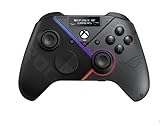
- Built-in OLED display: Create a unique look with customizable animations, view status indicators, and switch profile on the fly
- Versatile tri-mode connectivity: Use low-latency 2.4 GHz RF, Bluetooth, or wired USB-C to play on PC; plus certified for Xbox via USB-C connection
- Intuitive rear controls: Four left and right buttons can be programmed for in-game commands or for on-the-fly joystick sensitivity shifts
- Selectable step triggers: Left and right triggers can be set to short- or full-range modes, with dead zones customizable in Armoury Crate
- Premium sound: Built-in ESS DAC for immersive audio; plus 3.5 mm earphone jack, and a mute button
Dual-mode triggers
Hardware switches let LT and RT operate in either short-travel micro-switch mode or full-travel TMR analog mode. Short travel favors fast shots and menu-heavy games; full travel preserves progressive throttle and braking input for racing and other games that need variable trigger pressure. This is more flexible than a conventional trigger stop that only shortens travel.
ROG Xbox Ally controls
Dedicated Command Center and Library buttons match the ROG Xbox Ally-oriented design. They are useful on ASUS handhelds but less consequential if the controller will stay on a traditional Xbox.
Free tools Windows power users keep installed
One-click scans. No signup required.
Rank #3

- Built-in OLED display: Create a unique look with customizable animations, view status indicators, and switch profiles on the fly
- Tri-mode connectivity: Versatile flexibility with wired USB-C, low-latency 2.4 GHz RF, plus a Bluetooth mode
- Intuitive rear controls: Four left and right buttons can be programmed for in-game commands or for on-the-fly joystick sensitivity shifts
- Selectable step triggers: Left and right triggers can be set to short- or full-range modes, with dead zones customizable in Armoury Crate
- Premium sound: Built-in ESS DAC for immersive audio; plus 3.5 mm earphone jack, and a mute button
Connectivity and polling by platform
| Platform | Connection options | Polling listed by ASUS |
|---|---|---|
| Xbox Series X|S | Included 2.4GHz USB dongle or wired USB-C | 250Hz |
| PC | USB-C, 2.4GHz wireless or Bluetooth | Up to 1,000Hz over USB-C or 2.4GHz |
| ROG Ally / ROG Xbox Ally | USB, 2.4GHz wireless or Bluetooth according to ASUS product materials | Up to 1,000Hz over USB-C or 2.4GHz |
Bluetooth is described by ASUS as a PC connection method; it is not the wireless method for Xbox consoles. Xbox use requires the supplied 2.4GHz receiver or a USB cable. ASUS also advertises a 2.32ms PC wired latency figure, but that is a manufacturer comparison rather than an independent laboratory measurement.
How to connect it
Wired Xbox or PC
- Connect the included USB-C cable to the console or computer.
- Set the platform switch to Xbox or PC.
- Set the connection switch to USB.
- Press the Xbox button. The ROG Aura RGB light indicates connection.
2.4GHz wireless
- Remove the USB wireless dongle from its storage slot.
- Plug it into an available USB-A port on the Xbox or PC. If using the charging stand as the receiver location, connect the stand first.
- Set the platform switch to Xbox or PC and the connection switch to 2.4GHz.
- Press the Xbox button.
Bluetooth on PC
- Set the platform switch to PC and the connection switch to Bluetooth.
- Press the Xbox button, then hold the pairing button for more than three seconds until the ROG logo flashes blue.
- In Windows, choose Add a device under Bluetooth settings and select ROG RAIKIRI II.
Gear Link customization—and its Xbox limitation
ASUS’s browser-based Gear Link tool provides five profiles with button remapping, vibration control, joystick response curves, battery-level and low-battery settings, sleep timing, stick and trigger calibration, and full-travel trigger sensitivity. Triggers must be switched to full-travel mode before calibration.
Rank #4
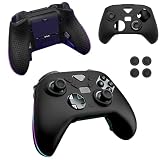
- Compatible models:For ASUS ROG Raikiri II Xbox Wireless Gaming Controller.Please check the model carefully before purchasing for it
- High-quality materials:Made of high quality material that can absorb shock, it not only feels good to the touch, but also provides excellent protection. It is also highly flexible and resistant to dirt and fingerprints. Even if it gets a little dirty, you can clean it by washing it with water or wiping it with a damp cloth.
- Full Protection:Strong and drop-proof, dustproof, good touch. Protect your device from any impact caused by accidental drop or collision.
- Precise Cutouts: All functions are easily accessible without removing the case.
- QUALITY GUARANTEE:All our products are inspected before shipment. We try our best to produce every product and strive to improve product quality. If you have any questions about our products, please contact us directly.
Gear Link is a PC/web workflow. TechRadar’s review identifies the lack of equivalent on-console configuration convenience as a weakness, so Xbox-first owners may need to connect the controller to a Windows computer whenever they want deeper profile management.
Independent reader supportYour contribution helps us test, update, and keep practical guides available for everyone.Battery, accessories and physical details
ASUS rates 2.4GHz battery life at up to 50 hours, with RGB lighting, audio and vibration turned off. That is a best-case manufacturer estimate, not a guaranteed runtime with those features enabled.
The Tool Desk
Outbyte Driver Updater FREEScan for outdated or missing drivers - takes under a minuteDriver Scan →Outbyte PC Repair FREERepair Windows errors before they cause bigger problemsFix Now →| Item | ASUS-listed detail |
|---|---|
| In the box | Controller, USB wireless dongle, detachable USB-C-to-USB-A cable, protective carrying case, charging stand, stand feet, two high-profile thumbstick caps, quick-start guide, warranty booklet and ROG sticker |
| Weight | 345g including cable |
| Dimensions | 105mm wide × 65mm high × 155mm long |
| Audio | 3.5mm analog headset output and microphone input |
| Cable | 2.5m detachable USB-C-to-USB-A |
The included case and charging stand materially improve the package compared with a controller-only price comparison. Remember that the 345g measurement includes the cable and is not directly comparable with wireless-only controller weights.
Who should buy it?
- Cross-platform players: You can use Xbox-certified 2.4GHz or USB connections on console, then switch to 1,000Hz PC operation and Bluetooth when appropriate.
- Competitive PC players: TMR sticks, four rear buttons, clicky controls and high polling are aimed at fast, configurable play.
- ROG Ally owners: The dedicated Command Center and Library buttons and bundled stand fit ASUS’s handheld ecosystem.
- Shooter-and-racing players: Dual-mode triggers cover rapid digital actuation and progressive analog control.
Who should skip it?
- Xbox-only casual players: You will receive 250Hz polling and may not benefit from the PC-only 1,000Hz headline.
- Buyers who need on-console setup: Deeper customization is handled through Gear Link on a PC/browser.
- Players seeking quiet, soft buttons: Micro-switches are tactile but can feel loud or sharp.
- Value-focused buyers: $189.99 is a substantial premium over a standard Xbox controller.
- Anyone interpreting “anti-drift” literally: TMR reduces one common sensor-wear mechanism but does not guarantee that every mechanical or calibration problem is impossible.
Common setup problems
- No Xbox wireless connection: Confirm the platform switch is on Xbox, the connection switch is on 2.4GHz, and the dongle is plugged into the console or charging stand.
- Bluetooth pairing fails: Bluetooth setup is for PC; select PC mode and hold the pairing button for more than three seconds.
- Trigger calibration is unavailable: Move LT and RT to full-travel mode before opening calibration in Gear Link.
- Battery falls short of 50 hours: RGB, audio and vibration consume additional power.
- Expected 1,000Hz on Xbox: Xbox operation is listed at 250Hz.
Verdict
At $189.99, the ROG Raikiri II is a feature-rich premium package rather than a straightforward Xbox replacement. TMR sticks, four rear buttons, clicky controls, switchable trigger behavior, a case and charging stand help justify the price for cross-platform players and ROG Ally owners. Its value is weaker for Xbox-only buyers who cannot use the 1,000Hz PC mode, dislike PC-based customization or simply want a quieter, simpler controller.
Quick Recap
Product prices and availability are accurate as of the date/time indicated and are subject to change. Any price and availability information displayed on Amazon at the time of purchase will apply.




