Quick wins for a faster PC:
Clear out junk files and repair common Windows errorsFree Scan →Scan for outdated or missing drivers - takes under a minuteDriver Scan →For most GTX 1070 owners, the AMD Ryzen 5 5600 is the best-value CPU: it has six cores and 12 threads, works with DDR4 on the AM4 platform, and is a sensible upgrade for many existing systems. The Intel Core i5-12400F is a strong alternative when its motherboard bundle costs less. If you are building a new system around a graphics-card upgrade planned soon, consider the Ryzen 5 7600 and AM5 instead—but it is more platform than the GTX 1070 needs on its own.
The right choice depends less on a theoretical “bottleneck” score than on your motherboard, memory, games, resolution, frame-rate target, and total upgrade cost.
Quick recommendations
| CPU | Best for | Platform and memory | Why choose it | Main trade-off |
|---|---|---|---|---|
| AMD Ryzen 5 5600 | Most buyers; AM4 upgrades and low-cost builds | AM4, DDR4; 6 cores/12 threads | Good gaming capability without requiring a DDR5 platform | Check motherboard BIOS support; AM4 has limited future CPU upgrade runway |
| Intel Core i5-12400F | Buyers who find a cheaper Intel bundle | LGA1700; DDR4 or DDR5 board; 6 cores/12 threads | Strong alternative with a discrete GPU already in the system | No integrated graphics; compare full platform cost |
| AMD Ryzen 5 7600 | New builds with a near-term GPU upgrade planned | AM5, DDR5; 6 cores/12 threads | Newer platform and more upgrade runway | Motherboard and memory raise the cost without materially helping the GTX 1070 |
| AMD Ryzen 7 5700X or 5700X3D | Existing AM4 systems needing more workload or gaming headroom | AM4, DDR4; 8 cores/16 threads | Can extend an existing platform, especially with a later GPU upgrade | Usually unnecessary for ordinary GTX 1070 gaming; 5700X3D pricing and stock vary |
| AMD Ryzen 5 5500 or Intel Core i3-12100F | Strictly low-budget builds | AM4/DDR4 or LGA1700; 4–6 cores depending on model | Can be adequate when the complete platform is notably cheaper | Less headroom for CPU-heavy games and background tasks |
These are scenario-based recommendations, not a claim that one processor always produces the highest frame rate. Compare CPU, motherboard, memory, cooler, and any BIOS-update costs together; do not judge by processor price alone.
Why the Ryzen 5 5600 is the best fit for most GTX 1070 owners
The Ryzen 5 5600 is a Zen 3 AM4 processor with six cores, 12 threads, boost clocks up to 4.4 GHz, a 65 W TDP, PCIe 4.0 support, and DDR4-3200 support, according to AMD’s product specifications and its Ryzen 5000 announcement. Six cores and 12 threads provide a sensible balance for games and everyday multitasking, while the DDR4 platform can keep an upgrade affordable.
The Tool Desk
Outbyte PC Repair FREERepair Windows errors before they cause bigger problemsFix Now →Outbyte Driver Updater FREEScan for outdated or missing drivers - takes under a minuteDriver Scan →#1 Best Overall

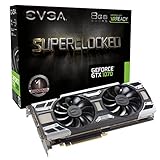
- Chipset: NVIDIA GeForce GTX 1070
- Video Memory: 8GB GDDR5;Virtual Reality Ready
- Memory Clock: 8008 MHz ; Memory interface: 256-bit
- Max. Resolution: 7680 x 4320, support 4x Display monitors
- Please Note: Kindly refer the User Guide before use.
It is especially compelling if you already own a compatible AM4 motherboard and DDR4 memory. For many games at 1080p or 1440p, it supplies ample CPU capability without paying for performance the GTX 1070 may not be able to use. It cannot, however, make the graphics card faster in demanding games where the GPU is already the limit.
Before installing it in an older AM4 system
- Find the exact motherboard model and check its official CPU support list for the Ryzen 5 5600.
- Confirm the required BIOS version and whether your board needs an intermediate update.
- Check that the existing cooler is compatible and mounted correctly.
- Confirm that memory is installed in dual-channel configuration and that its rated profile is enabled if appropriate.
AMD announced expanded Ryzen 5000 support for selected 300-series chipsets, but that does not guarantee support on every A320, B350, or X370 board; consult the specific board’s support page and BIOS notes before buying.
When the Core i5-12400F is the better deal
The Core i5-12400F has six performance cores and 12 threads, turbo frequency up to 4.4 GHz, 18 MB cache, and an LGA1700 socket. Intel’s specification page identifies it as a processor without integrated graphics; Intel’s reference material lists support for DDR4-3200 or DDR5-4800 and 65 W base/117 W maximum turbo power.
Choose it when a complete LGA1700 bundle—CPU, DDR4 motherboard, and any memory you need—costs less than the comparable AM4 option, or when you already have a suitable LGA1700 board. A DDR5 board is not a worthwhile extra expense just to run the GTX 1070. The F suffix means the processor cannot provide display output by itself, but that is not a problem while the GTX 1070 is installed: connect the monitor to the graphics card.
Recommended Free Tools
Rank #2

- Powered by the NVIDIA GeForce GTX 1070 graphics processing unit (GPU)
- 8GB GDDR5 (256-bit) on-board memory
- PCI Express 3.0 x16 interface
- NVIDIA CUDA technology
- VR-ready
Intel’s listed boxed recommended customer price is not a current retailer quote. Because this is an older generation, compare live local prices and the total bundle rather than relying on a launch or list price.
Should you build on AM5 with a Ryzen 5 7600?
The Ryzen 5 7600 makes sense when you are buying a new platform and expect to replace the GTX 1070 with a substantially faster card soon. AM5 and DDR5 offer a newer platform path, and the extra CPU capacity can matter more after a GPU upgrade. For a system intended to keep the GTX 1070 for years, however, a Ryzen 5 5600 or i5-12400F platform is generally a more proportionate spend.
Tom’s Hardware lists the Ryzen 5 7600X among budget gaming recommendations and describes the Ryzen 5 5600 as a value option for buyers remaining on AM4. Its broad gaming-suite testing is not a GTX 1070-specific comparison, so it supports platform context rather than a promised frame-rate gain for this pairing: Tom’s Hardware CPU recommendations.
When an eight-core AM4 processor is worth considering
Ryzen 7 5700X for mixed workloads
The Ryzen 7 5700X has eight cores and 16 threads, boost up to 4.6 GHz, a 65 W TDP, and AM4 support, according to AMD’s Ryzen 5000 announcement. Consider it if you already own a compatible AM4 system and use CPU-based streaming, compiling, rendering, or heavy multitasking—or if its price is close to the 5600 and you plan a GPU upgrade. For gaming with a GTX 1070 alone, the extra cores may not deliver a worthwhile difference.
Rank #3

- Chipset: NVIDIA GeForce GTX 1070
- Video Memory: 8GB GDDR5 and card dimension(mm)-6-pin x 1, 8-pin x 1
- Memory Clock: 8108 MHz (oc mode) ; Memory 8GB GDDR5 (256-bit) , Interface: PCI Express x16 3.0. DirectX Version Support - 12, OpenGL Version Support- 4.5, Multi-GPU Technology - SLI, 2-Way
- Max. Resolution: 7680 x 4320, support 4x Display monitors
- Please Note: Kindly refer the User Guide before use.
Ryzen 7 5700X3D as a final AM4 gaming upgrade
The 5700X3D is a situational choice for an AM4 owner who prioritizes CPU-heavy games, high-refresh 1080p, or a future faster graphics card. Tom’s Hardware identifies the 5700X3D and 5800X3D as the fastest gaming upgrade options on AM4 and notes that they have reached end of life. Remaining stock and used-market prices therefore matter. It is not a default GTX 1070 recommendation: paying a premium for it makes little sense if the graphics card is staying and the games are GPU-limited.
Cheaper choices: where to save and where not to
Ryzen 5 5500
The Ryzen 5 5500 can suit an extremely low-cost AM4 build if it is substantially cheaper than the 5600. It has less cache and PCIe 3.0 support rather than PCIe 4.0; Tom’s Hardware also flags its PCIe 3.0 limitation in its CPU recommendations. Prefer the 5600 when the price gap is small.
Core i3-12100F
The four-core, eight-thread i3-12100F can be adequate for lighter competitive games and ordinary 60 Hz gaming when the CPU-and-board bundle is materially cheaper. It gives up headroom in CPU-intensive modern games, streaming, background applications, and busy multiplayer sessions. If a six-core CPU is only a little more expensive, it is the safer general-purpose choice.
Ryzen 5 5600F
AMD lists the 5600F as a six-core, 12-thread AM4 processor with DDR4, PCIe 4.0, and a 65 W TDP, but its product page identifies APJ regional availability. Check local availability rather than assuming it is a broadly available US option: AMD Ryzen 5 5600F specifications.
Rank #4
- This Certified Refurbished product is tested and certified to look and work like new. The renovation process includes functionality testing, basic cleaning, inspection and repackaging. The product ships with all relevant accessories, a minimum 90 day warranty and may arrive in a generic box. Only select sellers who maintain a high-performance bar can offer Certified Refurbished products on Amazon.com
Will your CPU bottleneck a GTX 1070?
There is no fixed bottleneck percentage that describes every system. The limiting part changes with the game engine, resolution, graphics settings, frame-rate target, refresh rate, memory configuration, background applications, and software updates.
- At 1440p or high visual settings: the GTX 1070 is more likely to limit performance, so a costly CPU upgrade may barely change frame rates.
- At 1080p and 60 FPS: a Ryzen 5 5600, i5-12400F, or comparable modern six-core CPU is generally sufficient.
- At 1080p and high refresh rates: CPU speed and memory latency matter more, particularly in esports, simulation, strategy, and large multiplayer games.
- In CPU-heavy games: a stronger processor can improve average FPS or frame-time consistency even though the GTX 1070 remains unchanged.
To diagnose a problem, monitor GPU usage, individual CPU-core usage, clocks, temperatures, frame times, and the game’s FPS cap or V-sync setting. Low GPU utilization alone does not prove a CPU bottleneck: power settings, thermal throttling, background processes, driver issues, single-channel RAM, and game-engine behavior can also be responsible.
Compatibility checks before buying
- Identify the current platform. Check the motherboard model and socket; CPU names alone do not establish compatibility.
- Verify motherboard and BIOS support. Use the exact model’s CPU support list and required BIOS version. For an older AM4 board, confirm whether it can update with the current CPU installed or supports BIOS Flashback.
- Account for memory. Ryzen 5 5600 and DDR4 LGA1700 boards can reuse compatible DDR4. Ryzen 5 7600 requires an AM5 motherboard and DDR5.
- Check the cooler and case. Confirm the cooler’s socket mounting hardware, physical clearance, and adequate cooling. Check the specific boxed CPU listing to see whether a stock cooler is included.
- Check the graphics-card slot and power. The cited MSI Founders Edition specification for the GTX 1070 lists PCIe 3.0 x16, 8 GB GDDR5 on a 256-bit bus, 150 W power, and one 8-pin connector; it recommends a 500 W PSU. This is that model’s specification, not a universal rating for every partner card. See MSI’s GTX 1070 Founders Edition specifications.
- Connect the monitor to the right output. With an i5-12400F, connect it to the GTX 1070 because the CPU has no integrated graphics.
The card is a PCIe 3.0 device, so it works in newer PCIe slots but does not gain a meaningful performance boost from PCIe 4.0 or 5.0. Choose a newer platform for its CPU or future-upgrade path, not to unlock extra GTX 1070 performance.
Upgrade the CPU or the GPU first?
- CPU first: your processor is an old quad-core or older six-core model, gameplay stutters, frame times are erratic, and CPU load is high while the GPU is underused.
- GPU first: you already have a reasonably modern CPU, the GTX 1070 is near full utilization in your games, and lowering graphics settings or resolution increases frame rate.
- Compare whole-platform cost: include motherboard and memory replacement if the CPU upgrade requires them. If that total approaches the cost of a graphics-card upgrade, compare the expected improvement in the games you actually play.
- Plan for later: a more capable CPU platform can be reasonable if you will keep it for several years and install a faster GPU later. It is not automatically the best use of a limited budget today.
Used CPU buying checklist
Used prices and stock can change the value ranking, especially for older AM4 processors. Before paying, check:
- Whether the seller offers a return period and can show the processor booting.
- For the CPU’s condition: bent pins on pin-based models, or damaged contact pads on others.
- Whether a cooler is included and whether the listing is boxed or OEM/tray; warranty terms can differ.
- Whether your motherboard BIOS supports the exact CPU.
- The final price after shipping and taxes, compared with a newer complete platform.
Troubleshooting after an upgrade
No display with an F-series Intel CPU
The i5-12400F has no integrated graphics. Connect the monitor to the GTX 1070’s output, not the motherboard’s video connector. If the card still gives no display, check its power connector and reseat it with the system powered off.
Stuttering or unexpectedly low performance
- Confirm the motherboard BIOS and chipset drivers are current and appropriate for the new CPU.
- Check that memory is running in dual-channel mode and at its intended profile; enable XMP where applicable.
- Inspect cooler mounting, CPU temperatures, and boost clocks for signs of thermal throttling.
- Check power settings, game FPS caps, V-sync, overlays, recording software, and background applications.
- Review GPU drivers and frame-time behavior rather than relying on one utilization reading.
On older AM4 boards, follow the motherboard maker’s official BIOS instructions exactly. Confirm the needed version and whether the board can update without a supported CPU; never interrupt power during a BIOS update.
Quick Recap
Product prices and availability are accurate as of the date/time indicated and are subject to change. Any price and availability information displayed on Amazon at the time of purchase will apply.




