For most Linux players, start with standalone Snes9x. It offers the best balance of compatibility, speed, simple setup and useful features; the official project lists version 1.63 and provides Linux GTK and X11 builds. Choose bsnes for accuracy-focused emulation and unusual cartridge features, or RetroArch with the Snes9x core when you want one interface for several consoles. Mesen-S is a strong alternative core, while Snes9x 2005 Plus is reserved for exceptionally weak hardware.
An emulator is only the player. Use legally obtained dumps, homebrew or public-domain games; downloading copyrighted ROMs without permission may be unlawful where you live.
Quick comparison
| Option | Form | Best for | Setup | Performance profile | Accuracy and special features | Main drawback |
|---|---|---|---|---|---|---|
| Snes9x | Standalone app (also a RetroArch core) | Most players | Easy | Usually excellent on modest PCs | Excellent mainstream compatibility and broad enhancement-chip support | Not the specialist choice for every edge case |
| bsnes | Standalone app (also available as a core) | Accuracy, enhancement chips and advanced video | Moderate | May need more CPU/GPU headroom | Low-level coprocessor emulation, Super Game Boy, Satellaview, MSU1, HD Mode 7 | More configuration than Snes9x |
| RetroArch + Snes9x | Frontend plus core | Multi-system libraries | Moderate | Depends on frontend, driver and settings | Playlists, profiles, shaders, rewind, netplay and achievements | More layers and less obvious file paths |
| RetroArch + Mesen-S | Frontend plus core | Alternative high-accuracy testing and debugging | Moderate | Can be more demanding | Region controls and a different compatibility profile | Less beginner-friendly |
| Snes9x 2005 Plus | Legacy RetroArch core | Very weak hardware | Moderate | Lightweight | Older code path | Not the default for modern Linux systems |
1. Snes9x: the best overall choice
Snes9x is the practical recommendation for a single-console Linux setup. It is mature, lightweight, supports common .sfc and .smc images and many mainstream enhancement chips, and runs as a normal desktop application without a frontend. The project recommends current releases rather than obsolete speed-oriented builds; its release page lists Snes9x 1.63 at the time of writing: official releases. Project information is at github.com/snes9xgit/snes9x, with version guidance at What version should I use?.
Who should choose it
- You want to open a game quickly rather than learn a frontend.
- You have an older or modest Linux desktop.
- You mainly play ordinary commercial SNES/Super Famicom games.
- You want straightforward controller, save and video settings.
Download the Linux GTK or X11 archive from the release page. Package versions in distribution repositories may lag behind upstream.
#1 Best Overall

- ✅【Compatibility】Compatible with Raspberry Pi, Windows PC, Linux ,Mac. Specifically designed for playing classic old school retro snes games on computer or laptop.This is the USB controller what has a USB plug for PC, NOT compatible for Original SNES super Nintendo console
- ✅ 【Ergonomic Design】Super precise cross key and function buttons,the cross direction key adopts frosted concave design,anti-sweat and anti-slip.The shape of the controller is designed to fit the contour of your hands,easy and comfortable to hold.
- ✅ 【Advanced Game Experience】PC running operating system:Windows 98/2000/ ME/XP/Vista/Win7/8/8.1/11 or later,or Mac running OS X 10.0/Mac OS X or above.It works with most of emulators you wish to download and use,such as VirtuaNES(PC),sens9x,Zsens,sensgt,Uosnesw,RetroArch,OpenEmu(MAC),NESEmu and Jnes etc.
- ✅ 【Wired USB Connection】Standard USB 2.0 port with a 1.5 meters (5ft) cable, don't need to install any drivers, you must manually set the buttons and directionals within the emulator you're using, and the controller not automatically assigns buttons/directional axes. Notice: please download the game emulator first before start the games, you can download the emulator “VirtuaNES” on PC and “OpenEmu”on MAC.
- ✅【Satisfaction】Third party controller(USB Version), not for original snes console and not support for switch. If there is an incompatibility on MAC or Raspberry Pi , please contact the seller for a support.
2. bsnes: accuracy and advanced SNES features
Choose bsnes when faithful hardware behavior and unusual cartridge functions matter more than the simplest setup. Its Linux build documents low-level emulation of multiple coprocessors, true Super Game Boy emulation through SameBoy, HD Mode 7 with optional supersampling, Satellaview and BS Memory support, MSU1, IPS/BPS soft-patching, save-state undo/redo, OpenGL multi-pass shaders, run-ahead, dynamic rate control, 7-Zip decompression and built-in game and cheat databases. See the official Linux page.
For ordinary games, current Snes9x and bsnes can feel practically identical. bsnes is a better candidate for edge-case preservation and special-chip software, but it may require more resources and tuning. Do not treat its design goal as a guarantee that every title will look or run better.
3. RetroArch with the Snes9x core: best all-in-one setup
RetroArch is a frontend, not one SNES emulator. A separately installed core performs emulation, so changing from Snes9x to bsnes or Mesen-S can change timing, options and save locations.
Install and load a game
- Install RetroArch using your distribution package or an official build from RetroArch releases.
- Open the core downloader or core-management screen and install Nintendo – SNES / Famicom (Snes9x).
- Choose Main Menu → Load Content, select the game image and let RetroArch associate the installed core.
- Configure controls under the input settings; use the Quick Menu during play for core options, save states, shaders and overrides.
Labels vary slightly by build, theme, translation and distribution package. The current Libretro documentation lists support for .smc, .sfc, .swc, .fig, .bs and .st, plus saves, rewind, netplay, cheats, remapping and soft-patching: Snes9x core documentation.
Recommended Free Tools
Why use RetroArch
- One library and controller configuration for many systems.
- Centralized shaders, rewind, run-ahead, netplay, playlists and achievement integrations.
- Easy comparison of Snes9x, bsnes and Mesen-S cores.
The trade-off is complexity: settings can exist globally, per core, per content directory and per game. Overrides can make two apparently identical games behave differently.
Rank #2

- Wired Controller, USB cable: 1.8M.
- Compatible with Switch (version 3.0.0 or above), Windows, Raspberry Pi devices.
- Rumble vibration.
- Support turbo function.
4. RetroArch with Mesen-S
Mesen-S is a cross-platform SNES emulator available primarily as a Libretro core. Try it when a particular title behaves differently in Snes9x, when you want debugging-oriented tools, or when you prefer another accuracy-focused implementation. Its documentation covers region detection and core options at Libretro’s Mesen-S page.
Automatic NTSC/PAL detection is not always possible. If a game has incorrect speed, timing or compatibility, select the known region manually and test again. Mesen-S is usually overkill for a beginner who simply wants to play common cartridges.
5. Snes9x 2005 Plus: a narrow low-end fallback
Use this older core only if current Snes9x and bsnes-family cores cannot maintain full speed on your device. Libretro explicitly advises against making it the default: Snes9x 2005 Plus documentation. On modern Linux hardware, first try standalone Snes9x or the current RetroArch Snes9x core. Do not install ancient standalone Snes9x releases or ZSNES merely because they have a reputation for speed; they are obsolete choices.
Do these 3 things before closing this tab:
1Repair Windows errors before they cause bigger problems2Scan for outdated or missing drivers - takes under a minute3Clear out junk files and repair common Windows errorsHow to install on Linux
Official Snes9x archive
Download the Linux GTK or X11 build from the official releases. An illustrative extraction workflow is:
mkdir -p "$HOME/Applications/snes9x"
tar -xf snes9x-*.tar.* -C "$HOME/Applications/snes9x"
find "$HOME/Applications/snes9x" -maxdepth 2 -type f -perm -111
Archive formats and executable names can change, so inspect the extracted directory rather than assuming this is a universal installer.
Rank #3

- 【Supported Operating System】The Game Controller is specifically designed for playing classic old school retro snes games on computer or laptop. Compatible with Windows 98 / ME / Vista / 2000/2003 / XP / 7 / 8 / 8.1 / 10/11, Mac OS X/ OS X 10.0 and beyond, Raspberry Pi, Raspberry PI 2 model B,Model A, Raspberry Pi 1 Model B+, Raspberry Pi 2,Raspberry Pi OS, Raspberry Pi 3 Model B+, Raspberry Pi 3, Raspberry Pi Zero.
- 【Simple USB Plug and Play】If your program or application accepts USB controller input, this classic game controller do not need install drivers or patches. 1.5 meter external cable(approx. 5 ft. Long). Notice: Please download the game emulator first before start the games, and then you must manually set the buttons and directionals within the emulator you're using, and the controller not automatically assigns buttons/directional axes. If on the Steam platform, you need to first enable Steam's "Universal Controller Configuration Support" and then restart Steam. After entering the game, you also need to manually bind key positions in the game
- 【High Sensitivity without Delay】Super sensitive buttons for precision control: 6 fire buttons, a 'Start' button and a 'Select' button, motion control cross. Play your favorite old school games with classic retro feel. Fits perfectly in the hand and also perfect for two player action.Note: Not applicable to Switch/PS games. Not Compatible with TV/ TV Box, third Mini Games Box and Tesla Model 3
- 【Supported Game Emulators】The game controller works with most emulators. Download any emulator you wish to download and use from Google and do the same with ROMS. Notice:Third party controller, not original controller. But it works phenomenal with the Raspberry Pi game emulation and so on
- 【Product Service】If you have any problem during use, send message to us and we will help you to solve the problem soon
Distribution packages
Package names and versions vary. Verify the package for your release before running a command. Common examples are:
sudo apt install retroarch
sudo dnf install retroarch
sudo pacman -S retroarch
These install RetroArch, not necessarily the SNES core; install Nintendo – SNES / Famicom (Snes9x) inside RetroArch afterward. Repository builds may lag behind upstream.
Controllers, video and audio: a safe baseline
Controllers
Pair Bluetooth devices through your Linux desktop first. USB SNES pads, Xbox and PlayStation controllers and generic XInput/SDL devices often work, but automatic mapping is not guaranteed. In the emulator, verify Player 1 and Player 2 separately:
- D-pad diagonals and both analog-stick directions if applicable.
- A, B, X, Y, L, R, Start and Select.
- RetroArch hotkeys, which can intercept a button combination intended for the game.
bsnes exposes configurable controls and hotkeys for fullscreen, state management and fast-forwarding; see its default-controls documentation.
Picture and sound
- Begin at the correct aspect ratio and integer scaling where it fits your display.
- Start with no shader. CRT, HQ2x and NTSC filters are aesthetic choices; heavy shaders increase GPU load.
- Enable frame limiting and stable audio/video synchronization before adjusting latency.
- Run-ahead reduces perceived input lag but increases CPU demand.
Widescreen hacks are not equivalent to original hardware behavior. Audio interpolation and filters are preferences, not objective accuracy improvements.
Rank #4
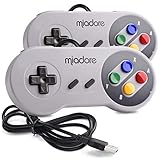
- ✔ Compatible with Windows98/ME/Vista/2000/2003/XP/7/8/8.1/10; Mac OS X and beyond ; Emulators ;Raspberry Pi ;Raspberry PI 2 model B ;Retro Pi OS; Retropi System.
- ✔ Simple USB plug and play, no drivers and software required. Note: If you have trouble with using this, make sure it is plugged in before starting your emulator. Also go into input settings and you may have to map the buttons.
- ✔ Work with any emulator you wish to download and use. Google S-N-E-S emulator and then the same for Roms. Way better than normal joypad and keyboard and mouse playing to really enjoy the emulator experience.
- ✔ Super sensitive buttons for precision control, Eight-way directional pad and six digital buttons. Play your favorite old school games with authentic retro feel. Arrowed D-pad, concave X and Y buttons, convex A and B buttons, rubber start and select buttons. Cord is approx. 5 ft. Long, providing a comfortable distance while playing.
- ✔ If you want to play S-N-E-S, N-E-S, PSX, Atari, Genesis, or any other types of this vintage of games... get this. You will not regret it. NOTE:Third party controller, not original S-N-E-S / N-E-S controller. But it works phenomenal with the Raspberry Pi game emulation and so on.
Saves, states, patches and firmware
Normal saves versus save states
- In-game battery saves are written in the format the game expects and are generally the most portable.
- Save states are emulator-specific snapshots. They can fail after changing cores, versions, ROM revisions or settings.
- Auto-save and auto-resume features vary by emulator; never assume closing a window created a portable game save.
- Make a normal in-game save.
- Exit the emulator cleanly.
- Back up the battery-save file and any important states.
- Test a migrated save before deleting the original.
bsnes documents named states, screenshot previews, undo/redo and automatic game-save behavior at its Linux feature page. Snes9x shortcut layouts vary by port and version; current Unix notes are at the Unix documentation.
The Tool Desk
Outbyte PC Repair FREERepair Windows errors before they cause bigger problemsFix Now →Outbyte Driver Updater FREEFix the driver behind crashes, sound loss and screen glitchesFind Drivers →Soft-patching translations and hacks
IPS and BPS files are patches, not complete games. bsnes and Libretro cores support soft-patching; see Libretro’s guide. Keep the original dump untouched and create a separate patched copy. A patch can fail when the base image has the wrong region, revision, checksum or header format, or when you apply it to a ZIP/7z archive instead of the extracted ROM. Do not load states made from the unpatched image into the patched version.
BIOS and special systems
Ordinary SNES cartridge games generally need no separate BIOS. Special content is different: the Libretro Snes9x core lists optional BS-X.bin for BS-X/Satellaview and STBIOS.bin for Sufami Turbo, placed in RetroArch’s system directory. Super Game Boy, Satellaview, Sufami Turbo and MSU1 projects can each have additional file or dump requirements.
Troubleshooting
The game will not load
- Confirm the file is an SNES image, not a patch or unsupported archive.
- Extract the archive if your emulator cannot read it.
- Try a known-good, legally obtained dump.
- Use the current Snes9x core or standalone build.
- Check whether special hardware needs firmware.
- Remove an incompatible save state and launch normally.
Black screen or missing graphics
Disable shaders, return to native resolution and default core options, then test another current core. A bad dump, failed patch, enhancement-chip setting or video driver can all produce similar symptoms.
Crackling audio or uneven speed
First disable heavy shaders and run-ahead, restore default audio buffering and verify full-speed emulation. Check the selected audio driver, frame synchronization and system power-management mode. Some games intentionally slow down on original hardware; distinguish that from the emulator failing to maintain its target rate.
Quick wins for a faster PC:
Repair Windows errors before they cause bigger problemsFix Now →Fix the driver behind crashes, sound loss and screen glitchesFind Drivers →A save disappeared
Check whether you changed the ROM filename, directory, core or save directory, and whether the file is read-only. Back up saves before upgrading or switching cores; a save state is not the same thing as the game’s battery save.
The controller works in Linux but not in-game
Confirm the emulator sees the device, assign it to Player 1, reload its mapping profile and check that a RetroArch hotkey is not capturing the input. Some accessories require a compatible game or subsystem.
Quick Recap
Which one should you install?
- Fastest path to playing: standalone Snes9x.
- Accuracy, enhancement chips or preservation features: bsnes.
- One interface for many consoles: RetroArch with the current Snes9x core.
- A second high-accuracy core or region/debugging options: Mesen-S.
- Only when newer cores are too slow: Snes9x 2005 Plus.
Product prices and availability are accurate as of the date/time indicated and are subject to change. Any price and availability information displayed on Amazon at the time of purchase will apply.




