There is no motherboard you need to buy specifically for an RTX 3070. The card uses a PCIe 4.0 graphics interface, so the right board is one that fits your CPU, memory, case and expansion needs, with a full-length graphics slot for the card. For most buyers, the sensible choices are B550 for an existing AM4 system, B650 or B850 for a new AMD build, and B760 for a mainstream Intel LGA1700 system.
Best motherboard choices by platform
These are platform directions and example models to investigate, not a ranking based on RTX 3070 gaming tests. Check the exact board revision, CPU support, memory type, dimensions and features before buying; names and specifications can vary by revision or region, and prices change.
| Build or upgrade | Board direction | Examples | Why it fits | Trade-off |
|---|---|---|---|---|
| New AMD build | AM5 B650 or B850 | MSI MAG B650 Tomahawk WiFi; ASUS TUF Gaming B650-Plus WiFi; MSI MAG B850 Tomahawk WiFi | Pairs with AM5 Ryzen CPUs and DDR5, with mainstream features and a newer AMD platform. | Requires a compatible AM5 CPU and DDR5 memory; not a drop-in upgrade for an AM4 system. |
| Existing AM4 system | B550 | MSI MAG B550 Tomahawk; ASUS TUF Gaming B550-Plus; MSI MAG B550M Mortar WiFi | Can preserve DDR4 and suit supported Ryzen 3000- or 5000-series processors. | Confirm the exact CPU and required BIOS version. It is a mature platform rather than a new socket path. |
| Existing Intel 12th–14th-generation system | B760 for mainstream use; Z790 for specific tuning or expansion needs | MSI MAG B760 Tomahawk WiFi; ASUS TUF Gaming B760-Plus WiFi; MSI MAG Z790 Tomahawk WiFi | These chipsets are in the LGA1700 desktop platform family. | Board variants use either DDR4 or DDR5, not both. Choose the version that matches your memory. |
| Compact system | Micro-ATX B550M, B650M/B850M or B760M | MSI MAG B550M Mortar WiFi; MSI MAG B650M Mortar WiFi; ASUS TUF Gaming B650M-Plus WiFi | Smaller board layout can suit a Micro-ATX case without paying for an ATX board. | A large or thick RTX 3070 can cover nearby slots; check the card and case dimensions. |
| Premium connectivity or expansion | X670/X870 or Z790, selected for the required features | MSI MAG X870 Tomahawk WiFi; MSI MAG Z790 Tomahawk WiFi | Can provide more connectivity, storage or tuning options depending on the exact model. | Does not inherently make an RTX 3070 render games faster. Buy these features only if you need them. |
For a current AMD build, MSI’s platform overview places B650/B850 and higher AM5 chipsets with Ryzen 7000-, 8000- and 9000-series processors, which use DDR5: MSI’s motherboard platform guide. Intel confirms that 12th-, 13th- and 14th-generation desktop processors use LGA1700 with compatible 600- or 700-series chipsets: Intel’s LGA1700 compatibility guidance.
What an RTX 3070 needs from a motherboard
The RTX 3070 does not draw its main operating power through the motherboard slot; it also needs the appropriate power connectors from the PSU. The motherboard’s job is to provide a suitable graphics slot and work with the CPU, memory and other devices in the system.
#1 Best Overall
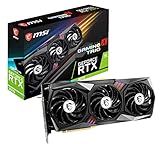
- Chipset: NVIDIA GeForce RTX 3070
- Video Memory: 8GB GDDR6
- Memory Interface: 256-bit
- Output: DisplayPort x 3 (v1.4a) / HDMI 2.1 x 1
- Digital maximum resolution - 7680 x 4320
- A full-length PCIe graphics slot: Use the primary slot, which is commonly the top slot nearest the CPU. A board may have another x16-length connector that is electrically wired for fewer lanes; consult the manual.
- Compatible CPU and memory: Socket, chipset, BIOS support and DDR4/DDR5 type must all match. The GPU does not determine these.
- Physical room: Check the exact card’s length, thickness and occupied slots against the case, other cards, fans and radiators. NVIDIA lists its Founders Edition RTX 3070 at 242 mm long, 112 mm wide and two slots thick, but partner cards can differ: NVIDIA RTX 3070 specifications.
- Enough PSU capacity and the right connector: NVIDIA gives 650W as the reference system-power recommendation, based on a system using an Intel Core i9-10900K. Treat that as a reference, not a guarantee for every build; CPU, card model, PSU quality and condition affect the choice. A quality 650W unit is a practical baseline for a conventional configuration, while a high-power CPU, factory-overclocked card or aging PSU can justify considering 750W. Confirm the exact card’s connector requirements.
NVIDIA specifies PCI Express Gen 4 support, 8GB of GDDR6 and 220W graphics-card power for the RTX 3070. PCIe 5.0 is not required, and choosing a PCIe 5.0 board does not by itself improve RTX 3070 gaming performance. See NVIDIA’s RTX 3070 specifications.
Match the board to your CPU and memory
AMD AM4: keep the value of parts you already own
AM4 is relevant to Ryzen 3000- and 5000-series systems and uses DDR4. A B550 board is generally the balanced choice when replacing a board or building around compatible AM4 parts. X570 can make sense when its additional connectivity or storage support answers a real need. A520 or B450 may cost less, but confirm support for the exact CPU and BIOS; do not assume every board will boot a newer processor out of the box.
Rank #2

- 1. Compatible with multiple CPU types and equipped with advanced chipsets. It delivers high-speed data processing capabilities, effortlessly handling multitasking and complex computations, providing stable core performance for your computer.
- 2. Equipped with multiple interfaces, including several USB ports, high-speed SATA interfaces, and high-performance network card interfaces, it can easily connect to various external devices and achieve efficient data transfer.
- 3. The high-speed memory bracket with a dual-channel design further enhances read and write speeds, making the system more responsive and capable of smoothly running large-scale games and professional software.
- 4.The motherboard employs high-quality electronic components and advanced manufacturing techniques, featuring excellent thermal dissipation performance. It effectively reduces motherboard temperature, ensuring long-term stable operation and extending service life.
- 5. Choose our motherboard, upgrade your computer, and embark on a high-performance and stable digital journey!
If you already have a working AM4 CPU and DDR4 memory, replacing the motherboard with AM5 also means buying an AM5 processor and DDR5 memory. That platform change may still be right for a new build, but the RTX 3070 alone is not a reason to make it. MSI’s overview distinguishes AM4/DDR4 from AM5/DDR5: How to choose a motherboard.
AMD AM5: the mainstream choice for a new AMD build
Ryzen 7000-, 8000- and 9000-series desktop processors use AM5 and DDR5, subject to the exact board’s CPU support and BIOS version. B650 is a value-oriented starting point; B850 is another mainstream option. Consider X670 or X870 when the specific board supplies storage, I/O or connectivity you will use. The E-series chipsets are not an RTX 3070 requirement: pay extra only when the board’s particular expansion features matter.
Rank #3
- Robust Power Solution: high-quality alloy chokes, and durable capacitors to support multi-core processors
- Optimized Thermal Design: Massive heatsinks with strategically cut airflow channels and high conductivity thermal pads
Intel LGA1700: check chipset and the board’s memory variant
For Intel 12th-, 13th- and 14th-generation desktop CPUs, look at a compatible 600- or 700-series LGA1700 board. B660/B760 is generally the mainstream direction; Z690/Z790 is worth considering for supported CPU tuning or additional expansion features. A Z-series board is not automatically faster for gaming with the RTX 3070. Intel’s chipset descriptions outline the platform differences: Intel desktop chipsets.
LGA1700 boards are sold in DDR4 and DDR5 versions. Memory is not interchangeable between those board versions, so identify your existing kit and verify the exact model suffix before ordering.
Rank #4
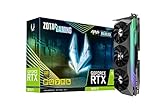
- NVIDIA Ampere architecture, 2nd Gen Ray Tracing Cores, 3rd Gen Tensor Cores.Recommended Power Supply : 750W. Power Consumption : 310W. Supported OS : Windows 10 64-bit (build 2004 or later).Slot Size : 2.5 slot, SLI : Not Supported.
- 8GB 256-bit GDDR6X, 19 Gbps, PCIE 4.0; Boost Clock 1830 MHz
- HoloBlack, SPECTRA 2.0 RGB Lighting, IceStorm 2.0 Advanced Cooling, FREEZE Fan Stop, Active Fan Control, Lighted Metal Backplate
- 8K Ready, 4 Display Ready, HDCP 2.3, VR Ready
- 3 x DisplayPort 1.4a, 1 x HDMI 2.1, DirectX 12 Ultimate, Vulkan RT API, OpenGL 4.6
Newer Intel platform: do not choose it for the graphics card
For a new Intel build around a Core Ultra 200-series desktop processor, check the LGA1851 socket and 800-series chipset compatibility for the exact CPU and board. That is a separate platform decision, not an RTX 3070 requirement. MSI’s platform guide covers its current socket categories: MSI’s platform guide.
Choose features for the rest of the build
Two boards with the same socket can differ in ways that matter more day to day than their GPU slot. Make a short list of the parts and connections you actually need before comparing models.
What’s actually slowing this PC down?
Pick the symptom - the matching free tool is one click away.
Best Value
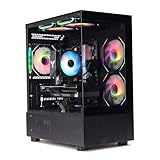
- Processor: I7-12700F 16-Core 24-thread Processor (2.1GHz-5.2GHz)| Graphics: RTX4060 model number:I7 12700F|RTX4060 brand:MXZ
- RAM;16GB | Hard Drive; NVME 1T Solid State Drive
- Power Supply;700W 80+ Power Supply | Operating System; Windows 11 Pro (installed already)
- Special Add-Ons:Window side case panel | Multiple RGB Fans for Maximum Air and lighting
- 1 year parts & labor | Free lifetime tech support| This figuration is capable of running many games.
- Storage: Count the M.2 NVMe drives and SATA devices you plan to install. Some boards disable SATA ports or change slot behavior when particular M.2 sockets are populated; look for the manual’s lane-sharing table.
- Expansion: Account for capture, sound or network cards and for the space the RTX 3070 cooler occupies. An x16-length slot is not necessarily wired for x16 operation.
- Networking and I/O: Decide whether you need Wi-Fi, Bluetooth, 2.5Gb Ethernet, rear USB-C, a front USB-C header or optical audio. These affect usability, not RTX 3070 frame rates.
- Firmware and troubleshooting: BIOS Flashback can help when a CPU needs a firmware update before the system will boot. Debug LEDs, a clear-CMOS control, sufficient fan headers and useful fan controls can also make setup and recovery easier.
- CPU power delivery: Pick VRM cooling for the CPU and its sustained workload. A competent mainstream board is usually appropriate for a Ryzen 5 or Core i5; higher-power Ryzen 7/Core i7 and Ryzen 9/Core i9 workloads call for closer attention to heatsinks, temperatures and firmware power behavior. A large advertised phase count alone does not establish real-world quality.
Form factor is a case compatibility question as well as a board choice. Confirm that the case accepts ATX, Micro-ATX or Mini-ITX as appropriate, then check the exact RTX 3070 model’s clearance. The Founders Edition dimensions do not describe every partner or used card.
Independent reader supportYour contribution helps us test, update, and keep practical guides available for everyone.Enable Resizable BAR carefully
The RTX 3070 supports Resizable BAR, but the option’s availability and menu labels depend on the motherboard, CPU and BIOS. It can help in supported games and configurations, but results vary; it is not a guaranteed performance increase. NVIDIA lists the feature for the card in its RTX 3070 specifications.
- Enter the motherboard’s UEFI/BIOS setup and check that the system boots in UEFI mode.
- Find and enable Above 4G Decoding.
- Enable Resizable BAR or Re-Size BAR Support, if offered. Menu names vary by maker and firmware version.
- Disable CSM if the board requires it for the feature, then save and reboot.
- Verify the status in NVIDIA Control Panel or a trusted system-information utility.
Before changing CSM: an existing Windows installation configured for legacy BIOS boot may fail to start after switching boot modes. Check the installation’s boot mode and partition style, and back up important data before making changes. If you are unsure, consult the motherboard maker’s instructions for your specific firmware rather than changing settings at random.
Buying and installation checks that prevent common problems
- Identify the exact CPU. Confirm socket, supported chipset and BIOS compatibility on the board maker’s support page. If an update may be needed before the system can boot, look for BIOS Flashback or another supported update method.
- Identify the memory you will use. Confirm DDR4 versus DDR5 and check the board’s specification and CPU memory support. Do not order RAM based only on the chipset family.
- Confirm the card and case fit. Look up the exact RTX 3070 manufacturer model, including its dimensions, thickness and power connectors. Check the case’s clearance and whether the card blocks another slot or restricts airflow.
- Install the card in the primary graphics slot. Consult the manual if the board layout or slot wiring is unclear. After assembly, use system information to confirm the negotiated link is as expected under the system’s operating conditions.
- Check lane sharing before adding drives. Use the manual’s storage and PCIe tables to see whether an M.2 installation disables SATA ports or changes another slot’s operation.
- Match the PSU to the whole system. Confirm its GPU cables and capacity against the CPU and exact card, not just the motherboard choice.
The most common expensive mistake is buying the board before checking the CPU socket and RAM type. Another is paying for a flagship chipset or PCIe 5.0 label on the assumption it will make this PCIe 4.0 graphics card faster. Spend on those features only if they solve a real expansion, storage, tuning or connectivity need.
Recommended Free Tools
Which one should you choose?
- Building new with AMD: Start with a B650 or B850 AM5 board that has the connectivity and storage you need, plus Wi-Fi if you will use it.
- Upgrading an AM4 PC: Look at B550 first if it preserves your compatible CPU and DDR4 memory; verify BIOS support.
- Keeping an Intel 12th–14th-generation CPU: Choose a compatible B760 board for mainstream use; consider Z790 when you specifically need its tuning or expansion options.
- Building compact: Consider a compatible Micro-ATX board, then verify case support, exact card thickness and whether the GPU blocks other devices.
- Considering a premium board: Compare its M.2 slots, I/O, networking, diagnostics and CPU power delivery with what you will use. The RTX 3070 does not justify premium pricing on its own.
Motherboard recommendations are most useful when matched to a CPU, socket and feature list rather than treated as a single GPU ranking. For additional socket-oriented board comparisons, consult Tom’s Hardware’s motherboard guide; for examples of gaming-board categories, see PC Gamer’s gaming motherboard guide.
Quick Recap
Product prices and availability are accurate as of the date/time indicated and are subject to change. Any price and availability information displayed on Amazon at the time of purchase will apply.



