There is no single objectively best pinball game on Steam: the right pick depends on the tables you want, how realistic or forgiving you want the physics to feel, and which modes and PC features matter to you. For Zen Studios’ games, the current Pinball FX is its remastered, updated platform; FX Classic/FX3 remains a separate option with a different feel that some players prefer. To improve at either, learn each table’s rules, control the ball with deliberate flipper timing, and nudge with care.
Which pinball game on Steam should you choose?
Start with the specific tables you want, then consider how you want the game to feel. Steam offers more than one digital pinball option, and community comparisons can help you find candidates, but they are personal impressions rather than a controlled ranking.
| # | Preview | Product | Price | |
|---|---|---|---|---|
| 1 |

|
Star Wars Pinball (Nintendo Switch) | $35.75 | Buy on Amazon |
| 2 |
|
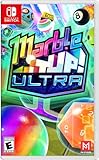
Marble It Up! Ultra – Nintendo Switch | $29.99 | Buy on Amazon |
| 3 |

|
Pinball Arcade (PS4) | $23.95 | Buy on Amazon |
| 4 |
![Pokemon Pinball [video game]](https://m.media-amazon.com/images/I/41IOSBsSz+L._SL160_.jpg)
|
Pokemon Pinball [video game] | $21.43 | Buy on Amazon |
| 5 |

|
Dream Pinball 3D - Nintendo Wii | $26.95 | Buy on Amazon |
| Option | What the available evidence supports | Best fit to investigate |
|---|---|---|
| Pinball FX | Zen Studios describes this as its current platform, with remastered and updated tables. Its Steam announcement advertises “Pro Physics,” “4K HDR visuals,” and ray tracing; these are vendor feature claims, not independent performance measurements. | Players interested in Zen’s current platform and its presentation features. Check the Steam page for current tables, modes, and PC requirements. |
| FX Classic/FX3 | A separate Steam listing from Pinball FX. Zen’s FAQ says it had no plans to sunset FX3 when that FAQ was published; that is not a guarantee of future support. Some community commenters prefer its lighter or more arcade-like feel, but that is subjective. | Players who want to compare its feel with Pinball FX or who are interested in its separate library. Verify table ownership and entitlements before buying. |
| Zaccaria Pinball or Pinball Arcade | Both appear in Steam community discussions as alternatives. Those discussions do not establish a complete, current feature or table inventory. | Players whose preferred tables or style may be better served by another developer. Check the relevant Steam listing for current catalog and modes. |
Zen’s FAQ identifies Pinball FX as available on Steam and presents it as its remastered, updated platform. The FAQ’s statement about FX3 reflects Zen’s plans at the time it was written, not a promise about future support. See Zen Studios’ Pinball FX FAQ and its Steam announcement.
How to compare pinball games before choosing
Use the same questions for every candidate rather than relying on an overall “best” label. Catalogs, features, and availability can change, so confirm specifics on each game’s Steam page before purchasing.
The Tool Desk
Outbyte PC Repair FREERepair Windows errors before they cause bigger problemsFix Now →Outbyte Driver Updater FREEFix the driver behind crashes, sound loss and screen glitchesFind Drivers →#1 Best Overall
- 19 Star Wars pinball tables
- asynchronous online multiplayer with a League system
- user generated tournaments
- career mode
- force powers and talents.cantina jukebox.next gen graphics engine, HD rumble support and vertical play
- Table catalog: Are you looking for licensed recreations of real-world tables, original designs, or a particular title? Community discussion describes these differences, but it is not a current, complete inventory.
- Physics and difficulty: Decide whether you prefer a more simulation-oriented or more arcade-like feel, and whether the game’s forgiveness suits you. Players’ descriptions can reflect different versions, tables, or modes.
- Modes and competition: Check for the features you actually use, such as single-player, multiplayer, leaderboards, tournaments, achievements, or challenges. Community comments are not a reliable full feature matrix.
- Presentation and PC fit: High-end visual features do not guarantee a particular frame rate or image quality on your computer. Read the current requirements and consider your own hardware.
- Library continuity: FX Classic/FX3 and Pinball FX are separate platform listings. Check whether tables you already own carry over before assuming an entitlement transfers.
How to get better at digital pinball
Digital pinball rewards deliberate control, not just fast flipper presses. The technique guidance below draws on a guide for Pinball FX2, last updated in 2022. Controls and physics vary by game, table, and mode, so use it as a starting point and check the rules and controls in the game you play.
- Learn the controls and launch: Read the table’s instructions to understand the plunger, launch power, and skill-shot target. The right launch varies by table.
- Practice receiving the ball: Watch where the ball meets the flipper and how fast it is moving. Aim for repeatable contact instead of flipping at every approach.
- Trap the ball when the table allows it: Holding a flipper can settle the ball and give you time to choose a shot. Whether and how this works depends on the game’s physics.
- Build repeatable shots: Learn which flipper contacts send the ball toward the lanes, ramps, or targets you want. Prioritize accuracy over frantic button presses.
- Add controlled nudges and transfers: A nudge may redirect a ball or prevent a drain, while a pass can move it between flippers. Use these techniques sparingly: nudging can trigger a tilt warning or tilt the table, depending on the game and mode.
- Manage multiball and table objectives: Track each ball and learn which shots advance modes, combos, multiball, or jackpots. Plan rather than pressing both flippers at random; the best scoring priorities are table-specific.
This is a practical progression synthesized from the FX2 technique guide and player advice, not a tested training program. The guide also documents analog controller input for launch and nudging in FX2, but that does not establish universal controller compatibility across current Steam pinball games. A controller is optional; check a specific game’s controls before choosing one.
Rank #2
- A Vast Campaign: Roll through an extensive single-player campaign filled with dangerous obstacles, mind-bending paths, shifting gravity, bouncy floors, and potent power-ups.
- Multiplayer Mayhem: Embrace the five competitive and chaotic multiplayer modes. Team up to hunt gems, score goals, escape zombies, and prove your marble mettle online. Blast your way to glory!
- A Beautiful Collection: Unlock a magnificent collection of marbles, trails, and hats! Find hidden trophies, earn medals, and play online - all while earning your next piece of marble fashion.
- Master Your Skills: Push yourself to the next level. Hunting achievements and climbing the Global Leaderboards are sure-fire ways to become a marble master! Weekly Challenges add new modifiers to levels for a fresh new way to compete each week!
- Languages: Dutch, English, French, German, Italian, Korean, Portuguese, Russian, Simplified Chinese, Spanish, and Traditional Chinese.
Read the Pinball News FX2 guide for its table-control examples, and treat them as FX2-specific unless your chosen game documents the same behavior.
Quick Recap
Best Value
- 6 tables with various themes. Multi-ball mode - 3 balls at once.
- Sounds and music with brilliant lighting. Multiplayer mode-up to 4 gamers.
- 6 dynamic + 1 fixed camera position.
- Pinball simulation game with realistic physics.
- Balls made out of 6 materials such as: steel, wood, marble, ivory and gold.
Rank #4
- Whack a Pokeball around a pinball machine that helps you catch Pokémon
- Red and Blue machines have their own techniques, challenges, bonus levels, and Pokémon
Rank #3
- title: Pinball Arcade Sony Playstation 4 PS4 Game UK
- brand: Nioxin
- manufacturer: System 3
Product prices and availability are accurate as of the date/time indicated and are subject to change. Any price and availability information displayed on Amazon at the time of purchase will apply.



