Free tools Windows power users keep installed
One-click scans. No signup required.
This project builds two small handheld Pong consoles that communicate directly over ESP-NOW: no Wi-Fi router or internet connection is needed. Each unit uses a LOLIN D1 Mini with an ESP8266, an 84×48 Nokia 5110 display and physical controls; one runs as the host and the other as the client. The original project, published by All About Circuits on March 3, 2024, is a useful reference build, but its linked software instructions are version-specific and some wiring and library details need checking before assembly.
What the project builds
The demonstration is a pair of handhelds for a two-player Pong-style game, not a single console or a general-purpose emulator. The host starts each match and keeps the authoritative game state. The client sends its paddle input and renders state received from the host. The original article’s parts list is for one unit, so a multiplayer pair needs two complete builds. See the original project and its downloadable files.
Each console combines a LOLIN D1 Mini (ESP8266), Nokia 5110 LCD, PCF8574 I/O expander, buttons, buzzers and an ATtiny85/45 audio controller. It can be prototyped on a breadboard, moved to perfboard, or built around the Eagle PCB files supplied with the project.
How the local wireless link works
ESP-NOW uses the ESP8266’s Wi-Fi radio for direct device-to-device communication. In this design, each board addresses its peer by MAC address. That is distinct from ordinary infrastructure Wi-Fi: the consoles do not need to join a router, reach the internet or use a cloud service.
#1 Best Overall

- HANDHELD VIDEO GAMES - Thanks to the deluxe handheld games for adults, "what happens in Vegas" can now happen wherever you are. This small games machine is pocket-size so you can play five of the most exciting classic poker games anytime and anywhere.
- 5 IN 1 HANDHELD GAME MACHINE - This hand held game device features five classic casino games in one pocket-sized device. The ultimate in gambling gifts, this handheld game comes with Draw, Deuces, Bonus, 2x Bonus, and 2x2 Bonus for hours of entertainment.
- AUTO SHUT-OFF - This hand held poker machine features a shut-off timer that automatically turns off after 2 minutes of inactivity. Powered by the included AA battery, this casino games compendium will have you playing and laying bets straight out the box.
- HANDHELD GAMES FOR ADULTS AND TEENAGERS - It's recommended this handheld game machine is only used by adults and children aged 13 and older. These electronic games are a fun and popular gambling gift idea for those who enjoy the thrill of playing poker.
- PRODUCT DETAILS - Materials: Plastic. Dimensions: (L) 3.9" x (W) 3.4" x (H) 0.6". 1AA Battery Included. Color: Red.
The host calculates the moving ball, collisions and score, then sends relevant game state to the client. The client sends paddle direction and displays the received state. Keeping one authority avoids two independent simulations drifting apart—a useful design choice on an 84×48 display, where a one-pixel difference is noticeable. The project’s sketches include a MAC-address finder; the resulting peer addresses are hard-coded into the host and client firmware.
The article does not document packet fields, sequence numbers, update rates, loss handling, reconnection, or a pairing interface. Treat its communication design as a fixed-pair example rather than a finished general-purpose multiplayer protocol. If a board is replaced, its MAC address may need to be found again and updated in the opposite unit’s sketch.
Parts list
The source list is per console. Quantities for two matching units are shown alongside it; these are counts from the published design, not a verified purchase list for every module revision.
Rank #2
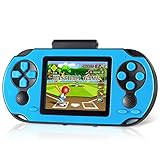
- Brand New Game Console: This handheld video games built-in 230 newly designed educational puzzle and leisure, racing, fighting, adventure games without repetition. Also comes with 3 game cartridges, each with a separate classic game. Have fun playing the game console while they work on important developmental skills such as hand-eye coordination, thinking and problem-solving skills
- Larger and Clearer Screen: 3 inch high definition display and substantially more stable, no longer prone to black screen. To ensure the portability and the comfort of playing the game. Our gameboy is not too bulky or too small, perfectly tailored for children. Warm tip: Please tear off the protective film before use
- Rechargeable Battery: Our handheld games built-in 800mAh high-capacity lithium battery, which can be charged and played at the same time. After each full charge, the game can be played for 5 hours. When you are on a business trip, travel, camping, you don't have to worry about running out of power. (Note: Please fully charge the battery before the first use
- Sturdy and Durable: The shell of this handheld game console is made of sturdy and environmentally friendly plastic. Anti-fingerprint and anti-scratch. Tested for a long time and real experience, it is strong enough to withstand daily drops
- Perfect Gift for Kids & Adults: This retro handheld game systems can definitely bring you and your children a surprise. It is perfect as a gift for birthday, Christmas, party
| Part | Per console | For two consoles | Purpose |
|---|---|---|---|
| LOLIN D1 Mini (ESP8266) | 1 | 2 | Main controller and wireless radio |
| ATtiny85 or ATtiny45 | 1 | 2 | Music playback |
| Nokia 5110 LCD | 1 | 2 | 84×48-pixel monochrome display |
| PCF8574 | 1 | 2 | Eight-bit button I/O expansion |
| Buzzer | 2 | 4 | Game effects and music audio paths |
| Buttons | 8 | 16 | Directional and general-purpose controls |
| 10 kΩ resistors | 10 | 20 | Button and I²C networks |
| 330 Ω resistors | 2 | 4 | Buzzer circuits |
| Two-position DIP switch | 1 | 2 | Audio muting |
| On/off switch | 1 | 2 | Main power control |
| Header set | 1 | 2 | Interconnections |
| Four-cell AA or AAA battery holder and cells | 1 holder, 4 cells | 2 holders, 8 cells | Portable power |
| Breadboard, perfboard or custom PCB | 1 | 2 | Assembly platform |
The original design’s eight-button arrangement allows room for menus or future games, although its basic Pong controls need only two paddle buttons per player plus the host’s separate start control. The article does not provide a verified enclosure, battery-runtime figure or measured current draw.
Quick wins for a faster PC:
Repair Windows errors before they cause bigger problemsFix Now →Scan for outdated or missing drivers - takes under a minuteDriver Scan →Plan and assemble the circuit carefully
The original article supplies a schematic and Eagle PCB files, but not a reliable text-rendered pin-by-pin wiring table. Without inspecting the schematic and files for the exact board revisions being used, it would be unsafe to invent pin assignments. Use those design files as the wiring reference and verify every module’s pin labels and voltage requirements before applying power.
- Connect the ESP8266 to the Nokia 5110 module according to the project schematic; the display uses a PCD8544 controller and an Adafruit PCD8544-compatible library.
- Connect the PCF8574 to the ESP8266’s I²C lines, and wire buttons to the expander inputs using the intended pull-up arrangement. Confirm the expander address pins and the actual board’s I²C pull-ups.
- Place the specified 330 Ω resistors in the buzzer paths as shown in the schematic. Check whether the buzzer is passive or active and its voltage and current requirements; do not assume every buzzer can be driven safely from a GPIO. Add a driver if the load exceeds the board’s GPIO limits.
- Wire the ATtiny’s music-selection inputs and reset control to the ESP8266 as shown. Give the systems a common ground so control signals have a shared reference.
- Check the four-cell battery pack’s voltage against the specific D1 Mini regulator/input limits. The source also permits powering a D1 Mini through USB during development; it does not establish that any four-cell pack can connect directly to every board.
Module layouts vary, especially among inexpensive LCD and D1 Mini variants. Confirm supply voltage, logic levels, polarity and pinout from the exact module documentation. A breadboard is fastest for initial experiments but can be bulky and prone to intermittent connections; perfboard is more durable but demands careful point-to-point wiring; a custom PCB is compact and repeatable but adds fabrication and validation work.
Rank #3
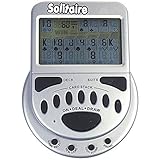
- 2 Games in 1
- Large easy to read screen
- Play Draw 1 or Draw 3 Klondike Solitaire
- Game turns itself off after sitting idle for two minutes
- 2 AAA batteries included
Prototype in stages
- Test the display alone. Wire the LCD, compile a minimal PCD8544 graphics example, and check that text and pixels appear before adding wireless or button circuitry.
- Test the controls. Verify each PCF8574 input changes predictably, with no floating lines. Confirm the expander address and library match the installed hardware.
- Test ESP-NOW between the two boards. Run the MAC-address finder sketch on each D1 Mini, record both addresses, and verify a small message passes in each intended direction before loading the game.
- Test each audio path separately. Confirm game tones from the ESP8266 buzzer and separately program and test the ATtiny music controller.
- Integrate one unit at a time. Add the full host and client firmware only after the display, controls, link and audio work independently; this narrows the cause of failures.
Set up the display, controls and sound
Graphics and controls
The Nokia 5110 display is 84×48 pixels. The project uses Adafruit GFX with PCD8544 support to draw the menu, court borders, center divider, player labels, paddles, ball and scores. Artwork can be converted into bitmap data with image2cpp.
The PCF8574 supplies eight I/O lines for Left, Right, Up, Down and A–D. The project text also names a PCF8575.h library while describing a PCF8574. These are different expander families, not interchangeable labels. Check the supplied code and schematic to identify the intended chip-library pairing before installing a library or wiring a board; do not assume a PCF8575 library works with a PCF8574.
Audio
The ESP8266 uses Arduino’s tone() function for game effects. A separate ATtiny plays looping music: two ESP8266 outputs select among tracks, and a third resets the ATtiny so it can leave a loop and read a new selection. MIDI-to-Arduino conversion is used for short music snippets, but the ATtiny’s limited memory constrains their size.
Rank #4
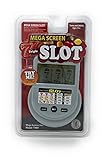
- Large Screen for Easy Viewing
- Unit Measures 6 x 4.25 x 0.75 inches
- Requires (2) AAA Batteries (included)
- For Teens and Adults - Ages 13+
Conversion does not grant permission to use a composition or recording. Use music you created, material with a license that permits the intended use, or material in the public domain, and retain any required attribution. The separate microcontroller also means more programming, wiring and debugging than a sound-effects-only build.
Install and upload the software
The original project provides a ZIP with the host sketch, client sketch, audio sketch and MAC-address-finder sketch: download the project code. The source’s ESP8266 installation link documents Arduino Core 2.0.0, so its steps are a historical reference, not a guarantee of current 2026 menu labels or sketch compatibility.
- Install the ESP8266 board package through Arduino IDE’s Boards Manager, following documentation for the specific core version you intend to use. The project-linked instructions are for ESP8266 Arduino Core 2.0.0; its package URL is
http://arduino.esp8266.com/stable/package_esp8266com_index.json. - Install the display libraries required by the sketches, including Adafruit GFX and PCD8544 support, and the correct I/O-expander library after resolving the PCF8574/PCF8575 mismatch.
- Select the board entry matching the actual D1 Mini and confirm the sketch’s pin definitions against the board. Compile a display or communication test before the complete firmware.
- Flash the MAC-address-finder sketch to each board, record the addresses, then enter each peer’s address in the opposite host/client sketch as required by the project code.
- Upload the host sketch to one console and the client sketch to the other. Confirm their roles and peer addresses before attempting a match.
For the music controller, the linked 2019 third-party Arduino-as-ISP guide uses an Arduino Uno and ATTinyCore. Its procedure calls for uploading the ArduinoISP example, wiring the Uno to the ATtiny85, placing a 10 µF capacitor between Uno reset and ground to prevent auto-reset, then selecting ATtiny25/45/85, ATtiny85, Internal 1 MHz and Arduino as ISP before burning the bootloader and uploading the audio sketch. Verify the guide’s current core instructions and pin mapping for your hardware before following it.
Windows Errors? Fix Them Before They Spread
Repair common Windows errors and clear accumulated junk for a smoother, more stable PC - no reinstall needed.Free scan · no reinstallOutdated Drivers Are Slowing You Down
One free scan finds every outdated or missing driver and matches the right update for your exact hardware.Free scan · exact hardware matchBest Value

- 【Pre-loaded Classics】This new style of handheld game console is designed to bring fun to young gamers, built-in different classic games. No matter what kind of games you want, you can find them in this retro game console. Let you play games without repetition every day and bring back your memory to the fun,enjoy family entertainment time.
- 【3.0-Inch LCD Display】Featuring a clear 3.0-inch screen with vibrant colors, this video game console delivers excellent visuals for all handheld games. The bright display ensures smooth gameplay while protecting eyesight. Enjoy classic gaming anywhere.
- 【Rechargeable Battery: This retro gaming console delivers 6 hours of stable gameplay on a single charge. With USB plug-and-play charging, enjoy uninterrupted handheld video game sessions during long trips without battery changes (Please charge fully before first use)
- 【2 Players & Play on TV】Rediscover the fun of classic games with our nostalgic gamepads. Even better, you can play two-player games with friends or family. Connect the 3.0-inch LCD screen to your TV via AV output and use the included gamepad to play games with friends for a more immersive gaming experience, double the fun.
- 【Easy to Operate】This mini handheld console is extremely easy to operate, suitable for all ages. It's an ideal gi-ft for birthdays, Christmas, Thanksgiving, and other holidays, sure to bring great surprise and joy to your loved ones.
How a Pong match runs
- Draw the static court and keep the paddle positions, ball coordinates and direction as game state.
- Move the ball and check whether it overlaps the paddle at the relevant vertical position. On a hit, reverse or alter its direction and play a hit tone.
- If the ball passes a paddle, pause for about 0.5 seconds, play a miss tone, award a point and reset the ball near the center.
- End the example match when a player reaches five points; the score threshold is configurable in the game logic.
- After the match, prompt the host to start another game. Only the host has the separate start control.
The project’s host-authoritative split means the client renders received state instead of running a second independent ball simulation. It does not describe a stale-packet policy or recovery handshake, so those are sensible additions if adapting the design: sequence-number state updates, define what the client does while updates stop, and provide a way to reinitialize the peer link.
Troubleshooting
| Symptom | Checks |
|---|---|
| No wireless connection | Confirm the correct host and client sketches are on the respective boards, recheck the copied MAC addresses, and ensure both devices run compatible ESP-NOW setup. Investigate channel and API compatibility if the boards still do not exchange packets. |
| Blank display | Check LCD power and ground, controller-compatible library, signal wiring, pin definitions and contrast. Confirm the module’s voltage and logic requirements. |
| Buttons act unpredictably | Check common ground, I²C wiring, PCF8574 address pins, pull-ups, floating inputs and switch bounce. Resolve the PCF8574 versus PCF8575 library mismatch. |
| ATtiny upload fails | Verify ISP wiring, selected board, processor, clock and programmer, and that the Uno reset capacitor is in place as directed by the guide. |
| Music will not change or stop | Check the selector lines, shared ground, reset connection and ATtiny startup behavior; the reset signal is used to break the music loop so a new selection can be read. |
| Client freezes or looks delayed | Check whether the host is still sending state and whether the client receives it. The published project reports no measured latency or packet-loss behavior, so diagnose with packet logging rather than assuming a particular range or update rate. |
| Random resets or power problems | Check battery polarity, pack voltage, regulator limits, wiring and supply stability. The original project reports no measured runtime or current draw; do not size a battery from an assumed runtime. |
Choices and upgrade paths
- Keep the ESP8266: It matches the published sketches and ESP-NOW design and is adequate for this small monochrome game. Preserve the original board and pin assumptions if reproduction is the goal.
- Redesign around ESP32: It offers more GPIO and processing headroom, but the project does not provide an ESP32 port. Expect code and wiring changes, not a drop-in substitution.
- Simplify audio: Omit music and retain game tones, or generate both on the main controller; either option avoids the ATtiny programming and reset subsystem.
- Change the assembly method: Breadboard for experimentation, perfboard for a more durable one-off, or validate the Eagle design and use a custom PCB for a compact pair.
- Improve portability: A rechargeable pack and USB-C charging can be considered, but charging and protection circuitry, regulator compatibility and enclosure changes are additional design work not specified in the original build.
The original project is a practical starting point for learning direct ESP-NOW communication and embedded game design, but it does not report measured range, latency, packet rate, current draw or battery runtime. Treat those as quantities to test on the hardware you build rather than promised specifications.
Quick Recap
Product prices and availability are accurate as of the date/time indicated and are subject to change. Any price and availability information displayed on Amazon at the time of purchase will apply.



