Some links on this page are affiliate links: if you buy through them we may earn a commission, at no extra cost to you.
Cybershoes’ wireless system for Oculus Quest and Quest 2 launched on Amazon US on May 26, 2021, at a listed price of $349. That is a historical launch price, not confirmation that the product is still sold on Amazon or available at that price. Cybershoes are seated locomotion overshoes—not a walking treadmill—and whether they make sense today depends on your headset, games, setup and the current bundle. BetaNews reported the launch; UploadVR covered the price and launch.
What Cybershoes do
Cybershoes are wearable overshoes with rolling sensors. While seated, you move your legs and feet to send artificial movement commands to a VR game. The classic setup pairs the shoes with a swiveling chair and a low-friction carpet or floor surface. It offers a way to use leg movement instead of relying only on a controller thumbstick, but it does not let you walk freely in every direction like a full-body treadmill. You remain seated, and the game translates your foot movement into virtual travel.
The setup is consequently more than a pair of shoes: chair, floor surface, receiver placement and room to move your feet all matter. A seated arrangement may suit someone who wants to avoid walking around a room-scale play area, but it is not automatically suitable for every mobility or health need.
Crashes, No Sound, or Screen Glitches?
Random freezes, missing sound and display glitches usually trace back to one bad driver. Find and replace yours safely.Free scan · under a minuteWindows Errors? Fix Them Before They Spread
Repair common Windows errors and clear accumulated junk for a smoother, more stable PC - no reinstall needed.Free scan · no reinstallWhat was included in the 2021 Amazon package?
Contemporary 2021 coverage described the Amazon bundle as including one pair of Cybershoes, batteries, a swivel-style Cyberchair, a 60-inch round carpet or Cybercarpet, a wireless receiver, an AC adapter and required cables. Road to VR’s package description refers to that launch-era bundle; contents can differ across later models, sellers and regions, so check the exact listing before buying.
#1 Best Overall

- Controller Protectors: AMZDM Controller Grips provide a bit of added protection around the main body of your Quest 2 to keep it safe and secure. Strapping the controllers to your hands enables you to let go of the controllers without dropping them, which makes gaming even more fun!
- Comfortable and Reliable: The Quest 2 controller grips are also humainized design. Larger area of non-slip design adds friction against your palm while keeping your hand cool. Premium skin-friendly silicone for better grip control, allowing for comfortable use over long time while reducing strain or discomfort on the wrists. Come in a pair of thumb grips with a textured surface for super control feelings, less thumb fatigue.
- Durable and Sweat Proof: These grip covers are made of premium silicone material with an unique non-slip pattern. They help your Quest 2 stay in the best condition while protecting the handles from sweat, dust and scratches. After long-time gaming playing, you could clean it by water or damp cloth with ease.
- Adjustable and Convenient: The touch controller cover is crafted from vegan leather elastic knuckle straps, which has abrasion resistance, elasticity, and slip resistance. Comfortable and adjustable to fit big, average and small hands. Besides, 360°rotatable rivets increase flexibility that makes it easy to reach the top buttons.
- Easy to Install and Remove: Specially designed for Oculus Quest 2 touch controllers, these grips have a perfect fit and install easily. They come in 2 securing grommets that keeps your controllers in place regardless of how intense the game becomes.
The classic package should also not be confused with Cybershoes LT. The manufacturer describes the LT as using the buyer’s own carpet, whereas the classic Quest/SteamVR package has been listed with a Cybercarpet. The official EU classic product page showed a price of €349.88 including VAT and marked the item out of stock when crawled; that is neither a current US Amazon price nor proof of US availability. Check the manufacturer’s product page for model-specific details.
Quest standalone and Quest PC VR are different setups
In 2021 the headsets were called Oculus Quest and Oculus Quest 2; Meta now uses the Meta Quest name. Cybershoes’ current site lists Quest 1, Quest 2, Quest 3 and Quest Pro compatibility, but the original Amazon announcement concerned Quest and Quest 2. Verify the specific headset, receiver and game configuration for the model you intend to use. Cybershoes’ site is the manufacturer’s current compatibility reference.
| Mode | PC needed? | Receiver connects to | What to check |
|---|---|---|---|
| Standalone Quest | No, for supported native Quest games | Quest headset, using the connection method specified for your receiver | Confirm the exact game appears in the standalone compatibility list and that required setup software is obtainable. |
| Quest with Link cable or Air Link | Yes | Windows PC | Uses a PC VR/SteamVR workflow; Air Link also depends on network quality. |
| Quest with Virtual Desktop | Yes | Windows PC | Uses a PC VR/SteamVR workflow and requires a capable PC and suitable Wi-Fi. |
For standalone play, the manufacturer describes connecting the receiver to the headset and using it with supported Quest games. Follow the manual for your exact receiver and bundle: the official instructions vary in how they describe physical attachment and USB connection, so one method should not be assumed to fit every version.
Recommended Free Tools
Rank #2

- 【Designed for Oculus Quest 2】Our VR foam face pad replacement set is designed to improve hygiene, immersion, and comfort. It’s effective at reducing pressure and making longer VR sessions more enjoyable. The upgraded design of the face interface is compatible with the Oculus Quest 2 original spacer.
- 【Enhanced VR Immersion】For optimal comfort, the facial interface bracket has passive air vents to improve air circulation and reduce fogging. Effective at reducing pressure and red marks on the face, allowing you to have the ultimate VR immersion.
- 【Improved Hygiene】Our face cover is made of PU leather and sponge foam to keep your VR headset clean and not soaked by sweat. The face cushion makes your extended VR gaming more hygienic and share your happiness with family or friends.
- 【Better VR Field of View】The ergonomic design of the face pad perfectly fits different face shapes, puts you closer to the display, and offers a wider field of view and a tighter fitting, making long VR sessions much more comfortable.
- 【Easier Upkeep】The facial interface frame is easy to install, snap in and go. Cleaning the accessories is easy, simply use a cloth or wipes to remove sweat and grime and you will have a fresh and hygienic headset again in no time.
For PC VR, Quest streams the experience from a Windows computer through Link, Air Link or Virtual Desktop. The receiver connects to the PC, and Cybershoes’ PC instructions call for its Steam software plus the enabled SteamVR add-on and overlay. Wireless shoes do not make this configuration independent of a gaming PC or, when streaming wirelessly, a reliable home network.
Which games work?
Compatibility is not universal. The manufacturer’s game compatibility table separates standalone Quest from PC configurations. At the time represented by the supplied official pages, it listed 17 standalone Quest titles, 60 for Quest with Virtual Desktop and SteamVR, and 50 for Quest through Air Link or Link cable and SteamVR. The broader SteamVR totals varied by page and counting method, so treat these as site-listed category counts, not a permanent guarantee.
Examples named by Cybershoes or contemporary reporting include Arizona Sunshine, The Walking Dead: Saints & Sinners, VRChat, In Death: Unchained, The Wizards – Dark Times, Ancient Dungeon, Return to Castle Wolfenstein Quest, QuestZDoom, Skyrim VR, Half-Life: Alyx, Rec Room and CyberRunner. The Amazon launch coverage highlighted In Death: Unchained and The Wizards – Dark Times among games receiving native support at the time; UploadVR also reported planned or announced support for Ancient Dungeon, Return to Castle Wolfenstein Quest and QuestZDoom in that 2021 context. Those announcements are not current promises.
Rank #3

- 128GB Storage Capacity
- Top VR Experience: Oculus Quest 2 features a blazing-fast processor, top hand-tracking system, and 1832 x 1920 Pixels Per Eye high-resolution display, offering an incredibly immersive and smooth VR gaming experience.
- Anti-Slip Controller Grip Covers: grip covers are made of nice silicone material that effectively prevents sweat, dust, and scratches. Anti-slip bumps enhance the handgrip and feel.
- Adjustable Knuckle Straps: knuckle straps make it possible to relax your hands without dropping the controllers. High-quality PU material offers extra durability and velcro design makes it easy to adjust the strap length to different needs.
- WIAIM USW ACBLI USW Includes in Package: VR Headset; Two Touch Controllers; Two AA Batteries; Silicone Cover; Glasses Spacer; Charging Cable; Power Adapter.
Some titles have native integration; other PC games may work through generic artificial-stick locomotion or a particular SteamVR configuration. A game having smooth locomotion does not by itself guarantee that Cybershoes will work correctly. Check the current game table for the exact title and mode before purchasing.
Setup overview
Standalone Quest
- Charge and switch on the Cybershoes.
- Connect the receiver to the headset using the method specified in the manual for your model.
- Follow the documented pairing or connection workflow for the receiver and headset.
- Install the Cybershoes tutorial app if it is available for your headset and region. A third-party Quest database reports that the app was discontinued on March 5, 2025; that status has not been confirmed here against an official Meta listing, so verify availability before relying on it.
- Choose a game explicitly listed for standalone Quest, apply any game-specific settings, then test movement while seated and begin with low sensitivity.
Quest connected to a PC and SteamVR
- Set up the Meta/Oculus PC software, Steam and SteamVR, then connect Quest with Link, Air Link or Virtual Desktop.
- Connect the Cybershoes receiver to the Windows PC and install the Cybershoes software through Steam as directed by the manufacturer.
- In SteamVR, open Settings → Startup → Add-ons and enable Cybershoes. Also open Settings → Startup → Overlay Apps and enable Cybershoes.
- Open the Cybershoes overlay, calibrate the shoes and choose follow shoes. The manufacturer also describes Z-scaling or Crouch Assistant for relevant cases.
- Use the manufacturer’s game table for title-specific settings before launching.
Labels and workflows can change with software updates. Use the current manufacturer instructions for your receiver and headset rather than treating this overview as a substitute for the model’s manual.
Common problems and fixes
- Movement goes backward or points the wrong way: in the SteamVR Cybershoes overlay, use the follow or recalibration function.
- Cybershoes do not appear in SteamVR: check that both the Cybershoes add-on and overlay app are enabled in SteamVR startup settings.
- Air Link image quality or latency is poor: Cybershoes recommends a Wi-Fi 5- or Wi-Fi 6-class router and Ethernet from the PC to the router where possible. Restart Air Link and SteamVR, and connect Cybershoes before launching the game.
- Virtual Desktop produces duplicate movement: for some games, including Skyrim, the vendor says to disable “emulate gamepad on PC” in Virtual Desktop if the game receives duplicate commands.
- Radeon/AMD overlay trouble: an older Cybershoes support page directs users to its AMD/Radeon beta branch. Because that vendor-specific advice may have changed, check current support documentation before changing software branches.
- Discomfort or nausea: lower movement sensitivity, start with slower games, and avoid jumping or climbing while learning. The manufacturer warns that jumping and climbing can induce motion sickness.
Comfort, motion sickness and suitability
Cybershoes says that leg movement can help reduce VR sickness because it more closely accompanies virtual movement. That is a manufacturer claim, not a guaranteed result. UploadVR’s 2021 coverage found the system effective at translating seated movement into artificial locomotion and suggested it might help some users, while noting that results vary. Cybershoes may help some players feel more comfortable, but they are not a treatment or a sure way to prevent motion sickness. Game speed, turning, jumping, climbing and individual sensitivity still matter.
Rank #4

- 【 Precision Thumbsticks for Meta Quest 2/3 Controllers】Elevate your gaming experience with our premium replacement thumbsticks, compatible with both left and right Oculus Quest 2 and Meta Quest 3 controllers. Designed for increased agility, accuracy, and grip, the extended arc distance design transforms your gameplay. Easily snap them on and off for a seamless upgrade.
- 【Upgraded Durability and Comfort】Our latest thumbstick version offers enhanced sturdiness and durability, requiring less force for movement. Experience reduced wrist, hand, and thumb fatigue with this cost-effective replacement set, perfect for extended gaming sessions.
- 【Reliable and Convenient Kit】This dependable kit is an excellent backup option for all Oculus Quest 2 and Meta Quest 3 enthusiasts. While professional replacement is recommended, our kit provides a practical and convenient solution for any troubleshooting needs.
- 【 Complete Set of Replacement Thumbsticks】The package includes two replacement thumbsticks compatible with Oculus Quest 2 and Meta Quest 3 controllers. Keep an extra set on hand for emergencies or switch between different gameplay styles effortlessly.
- 【Enhance Your Gaming Performance】Upgrade your controllers with our precision thumbsticks and enjoy a superior gaming experience. Designed to enhance your performance, these thumbsticks provide the accuracy and control you need to dominate your favorite games.
The system is designed for seated play and requires space for a rotating chair, leg movement and clear foot placement. Cybershoes LT documentation gives a recommended play-area range of roughly 75–90 inches (190–220 cm), depending on height; confirm the requirements for the specific model. Users need to be able to move their feet safely. It may be a useful seated-locomotion option for some people who do not want or cannot comfortably use room-scale walking, but it is not a certified accessibility device or medical product. Anyone with balance, joint, cardiovascular or mobility concerns should follow manufacturer safety guidance and seek qualified advice where appropriate.
Independent reader supportYour contribution helps us test, update, and keep practical guides available for everyone.Is it worth considering?
Cybershoes may suit a Quest owner who prefers seated play, wants leg-driven movement, and has confirmed that the games they play work in their chosen mode. It is a weaker fit if you expect a full treadmill, unrestricted compatibility with every Quest title, minimal setup, or a guaranteed solution to nausea. Its $349 figure was the 2021 US launch price, so it should not be used as a current value comparison.
Before buying, verify the exact model (Classic, LT or another bundle), headset, standalone versus PC mode, the specific game, receiver connection, included chair and carpet, current seller and stock, warranty region and returns. Also confirm that any required tutorial or setup software is still obtainable. If you only need basic movement, thumbstick controls are already part of Quest controllers; teleport movement may be more comfortable for some players, while room-scale walking and treadmill or slide-platform systems trade space, cost and setup in different ways.
Best Value
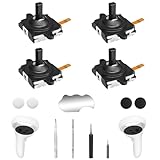
- 【2 × 3D Left/Right Thumb Sticks + 4 × Thumbstick Caps】Perfect replacement analog joysticks for oculus quest 2 controller, work for left and right meta quest 3 controller, repair your worn-out, damaged and drift analog joystick. The thumb stick caps can protect your joystick from scratches, corrosion, spallingor other damage. It made of high-quality silicone material, very safe, soft and comfortable.
- 【The 3rd Generation Joystick】The 3rd Generation Joystick is sturdy and durable. This is newest version, we improve internal spring, increase the number of grooves to strengthen the 2nd gen. Change the cable to highly conductive one. It's easier to install than previous versions. You can replace the damaged original one to reduce the frequency of replacement and replacement costs.
- 【T5 Screwdriver, Tweezer, Pry Tool】The kit is equipped with a T5 screwdriver and a small T5 screwdriver, switch at any time according to your needs. Comfortable and easy to open the oculus controller without much force. In addition, we also provide Tweezer, Pry Tool. (Note:Professional replacement is highly recommended).
- 【Complete Repair Kit】Package include –2 x Replacement joystick, 4 x Thumb Stick Caps, 1 × Tweezer, Pry Tool, 1x T5 Screwdriver, 1x Small T5 Screwdriver, 1 × Metal Pad Tool.
- 【Note】This repair set for oculus quest 2 controller does not include meta quest 2 controllers.
For PC VR, account for the computer, SteamVR and streaming setup as well as the shoes. Air Link and Virtual Desktop performance depend on the network, with the Cybershoes documentation recommending suitable Wi-Fi and a wired PC-to-router connection where possible. Check the manufacturer’s Quest setup instructions and compatibility table before deciding.
Availability today
The Amazon news is a dated May 26, 2021 launch report, not a current stock notice. The official Cybershoes site continues to describe Quest-compatible products, but that does not establish whether the original Amazon US listing is in stock, who the seller is, or what the current price, shipping, returns or warranty terms are. Check the live listing and compare it with the manufacturer’s current product page; do not assume the launch bundle or $349 price still applies.
Quick Recap
Product prices and availability are accurate as of the date/time indicated and are subject to change. Any price and availability information displayed on Amazon at the time of purchase will apply.

