Free tools Windows power users keep installed
One-click scans. No signup required.
Some links on this page are affiliate links: if you buy through them we may earn a commission, at no extra cost to you.
The Dell XPS Desktop Special Edition 8940 could pair an understated office-friendly case with serious gaming hardware—but only in the right configuration. HotHardware’s February 2021 review tested an 8-core Core i7-10700K and GeForce RTX 3070, a much stronger system than many 8940 listings. That machine delivered convincing 1440p performance, but its compact cooling and nonstandard power-supply design make it a limited enthusiast platform. Dell now lists the model as unavailable, so in 2026 the question is whether a particular used unit is healthy and cheap enough to make sense.
Quick verdict
Best for: Buyers who want a discreet desktop and find a well-maintained RTX 3060 Ti or RTX 3070 configuration at a compelling used price.
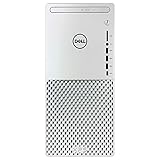
Biggest strength: The reviewed RTX 3070 system combined strong gaming and productivity performance with a compact, restrained design.
Do these 3 things before closing this tab:
1Clear out junk files and repair common Windows errors2Fix the driver behind crashes, sound loss and screen glitches3Repair Windows errors before they cause bigger problemsBiggest drawback: Under sustained CPU-heavy loads, the stock cooling allowed high temperatures and throttling. The proprietary-looking PSU and compact layout also make major upgrades less straightforward than in a standard ATX PC.
#1 Best Overall

- Powerful 10th Gen Intel Core i5 Processor:Equipped with Intel Core i5-10400 6-core 12-thread CPU, up to 4.3GHz boost clock, delivers smooth multitasking for daily office work, content creation and casual gaming.
- Balanced Memory & Dual Storage Combo:16GB DDR4-2666 high-speed RAM ensures fluent multi-task operation; 256GB NVMe SSD offers fast system boot & program loading, paired with 1TB HDD for massive file, media and game storage.
- NVIDIA GTX 1660 Ti 6GB Dedicated Graphics:Comes with GeForce GTX 1660 Ti 6GB GDDR6 discrete GPU, supports mainstream gaming, photo editing, video rendering and multi-monitor output via DisplayPort & HDMI ports.
- Slim Premium XPS Compact Tower Design:Dell XPS 8940 mini-tower chassis features space-saving slim form factor with stylish textured front panel, easy placement in home, office and study rooms, friendly for interior layout.
- Abundant Versatile I/O Interfaces:Rich front & rear ports including USB-A, USB Type-C, SD card reader, HDMI, DisplayPort, RJ45 Ethernet and audio jacks. Convenient to connect monitors, external drives, peripherals and accessories without extra hubs.
Gaming target: The review configuration is best thought of as a strong 1440p machine. It is more than enough for many 1080p games, while 4K results depend heavily on the game and settings.
2026 buying rule: Judge the exact CPU, graphics card, PSU, memory, SSD, condition, and asking price—not the “Special Edition” name. Dell’s U.S. product page marks the XPS 8940 Special Edition unavailable.
What the XPS 8940 Special Edition is
The XPS 8940 was Dell’s mainstream desktop tower, sold in standard and Special Edition configurations. The SE’s Mineral White option gave it a distinctive, restrained look, while the Night Sky finish offered a darker alternative. Rather than being one fixed gaming PC, it was a configurable product family: processors, graphics cards, memory, storage, wireless hardware, power supplies, and even optical drives varied by model and sales period.
Dell offered configurations spanning 10th- and later 11th-generation Intel processors, integrated graphics and a range of discrete GPUs. A low-end GTX-equipped 8940 and the reviewed RTX 3070 system are not interchangeable performance propositions. Always identify the actual hardware before applying a review result to a listing.
The reviewed configuration
HotHardware’s review, published February 9, 2021, examined this comparatively high-end specification:
Rank #2

- Powerful Processor: 11th Generation Intel Core i7-11700 8-Core 2.50 GHz Processor with 16MB SmartCache and Turbo Boost technology up to 4.90 GHz
- Massive Storage and Memory: 64GB DDR4 2933 MHz Memory, 1TB SSD plus 2TB Hard Drive, DVD Drive that reads and writes to DVD/CD, Windows 10 Home 64-bit operating system
- Advanced Graphics and Connectivity: Intel UHD Graphics 750, Killer Wi-Fi 6 AX1650i (2x2) 802.11ax Wireless plus Bluetooth 5.1, 500 Watt Power Supply
- Comprehensive Port Selection: 1 x HDMI, 1 x DisplayPort 1.2, 7 x USB 3.1 Type-A, 2 x USB 2.0 Type-A, 1 x USB 3.1 Type-C, SD Card Slot, RJ-45 Ethernet port
- Complete Package: USB Keyboard and Mouse Included, Black finish, backed by Techno Intelligence with Free Tech Support
| Component | Review system |
|---|---|
| Processor | Intel Core i7-10700K, 8 cores and 16 threads; 3.8GHz base, up to 5.1GHz turbo |
| Graphics | Nvidia GeForce RTX 3070 with 8GB GDDR6 |
| Memory | 32GB (2 × 16GB) DDR4-2933 |
| Primary storage | 512GB Western Digital SN530 NVMe SSD |
| Secondary storage | 2TB Seagate Barracuda 7200RPM hard drive |
| Motherboard | Dell OEM board with Intel H470 chipset |
| Cooling | Stock air cooling |
| Power supply | 500W Lite-On, 80 Plus Platinum |
| Wireless / OS | Wi-Fi 5 / Windows 10 Home |
| Optical drive | Blu-ray reader/writer |
The Core i7-10700K is an unlocked processor, but that does not make this a practical overclocking PC. HotHardware found the stock BIOS and cooling unsuitable for meaningful CPU overclocking. The “K” label should not be mistaken for a promise of useful headroom in this chassis.
Design, build, and ports
The XPS 8940 SE’s visual appeal is its office-friendly restraint. The review reported dimensions of roughly 6.65 inches wide, 14.45 inches deep, and 12.13 inches high, with a maximum weight around 13.89 pounds. The case is compact compared with many gaming towers, and the white or dark exterior has no built-in RGB lighting. That is a plus if a glass-sided, illuminated gaming case would look out of place in a study or living room; enthusiasts seeking a showcase build may find it plain.
Recommended Free Tools
The side panel is removable and the review unit had relatively tidy cable routing. Some configurations included an optical drive, including the reviewed Blu-ray writer. These useful touches do not change the underlying trade-off: the internal arrangement is compact and Dell-specific, not a standard enthusiast case designed around easy component swaps.
Front connections on the reviewed machine included USB-C, three USB-A ports, headphone/line-out, and an SD card reader. The rear provided four USB 3.x ports, two USB 2.0 ports, Ethernet, audio, and display connections. Wi-Fi varied: the reviewed system used Wi-Fi 5, while Dell listed Wi-Fi 5 and Killer Wi-Fi 6 options depending on configuration. Check the actual machine rather than assuming it has the newer wireless option.
If a discrete graphics card is installed, connect the monitor to the graphics card’s display outputs, not the motherboard’s HDMI or DisplayPort sockets. Motherboard video outputs depend on integrated graphics and may not work as expected when the discrete GPU is in use.
Gaming performance: the GPU changes the story
The RTX 3070 review system was a capable gaming PC for its time. HotHardware reported triple-digit frame rates in its Middle-earth: Shadow of War testing at 1440p on high or ultra settings, and performance near RTX 2080 Ti comparison systems in several tests. In its 3840 × 2160 test for that game, it recorded 72 frames per second with a measured minimum of 52. These are historical results from one game and one test setup, not a guarantee for current releases. Game updates, drivers, settings, and the exact PC all matter.
What’s actually slowing this PC down?
Pick the symptom - the matching free tool is one click away.
- 1080p: An RTX 3070 configuration is well beyond basic 1080p gaming and can suit high-refresh-rate play, depending on the title and settings.
- 1440p: This is the most natural target for the reviewed hardware, with room for high settings in many games.
- 4K: The historical Shadow of War result shows that 4K was possible in that test; it does not mean every modern demanding game will sustain 60 fps at 4K.
Do not transfer those results to every 8940. GTX 1650 Super and GTX 1660-class configurations are entry-level 1080p systems by comparison. RTX 2060 and RTX 3060-class models occupy a middle tier, while RTX 3060 Ti and RTX 3070 versions offer substantially stronger 1440p performance. Exact GPU and power-supply details are essential when assessing a used listing.
Work and everyday use
With its i7-10700K, 32GB of dual-channel memory, NVMe system drive, and RTX 3070, the reviewed configuration had ample capacity for office multitasking, software development, photo and video work, and moderate 3D or GPU-accelerated workloads. HotHardware placed it near the top of its PCMark 10 comparison group and reported strong productivity results among non-overclocked systems. Those are results for that review unit, not a claim about lower-spec versions.
The 512GB SSD is the more obvious everyday limitation. It is quick for Windows and frequently used applications, but small for a large modern game library. The 2TB hard drive adds space, though games installed there will not load like they do from an SSD. If the machine still has its original storage, include a larger NVMe drive in your budget and check the existing drive’s health before relying on it.
Thermals, noise, and power
Cooling is the key caveat, and noise alone does not tell the whole story. In HotHardware’s combined CPU-and-GPU stress test, the CPU peaked at 97°C; after throttling began, clocks fell to about 3.83GHz and the sustained CPU temperature was around 89°C. The GPU was around 74°C. The measured sound level under combined stress was approximately 52dB. The reviewers did not characterize the machine as excessively loud, but those CPU readings show limited thermal margin under sustained heavy work.
Quick wins for a faster PC:
Clear out junk files and repair common Windows errorsFree Scan →Fix the driver behind crashes, sound loss and screen glitchesFind Drivers →Rank #4

- Dell XPS 8940 Desktop
- Intel Core i7 11th Gen i7-11700 Eight-Core Processor 2.5GHz (4.9GHz With Turbo Boost)
- 1TB SSD + 1TB HDD Hard Drive & 32GB RAM Memory
- Nvidia GeForce RTX 3060 Ti Graphics Card
- Wireless Wifi & Bluetooth, BD-RE Drive, Keyboard and mouse
The test combined Prime95 Small FFT with FurMark, a harsher scenario than ordinary gaming. A game may not drive both processors in the same way, so the stress result should not be read as the expected temperature in every session. It still matters for long renders, compiles, simulations, or other all-core workloads—and especially for a K-series CPU in this compact, stock-cooled system. A machine can sound reasonably controlled while its CPU is running close to its thermal limit.
HotHardware measured about 28W at idle, roughly 420W under its sustained combined load, and an initial peak near 510W. The reviewed unit’s 500W Lite-On 80 Plus Platinum PSU operated without instability in that testing, even though Nvidia’s contemporary reference recommendation for an RTX 3070 system was 650W. These are different claims: one is a reference system-power recommendation, the other is observed behavior of a specific Dell system and PSU. Neither proves that every 500W 8940 or replacement GPU combination is suitable.
Upgradeability: practical in places, constrained overall
Memory and storage are the most sensible upgrade areas. Dell’s specifications list memory configurations up to 128GB, but supported speeds depend on the processor: the listed behavior is up to DDR4-2933 for 10th-generation Core i7/i9 and DDR4-2666 for Core i3/i5, even where faster memory may be offered. Match memory capacity and speed sensibly, and use matched modules or pairs for dual-channel operation. A single 8GB stick is a notably weaker starting point than 16GB in dual channel or 32GB.
An NVMe drive can be added or replaced, and SATA storage can be changed where the relevant bay and mounting hardware are present. Before opening the case, consult the Dell XPS 8940 manuals and service documentation for the exact service procedure. Back up files before replacing a drive; plan to clone the old installation or reinstall Windows and required drivers.
The Tool Desk
Outbyte Driver Updater FREEScan for outdated or missing drivers - takes under a minuteDriver Scan →Outbyte PC Repair FREEClear out junk files and repair common Windows errorsFree Scan →GPU replacement is possible in principle but is not a simple wattage-only decision. Verify the installed PSU’s rating and PCIe power connectors, the card’s length and thickness, clearance, airflow, heat direction, and any relevant BIOS constraints. The reviewed unit’s 500W PSU was a particular Dell unit in a particular tested system. The 360W configurations are more constrained, and PSU replacement may be difficult because the unit appears to use a proprietary or modified form factor rather than a standard ATX or SFX supply. Do not assume a generic replacement fits or that a successful community upgrade is an official compatibility guarantee.
Best Value

- 11th Generation Intel Core i7-11700 8-Core 2.60 GHz Processor (16MB SmartCache, Turbo Boost up to 4.80 GHz)
- 32GB DDR4 Memory, 512GB PCIe SSD + 2TB 7200 RPM Hard Drive, DVD Optical Drive (Reads and Writes to DVD/CD)
- Operating System: Microsoft Windows 10 Pro (64 bit)
- 2-Year Warranty by Techno Intelligence / Free Tech Support, USB Wired Keyboard & Mouse Included, Black
- Ports & Slots: 3x SuperSpeed USB 3.1 Gen 1 Type-A 1x SuperSpeed USB 3.1 Gen 1 Type-C 2x Hi-Speed USB 2.0 Type-A 4x SuperSpeed USB 3.1 Gen 1 Type-A 1x Headset Jack 1x Microphone Jack 3x Re-Taskable Jacks 1x RJ-45 LAN 1x Media 3-in-1 Card Reader 1 HoatLou mousepad
Major motherboard, PSU, and cooling changes are where the compact OEM design becomes a liability. A compatible cooler or fan improvement may be possible, but mounting, headers, clearance, and Dell-specific hardware must be checked before buying parts. This is not the right base for someone expecting the freedom of a standard DIY ATX build.
Independent reader supportYour contribution helps us test, update, and keep practical guides available for everyone.What to inspect before buying used
- Identify the exact configuration. Ask for the Dell service tag and clear internal photos. Confirm CPU, GPU, RAM arrangement, storage, and PSU label; cross-check using Windows System Information, Task Manager, BIOS hardware summary, or a hardware identification utility.
- Test sustained CPU behavior. Run a repeatable CPU workload and monitor temperatures and clocks. Look for unexplained throttling, sharp clock declines, or stuttering. K-series models deserve particular scrutiny.
- Inspect cooling and the case. Check dust, fan operation, cooler mounting, rattling, and fan-blade contact. HotHardware found the GPU power cable touching a graphics-card fan on its review sample after shipping; it was fixed by adding slack and repositioning the cable.
- Check PSU and GPU fit. Confirm the PSU wattage, connectors, and condition, along with the installed GPU’s physical fit. Do not assume that a future high-power card will be supported.
- Check storage, activation, and support. Verify SSD health and capacity, Windows activation, display output from the discrete GPU, and whether Dell support utilities and drivers are available for the service tag. Check current BIOS and operating-system eligibility rather than assuming support based on the model name.
- Compare total cost. Add any needed SSD, memory, or cooling work to the asking price and compare the total with newer used gaming desktops or a current system. Dell marks the 8940 SE unavailable new; launch-era prices are not useful value benchmarks in 2026.
Who should buy it—and who should pass?
Consider it if you want an understated PC, find a healthy RTX 3060 Ti or RTX 3070 model at a strong used price, and mainly need gaming, creative, or everyday performance without extensive upgrades. The SD reader and optical-drive option may also be useful if the particular system includes them.
Pass or demand a steep discount if it has a GTX 1650 Super and only 8GB of single-channel RAM, an undersized or unhealthy SSD, unexplained thermal problems, missing power cables, or an asking price close to a newer desktop. Avoid it if you need a current new-machine warranty, want easy standard-part upgrades, plan CPU overclocking, need broad expansion options, or intend to fit a large, high-power modern GPU.
Crashes, No Sound, or Screen Glitches?
Random freezes, missing sound and display glitches usually trace back to one bad driver. Find and replace yours safely.Free scan · under a minutePC Slower Than It Used to Be?
A free scan shows the junk files, broken settings and background clutter dragging Windows down - then fixes them in one click.Free scan · Windows 10 & 11As a practical floor for a gaming-focused used purchase, look for at least 16GB of RAM—preferably dual-channel—plus a 512GB NVMe SSD, a 500W PSU for higher-performance GPU configurations, and a GPU around RTX 3060 class or better. That is a screening guideline, not a compatibility guarantee: verify the specific system and insist on healthy operation.
Pros and cons
Pros
- Distinctive, restrained design in a compact tower.
- Strong 1440p gaming and productivity performance in the reviewed RTX 3070 configuration.
- Useful front USB-C, USB-A, and SD card access, with a good range of rear connections.
- Some configurations include an optical drive.
- Memory and storage are more practical upgrade targets than the core platform.
Cons
- CPU temperatures can approach the thermal ceiling under sustained heavy load.
- Limited value from the unlocked CPU because the system is not designed for meaningful overclocking.
- Proprietary-looking PSU and compact OEM layout constrain major upgrades.
- Many configurations have limited SSD capacity, and lower-tier GPUs perform very differently from the review unit.
- Discontinued and unavailable new from Dell.
Final verdict
The Dell XPS Desktop Special Edition 8940 was a sleek and capable gaming desktop when configured with the RTX 3070, but it was never an ideal enthusiast platform. Its best qualities—quietly professional styling, compactness, and strong performance in the right specification—remain attractive. Its heat behavior, PSU constraints, and limited upgrade path remain equally relevant. In 2026, treat it as a specific used-PC deal to evaluate, not as a model name that guarantees gaming performance: a healthy, fairly priced high-GPU configuration may still make sense; an overpriced low-end one does not.
Quick Recap
Product prices and availability are accurate as of the date/time indicated and are subject to change. Any price and availability information displayed on Amazon at the time of purchase will apply.

