Crashes, No Sound, or Screen Glitches?
Random freezes, missing sound and display glitches usually trace back to one bad driver. Find and replace yours safely.Free scan · under a minutePC Slower Than It Used to Be?
A free scan shows the junk files, broken settings and background clutter dragging Windows down - then fixes them in one click.Free scan · Windows 10 & 11GameStop may replace a controller with stick drift if it is covered by an eligible Product Replacement Plan (PRP); it does not promise free, walk-in repairs for every drifting controller. GameStop’s plan page advertises replacement for covered controllers, while its support terms describe repair or a one-time replacement at GameStop’s discretion. Check your plan, purchase record and other coverage before visiting a store.
What GameStop offers for controller drift
GameStop’s U.S. PRP page says, “Bad case of stick drift? Bring in your affected controller and we’ll replace it.” That statement applies to controllers covered by the plan, not automatically to any controller brought into a store. The page presents PRP as optional protection separate from a manufacturer warranty. GameStop Product Replacement Plan
GameStop’s support article describes PRP as hardware coverage that can provide repair or a one-time replacement, at GameStop’s discretion. Coverage lasts one or two years depending on the plan purchased. For an in-store purchase, coverage starts on the purchase date; for an online order, it starts on delivery. The terms include mechanical or operational failure, defects and normal wear and tear, but exclusions apply. GameStop PRP and GPG support terms
What a plan-based replacement means
GameStop says PRP replacements are pre-owned or refurbished. If the exact item is unavailable, it may offer a like or equivalent pre-owned or refurbished item. The support article also lists exclusions such as misuse or abuse, theft, fire, flooding, weather, vandalism, power events and cosmetic damage. Read the complete terms for your plan because eligibility depends on the specific purchase and coverage.
#1 Best Overall
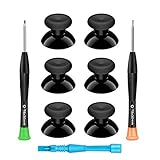
- 🎮 BEST XBOX THUMBSTICKS IN THE MARKET - Don't continue playing with those ratty old Xbox One thumbsticks! Game longer, better and more comfortably with original Xbox thumbsticks. Our inexpensive analog sticks are designed to be direct replacement of the original One/One S/One X Controller joystick, makes your controller stand out from the crowd with a new, fresh look and unique styling unlike any other.
- 🎮 ENJOY YOUR FULLY FUNCTION XBOX ONE CONTROLLER - Personalize and enhance your gaming experience with feedback based rubber design. True rubberized on the top and side, you will no longer have to worry about slipping off the analog stick of your controllers, and provide more accuracy and sensitivity, give you the most complete game pleasures.
- 🎮 UPGRADED PREMIUM QUALITY - Created with the gamer in mind, perfectly fit for your controller with aggressive textured grip. Also all products from us will be put under professional quality inspection before packaging to make sure the joysticks you received are in good condition.
- 🎮 MONEY SAVER & EASY TO INSTALL - There are plenty of YouTube videos that will walk you through the process, T8 T6 screwdrivers included help you open the shell very easily, then just replace the worn out or broken controller thumbsticks which will make your controller look awesome again, everybody is able to save $60 controller with our cheap parts in 10 minutes.
How to check whether your controller is covered
- Find the purchase record. Locate the receipt or online order details and confirm the controller and purchase date.
- Look for a PRP. Verify that you actually purchased GameStop’s Product Replacement Plan for that controller; the plan is optional.
- Check the coverage period. Confirm whether the plan was for one or two years and whether it is still active, counting from the applicable purchase or delivery date.
- Review the terms and ask GameStop about the claim. Confirm that your controller and the reported problem qualify, and ask what replacement is available. The plan page lists one- and two-year choices and example prices, but prices and eligible products can change; verify current details with GameStop before relying on them.
Other options if you do not have a GameStop plan
Check the return or exchange window
GameStop’s general help page says unopened new items are generally eligible for a refund or replacement within 15 days, subject to category exceptions. Pre-owned items generally have a seven-day refund window and a 15-day replacement window. These are general policy windows, not a guarantee that a drift complaint qualifies. Check the current policy, the item category and your receipt or order details. GameStop return-window policy
Contact the controller’s manufacturer
Manufacturer coverage is a separate route from GameStop PRP. Check the warranty and support process for your specific controller, country and purchase. For example, Nintendo UK’s Joy-Con guidance addresses drift and says free repair may be refused in certain cases, including some third-party accessories, accidental damage, or unauthorized opening, modification or repair. That is UK guidance for Joy-Con controllers—not a statement of U.S. policy or a rule for other brands. Nintendo UK Joy-Con drift support
Rank #2

- Upgraded Anti-Drift TMR Joystick Technology – Evolved from GuliKit's patented Hall Effect joystick, the more advanced TMR (Tunnel Magnetoresistance) thumb stick same works with contact-less magnetic field sensing mechanism to eliminate stick drift cause,while offers ultra-low power consumption, enhanced stability, drift-free long lasting durability, high-precision and silk-like smoothness.
- No Circuit Changes Required (Soldering Required) – Install the enhanced TMR stick module kit directly on Xbox Series X|S/Elite Series 2 Controller(not for Xbox 360/One & Elite Series 1 ) to fix the stick issue ultimately. Save the hassles and your money. Important Note for Elite Series 2 Users: After installation, only the thumbstick caps included in this kit can be used. The original caps are not compatible due to a different installation structure — the original uses a screw-on design.
- Anti-Interference Structure –Unique structural design prevents interference from magnetic triggers on the joysticks.
- Premium Stick Caps – Includes 2 GuliKit KK Ring anti-friction stick knobs designed for enhanced gripping and comfort during extended play.
- Note: The analog joystick replacement work requires professional tool kit/repair devices(not included in our package) and good skills in desoldering and soldering. If you are not experienced with soldering, we recommend seeking professional assistance to ensure proper installation. After replacing the joysticks, you can go to the X BOX console or download the "X BOX Accessories" software from the Microsoft Store on PC, then find the "Recalibrate" option and follow the instructions to calibrate the joysticks.
Ask about trade-in only if the controller works properly
GameStop says trade-in items must be in good, working condition, with acceptance and final value determined in store after inspection. Its policy does not promise acceptance or a particular trade value for a drift-affected controller. GameStop trade-in condition policy
Compare repair with replacement
If neither a return nor coverage applies, compare a repair quote with the cost of replacing the controller. Repair cost, turnaround and availability depend on the model and provider; GameStop’s published plan material does not establish a universal walk-in repair price or turnaround. Match any replacement to the exact console and controller generation.
The Tool Desk
Outbyte PC Repair FREERepair Windows errors before they cause bigger problemsFix Now →Outbyte Driver Updater FREEFix the driver behind crashes, sound loss and screen glitchesFind Drivers →Quick Recap
Best Value

- Custom designed joysticks to perfectly fit for Xbox Series X/S, for Xbox Core controller (Model 1914) , for Xbox One standard (Model 1537/1697), for Xbox One X/S (Model 1708), for Xbox One Elite V1 (Model 1698) controller; Not compatible with Xbox Elite Series 2 and other controllers. Work exactly like the original thumbsticks
- Unique replacement to add much more personality to your controller. The replacement thumb sticks will make your controller distinct when playing with friends, no more boring standard color
- Made of premium PC & TPE plastic material, durable and practical. Ideal replacement for your broken or cracked controller thumbsticks
- The carmine red color looks great; Would be awesome if you combine it with the custom shell from eXtremeRate (You can find these shells in our store.)
- Easy to install, requires internal fitting, the screwdriver tool included can help you easily open the shell and install the gaming parts
Rank #4
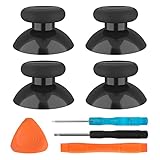
- SAVE MONEY! Perfectly fit for Xbox One/ Xbox One S controllers, replace your broken or worn-out original controller thumbsticks. This repair kit contains everything you need to switch the old analog joysticks out and save you from spending $60 on a new controller
- COMPATIBILITY: Only official orginal controller,compatible for Xbox One, for Xbox One S, for Xbox One X, for PS4 controllers,NOT compatible with PS5,NOT compatible with Nintendo switch pro,Power A controllers.NOT FOR any Third-party Brands controller
- MORE DURABLE THAN THE ORIGINAL - The top and sides are coated with hard rubber, which makes them last longer than the original rubber joystick.
- PACKAGE INCLUDE: 4 x Joystick Thumbsticks, 1 x T8 Screwdriver, 1 x Phillips Screwdriver, 1 x Prying Tool, 1 x Triangle Opening Picks
- At TOMSIN we stand by our products. That's we offer a 1-year warranty for all of our products. Any problems, please feel free to contact us via Amazon Email System and we will do our best to solve it
Rank #3

- Compatibility and Application: The 4PCS 3D Joysticks is for Xbox Series S/X joystick replacement. Our for Xbox Series S/X joystick replacement's type is Hall Effect joystick, it only suits for the controller for Xbox . The replacement for Xbox Series S/X Joystick are apply to the problem of the drifting, blind spots, dead spots, can't center, damaged or broken, long time to use, not sensitive, etc. Will better to solve the problem of drifting.
- 4th Generation Joystick: The center position of the 4th generation for Xbox Series S/X is smaller than that of previous generations. Cancels manual adjustment, so you no longer have to worry about the handle falling and causing the center point to deviate. Adjustable outer ring is circular, and has improved the magnet to a fan-shaped shape. The accuracy is higher, there is no delay, and the hand feels smooth without blocking. Can use software calibration: Use the accessories that come with the console or download it from the computer store (for "Xbox Accessories".)
- Advantage of Hall Joystick: The joystick after using long time, it will has some problem:Electrical parts will wear out due to physical properties,resistance will increase and delay to operate. Our Hall Effect joystick for Xbox Series S using the principle of the Hall effect and magnetic field induction, the accuracy is usually higher and can provide more accurate position detection. For Xbox Series X Hall joystick has a longer life and is suitable for long-term use.
- Protection and Convenient Installation: Come with 4pcs for Xbox Series S/X thumbsticks replacement. Good replacement for your broken or cracked joystick.This 3D thumb stick replacement will help you to improve your playing experience. And it comes with set tool:Screwdriver、Opening Tools、Pry Tool and Tweezer. Helps to disassemble and replace for Xbox Series S/X joystick more convenient.
- Installation Suggestion: After the joystick is installed, it may not be exactly centered with the your handle motherboard, and calibration is required to center it. Currently, the joystick can be calibrated to the center by adjusting the brush angle or adding an adjustable resistor.In mostly, the joystick offset within 5% is almost imperceptible. Generally, it will only cause a slight rotation of the perspective or automatic walking when it reaches more than 8%, so if the joystick is calibrated to 2% - 3%, it is normal to use.
Which route should you try first?
| Situation | Best first step | What to verify |
|---|---|---|
| You bought a GameStop PRP for the controller | Contact or visit GameStop about a plan claim | Active coverage, eligible controller, exclusions and available replacement |
| The purchase may still be within GameStop’s return window | Check the receipt and current return policy | New or pre-owned status, item-category exceptions and whether the drift issue qualifies |
| You have no PRP or the plan has expired | Check manufacturer support | Warranty status, regional process and any conditions affecting service |
| No coverage applies | Get a repair quote or compare replacement controllers | Model compatibility, total cost, availability and turnaround |
| You are considering trade-in | Ask a store to inspect it | GameStop requires good, working condition; acceptance and value are not guaranteed |
Product prices and availability are accurate as of the date/time indicated and are subject to change. Any price and availability information displayed on Amazon at the time of purchase will apply.



