No—reWASD does not provide aim assist. It remaps input and can emulate a virtual controller on supported devices; any aim-assist behavior is controlled by the game. Whether a game accepts a particular reWASD setup, and how it treats that input, depends on that game’s current rules and compatibility.
What reWASD does—and what it does not do
reWASD is input-remapping software. It can translate input from a supported physical device into virtual-controller input, but that is not the same as adding an aim-assist algorithm. In a forum reply dated October 13, 2023, reWASD administrator 1ncorrect put it plainly: “First, I’ll have to warn you that reWASD does not provide aim assist. The game does, when it detects that player uses controller only. reWASD doesn’t have an effect on aim assist” (reWASD forum response).
The administrator’s statement describes reWASD’s role; it should not be read as a guarantee that every game currently grants aim assist whenever it receives controller-style input. Each game determines its own input detection and aim-assist behavior.
Can you map a mouse to a controller stick?
Yes, reWASD’s Advanced Mapping features include mapping a physical mouse to a right stick. The game may then receive controller-style stick input, but reWASD still is not supplying aim assist. The October 2023 forum response identifies Advanced Mapping as necessary for mapping a mouse to a virtual controller stick; consult the current Advanced Mapping guide for feature details and requirements.
Do these 3 things before closing this tab:
1Repair Windows errors before they cause bigger problems2Scan for outdated or missing drivers - takes under a minute3Clear out junk files and repair common Windows errors#1 Best Overall

- MODERNIZED DESIGN — Experience the modernized design of the XBOX Wireless Controller with sculpted surfaces and updated geometry that enhances comfort and control during long gaming sessions.
- PRECISION PERFORMANCE — Stay on target with a hybrid D-pad and textured grips on triggers, bumpers, and back case for improved accuracy and handling.
- SHARE BUTTON: Seamlessly capture and share content such as screenshots, recordings, and more with the new Share button.
- VERSATILE CONNECTIVITY — Connect via USB-C for plug-and-play on console and PC, or quickly pair and switch between supported devices with XBOX Wireless and Bluetooth support.
- BUILT-IN AUDIO SUPPORT — Plug in compatible headsets using the 3.5mm audio jack for direct voice chat and immersive in-game sound.
That distinction matters if your goal is to use mouse and keyboard while a game treats some input as controller input. The mapping alone does not establish that the game will enable aim assist, accept the mixed setup, or handle it as intended.
What to check before using a remapped setup
- The game’s rules: Check the current policy for the specific title. The available official statements do not establish whether remapping is permitted or ban-safe in every game.
- Compatibility: Game compatibility can change. A reWASD administrator has noted that a developer patch may block the software (reWASD forum response).
- Conflicts: reWASD release notes advise fully closing the app before starting conflict-prone games. Check the release notes for version-specific compatibility guidance.
- Features and devices: Verify the required mapping feature, supported hardware, and connection method in the current reWASD guide and supported devices list.
Using a controller instead
A physical controller is optional for reWASD remapping workflows; it is not an aim-assist product. reWASD lists Xbox controller button remapping on PC among its use cases, but the controller itself does not create aim assist. If you want a game’s native controller experience, check that game’s own control and aim-assist settings and policies. If you want to remap a controller, confirm its exact model and connection method against reWASD’s supported-device information.
Rank #2
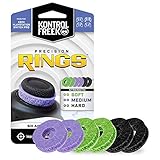
- IMPROVES AIM: Our Precision Rings are made from a unique material that adds resistance to your stock thumbsticks so you can take more accurate shots, even at max in-game sensitivities
- INCREASE CONTROL: Precision Rings compact to cushion your stick, adding resistance and preventing you from over-shooting your target. Increase your in-game sensitivity to turn on your opponents and snap to targets faster, helping you win more gun battles
- MIXED RESISTANCE LEVEL: Includes six (6) universal rings in soft, medium and hard strengths
- HIGH QUALITY HIGH QUALITY MATERIAL: Flexible, moisture wicking material is resistant to hand and finger oils, dampens sound and quickly recovers its original shape so you can use it over and over again
- COMPATIBLE WITH PERFORMANCE THUMBSTICKS: Similar to weighted sports gear, try adding them to your setup for training to build muscle in your thumbs and fine tune your aim
Bottom line
reWASD can change how supported devices’ inputs are presented to a game, including through virtual-controller emulation and mouse-to-stick mapping. The game—not reWASD—determines whether aim assist is available and how it handles the resulting input.
Quick Recap
Best Value

- Enhanced Aim & Accuracy Upgrade your gameplay with precision rings designed for PS5, for PS4, and Compatible with Xbox controllers. These rings improve thumbstick control, giving you better aim, especially in FPS games like Fortnite.
- Comfortable & Durable Material Made from soft, durable silicone material, these rings provide just the right amount of resistance for enhanced precision without compromising comfort during long gaming sessions.
- Ideal for Competitive Gaming Whether you're grinding ranked matches or playing casually, these aim assist rings help reduce over-aiming and improve shot accuracy, making them a must-have for serious gamers.
- Universal Fit & Easy to Install Compatible with PlayStation and Compatible with Xbox controllers, the rings are easy to install and remove. Just slide them onto your thumbsticks and you're ready to game with improved control.
- Great Value 8 Pack Each set includes 8 Pack precision rings in varying, allowing you to customize your setup based on your preferred gameplay style and control sensitivity.
Rank #4

- The HipShotDot is the gaming industry’s first and ONLY powered red dot sight attachment for your television. The HipShotDot replaces or enhances your in game sights with a physical USB powered red dot sight. This attachment is made of sturdy and durable materials and is designed for long - lasting use. Improve your KDR, perfect your trick scope, run and gun and shoot from the hip like never before. Level up with the HipShotDot!
- Shoot From The Hip: Shoot With Pinpoint Accuracy. No More Zooming And Taking Your Attention Off The Screen When Using Rifles To Strengthen Your Run-And-Gun Style
- Emp Proof: Dominate Hardcore Matches With A Permanent Red Dot Sight On Any Weapon Style, Even If The In-Game Sight Goes Away For Some Reason. In-Game Advantage: Leverage The Advantage Of An Additional Weapon Attachment Over The Competition By Instantly Making Any Weapon More Accurate
- The HipShotDot PRO is powered from a standard USB port. Simply connect the HipShotDot to any available USB port on your game console. You may also power the HipShotDot with a standard USB power supply, i.e. phone charger or available USB port on your television. The power indicator on the HipShotDot' s USB connector and red dot sight will illuminate.
- HSD PRO - 2nd Generation of HipshotDot. Upgraded suction cup, added color adjustment option with 3 colors and brightness control. Including two clear sticker for gaming monitors.
Rank #3

- BREAKER SERIES — Hold nothing back. Storm Breaker lets nothing stop its style with classic grays and blacks, offset with whites. Part of the collective debut of the Breaker special edition series.
- BOLD STYLE, BUILT TO PERFORM — Define your swagger with a wild, head-turning design. Stay elegantly on target with textured triggers built for every moment.
- RUBBERIZED GRIPS — Hold on to the action with rubberized grips on the back cases, designed for comfort and control during long gaming sessions.
- UP TO 40 HOURS OF BATTERY LIFE — Get up to 40 hours of battery life so you can keep playing without stopping to recharge.
- PLAY ACROSS EVERY SCREEN — Quickly pair with, play on, and switch between devices including console and PC. Stream games across mobile, gaming handhelds, Smart TVs, and supported VR headsets with XBOX Cloud Gaming.
Product prices and availability are accurate as of the date/time indicated and are subject to change. Any price and availability information displayed on Amazon at the time of purchase will apply.
The Tool Desk
Outbyte Driver Updater FREEScan for outdated or missing drivers - takes under a minuteDriver Scan →Outbyte PC Repair FREEClear out junk files and repair common Windows errorsFree Scan →



