What’s actually slowing this PC down?
Pick the symptom - the matching free tool is one click away.
The Glorious Model O- is still a capable, exceptionally light wired mouse for FPS players who prefer a compact, low-profile shape—especially small-handed claw and fingertip grippers. But it is a first-generation model with legacy Windows-only configuration software, and it is not currently listed in Glorious’s main Model O catalog. Buy one only if the price is meaningfully below newer options, the shape suits you, and the individual mouse checks out.
Glorious Model O- specifications
| Connection | Wired USB 2.0 |
|---|---|
| Weight | 58 g ±1 g |
| Sensor | PixArt PMW-3360 |
| Maximum sensitivity | 12,000 DPI |
| Tracking speed and acceleration | 250+ IPS; 50G |
| Polling rate | Up to 1,000 Hz |
| Buttons | Six, including two side buttons |
| Main switches | Omron mechanical, rated for 20 million clicks |
| Configuration software | Legacy Model O Wired Software for Windows; not compatible with Glorious CORE |
Specifications are from Glorious’s V1 Model O wired product guide. A rated click lifespan is a component specification, not a guarantee that a particular mouse—especially a used one—will avoid switch problems.
What is the Model O-?
The Model O- (also called Model O Minus) is the smaller wired version of Glorious’s original Model O. It has a symmetrical, perforated shell, six buttons and a low-profile shape. The original Model O arrived in 2019, and the O- belongs to that first generation; “Glorious PC Gaming Race” is older brand wording, while the company’s current official pages use Glorious or Glorious Gaming. See the Model O launch announcement and the current Model O catalog.
The O- remains in Glorious’s support documentation, but it is not listed among the products in the company’s current direct-sale Model O catalog. That makes availability, warranty, and seller return terms particularly important: an old-stock or used listing is not the same purchase as a current, directly supported retail model.
Free tools Windows power users keep installed
One-click scans. No signup required.
#1 Best Overall

- 55g Ultralight Weight: Up to 35% lighter than competitors, thanks to our signature honeycomb shell that reduces weight without compromising comfort or durability. Enjoy faster swipes, precise stops, and effortless control in fast-paced games.
- Highly Versatile Shape: Hold it your way—whether you’re gaming or just getting things done, the symmetrical design ensures your grip always feels natural and secure.
- Dual-Zone RGB Lighting: More than just a glowing logo, dual RGB zones flood the mouse's flared side panels with vibrant color. Instantly customize with quick button shortcuts or fine-tune to perfection using Glorious CORE software.
- 80-Million-Rated Mechanical Switches: Precise and durable, delivering crisp clicks through countless matches without double-clicking issues.
- 6 Remappable Buttons: Map your go-to equipment, abilities, and shortcuts exactly where they feel right with Glorious CORE software, keeping your actions seamless in-game and beyond.
Shape and grip: the reason to choose the O-
Its main advantage is not a headline sensor number; it is the combination of small size, low height and low weight. RTINGS describes the O- as better suited to smaller hands than the full-size Model O. The compact, relatively flat body gives claw and fingertip users room to steer with their fingers and reposition quickly. It offers less of the raised, rounded support that a palm gripper may want.
- Small hands: The clearest fit, particularly for claw or fingertip grip.
- Medium hands: A plausible fit if you like a low-profile mouse; personal grip and preferred height matter.
- Large hands: Try it before buying if possible. Its compact body and limited palm support are the main risks.
- Left-handed use: The shell is symmetrical, but the two side buttons are on the left side for right-handed thumb access. It is not equally practical as a fully featured left-handed mouse.
RTINGS notes that the glossy finish can feel slippery and that the sides lack added grips. If grip security matters, finish choice and your own feel are worth checking rather than assuming the shell texture will suit you. Glorious’s accessible V1 guide does not provide a complete dimensional table, so there is no reliable hand-length cutoff to recommend.
Weight and FPS performance
Glorious lists the O- at 58 g ±1 g. That low mass can make broad swipes and rapid direction changes feel easy, and it may be less tiring for players who use low sensitivity and move the mouse a lot. It can also feel less planted than a heavier mouse. Lightness does not improve aim by itself: shape, grip, sensitivity and consistent control matter more than the number on the scale.
Rank #2

- 55g Ultralight Weight: Up to 35% lighter than competitors, thanks to our signature honeycomb shell that reduces weight without compromising comfort or durability. Enjoy faster swipes, precise stops, and effortless control in fast-paced games.
- Highly Versatile Shape: Hold it your way—whether you’re gaming or just getting things done, the symmetrical design ensures your grip always feels natural and secure.
- Dual-Zone RGB Lighting: More than just a glowing logo, dual RGB zones flood the mouse's flared side panels with vibrant color. Instantly customize with quick button shortcuts or fine-tune to perfection using Glorious CORE software.
- 80-Million-Rated Mechanical Switches: Precise and durable, delivering crisp clicks through countless matches without double-clicking issues.
- 6 Remappable Buttons: Map your go-to equipment, abilities, and shortcuts exactly where they feel right with Glorious CORE software, keeping your actions seamless in-game and beyond.
The PMW-3360 is an older sensor, but its age does not make it inadequate for ordinary gaming. The official guide lists up to 12,000 DPI, 250+ IPS tracking, 50G acceleration and up to 1,000 Hz polling. Most buyers should care more about consistent tracking and a comfortable shape than about chasing a very high maximum DPI. RTINGS reports strong CPI tracking and low click latency for the O- and highlights its light construction and smooth feet. Those findings support its continuing usefulness for FPS play, not a claim that it outperforms newer mice in every respect.
The mouse is wired only. A flexible cable and low-friction PTFE feet help the O- glide smoothly, according to RTINGS, but cable routing still affects the feel: a bungee or cable arm can reduce drag. Glorious says the feet may arrive with blue protective film; remove it before use. On a used mouse, inspect the feet for wear or peeling and the cable for kinks, fraying or intermittent connection.
Buttons, wheel and build trade-offs
The six-button layout includes two side buttons, so it covers basic FPS and everyday control without the extra buttons of an MMO mouse. The main Omron mechanical switches are rated for 20 million clicks, but an old or heavily used unit should be judged by how it works now, not by that rating. Test for missed clicks, double-clicking and chatter.
Rank #3

- Size & style: Ambidextrous lightweight mouse for gaming. Built for speed, control and comfort, with optimal weight and high durability. Ideal for medium and large hands.
- Ultra Flexible Cable: Our 'Ascended' Paracord is so light it produces drag-free use. The ultimate wired mouse with the feel of a wireless gaming mouse.
- Mouse Feet: The Glorious Skates are 100% pure Virgin PTFE that will glide like blades on ice, giving you perfect control even at the highest speeds.
- Optimized for competitive gaming: Pixel perfect tracking, zero mouse acceleration, no more spinouts, 1000 Hz polling rate, less than 0.7mm lift-off distance. Click/scroll speed, 6 buttons with macro support, and more.
- Built to last: Model O's honeycomb design helps create the ultimate lightweight mouse, without sacrificing durability. State of the art Omron switches that are good for 20M clicks, and top-tier build quality makes the Model O built to last.
RTINGS describes the lightweight mouse as solidly built and calls out its cable and feet as strengths. The honeycomb openings help keep weight down, but leave the interior more exposed to dust, crumbs, sweat and pet hair than a closed shell. Cleaning takes more care, and some users dislike feeling openings beneath their fingers. The scroll wheel works for ordinary use but does not have an unlockable free-scroll mode, according to RTINGS.
To clean it, disconnect the mouse, use a lightly dampened microfiber cloth on exterior surfaces and avoid spraying liquid directly into it. Use compressed air sparingly so debris is not driven deeper into the shell. Glorious’s guide says warranty coverage does not cover damage resulting from opening the mouse, so do not disassemble it casually if coverage might apply.
Software and operating-system support
The O- works as a basic USB pointing device on Windows 7 and newer, macOS and Linux, according to Glorious’s V1 guide. That does not mean every platform has the same configuration support. The full customization utility is the legacy Model O Wired Software for Windows; Glorious explicitly says the V1 O and O- are not compatible with Glorious CORE.
Rank #4
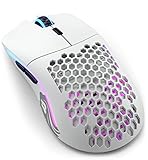
- Lightning fast: Built with 2.4GHz wireless connectivity, the Model O Wireless has the lowest wireless latency of any mouse in its class. Get blazing-fast 1ms latency with a strong and stable connection, for super consistent performance.
- Customizable RGB: Choose from 16.8M possible colours, quickly adjustable without software using mouse buttons. Deeply customize it in Glorious CORE, to make it match the rest of your desktop.
- Battery life: Model O Wireless has the highest battery life of any mouse in its class. You get up to 71 hours* of playtime in wireless mode, and you can play while charging, using the ultra-flexible USB-C Ascended paracord charging cable (*with RGB off).
- Optimized for competitive gaming: Pinpoint precision with 400 IPS tracking speed, 19,000 Max DPI and up to 1,000Hz polling rate. The proprietary BAMF Senor gives you unrivalled performance, with lower power draw, for long wireless gaming sessions.
- Built to last: Model O Wireless' honeycomb design helps create the ultimate wireless lightweight mouse, without sacrifcing durability. State of the art Omron switches with 20M clicks in them, and top tier build quality makes the Model O Wireless built to last.
That distinction matters if you want to remap buttons or change settings such as DPI, lift-off distance, debounce or lighting. Glorious lists a default 2 mm lift-off distance, adjustable from 2–3 mm, and a 10 ms default debounce time, adjustable from 4–16 ms. Buyers using macOS or Linux should expect basic pointer operation, not the full Windows configuration experience. Do not assume newer Model O 2 or O3 software or firmware applies to this V1 mouse.
RGB can be adjusted through hardware shortcuts, while the legacy utility offers more configuration. Glorious documents these shortcuts in its V1 guide:
- Change lighting effect: Middle button + forward side button + DPI button.
- Adjust brightness: Middle button + DPI button + right mouse button.
- Adjust speed: Middle button + DPI button + back side button.
- Change color: Middle button + DPI button + left mouse button.
Lighting is cosmetic; it is not a meaningful reason to choose the O- over a newer mouse. If advanced setup matters, confirm that the legacy utility is available and recognizes the unit on your Windows system before relying on it.
The Tool Desk
Outbyte PC Repair FREEClear out junk files and repair common Windows errorsFree Scan →Outbyte Driver Updater FREEScan for outdated or missing drivers - takes under a minuteDriver Scan →Best Value

- Size & style: Ambidextrous lightweight mouse for gaming. Built for speed, control and comfort, with optimal weight and high durability. The Model O- (Minus) is ideal for Medium and Small hands.
- Ultra Flexible Cable: Our 'Ascended' Paracord is so light it produces drag-free use. The ultimate wired mouse with the feel of a wireless gaming mouse.
- Mouse Feet: The Glorious Skates are 100% pure Virgin PTFE that will glide like blades on ice, giving you complete control even at the highest speeds.
- Optimized for competitive gaming: Pixel perfect tracking, zero mouse acceleration, no more spinouts, 1000 Hz polling rate, less than 0.7mm lift-off distance. Click/scroll speed, 6 buttons with macro support, and more.
- Built to last: Model O-'s honeycomb design helps create the ultimate lightweight mouse, without sacrificing durability. State of the art Omron switches that are good for 20M clicks, and top-tier build quality makes the Model O- (Minus) built to last.
How the Model O- compares with current Glorious wired mice
The prices below are observed US catalog prices, not guaranteed current prices. Model O Eternal’s listed sensor detail is as stated by Glorious; where the comparison sources do not establish a value, it is marked accordingly.
| Mouse | Weight | Sensor / software | Observed US price | Best fit |
|---|---|---|---|---|
| Model O- | 58 g ±1 g | PixArt PMW-3360; legacy Model O Wired Software, Windows only; no CORE | Not listed in current Glorious catalog | Discounted unit for someone who specifically wants its compact legacy shape |
| Model O Eternal Wired | 55 g | 12,000 DPI optical sensor; software details not stated in the cited catalog material | $39.99 | Budget current wired Model O-family option; verify fit because it is not established as a direct ergonomic O- replacement |
| Model O 2 Mini Wired | 49 g | BAMF 2.0, up to 26,000 DPI; Glorious CORE | $64.99 | Small-to-medium hands seeking a newer compact wired model |
| Model O 2 Wired | 59 g | BAMF 2.0, up to 26,000 DPI; Glorious CORE | $64.99 | Buyers wanting the standard-size wired Model O concept with newer internals |
| Model O3 Wired | 54 g | BAMF 3.0, up to 30,000 DPI; Glorious CORE | $69.99 | Buyers prioritizing newer specifications and current software support |
The Model O 2 Mini Wired is the closest current Glorious option for a buyer who wants a compact, light wired mouse, but it is a different model and may feel cramped to some users. The standard-size O 2 is a more natural comparison for someone who wants the general Model O concept without the O-’s smaller body. The Eternal is the lower-cost current option, while the O3 costs more and emphasizes newer specifications. Check the linked product pages for current availability and pricing.
Used Model O- buying checklist
Because the O- is an older model and listings may be used or remaining stock, test the individual unit before keeping it. Ask about a return option if you cannot inspect it in person.
- Test left and right clicks for missed inputs, double-clicking and chatter.
- Click the wheel repeatedly and scroll in both directions to check for skipping.
- Test both side buttons for reliable presses.
- Move quickly at both low and high sensitivity to check for tracking interruptions.
- Gently flex the cable near the mouse and USB plug while moving the cursor; watch for disconnects.
- Inspect the feet for heavy wear, peeling or missing sections.
- Check the shell for cracks, excessive flex, broken ribs or signs of liquid damage.
- Unplug and reconnect it more than once to confirm consistent detection.
- If configuration matters, check whether the legacy Model O software recognizes it on Windows.
- Confirm the return policy and whether any manufacturer warranty actually applies to that unit.
Should you buy the Glorious Model O-?
Buy it if you have small or medium hands, prefer a claw or fingertip grip, want a very light wired FPS mouse, and find a good-condition unit at a clear discount. Its sensor and glide remain capable; its particular compact shape is the enduring reason to pick it.
Do these 3 things before closing this tab:
1Scan for outdated or missing drivers - takes under a minute2Repair Windows errors before they cause bigger problems3Fix the driver behind crashes, sound loss and screen glitchesSkip it if you want wireless, current Glorious CORE support, easy closed-shell cleaning, a taller palm-supporting body, or a dependable purchase at a price close to a current model. For a compact current alternative, compare the Model O 2 Mini Wired; for a lower-cost current wired option, compare the Model O Eternal; for a standard-size successor, compare the Model O 2 Wired.
Quick Recap
Product prices and availability are accurate as of the date/time indicated and are subject to change. Any price and availability information displayed on Amazon at the time of purchase will apply.




