The Tool Desk
Outbyte Driver Updater FREEScan for outdated or missing drivers - takes under a minuteDriver Scan →Outbyte PC Repair FREERepair Windows errors before they cause bigger problemsFix Now →Some links on this page are affiliate links: if you buy through them we may earn a commission, at no extra cost to you.
If Hell Is Us crashes during its opening cinematic on an NVIDIA RTX 40- or RTX 50-series GPU, Nacon’s temporary workaround is to lower the graphics preset and disable all upscaling, frame-generation, and Intel Xe Low Latency options before starting the sequence. Once you are controlling Rémi, Nacon says you can raise the settings again.
The developer disclosed the issue on June 2, 2025, in connection with the PC demo. It was described as an apparent problem affecting some NVIDIA RTX 4000- and RTX 5000-series cards—not proof that every card in those generations is affected.
| # | Preview | Product | Price | |
|---|---|---|---|---|
| 1 |

|
ASUS TUF Gaming GeForce RTX 5090 32GB GDDR7 OC Edition Gaming Graphics Card | $6,995.95 | Buy on Amazon |
How to apply the official workaround
- Launch Hell Is Us and remain at the main menu.
- Open Options or the game’s graphics settings.
- Lower the overall graphics preset or quality setting.
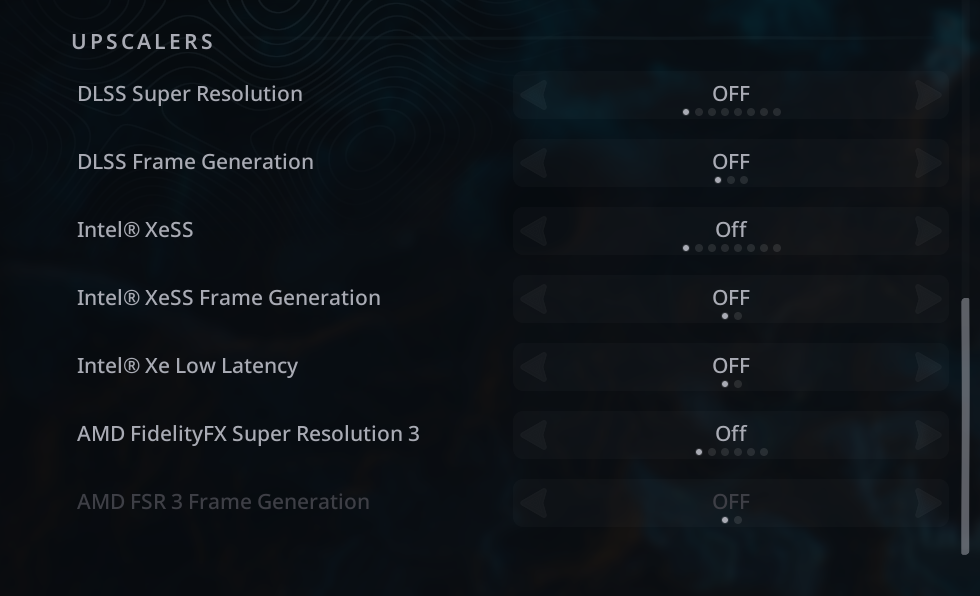
- Set each of the following options to Off:
- DLSS Super Resolution
- DLSS Frame Generation
- Intel XeSS
- Intel XeSS Frame Generation
- Intel Xe Low Latency
- AMD FidelityFX Super Resolution 3
- AMD FSR 3 Frame Generation
- Start or resume the game and get through the introduction cinematic.
- After control returns to Rémi, restore your preferred graphics settings.
Nacon’s settings image shows all seven options disabled. This is broader than simply turning off DLSS: the list covers super-resolution upscalers, frame-generation features, and Intel’s latency option. The developer’s original notice is available in its Steam announcement, while the exact settings appear in Nacon’s configuration screenshot.
Do these 3 things before closing this tab:
1Scan for outdated or missing drivers - takes under a minute2Clear out junk files and repair common Windows errors3Fix the driver behind crashes, sound loss and screen glitchesWhen should you turn the settings back on?
The workaround is intended to get players past the problematic cinematic, not necessarily to force them to play the entire game at reduced settings. Once the opening sequence ends and you are controlling Rémi, re-enable features gradually rather than switching everything on at once:
#1 Best Overall
- AI Performance: 772 AI TOPS
- OC mode: 2580 MHz Default mode: 2550 MHz(Boost clock)
- Powered by the NVIDIA Blackwell architecture and DLSS 4
- SFF-Ready Enthusiast GeForce Card
- Axial-tech fans feature a smaller fan hub that facilitates longer blades and a barrier ring that increases downward air pressure
- Raise the general quality preset.
- Test the game.
- Re-enable one upscaler.
- Test again.
- Enable frame generation last.
This staged approach is practical troubleshooting, not a documented diagnostic procedure from Nacon. If the crash returns, leave the setting that preceded it disabled and test the remaining options separately.
What exactly was the bug?
Nacon said Hell Is Us could crash during its introduction cinematic and that the problem appeared to affect NVIDIA RTX 4000- and RTX 5000-series graphics cards. The wording was preliminary: the cause was still being investigated, and the notice did not establish that NVIDIA hardware was the sole cause.
That distinction matters. A crash during a cinematic is not automatically evidence of insufficient GPU performance or a general frame-rate problem. The supplied workaround targets the rendering features active around the opening sequence.
Does this apply to the full game?
The announcement was published on June 2, 2025 and specifically discussed the PC demo. Hell Is Us subsequently released on PC on September 4, 2025, according to the game’s Steam technical-support page.
Therefore, players using a current full-game build should first install available game updates and check current support information. The June workaround remains the relevant developer guidance supplied for the demo-era cinematic crash, but the available announcement does not provide a verified patch number or release date for a permanent fix. It should not be presented as proof that every later build still has the same defect—or that the issue is universally fixed.
What if the game crashes before the graphics menu?
The official workaround requires access to the main menu. If the game crashes before you can reach or complete the opening sequence, it may not be usable. Community discussions include reports of crashes on other NVIDIA hardware, including RTX 3070 and RTX 3080 Ti systems, as well as reports from RTX 50-series owners. These posts show that the problem was not necessarily limited to the officially identified cards, but they do not prove a universal RTX 30-series bug or establish a separate official diagnosis.
Try these general troubleshooting steps, in order:
- Verify the game files in Steam. Use Steam’s installed-game properties and its file-verification option.
- Disable overlays. Temporarily turn off Steam, NVIDIA, and other performance or recording overlays.
- Restart the computer and try again with conservative settings.
- Check the active GPU. On a laptop, confirm that the game is using the intended discrete GPU.
- Try a clean GPU-driver installation if normal driver troubleshooting is appropriate.
- Disable driver-level enhancements in the NVIDIA App or NVIDIA Control Panel for the game.
- Contact Nacon support if you still cannot reach the menu.
If you contact support, include your GPU and CPU models, Windows version, NVIDIA driver version, storefront, the exact point of failure, and any crash logs or screenshots. Steam lists Nacon as publisher, Rogue Factor as developer, and [email protected] as the support address.
Should you update or roll back your NVIDIA driver?
Checking for driver updates is reasonable, but the available evidence does not prove that a driver caused or fixes the cinematic crash. NVIDIA’s GeForce Game Ready Driver 581.57 page, released October 14, 2025, lists a fix for random red-and-green visual glitches in Hell Is Us. That is a different issue from the introduction-cinematic crash, so it should not be described as confirmation of a fix for this problem.
Likewise, do not treat a particular rollback as Nacon’s official solution. Laptop owners should be especially careful: NVIDIA notes that notebook users may need manufacturer-certified drivers instead of the generic desktop package. Check your laptop maker’s support guidance before replacing its driver.
Will lowering settings hurt performance?
Possibly. Disabling super resolution can make the GPU render closer to native resolution, which may reduce frame rate. Disabling frame generation removes generated frames, and lowering the preset reduces visual quality. The impact depends on the GPU, CPU, resolution, and selected quality settings, so no universal frame-rate result can be promised.
For that reason, treat the changes as a temporary compatibility workaround. They are not a recommendation to permanently play at low quality, and buying a newer graphics card is not a demonstrated solution: Nacon’s reported issue involved the RTX 40 and RTX 50 generations themselves.
Quick Recap
What is confirmed—and what is not?
| Question | Supported answer |
|---|---|
| Was the issue acknowledged by the developer? | Yes. Nacon acknowledged it on June 2, 2025. |
| What was the trigger? | The introduction cinematic in the PC demo. |
| Which cards did Nacon identify? | NVIDIA RTX 4000- and RTX 5000-series cards, using cautious preliminary wording. |
| What is the official temporary action? | Lower the graphics setting and disable the seven listed features. |
| Can settings be restored? | Nacon says yes, after the cinematic when you control Rémi. |
| Is a permanent patch documented here? | Nacon said one was being investigated, but no verified patch number or date is supplied. |
| Does a later NVIDIA visual-glitch fix prove the crash was fixed? | No. The driver note concerns a separate red/green visual issue. |
Product prices and availability are accurate as of the date/time indicated and are subject to change. Any price and availability information displayed on Amazon at the time of purchase will apply.