If Honkai: Star Rail shows “Global Distribution Error” every time you open it, HoYoverse says this message often indicates a network connection issue. That is a useful first lead, not proof that your home internet is definitely the cause. Restart your router and device, test another network if available, and check for VPN, proxy, or DNS settings before contacting support.
What “Global Distribution Error” means
HoYoverse groups “Global Distribution Error” with login errors 1001 and 400_0 and getting stuck on the loading screen. Its official troubleshooting article, updated October 23, 2025, says these problems often indicate a network connection issue. “Often” matters: the message alone does not identify the cause in your particular case, and HoYoverse does not explain the technical meaning of “distribution” in that article.
Some players report seeing wording such as “Global distribution error. Please check your internet connection and restart the game.” A HoYoLAB user post includes that wording and anecdotal accounts of the error persisting despite other internet activity working or a reinstall. Those reports describe individual experiences; they do not establish a cause or a reliable fix.
Try these network checks in order
- Restart the router and the device running the game. Close the game, restart the device, and restart your router before trying again. These are the first checks in HoYoverse’s guidance.
- Test a different connection. If you are on Wi-Fi, try mobile data; if you are on mobile data, try Wi-Fi. If the game works on one but not the other, note that difference—it can help support narrow down the conditions associated with the error.
- Temporarily disable network intermediaries. Turn off an active VPN, proxy, or other third-party network software and retry. HoYoverse’s guidance does not call for installing another network utility.
- Check DNS. Make sure the device or network is set to obtain DNS automatically. Avoid treating community-posted command-line changes as an official fix; HoYoverse’s published guidance is to use automatic DNS.
Retry the game after each change so you can tell whether the outcome changed. These checks are not guaranteed fixes; HoYoverse recommends contacting support if the error remains.
Free tools Windows power users keep installed
One-click scans. No signup required.
#1 Best Overall

- Fast 1300Mbps USB WiFi Adapter - Nineplus wifi adapter provides long-range and stable wifi connections,Upgrade your desktop or laptop wifi Technology with our AC1300Mbps usb wireless Adapter. Whether your desktop pc's wifi usb is malfunctioning or you’re looking to upgrade to faster dual-band 5GHz and 2.4GHz speeds, this pc wifi adapter is the ideal choice. It’s a budget-friendly way to extend your device’s life and experience the benefits of modern WiFi technology
- Dual-band 5.8GHz and 2.4GHz Bands - 5.8Ghz wifi Connection speed up to 867Mbps,2.4GHz 400Mbps,With these upgraded speeds, web surfing, gaming, and streaming online meeting is much more enjoyable without buffering or interruptions,Experience the High Wi-Fi speed of our AC1300Mbps wifi dongle delivers faster internet speeds and stronger, more reliable signal penetration over long distances. It's a high-speed dual-band wifi usb adapter for pc and easy for the modern user.
- Two 5dBi High Gain Wifi Antenna – The high gain antenna of the desktop wifi adapter greatly enhances the reception and transmission of WiFi signal strengths.Equipped with dual high-gain pc wifi antenna, our wifi dongle for desktop pc ensures accurate capture of WiFi signals, providing a stable and strong connection even at greater distances, ideal for overcoming poor signal issues in bedrooms. This computer wifi adapter, wifi card, and usb wifi antenna extend your coverage.
- Super Speed USB 3.0 - wifi adapter for desktop pc Connect speeds Up to 10x faster than USB 2.0 USB, Super USB3.0 delivers faster data transfer, a more reliable network connection, and improved compatibility for wifi adapter for pc. It fully supports the high-speed demands of AC1300 wireless adapter, ensuring peak performance. Plus, it's backward compatible with standard USB 2.0 ports for added flexibility.usb wifi adapter for desktop pc 3.0
- Compatibility Systems: This Wi-Fi usb adapter is compatible with Windows11/10/8.1/8/7/XP,not supports Mac OS or Chromebook or Linux. Most Windows 11/10 systems will automatically detect and install the drivers. If the system does not detect the driver, you will need to download it from our website. For Windows 7, you will need to manually install the driver for this wifi card.or you go to the website online-setup support,we do online-setup for you.
Could it be a HoYoverse service problem?
It is possible for a broader service issue to affect access, but old community posts cannot confirm that one is happening now. A HoYoLAB thread dated June 5, 2025 contains reports involving more than one HoYoverse game and a later comment that access returned. That is anecdotal and historical, not live outage confirmation. Check HoYoverse’s official announcements or support channels for current information, then retry after the local network checks.
What to send HoYoverse Support
If the error persists, contact HoYoverse Customer Support and include the details it requests. A screenshot or short video of the message can show exactly what appears when you launch.
Rank #2

- 𝐋𝐨𝐧𝐠 𝐑𝐚𝐧𝐠𝐞 𝐀𝐝𝐚𝐩𝐭𝐞𝐫 – This compact USB Wi-Fi adapter provides long-range and lag-free connections wherever you are. Upgrade your PCs or laptops to 802.11ac standards which are three times faster than wireless N speeds.
- 𝐒𝐦𝐨𝐨𝐭𝐡 𝐋𝐚𝐠 𝐅𝐫𝐞𝐞 𝐂𝐨𝐧𝐧𝐞𝐜𝐭𝐢𝐨𝐧𝐬 – Get Wi-Fi speeds up to 200 Mbps on the 2.4 GHz band and up to 433 Mbps on the 5 GHz band for upgraded web surfing, gaming, and streaming. Performance varies by conditions, distance to devices, and obstacles such as walls.
- 𝐃𝐮𝐚𝐥-𝐛𝐚𝐧𝐝 𝟐.𝟒 𝐆𝐇𝐳 𝐚𝐧𝐝 𝟓 𝐆𝐇𝐳 𝐁𝐚𝐧𝐝𝐬 – Dual-bands provide flexible connectivity, giving your devices access to the latest routers for faster speeds and extended range. Wireless Security - WEP, WPA/WPA2, WPA-PSK/WPA2-PSK
- 𝟓𝐝𝐁𝐢 𝐇𝐢𝐠𝐡 𝐆𝐚𝐢𝐧 𝐀𝐧𝐭𝐞𝐧𝐧𝐚 – The high gain antenna of the Archer T2U Plus greatly enhances the reception and transmission of WiFi signal strengths.
- 𝐀𝐝𝐣𝐮𝐬𝐭𝐚𝐛𝐥𝐞, 𝐌𝐮𝐥𝐭𝐢-𝐃𝐢𝐫𝐞𝐜𝐭𝐢𝐨𝐧𝐚𝐥 𝐀𝐧𝐭𝐞𝐧𝐧𝐚: Rotate the multi-directional antenna to face your router to improve your experience and performance
- Your server
- Your platform: PC, iOS, Android, or PlayStation
- Your region or country
- Your network provider
- Whether you are using Wi-Fi or mobile data
- A screenshot or video of the error
Also say whether switching between Wi-Fi and mobile data changed the result. That comparison is useful context, especially if one connection lets you log in and the other does not.
Independent reader supportYour contribution helps us test, update, and keep practical guides available for everyone.What is not established
HoYoverse provides common network checks rather than separate confirmed fixes for PC, mobile, and PlayStation. Its guidance does not give a guaranteed recovery time, and the error message does not by itself prove whether the issue is on your device, network, or a service. If the official checks do not resolve it, support is the appropriate next step.
Crashes, No Sound, or Screen Glitches?
Random freezes, missing sound and display glitches usually trace back to one bad driver. Find and replace yours safely.Free scan · under a minutePC Slower Than It Used to Be?
A free scan shows the junk files, broken settings and background clutter dragging Windows down - then fixes them in one click.Free scan · Windows 10 & 11Quick Recap
Best Value

- 𝐍𝐞𝐱𝐭 𝐆𝐞𝐧 𝐖𝐢𝐅𝐈 𝟔 - Reach incredible speeds up to 2.4 Gbps (2402 Mbps in 5 GHz or 574 Mbps on 2.4 GHz) with ultra-low latency and uninterrupted connectivity using Wi-Fi 6 technologies¹
- 𝐌𝐢𝐧𝐢𝐦𝐢𝐳𝐞𝐝 𝐋𝐚𝐠 𝐟𝐨𝐫 𝐘𝐨𝐮𝐫 𝐏𝐂 - The networking card is equipped with OFDMA and MU-MIMO technology to reduce lag so you can enjoy ultra-responsive real-time gaming, or an immersive VR experience on even the busiest networks
- 𝐁𝐫𝐨𝐚𝐝𝐞𝐫 𝐑𝐚𝐧𝐠𝐞 - 2 powerful signal-boost, high-gain antennas greatly inrease range for a smoother online gaming experience in further away distances
- 𝐁𝐥𝐮𝐞𝐭𝐨𝐨𝐭𝐡 𝟓.𝟐 𝐟𝐨𝐫 𝐆𝐫𝐞𝐚𝐭𝐞𝐫 𝐒𝐩𝐞𝐞𝐝 𝐚𝐧𝐝 𝐑𝐚𝐧𝐠𝐞 - Equipped with the latest Bluetooth technology, Archer TX55E achieves 2x faster speeds and 4x broader coverage compared to Bluetooth 4.2 so you can connect your favorite devices such as game controllers, headphones, and keyboards for the ultimate setup.²
- 𝐂𝐮𝐭𝐭𝐢𝐧𝐠 𝐄𝐝𝐠𝐞 𝐖𝐏𝐀𝟑 - Protector your network with the latest WPA3 security protocol so your information transmitted via the wireless adapter is secure from hackers³
Rank #4
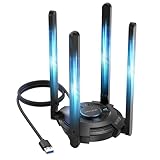
- 【Next-Gen Wi-Fi 7 Tri-Band】Experience blazing-fast tri-band speeds of up to 688Mbps on the 2.4GHz band, 2882Mbps on the 5GHz band, and 2882Mbps on the ultra-fast 6GHz band — ideal for bandwidth-intensive tasks like 8K streaming, lag-free gaming, and large file transfers. With Wi-Fi 7 technologies such as MLO (Multi-Link Operation) and Multi-RU, enjoy lower latency and more stable connection even in crowded networks. 𝐓𝐨 𝐮𝐭𝐢𝐥𝐢𝐳𝐞 𝟔𝐆𝐇𝐳 𝐖𝐢-𝐅𝐢, 𝐲𝐨𝐮𝐫 𝐬𝐲𝐬𝐭𝐞𝐦 𝐧𝐞𝐞𝐝𝐬 𝐭𝐨 𝐛𝐞 𝐮𝐬𝐢𝐧𝐠 𝐖𝐢𝐧𝐝𝐨𝐰𝐬 𝟏𝟏 (𝐯𝐞𝐫𝐬𝐢𝐨𝐧 𝟐𝟏𝐇𝟐 𝐨𝐫 𝐥𝐚𝐭𝐞𝐫). 𝐏𝐥𝐞𝐚𝐬𝐞 𝐮𝐬𝐞 𝐔𝐒𝐁 𝟑.𝟎 𝐩𝐨𝐫𝐭 𝐭𝐨 𝐞𝐧𝐬𝐮𝐫𝐞 𝐨𝐩𝐭𝐢𝐦𝐚𝐥 𝐩𝐞𝐫𝐟𝐨𝐫𝐦𝐚𝐧𝐜𝐞.
- 【Built-in Driver for Windows 10/11】Only for Windows 11/10, this WiFi 7 adapter includes a built-in driver that runs automatically after plugging in. No extra downloads needed in most cases — enjoy a seamless and easy installation experience. Note: The driver pop-up window will appear in the lower-right corner of the taskbar. If the pop-up window does not appear, open "This PC", look for "CD Drive", and then proceed with the installation. If your computer has this driver installed, the "CD Drive" will not be displayed after connecting the adapter.
- 【Versatile Connectivity Modes】Supports both Receive Mode and Hotspot Mode for flexible usage. In Receive Mode, it connects wirelessly to your router’s 2.4GHz, 5GHz, and 6GHz signals. In Hotspot Mode, you can share your PC’s internet connection as a Wi-Fi hotspot, allowing smartphones, tablets, laptops, and other devices to access the network seamlessly.
- 【𝐌𝐮𝐥𝐭𝐢𝐜𝐨𝐥𝐨𝐫 𝐖𝐢-𝐅𝐢 𝐒𝐭𝐚𝐭𝐮𝐬 𝐋𝐄𝐃 𝐋𝐢𝐠𝐡𝐭𝐢𝐧𝐠】WAVLINK usb wifi 7 adapter features an intuitive multicolor LED indicator (blue, pink, red). It provides instant visual feedback on your network status, while the responsive touch switch lets you easily customize the lighting, merging clear functionality with modern desktop aesthetics.
- 【Adjustable Antennas for Optimal Performance】Equipped with 4 high-gain 5dBi antennas that deliver strong signal coverage and improved stability, even in demanding environments. The foldable antenna design allows for easy storage and flexible positioning to optimize wireless performance. Built with ventilation slots on both the surface and bottom, the adapter ensures efficient heat dissipation during long periods of use.
Rank #3

- 𝐅𝐚𝐬𝐭, 𝐅𝐥𝐞𝐱𝐢𝐛𝐥𝐞 𝐖𝐢-𝐅𝐢 𝟔 - Delivers smooth dual-band connectivity, with 5 GHz for streaming and gaming and 2.4 GHz for longer-range browsing, downloads, and everyday use. Performance varies by conditions, distance to devices, & obstacles such as walls.
- 𝐈𝐧𝐬𝐭𝐚𝐧𝐭 𝐔𝐩𝐠𝐫𝐚𝐝𝐞 𝐟𝐨𝐫 𝐎𝐮𝐭𝐝𝐚𝐭𝐞𝐝 𝐖𝐢-𝐅𝐢- Whether your current Wi-Fi card is outdated or malfunctioning, this powerful USB adapter is a cost-effective way to revive and modernize your device for the digital age. Enhance your productivity and entertainment experience instantly.
- 𝐆𝐫𝐞𝐚𝐭𝐞𝐫 𝐂𝐨𝐯𝐞𝐫𝐚𝐠𝐞 𝐚𝐧𝐝 𝐂𝐨𝐧𝐧𝐞𝐜𝐭𝐢𝐨𝐧 𝐒𝐭𝐚𝐛𝐢𝐥𝐢𝐭𝐲 - Equipped with 2× high-gain dual-band antennas and advanced beamforming technology, the TX30U Plus ensures stronger signal reception and wider Wi-Fi coverage. Even in complex layouts or through walls, it delivers reliable and consistent connectivity—ideal for homes, apartments, and office environments. Perfect for streaming, gaming, and video conferencing across rooms or floors.
- 𝐎𝐮𝐫 𝐂𝐲𝐛𝐞𝐫𝐬𝐞𝐜𝐮𝐫𝐢𝐭𝐲 𝐂𝐨𝐦𝐦𝐢𝐭𝐦𝐞𝐧𝐭 - TP-Link is a signatory of the U.S. Cybersecurity and Infrastructure Security Agency’s (CISA) Secure-by-Design pledge. This device is designed, built, and maintained, with advanced security as a core requirement.
- 𝐄𝐚𝐬𝐲 𝐭𝐨 𝐔𝐬𝐞 – 1. Easy Installation - Installs quickly with our preloaded internal driver for seamless connectivity. 2. Adjust and Pack with Ease - Optimizes signal with adjustable antennas and folds compactly for easy storage.
Product prices and availability are accurate as of the date/time indicated and are subject to change. Any price and availability information displayed on Amazon at the time of purchase will apply.



