How you customize a PowerA controller depends on its model and platform: use PC HQ for supported OPS and Battle Dragon PC controllers, Gamer HQ for compatible Xbox controllers, or the controller’s own program button to assign Advanced Gaming Buttons on supported Nintendo Switch models. Check the model name and its official manual first; app features and button procedures are not universal.
First, identify your PowerA controller
Check the model name on the controller or its packaging, then find its matching PowerA product support page or manual. The customization route depends on whether you have an OPS or Battle Dragon PC controller, an Xbox controller, or a Nintendo Switch controller with Advanced Gaming Buttons.
| Controller family | Customization route | Where it happens | Important qualification |
|---|---|---|---|
| Supported OPS or Battle Dragon PC controller | PC HQ | Windows PC | Options differ by model; PC HQ does not support PowerA Xbox controllers, as clarified in PowerA PC HQ version 1.4.2 release notes dated August 6, 2025: PowerA PC HQ. |
| Supported Xbox controller | Gamer HQ | Windows 10/11, Xbox Series X|S, or Xbox One | PowerA says Gamer HQ is compatible with its Xbox Series X|S controllers; Xbox One support is limited, and features vary by model: Gamer HQ and PowerA support. |
| Supported Nintendo Switch controller with Advanced Gaming Buttons | Assign buttons on the controller | Controller hardware | Availability and reset behavior depend on the model: PowerA support. |
Customize a supported OPS or Battle Dragon controller with PC HQ
PC HQ is a Windows workflow. PowerA lists Windows 10 version 17763.0 or higher as the minimum on its PC HQ page. The OPS manual instructs users to connect a supported controller to a Windows 10 or 11 PC by USB-C.
- Confirm your controller is a PC model listed as compatible with PC HQ.
- Install the official PC HQ app on a supported Windows PC.
- Connect the controller to the PC with a USB-C cable and open PC HQ.
- Select the setting you want to adjust. The choices shown depend on the controller model.
Depending on the model, PC HQ can manage profiles, remap supported buttons, adjust trigger behavior and stick deadzones or active areas, change rumble or game-chat balance, test inputs, recalibrate analog controls, and update firmware. Do not assume that every controller has every setting.
Free tools Windows power users keep installed
One-click scans. No signup required.
#1 Best Overall

- Multi-Zone RGB Lighting – Customize you controller with 4 individual lighting zones and 3 lighting modes for thousands of color combinations
- Built-In IR Transmitter –Allows you to control compatible Lumectra Zone RGB lighting accessories from your gamepad
- Advanced Gaming Buttons – Get an edge over the competition with two mappable buttons you can program on-the-fly, mid-game—no system settings to configure
- 3-Way Trigger Locks – Set the travel distance of the triggers with three different positions to pull off quicker actions in your favorite FPS games or go full throttle in a high-end race car
- Dual Rumble Motors - Take your gaming experience to the next level, providing tactile feedback and sensations that bring your virtual worlds to life
Profiles on the OPS v3 Pro
The OPS v3 Pro manual documents saving up to three custom profiles to the controller and cycling through them with its Profiles button. That count is specific to the OPS v3 Pro; check another model’s manual rather than assuming it has the same profile limit.
Customize a supported Xbox controller with Gamer HQ
Use PowerA Gamer HQ for supported Xbox controllers. PowerA describes the app as compatible with its Xbox Series X|S controllers. It is available on Windows 10/11, Xbox Series X|S, and Xbox One, but PowerA says Xbox One support is limited and the available features depend on the controller.
Rank #2

- Quick-Twist Thumbsticks – Easily adjust the height for each thumbstick in the middle of a game with a simple twist: no need to swap out parts. Three height settings for each thumbstick let you customize them to your gameplay style
- Hall Effect Modules – Contact-free magnetic sensors in the thumbsticks provide a more fluid pro-level feel to help with precision and longevity
- Advanced Gaming Buttons – Get an edge over the competition with 4 mappable buttons that you can program on the fly, mid-game—no system settings to configure
- 3-Way Trigger Locks – Set the travel distance of the triggers with three different positions to pull off quicker actions in your favorite FPS games or go full throttle in a high-end race car
- Immersive Gaming – Dual rumble motors and impulse triggers add lifelike tactile details to your games while a 3.5mm stereo jack delivers clear dynamic audio*
For compatible models, Gamer HQ can provide button remapping, stick deadzone and trigger settings, audio and vibration controls, and firmware or calibration functions. Lighting controls are for supported Spectra and Lumectra Xbox models, not all PowerA controllers. PowerA’s release notes dated October 2, 2026, say version 3.1.14.70 added profile support for a wider range of Wireless Special Edition controllers: Gamer HQ release notes.
Do not run firmware updates or calibration tools unless PowerA lists your exact model as compatible. PowerA warns that these tools do not support some older PowerA controller versions, MOGA controllers, or non-PowerA controllers. Check the model-specific FAQ and manual at PowerA support before proceeding.
Rank #3
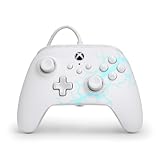
- Now Including Hall Effect Modules – Say goodbye to stick drift with contract-free magnetic sensors in the thumbsticks giving you smoother control, enhanced precision, and increased longevity
- Advanced Gaming Buttons – Get an edge over the competition with two mappable buttons you can program on-the-fly, mid-game—no system settings to configure
- 3-Way Trigger Locks – Set the travel distance of the triggers with three different positions to pull off quicker actions in your favorite FPS games or go full throttle in a high-end race car
- Dual Rumble Motors – Take your gaming experience to the next level, providing tactile feedback and sensations that bring your virtual worlds to life
- Immersive Impulse Triggers – Provides reactive rumble sensations using built-in motors so you can feel the action of the game*
Assign Advanced Gaming Buttons on a supported Switch controller
On a Nintendo Switch controller that has Advanced Gaming Buttons and supports onboard assignment, you can copy another button’s function to a paddle without using PC HQ or Gamer HQ. PowerA’s procedure is:
- Hold the program button for 2–3 seconds, until the indicator flashes.
- Press the controller button whose function you want to copy.
- Press the Advanced Gaming Button that should receive that function.
- Repeat the assignment for another paddle if needed.
PowerA says assignments remain in memory after the controller is disconnected. Resetting an assignment is a separate procedure and varies by model, so follow the manual for your controller rather than assuming the same reset sequence applies to every Switch model. See PowerA support.
Quick Recap
Rank #4

- Now Including Hall Effect Modules – Say goodbye to stick drift with contact-free magnetic sensors in the thumbsticks giving you smoother control, enhanced precision, and increased longevity
- Code for Bonus Virtual Item Included – Moon Bounce Emote
- 2 Types of Glow – Bring the spirit of the arcade to your controller with a glow in the dark effect and a reaction when a UV light is applied giving off a fluorescent glow
- Advanced Gaming Buttons – Get an edge over the competition with two mappable buttons you can program on-the-fly, mid-game—no system settings to configure
- 3-Way Trigger Locks – Set the travel distance of the triggers with three different positions to pull off quicker actions in your favorite FPS games or go full throttle in a high-end race car
If customization is missing or an app will not work
- Check the family and model. PC HQ is for supported PC controllers, not PowerA Xbox controllers; Xbox and Switch procedures are different.
- Check the app’s platform and compatibility list. PC HQ requires Windows 10 version 17763.0 or higher. Gamer HQ’s Xbox One support is limited.
- Use the model’s manual for firmware and calibration. These tools are not compatible with every PowerA generation or other controller brands.
- Verify a setting is supported before troubleshooting it. Profile, lighting, remapping, and response options are model-specific.
Product prices and availability are accurate as of the date/time indicated and are subject to change. Any price and availability information displayed on Amazon at the time of purchase will apply.



