PC Slower Than It Used to Be?
A free scan shows the junk files, broken settings and background clutter dragging Windows down - then fixes them in one click.Free scan · Windows 10 & 11Crashes, No Sound, or Screen Glitches?
Random freezes, missing sound and display glitches usually trace back to one bad driver. Find and replace yours safely.Free scan · under a minuteSome links on this page are affiliate links: if you buy through them we may earn a commission, at no extra cost to you.
A PS3 power supply is a strong suspect if the console has no standby red light after you have tested a working outlet and compatible AC cable, or if it shows no response when you press power. A yellow-light shutdown with no fan movement adds suspicion, but no single light sequence proves the PSU is faulty. First rule out the outlet, cable, overheating and connected accessories; then confirm with a correctly matched known-good PSU or a qualified technician.
What the PS3 power lights mean
Sony’s PS3 documentation defines the basic indicators as follows. The exact warning and shutdown behavior can vary among Fat, Slim and Super Slim revisions, so treat the light as a clue rather than a component-specific code.
| Indicator | Meaning |
|---|---|
| Solid red | The system is off and in standby. |
| Solid green | The system is on. |
| Flashing green | The system is turning off. |
| Alternating red and green | Sony identifies this as elevated internal temperature; investigate cooling and ventilation first. |
Sources: Sony PS3 Quick Start Guide and Sony PS3 safety documentation.
Do these 3 things before closing this tab:
1Repair Windows errors before they cause bigger problems2Scan for outdated or missing drivers - takes under a minute3Clear out junk files and repair common Windows errorsSymptoms that make a bad PSU more likely
| What happens | How much it points to the PSU | What else could cause it |
|---|---|---|
| No standby red light | High, after external power checks | Outlet, AC cable, rear switch or inlet, connector, or a severe motherboard short |
| Red standby light, but pressing power causes no beep, green light or fan movement | Moderate to high | Control circuitry or motherboard fault |
| Green light appears briefly, then the console goes completely dead | Moderate | PSU protection shutdown, motherboard short or another internal fault |
| Green, brief yellow, then flashing red, with no fan movement | More suggestive | Still not conclusive; other internal faults can produce shutdowns |
| Visible PSU damage, scorch marks, corrosion, a burnt smell or liquid exposure | High concern; stop using the console | Damage may also affect other components |
Do not keep trying to power on a console with a burnt smell, visible damage or suspected liquid exposure. Disconnect it from the wall and arrange professional inspection.
#1 Best Overall
![3 Prong AC Power Cord Compatible with Sony PS3 First Generation(Fat), Original PlayStation 3, Xbox 360 1st Generation(Fat) Universal Power Cable Replacement [UL Listed]](https://m.media-amazon.com/images/I/41wGbV5GFcL._SL160_.jpg)
- Compatible with: Sony Playstation 3 First Generation (power connector is 3-slot)
- Power Cord Type: 18 AWG, 125V 10A; Length: 4 Feet
- Universally Compatible: Works with most PCs, TVs, Monitors and Other Devices that Accommodate a 3-pin Power Connector. ▶NOTE: Please check pictures to confirm compatibility before purchasing
- Safety / UL Listed: Tested, Approved and Certified by UL
Symptoms that more often point somewhere else
- Fan starts briefly during a green-to-yellow-to-flashing-red shutdown: iFixit’s troubleshooting guide treats this as more suggestive of a motherboard fault than a PSU fault. It also describes motherboard problems as the more common cause of YLOD. iFixit PS3 troubleshooting.
- Alternating red and green: Treat this first as an overheating warning, not a PSU diagnosis. Turn the console off, let it cool, clear dust from the external vents and move it into an open, ventilated space. Sony warns against enclosed cabinets and blocked vents in its safety documentation.
- Console stays on but there is no picture: Check the TV input and video cable, try another display or available AV output, and consider Sony’s video-output reset: turn the system off, then hold its power button for at least five seconds until the second beep. This is a video recovery step, not a PSU test. Sony Quick Start Guide.
- It boots but freezes, reports storage errors or will not read discs: Investigate the hard drive, software, Blu-ray drive or related control board before suspecting the PSU.
- It shuts down after several seconds or around 10 seconds: That timing alone is not a universal PSU diagnosis. Thermal sensing, fan issues, motherboard faults and model-specific behavior can cause similar symptoms; see iFixit’s Super Slim troubleshooting guide.
Check the external power path before opening the console
- Test the outlet. Plug a known-working device into the same outlet. If you use a surge protector, extension cord or power strip, bypass it temporarily and test the PS3 directly from a known-good wall outlet.
- Inspect and reseat the AC cable. Turn the PS3 off and unplug it first. Look for cuts, loose connections, bent contacts, heat damage or a damaged plug. Try a known-good cable of the correct type. Do not use a modified or damaged cord; Sony says to inspect the AC cord and stop using it if damaged.
- Perform a basic power reset. Unplug the AC cable from both the wall and console, wait several minutes, reconnect directly to the wall and try again. This is a basic isolation step, not a factory reset or guaranteed repair.
- Remove external variables. Disconnect HDMI or AV, USB devices, controllers and hubs, Ethernet, and other accessories. Remove a disc only if the model permits safe removal. Test whether the power behavior changes.
- Record the response. Note the light sequence, any beep, whether the fan starts, how long the console stays on and whether the response changes after the reset.
Sony’s guidance on AC-cord safety is in its PS3 safety documentation.
Watch and listen for the fan
Without opening the console, listen near its vents as you press power. Fan behavior is a useful discriminator, not a verdict:
Rank #2

- ➽EADP-220BB Power Supply Replacement and Repair for Sony PlayStation 3 PS3 Slim CECH2001 / CECH2101 / CECH2501
- ➽Power Supply Unit PSU Replacement, special for PS3 Slim Console PS3 2000 2500 120GB 160GB 250GB 320GB
- ➽Replacing your old part with this good one will solve your problem! This replacement is what works for the game doctor in you! Save money and fix your system by replacing it at a fraction of the original one price!
- ➽If your PS3 will not turn on at all and you don't even see the red light on the front of the system, this part may be all you need. you can change it with this newer power supply model which does not got hot.
- ➽Note: please note this item is a Disassembly parts from original device. (may get a little scratches) if you mind the condition, please do not order this
- No fan movement during a yellow-light attempt: This increases suspicion of a PSU problem under iFixit’s troubleshooting heuristic, but does not prove it.
- Fan spins briefly, then the console shuts down: This leans more toward a motherboard fault than a PSU fault, according to the same guide.
- Fan immediately runs unusually fast: A thermal, fan-signal or board issue may be involved; high fan speed alone does not identify a failed PSU.
- Fan runs and the console remains on, but there is no picture: Focus on video output, display handshake, settings or graphics/motherboard faults instead.
The classic green-to-yellow-to-flashing-red sequence is often called YLOD, but it signals a general hardware failure rather than naming the failed component. The indicator alone cannot distinguish PSU failure from a motherboard problem. Slim and Super Slim systems may also shut down without displaying the same sequence. iFixit’s PS3 guide and Super Slim guide discuss these differences.
Find the exact CECH model before buying a PSU
Read the full model number from the console label; examples include CECHA, CECHG, CECH-2001A, CECH-2501B and CECH-4301C. Photograph it before ordering parts. PS3 power supplies are not universally interchangeable: Fat, Slim and Super Slim systems use different designs, and revisions within a family may differ too. Match the replacement’s part number and connector layout to the exact console, and check regional voltage compatibility. A listing that says only “for PS3” is not enough.
Rank #3

- ETL Certified for Peace of Mind: This power cord features a pure copper core for stable power delivery, dependable durability, and safe daily use—ideal for home, office, and outdoor applications
- Wide Compatibility: Compatible with Sony PS5, PS5 Slim, PS4, PS4 Slim, PS3 Slim, and PS3 Super Slim consoles. Also fit for Xbox Original, Xbox One S, Xbox One X, Xbox Series S, Xbox Series X, and other devices with a matching power port, such as TVs, printers, speakers, and monitors
- Please Check Before Purchase: Not compatible with Sony PS1, PS2, original PS3 Fat, PS4 Pro, Xbox One Fat, or Xbox 360 Core/Pro/Elite/Slim/E models
- Power Cord Type: Non-Polarized 2-Prong Figure 8 Power Cord (IEC 60320 C7 to NEMA 1-15P), 18 AWG, rated for 125V AC, 7A Max
- Multiple Length Options: Choose the length that fits your setup. Please check the product images to confirm the connector type before purchase. Contact us with any questions
iFixit separates PS3 model families in its PlayStation 3 repair catalog. Its example Slim PSU is listed for CECH-2001A, not every Slim: iFixit Slim power-supply listing.
How to confirm whether the PSU is bad
- Most reliable: Have a qualified technician test the PSU and motherboard separately.
- Strong practical confirmation: Test with a known-good PSU whose part number and connectors match the exact CECH revision. If the console then works normally, the original PSU was likely the cause. A swap is a useful diagnostic experiment only when the part is confirmed compatible.
- Advanced electrical test: PSU output measurements need the correct revision-specific pinout and the right standby and enable conditions. A reading under the wrong conditions can mislead, and a no-load voltage reading may not reveal a supply that fails under load.
- Weak evidence on its own: YLOD, a shutdown after a few seconds, or a console that seems completely dead. These symptoms can arise from several faults.
A continuity beep from an unplugged cable does not prove that a switching PSU works under load. Do not casually open, probe or jumper the PSU: it connects to mains voltage and can retain dangerous charge. Unless you already have electronics training and the exact service procedure, use professional testing or a controlled compatible-PSU swap.
Rank #4

- Compatible with: Sony PS5 / PS5 Slim / PS5 Pro / PS4 / PS4 Slim / PS3 Slim/ PS3 Super Slim ; Xbox Series S, Xbox Series X, Xbox One S, Xbox One X
- UL Listed / Safety: this power cord are Tested, Approved, and Certified by UL to ensure safety for you and your device. UL testing is authorized by OSHA - US Federal Agency, this certification provides peace of mind that this power cord meets rigorous safety standards for electrical products
- Power Cord Type: Non Polarized 2 Prong C7 Figure 8 Power Cord, 125V 7A, 18 AWG (American wire gauge)
- Durable & Sturdy: built with pure copper wire / heavy-duty flame-retardant cable Jacket, resistant to bending and daily wear for long-lasting use
- Wide Compatibility: works with most Game Consoles, TVs, Printers, Speakers and Other Devices that use the same 2-prong figure-8 power connector
Should you replace the PSU yourself?
Only consider a DIY replacement after identifying the exact model and establishing that the part is compatible. The tools and disassembly steps vary by revision, and opening the console can damage ribbon cables, connectors, clips or brackets. A published guide for one Fat PS3, for example, calls for a T10 security Torx screwdriver and Phillips screwdriver and describes disconnecting the DC-In cables and AC-In connector before removing the supply. Its screw sizes and steps apply to that guide’s specific model, not every PS3: iFixit Fat PS3 PSU replacement guide.
If you lack experience working around mains-connected electronics, do not open or test the PSU yourself. A repair shop can inspect the supply and board without relying on symptom guesses; ask for a diagnosis and written estimate before authorizing repair.
Best Value
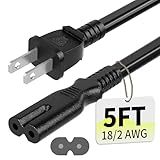
- Specifications: 5 feet tv power cord, non polarized 2 prong figure 8 power Cord (C7 to NEMA 1-15P ), 7A, 18AWG, 125V, NISPT-2, ETL listed
- Compatible: This ac power cable is fit for Sony PS5 / PS4 Slim / PS4/PS3 Slim/ PS3 Super Slim/Microsoft Xbox One S/Xbox One X/ Xbox Series X/Xbox Series S and other electronic devices such as TVs, printers, speakers, monitors, etc
- ETL Listed / Safety: This PS5 power cord is constructed with 100% pure copper and a flexible PVC jacket, providing high conductivity and minimal power loss
- Compatibility Note: To ensure compatibility, please verify that the connector matches your device's power port as illustrated in the product images
- Power Your Devices with the Perfect Reach: Select from multiple lengths to find your ideal match; this cord ensures safe, stable power for your game console, sound bar, speaker system and more
When a repair may not be worth the cost
Compare the quoted diagnosis and repair cost with the local price of a tested working console. A common Slim or Super Slim may not justify an expensive PSU replacement or board-level repair if another working unit costs less. A backwards-compatible Fat model may be worth more to its owner because later revisions lack those features. The decision depends on local used prices, the console’s condition and its personal value; do not buy a generic PSU before confirming compatibility and likely fault.
Quick Recap
Product prices and availability are accurate as of the date/time indicated and are subject to change. Any price and availability information displayed on Amazon at the time of purchase will apply.

