Some links on this page are affiliate links: if you buy through them we may earn a commission, at no extra cost to you.
Nintendo Switch Joy-Con and Switch 2 Joy-Con 2 controllers take about 3.5 hours to fully charge. The original Nintendo Switch Pro Controller takes about 6 hours. These are Nintendo’s approximate full-charge estimates; third-party controllers and the Switch 2 Pro Controller need model-specific guidance.
Switch controller charging times
| Controller | Approximate time to full charge | Applies to |
|---|---|---|
| Joy-Con | About 3.5 hours | Original Nintendo Switch Joy-Con |
| Joy-Con 2 | About 3.5 hours | Nintendo Switch 2 Joy-Con 2 |
| Nintendo Switch Pro Controller | About 6 hours | Original Nintendo Switch Pro Controller |
Nintendo gives these as approximate times, not guarantees for every battery condition or charging setup. Do not apply the original Pro Controller’s six-hour estimate to the Switch 2 Pro Controller: the cited Nintendo documentation does not establish a charging time for that model. Third-party controller times vary, so check the manufacturer’s instructions.
How to charge original Joy-Con
Attach them to a Switch or Switch OLED
- Slide the Joy-Con onto the console rails.
- Connect the console to its AC adapter.
- Leave the console powered on or in Sleep Mode. Nintendo estimates about 3.5 hours for a full charge.
Attaching Joy-Con to a console that is not receiving AC power is not a guaranteed way to charge them. A Switch Lite has no detachable Joy-Con rails, so Joy-Con used with it need a compatible, separately sold charging grip or charging stand. See Nintendo’s Joy-Con charging instructions.
The Tool Desk
Outbyte PC Repair FREEClear out junk files and repair common Windows errorsFree Scan →Outbyte Driver Updater FREEFix the driver behind crashes, sound loss and screen glitchesFind Drivers →Use a charging grip or stand
Attach the Joy-Con to a compatible charging grip or stand, then connect the accessory to a powered dock or, if its instructions allow, directly to the Nintendo Switch AC adapter. Allow about 3.5 hours for a full charge. The standard Joy-Con Grip is for holding the controllers like a gamepad; do not assume it charges them. Check the accessory name and specifications. Nintendo identifies the original Joy-Con Charging Grip as model HAC-012 and says it is sold separately.
#1 Best Overall

- 2 SET CHARGER - FastSnail Charging Stand Compatible with Joy Cons is a professional design to perfect fit for Joy Cons. Charge up to for 4 controllers for joycon simultaneously.(No include for Joycons)
- LIGHTWEIGHT BUT SOLID - Made of high quality materias, lightweight, portable, solid and durable.
- SIMPLE OPERATION DESIGN - Easy slide-in design & plug and play. Put for JoyCons into the charging dock, and plug it into any USB port, then it will charge. The individual LED lampposts will indicate charge level for JoyCon. So convenient.
- STORAGE AND DISPLAY STAND - It is safe and convenient to put for JoyCon on the stand and keep your controllers organized and ready for play. It also allows you to display for JoyCons Team.
- GREAT GIFT - It is a great gift for Switch Gamers. Moreover, If you are not 100% happy with the charging dock for any reason, please contact us. No questions. No charge. No kidding.
How to charge Joy-Con 2
Joy-Con 2 take about 3.5 hours to fully charge, according to Nintendo’s charging instructions.
- Attach the Joy-Con 2 to the Switch 2 while the console is connected to its AC adapter, or attach them to a Joy-Con 2 Charging Grip.
- If using the grip, connect it to the Switch 2 dock or the Switch 2 AC adapter as supported by Nintendo’s instructions.
- Allow about 3.5 hours for a full charge.
The Joy-Con 2 Charging Grip is a separate Switch 2 accessory, model BEE-010; it is not interchangeable with the original Joy-Con charging grip. Nintendo’s product page lists it as Switch 2-only and says it includes a USB-C cable.
Rank #2

- Charging Dock for Nintendo - The Joycon charger support nintendo switch joycons and nintendo pro controller and ps5 controller. Imitate official track design is simple to plug and unplug, Easy to set up plug and play.
- Ideal Accessories for Switch - The charging station could charge 4 joycons and 2 nintendo pro controller or 2 ps5 controller at same time. 6 in 1 charging station accessories for nintendo and playstation.
- More Way to Charge Joycons - The joy-con charging base station can provide power by game console, usb charging hub or wall charger. Usb-type c charging port design that easy to power.Support charging status LED indicator.
- Built Protection IC Chip - The switch controller charging dock built smart IC chip that provide over-charging,over-voltage, over-current,short-circuit protection. Fireproof panel design ensure safe to charge switch controllers.
- Package Description - Include a joy con charging dock and a 80cm usb-c charging cable and one year quality promise. Note:No any joycons switch controller include.Product is a charging dock for switch joycon controller.
How to charge the original Switch Pro Controller
- Connect the Switch AC adapter to the dock and a wall outlet.
- Connect the controller’s USB charging cable to the controller and an available USB port on the dock. Nintendo identifies the included cable as model HAC-010.
- Alternatively, connect the controller directly to the Nintendo Switch AC adapter.
- Allow about 6 hours for a full charge.
The Switch console itself does not need to be sitting in the dock for the Pro Controller to charge through a powered dock. The recharge LED beside the controller’s USB connector turns off when charging is complete. See Nintendo’s charging instructions.
Free tools Windows power users keep installed
One-click scans. No signup required.
Charging time versus play time
Nintendo estimates that a fully charged original Switch Pro Controller can run for approximately 40 hours. Actual battery life can be shorter depending on the software and functions used; that runtime is not the charging time and does not apply to other controllers. Nintendo’s Pro Controller FAQ gives the estimate.
Rank #3

- Charge Up to 6 Controllers Simultaneously: This 6-in-1 charging station charges up to 4 Joy-Con controllers and 2 compatible Nintendo Switch Pro Controllers at once, combining a Joy-Con charger and controller dock into one compact solution for your gaming setup.
- Smart LED Charging Indicators: Easily check charging status with clear red and green LED indicators. Know when your compatible controllers are charging or fully powered without guessing.
- Space-Saving Controller Organization: Keep your gaming area clean and organized by storing and charging multiple controllers in one place. This charging dock helps create a neat and convenient gaming setup.
- Easy Setup & Compatible Controllers: Simply connect to a 5V/2A USB power adapter and start charging. Designed for Nintendo Switch Joy-Con controllers and compatible Nintendo Switch Pro Controllers.
- Important Compatibility Notice: This controller charging dock is NOT compatible with Switch 2 controllers, PowerA controllers, HORI controllers, or other third-party controllers. Designed only for Nintendo Switch Joy-Con controllers and compatible Nintendo Switch Pro Controllers.
If a controller does not seem to charge
First confirm that the charging method matches the controller: Joy-Con need powered console rails or a compatible charging accessory; Joy-Con 2 need a powered Switch 2 or their own charging grip; the original Pro Controller can use a powered dock USB port or the Switch AC adapter.
- Check that the cable is firmly connected at both ends and that the power source is on.
- Try another dock USB port or wall outlet.
- Use the included cable or one confirmed compatible with that controller and accessory.
- If possible, test with another compatible Nintendo AC adapter.
- For an original Pro Controller that will not respond, let it charge for 15–30 minutes before judging whether it has powered on. This is Nintendo’s troubleshooting check, not a promise of a useful or full charge in that time.
Nintendo advises service if the original Pro Controller’s LEDs still do not turn on after charging for 15–30 minutes, or if its battery does not last properly after at least six hours of charging. Follow Nintendo’s Pro Controller power troubleshooting.
Rank #4

- 【Pre-Purchase Notes】Not compatible with Switch 2 Joy-cons. The Nintendo Switch controller charger is compatible with Joy-cons for Switch/OLED.
- 【2.5H Fast Charging】Switch charging station charges 4 Joy-cons simultaneously and get your joycon fully charged in just 2.5 hours. Indicators beside each joycon charging dock turns from red to green when the Joy Con is placed on the the corresponding nintendo switch controller charger dock. With translucent light bar, Joy con charger provides a clear visual cue at a glance. While charging, joy con charging dock glows a striking red, Once fully charged or empty, it shifts to a calming green.
- 【9 Lighting Modes】The nintendo switch charging station features an eye-catching RGB light strip at the bottom with 9 unique lighting modes, transforming your charging setup into a captivating visual display. With touch control, you can switch or turn off the lighting effect.
- 【Easy Slide-in Design】Our nintendo switch joy con charger features an intuitive and user-friendly slide-in design, allowing you to effortlessly dock your controllers with a simple, smooth glide. This hassle-free design makes the charging process quick, seamless, and stress-free, enhancing your overall gaming experience from the moment you power up.
- 【Sleek Joycon Display Stand】This switch remote charger not only can charge 4 joycons, but also can be used as joycon storage rack to keep your controllers organized and ready for play. It is great gift for switch game lover. The package of Tokluck switch charging stand includes 1 x joycon charger, 1 x USB-C charging cable, 1 x user manual.
Charging accessories for different setups
- One pair of original Joy-Con: Use the console rails when practical; a separate accessory may not be necessary.
- Switch Lite with detachable Joy-Con: Choose a compatible charging grip or stand, since the Lite cannot charge Joy-Con on console rails.
- Several original Joy-Con: Nintendo’s Joy-Con Charging Dock can charge up to four Joy-Con at once; its individual LEDs turn green when the corresponding controller is full.
- Original Pro Controller and Joy-Con: The Pro Controller and Joy-Con Charging Dock supports two Joy-Con and one original Switch Pro Controller simultaneously.
- Switch 2 Joy-Con 2: Use the Switch 2-specific Joy-Con 2 Charging Grip if you want to charge them off-console while holding them in a grip.
Check accessory compatibility before buying: original Joy-Con and Joy-Con 2 charging gear are not interchangeable, and a charging accessory does not establish a charge time for a different controller model.
Do these 3 things before closing this tab:
1Fix the driver behind crashes, sound loss and screen glitches2Repair Windows errors before they cause bigger problems3Scan for outdated or missing drivers - takes under a minuteQuick Recap
Best Value
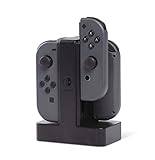
- Charges up to 4 Joy-Con Controllers simultaneously
- Individual LEDs indicate charge level for each Joy-Con
- Easy slide-in design connects each Joy-Con to charger
- Weighted base for stability
- Powered via USB
Product prices and availability are accurate as of the date/time indicated and are subject to change. Any price and availability information displayed on Amazon at the time of purchase will apply.

