Some links on this page are affiliate links: if you buy through them we may earn a commission, at no extra cost to you.
Where you cancel depends on who billed you: if you bought the server directly from Nitrado, contact Nitrado through its Support chat. If you bought an Xbox server through Microsoft, cancel it from the Microsoft account that made the purchase, under Services and subscriptions. Before the paid time runs out, download your world and any files you want to keep.
First, check who billed you
Use the receipt, order history or bank statement to identify the purchase route. The cancellation process follows the billing platform, not the game running on the server.
| Where you bought it | Where to cancel |
|---|---|
| Nitrado website | Start a request through Nitrado Support chat. |
| Xbox or Microsoft | Use the purchasing Microsoft account’s Services and subscriptions page. |
| Nitrado mobile app or another platform | Check the receipt to identify the platform that billed you. Use that platform’s subscription controls where available, or ask Nitrado Support to confirm the correct route. |
If you are unsure, tell support where the charge appears and provide the order or service details. Nitrado’s cancellation guide notes that purchases through the Xbox or PC app have platform-specific refund handling.
Free tools Windows power users keep installed
One-click scans. No signup required.
Cancel a server bought directly from Nitrado
Nitrado’s current instructions route direct-service cancellation through Support chat rather than promising a universal cancellation button in the server control panel.
#1 Best Overall

- Includes 3×120mm fans (pre-installed) or supports 360mm liquid cooling radiators (pre-installed fans must be removed)."
- M/B size: ATX/MicroATX/Mini-ITX
- Drive Bays: 2*3.5 (internal)+1*2.5 (internal) Storage: suggest use of M.2/NVMe and PCIe based storage on M/B
- 8 slots PCI/PCIE expansion: Support max length=320mm with fans only / max length=305mm with AIO only
- PSU: SFX or SFX-L
- Open Nitrado Support or its US support page, then choose Chat with us.
- Tell the automated assistant, FIN: “I want to cancel my Nitrado server and stop automatic renewal.”
- Choose the option for canceling the service. If you also want your money back, choose or request the cancellation-and-refund route.
- If FIN cannot complete the billing change, ask to speak with a support representative. Nitrado says a representative may need to finalize it.
- Give the representative your account ID and the server’s name, game and service details. Ask them to confirm whether renewal is off and when the service will end.
- Keep the chat confirmation, email or ticket number.
Be explicit about what you want: stopping future renewal, ending service immediately, a refund review, or some combination. They are not the same request.
Cancel an Xbox Nitrado server
For an Xbox server bought through Microsoft, Nitrado directs customers to cancel through Microsoft—not from the Xbox console. Use the Microsoft account that purchased the subscription.
Rank #2

- [CPU] AMD Ryzen 7 5700G Processor (8 Cores, 16 Threads, 3.8 GHz Base Clock Speed up to 4.6 GHz Max Boost Clock Speed) for Gaming and Content Creation with 7nm Leading Edge Technology | [STORAGE] 1TB PCIe NVMe M.2 SSD - Experience Hyper-Fast Bootup and Data Transfer thats up to 30x Faster Performance than a Traditional Hard Drive.
- Graphics: Integrated AMD Radeon Graphics | [RAM] 32GB DDR4 RAM 3200 Gaming Memory for Seamless Multitasking from Multiple Web Pages to Playing Games Online Simultaneously | [OS] Windows 11 Pro x64
- 2x 3.5" Drive Bays | 4x Expansion Slots | mATX Motherboard | ATX PSU
- [BUY WITH CONFIDENCE] Empowered PCs are Assembled in the USA, Rigorously Stress-Tested Before Shipping, and Supported with Lifetime Technical and Diagnostic Support and 3-Year Limited Hardware Warranty.
- Sign in to the relevant Microsoft account and open Services and subscriptions.
- Find the Nitrado subscription and select Manage.
- Choose Cancel subscription or the option to turn off recurring or automated payments, depending on what Microsoft displays.
- Complete Microsoft’s confirmation prompts, then check the subscription status or end date and save the confirmation.
If Nitrado does not appear, check that you are signed into the account used for the purchase and review Microsoft order history. If billing or refund controls are still missing, contact Nitrado’s Xbox cancellation guide and Microsoft Support for the platform-billed transaction.
Recommended Free Tools
Does cancellation shut the server down right away?
Usually, turning off renewal prevents the next automatic charge; it does not necessarily end already-paid service immediately. For Xbox services, Nitrado says the server remains available until its remaining runtime runs out. After that, it must be extended manually, and the subscription cannot be re-enabled.
Rank #3
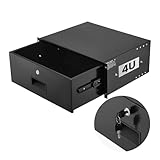
- 4U Rack Drawer: Fit for 19-inch server racks & network cabinets. This rack mount drawer has 13.8 inch inner depth gives you plenty of room to store your gear. Smooth sliding design allows easy access to your equipment
- Built to Last: Made from solid steel and coated with a rust-resistant, wear-proof finish, this rack drawer can hold up to 50 lbs (22.68 kg). Premium rails ensure every slide is smooth and reliable.(Overall size: 19" x 13.86'' x7.09” )
- Secure Lock: Equipped with a lock to guard your devices from unauthorized access. This server rack drawer provides added security for your setup
- Effective Wiring: Three cable management holes make organizing wires easy. This rackmount drawer keeps cables neat, hidden, and your space looking professional
- Easy to Install: Arrives fully assembled—just mount it in your rack using the included screws. This lockable drawer is ideal for server rooms, small offices, home offices, gaming setups, and more
For a direct Nitrado service, check the confirmation from support rather than assuming a particular shutdown date. The result may depend on whether you turned off renewal, asked support to end service immediately, or simply let the paid runtime expire. If you request immediate cancellation, ask whether you will lose the unused time. Stopping service early does not itself guarantee a refund.
Can you get a refund?
Cancellation and refund eligibility are separate. Nitrado’s current guidance generally limits server refunds to the first 14 days from the original purchase, subject to exclusions. That is an eligibility window, not a promise of a refund. A recent renewal charge does not automatically qualify just because it happened within the past 14 days.
Rank #4

- 【Powerful load-bearing】12U Network Rack Open Frame is constructed from durable Cold Rolled Steel; Rack Shelf Back Support enhances stability; load-bearing capacity of 260lbs
- 【Sliding&Considerate】Open-frame layout, including four wheels easy to move, a top panel adding space, anti-slip shelf stops fixing devices and compatible racks for stack and expansion to meet requirements of home server rack
- 【Complete Accessories】A 12U open frame server rack, two ventilated shelves, four shelf stops, four casters, four velcro straps and a set of equipment mounting screws
- 【Versatile Application】Ideal for space-efficient multi-device setups in warehouses, retail, classrooms, offices and more; Excellent choices as AV Rack/IT Rack
- 【Effortless Setup】Server rack with wheels includes hardware, a comprehensive manual, mounting hole drilling template and an online assembly video to simplify setup
Nitrado lists subscriptions and auto-renewals, three-day servers, and modified services as non-refundable. Modifications can include changing slots or runtime, upgrading RAM, or changing location. Gift cards and Paysafe-card purchases are also excluded. If you believe your purchase qualifies, ask for a refund review when you request cancellation. Nitrado may review exceptional circumstances, but an exception is not guaranteed.
For qualifying purchases through the Xbox or PC app, Nitrado says refund requests must go through Microsoft Support. Account credit follows different rules: Nitrado says credits may be refundable only if added within the previous 60 days, with any refund returned to the original payment method. Check the Nitrado payment FAQ for the applicable terms.
Best Value
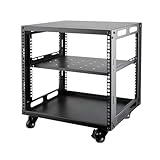
- SIZE: Width 15.75" (400 mm), Depth 19.49" (95 mm), Height 20.55" (522 mm). Additional heights of 6U and 12U are also available. The portable rolling network rack series is designed for versatility.
- STURDY: Featuring a robust 4-post construction, this 9U rack is manufactured using stringent sheet metal processes and high-quality spray treatments, making it resistant to scratches and rust.
- VERSATILE: This exceptional rack series is perfect for housing various electronics and equipment such as AV systems, TVs, NAS devices, data servers, internet routers, amplifiers, hard recorders, computers, and gaming consoles like the Xbox.
- INSTALLATION: Assembly is straightforward with clear instructions provided. The universal wheels equipped with brakes offer enhanced stability to ensure an uninterrupted online gaming experience and enjoyable entertainment moments.
- ACCESSORIES: The product will be delivered in a single box containing the 6U network rack along with essential accessories including screws & cage nuts and casters.
Back up your server before its time expires
Make your own copy before the service ends. Backup availability and history can vary by game, and a hosted backup should not be your only copy.
- Download the latest world or save files.
- Save configuration files, custom settings, mods and plugins you may want to reuse.
- Record the server name, game, location, slot count and remaining runtime.
- Tell players when access is expected to end.
- Keep screenshots or messages showing the cancellation status and end date.
Follow the game-specific file and backup instructions for your server. Do not assume files will remain accessible indefinitely after the service ends.
If you cannot find the cancellation option
- Check the purchase receipt to establish whether Nitrado, Microsoft or another platform billed you.
- If Microsoft billed you, make sure you are using the Microsoft account that made the purchase, then check Services and subscriptions.
- For a direct Nitrado purchase, open Support chat and state: “Please stop automatic renewal for server [server name]. I also want to know whether this charge is refundable.”
- Include the server and account details, and ask for written confirmation or a ticket number.
- If Microsoft billed the purchase, contact Microsoft about its subscription or refund controls.
Do not treat removing a payment method as proof of cancellation. It is not the cancellation route Nitrado documents, and it may leave the service or billing status unresolved.
The Tool Desk
Outbyte Driver Updater FREEScan for outdated or missing drivers - takes under a minuteDriver Scan →Outbyte PC Repair FREEClear out junk files and repair common Windows errorsFree Scan →Why not simply stop paying?
Ignoring a renewal or invoice is not a reliable way to cancel. According to Nitrado’s payment FAQ, an unpaid service may remain active during a grace period and then be suspended. If payment is still outstanding after 30 days, the service is canceled and its files are deleted; three-day-runtime servers have a shorter seven-day grace period. Use the proper billing controls or contact support, and download your files before service ends.
Quick Recap
Product prices and availability are accurate as of the date/time indicated and are subject to change. Any price and availability information displayed on Amazon at the time of purchase will apply.

