Free tools Windows power users keep installed
One-click scans. No signup required.
Some links on this page are affiliate links: if you buy through them we may earn a commission, at no extra cost to you.
A PSP that will not turn on may need a compatible AC adapter, time to charge, a model-specific replacement battery, or hardware repair. Start by checking the battery for damage, then identify the PSP model: the PSP-1000 does not support Sony’s documented USB-charging procedure, while the PSP-2000, PSP-3000, PSP Go and PSP-E1000 do.
Check the battery before connecting power
Remove the battery cover where applicable and inspect the battery before attempting to charge it. Do not charge or use a battery that is swollen, leaking, cracked, unusually hot, corroded or giving off an unusual odor. A bulging battery should be replaced immediately, as Sony’s PSP safety guidance advises.
Do not puncture, squeeze, bend, open, freeze or try to jump-start a lithium-ion battery. Keep a damaged battery away from combustible materials and follow local guidance for lithium-ion battery disposal. A battery that is merely flat is not automatically unsafe; physical damage, swelling, heat, leakage or unusual odor are reasons to stop.
Identify your PSP model
Check the model before buying a battery or choosing a charging method. The model number is normally beneath the battery on PSP-1000, PSP-2000 and PSP-3000 systems. The PSP Go (PSP-N1000) has a sliding screen; the PSP-E1000, also known as PSP Street, is a separate family with a different body and battery arrangement. iFixit’s PSP device listings distinguish these families.
#1 Best Overall

- 【POWER SPECIFICATION】: Input: AC 100-240V 50/60Hz; Output: DC 5V 2A. Professional charging cable is Fit for Sony PSP 1000 2000 3000 Series (PSP-1001, 2001, 3001) and E-1000.
- High Quality, Premium Speed 2.0 USB Cable. Thickened cable shell and high quality copper core. Super Quick Safely Charging The cable charging speed is faster than ordinary USB cable.
- Quality Assurance: adopt thickened PVC material, pass 1000+ bending test, the cable has tensile resistance, safety, long service life.
- convenient for travelers and most people to take it anytime, anywhere.
- Warranty and service: 1 month unconditional return policy, any questions can contact us..Note: Please check whether your product safety is 5V or 5V when buying. Charging more than 5V is not suitable for use
- PSP-1000: Original, or “fat,” model.
- PSP-2000: Slim model.
- PSP-3000: Slim model with a later display design.
- PSP-N1000 / PSP Go: Sliding-screen model with a distinct battery.
- PSP-E1000 / PSP Street: Separate model family; match its battery by exact model.
Do not order a battery just by searching for “PSP battery.” PSP-1000, PSP-2000/3000, PSP Go and E1000 batteries are not interchangeable by default. Sony also notes that PSP features and accessories can vary by model and region in its model information.
Try the AC adapter first
A compatible AC adapter connected directly to the PSP’s DC input is the best first test for a console that appears completely dead. Unlike USB charging, this does not require the PSP to boot into a menu. Use a known-compatible adapter; do not force an ill-fitting plug or substitute a random universal adapter.
- Turn the PSP fully off if possible. Remove any UMD and accessories that are not needed.
- Check the adapter, cable, plug and PSP DC input for damage or looseness.
- Wipe accessible connectors with a soft, dry cloth. Sony’s guidance says to check and clean connectors before connecting cables (connector guidance).
- Seat the adapter plug firmly in the PSP, then connect the adapter to a known-good wall outlet.
- Check for the orange power/charging indicator. If it appears, leave the PSP connected and undisturbed for at least 30 minutes before attempting to start it.
- Try powering on while it remains connected. If the battery is undamaged but deeply discharged, allow several hours of uninterrupted charging before assessing it again.
There is no established universal recovery time for every PSP, battery age and charger. An aged lithium-ion battery may not recover even after extended charging. Do not leave an unknown or damaged battery connected in the hope that more time will fix it.
Rank #2

- Universal Compatibility: Designed for PSP 1000, PSP 2000, and PSP 3000 models. Easily plugs into any standard USB port, such as wall chargers, power banks, car chargers, or computers, for convenient charging anywhere.
- Efficient Fast Charging: Built with a 24AWG high-purity pure copper core, this cable ensures minimal power loss and delivers a stable current for faster, more efficient charging compared to standard cables, getting you back to gaming quickly.
- Durable & Tangle-Resistant Design: The flexible yet robust PVC exterior is built to last, resisting wear, tear, and tangles. The reinforced connectors prevent bending and breakage at stress points, ensuring long-term everyday use.
- Safe Charging Guaranteed: Integrated with advanced safety features to protect your valuable PSP from over-current, short-circuit, and over-charging risks. Charge with complete peace of mind.
- Please Note: This is a CHARGING-ONLY cable and does NOT support data transfer or syncing. Package includes one 1.2-meter (4 feet) USB to PSP charging cable.
Read the charging light as a clue, not a verdict
| What you observe | What it suggests | Next check |
|---|---|---|
| Orange light appears | The PSP detects external power; this alone does not prove the battery is healthy or retaining charge. | Let it charge, then check whether it stays on after unplugging. |
| No orange light | The outlet, adapter, plug, DC input, contacts, power circuitry or a severely failed battery may be involved. | Test the outlet and a known-good compatible adapter before suspecting internal hardware. |
| Light flickers when the plug moves | A worn, loose or damaged connector is possible. | Stop wiggling the plug; have the input inspected if a secure connection cannot be made. |
| Light appears briefly, then goes out | The adapter, battery or charging path may be failing. | Test one known-good compatible adapter or battery at a time; do not repeatedly reconnect or force the plug. |
| PSP works on AC but dies as soon as it is unplugged | The battery is the leading suspect, though battery contacts or charging circuitry can also be at fault. | Test with an exact-model-compatible replacement battery. iFixit lists battery failure as a likely cause for this symptom (PSP-2000 troubleshooting). |
Use USB charging only on supported models
Sony documents USB charging for PSP-2000, PSP-3000, PSP-N1000/PSP Go and PSP-E1000. The PSP-1000 does not have the documented USB Charge setting, so do not use this procedure for it. Sony’s USB guidance describes the supported families and connection requirements.
USB is a fallback if the PSP can boot but the AC adapter or DC input is suspect. It is not a dependable way to wake a console that cannot turn on: Sony’s procedure requires the system to be on and in USB Connection mode.
- Connect a suitable USB cable between the PSP and an external USB device or known-compatible USB power source.
- Turn on the PSP.
- Open Settings > System Settings > USB Charge and set it to On if needed.
- Open Settings > USB Connection. The power indicator should turn orange if charging begins. See Sony’s USB Charge instructions.
If an external USB device does not recognize a PSP-2000, PSP-3000 or PSP Go, Sony suggests trying Settings > System Settings > USB Charge > Off as a troubleshooting exception (Sony USB troubleshooting). Also try another undamaged cable and a directly connected computer or known-compatible USB source. Do not assume that every modern USB-C charger or fast-charge setup will behave like the PSP’s original equipment; use known-compatible charging equipment.
Rank #3
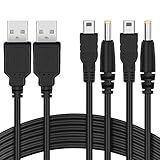
- The FunTurbo PSP Charger replaces the PSP original power outlet AC adapter charger forever. With this USB cable, to carry a bulky brick adapter is not an option anymore, simply wrap this cable in your PSP case for easy transport.
- Latest design PSP USB cable with better performance and workmanship in the market. Heavy duty 28AWG wires with 2 strands of 12 copper cored cables serve their stand-alone purposes for battery charging and stable data transmission for your PSP. Treated with cable protector on the USB, charging port & splitter for a longer time-span. The wire also passed the RoHS certification which is eco-friendly, a smelly and cheap PSP cable may harm your health, so we care.
- You can charge your PSP by plugging into the USB port on your laptop/PC, any smart phone USB Charger with proper voltage (5V 1A-2A) or a powerful charger for faster charging – Wall Charger, Car Charger, Portable Charger or Charger Dock.
- 2 in 1 USB 2.0 Type A to Mini-B and DC connector. 100% compatible with PC USB file transfers and data syncing for PlayStation 3 console, best companion with Funturbo PSP Memory Stick Adapter for anyone willing to copy .iso and other files to your PSP.
- Cable Length: 3.9 ft. 2 Cables Pack. Compatible with Sony PSP 1000 2000 3000 Series (PSP-1001, 2001, 3001) and the latest E-1000 model. Also supports PS3 DualShock 3 Controller if you still have one. Not compatible with PSP Go version.
If it works only while plugged in, test the battery
If the PSP runs on AC power but immediately shuts off when unplugged, the battery is the leading suspect. A battery that stays at zero, loses charge quickly or has been stored empty for years may have failed. Check contacts for contamination or corrosion, and test a known-good battery made for the exact model before buying other parts.
Windows Errors? Fix Them Before They Spread
Repair common Windows errors and clear accumulated junk for a smoother, more stable PC - no reinstall needed.Free scan · no reinstallCrashes, No Sound, or Screen Glitches?
Random freezes, missing sound and display glitches usually trace back to one bad driver. Find and replace yours safely.Free scan · under a minuteReplacement parts are model-specific. iFixit lists separate options for PSP-1000, PSP-2000/3000, PSP Go and E1000 on its PSP parts page. Its E1000 replacement listing specifies 3.7 V, 900 mAh and 3.33 Wh; those are specifications for that replacement part, not a universal spec for PSP batteries (E1000 battery listing). Third-party capacity claims and used-battery condition can vary.
Independent reader supportYour contribution helps us test, update, and keep practical guides available for everyone.Replace the complete battery pack
- Turn off the PSP and disconnect AC power.
- Remove the battery cover and lift the old pack from its intended edge or recess; do not pry or bend it.
- Check the battery contacts for corrosion or contamination. Stop if you find damage that requires scraping or soldering.
- Insert the model-compatible replacement in the correct orientation and refit the cover without forcing it.
- Connect the correct charger, confirm the orange indicator, and let the new pack charge before judging how long it holds power.
Replace the complete battery pack; do not open it to install a bare cell. iFixit describes PSP-1000 battery replacement as a moderate repair estimated at about 15 minutes in its PSP-1000 battery guide. That estimate applies to the guide’s procedure, not every model or repair condition.
Rank #4

- Applicable model:Cord for Charging Sony PSP 1000 2000 3000 Series (PSP-1001, 2001, 3001) and the latest E-1000 model.
- High Quality, Premium Speed 2.0 USB Cable. Thickened cable shell and high quality copper core. Super Quick Safely Charging The cable charging speed is faster than ordinary USB cable.
- For DC power - Recommended up to 24 volt, max load 100W or less. For any applications that requires DC input and accept 4.0mm x 1.7mm plug (Does not work with other size).
- Quality Assurance: adopt thickened PVC material, pass 10000+ bending test, the cable has tensile resistance, safety, long service life.
- Warranty and service: We provide 18month warranty service, and 1 month unconditional return policy, any questions can contact us..Note: Please check whether your product safety is 5V or 5V when buying. Charging more than 5V is not suitable for use.
If a replacement battery does not fix it
Change one variable at a time. That helps distinguish a failed adapter from a battery or console fault rather than replacing several parts without evidence.
| Test | Result | Likely direction |
|---|---|---|
| Try a different wall outlet | Charging begins | The original outlet or power strip may be faulty. |
| Try a known-good, model-compatible adapter | Charging begins | The original adapter or cable may have failed. |
| Run on AC, then unplug | PSP shuts off | Battery or battery contacts are the first things to investigate. |
| Try a known-good compatible battery and adapter | No response | Possible DC input, power switch, fuse, charging circuit or motherboard fault. |
| Compare AC and USB on a supported model | USB works but AC does not | Suspect the AC adapter plug, DC input or its charging path. |
| Compare AC and USB on a supported model | AC works but USB does not | Check the model limitation, USB setting, cable and USB port. |
iFixit’s troubleshooting guide treats adapter, battery, power-switch and motherboard problems as distinct possible causes, rather than assuming every no-power symptom is a battery fault (PSP troubleshooting).
Recommended Free Tools
Know when to stop DIY repair
- The battery is swollen, leaking, unusually hot or visibly damaged.
- The PSP smells burnt, has melted plastic or shows liquid corrosion.
- The DC jack is loose inside the case or power depends on holding the plug at an angle.
- Known-good compatible adapters and batteries do not change the result.
- Diagnosis requires soldering, fuse testing, opening the console or probing powered electronics.
Those faults need a repairer comfortable with handheld-console or board-level work. Do not bypass battery protection, apply voltage directly to battery terminals, bridge a fuse or charge a removed cell with improvised wiring. If the console is not charging, a system update is not the next step: Sony notes that low battery charge can prevent an update from starting (PSP update guidance).
Quick Recap
Product prices and availability are accurate as of the date/time indicated and are subject to change. Any price and availability information displayed on Amazon at the time of purchase will apply.

