Quick wins for a faster PC:
Repair Windows errors before they cause bigger problemsFix Now →Scan for outdated or missing drivers - takes under a minuteDriver Scan →Clear out junk files and repair common Windows errorsFree Scan →Some links on this page are affiliate links: if you buy through them we may earn a commission, at no extra cost to you.
Apex Legends Error Code 429 is usually caused by EA server maintenance or downtime. First check EA’s server status page and @PlayApex. If service is affected, wait for it to recover; changing your router or reinstalling the game cannot fix an unavailable server. If no incident is reported, restart Apex and your system, then check for a game update.
What does Apex Legends Error Code 429 mean?
EA describes Code 429 as a connection problem between Apex Legends and EA’s servers, usually caused by maintenance or downtime. It does not, by itself, mean your internet is too slow, your account is broken, or you have been banned. Although “429” has a rate-limiting meaning in some general web contexts, EA’s Apex-specific guidance points to service availability; there is no basis here to assume you personally sent too many requests.
EA’s recommended starting points are its Apex error-code guide, the EA Server Status page, and @PlayApex.
Check whether Apex is down before troubleshooting
- Open the EA Server Status page and check the Apex Legends listing.
- Check @PlayApex for an incident or maintenance announcement.
- Check the relevant platform’s service status too: Steam, PlayStation Network, Xbox, or Nintendo. For PlayStation, use the PlayStation Network status page.
If EA reports maintenance or downtime, wait for service to return, then restart the game. There is no guaranteed local fix in that situation, and EA does not give a universal recovery time. Avoid spending time reinstalling or changing network settings while the service is unavailable.
#1 Best Overall
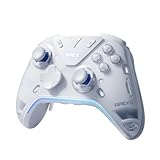
- Flydigi apex 5 pc controller work across multiple platforms: PC/NS/TV/Android/Laptop (NOT Support Xbox/PS)
- 3 Connection Modes: Wired/Bluetooth/2.4G Dongle Wireless connectivity, and can charging by wired connectivity or apex 5 exclusive dock (need extra purchase)
- FORCEFLEX Joysticks 2.0: Adjust joystick tension from 30gf to 100gf with Flydigi’s patented design, this is the first special feature apex 5 premium gaming controller provide, enjoy strong recentering, zero drift, and stick durability
- 3ms Ultra-Low Joystick Latency: 216MHz beast-powered processor bring lighting fast response, Wired: 3ms, Wireless: 5ms, more linear input, more precise, zero ghosting and laag, the second special feature apex 5 premium gaming controller provide
- FORCEADAPT Triggers: Realistically transmit in-game physics to the triggers and delivers enhanced 4-motor stereo vibration with counter-weighted zones, creating a highly immersive gaming experience in specific genres, especially in racing and shooting games, the third special feature apex 5 premium gaming controller provide
A green status indicator is useful, but not conclusive: dashboards can lag or miss a regional, platform-specific, or otherwise limited issue. If many players are reporting Code 429 despite a green status page, check official channels again and give the service time before assuming your setup is at fault.
EA’s first steps for Code 429
If there is no reported outage, work through this short sequence. EA’s Code 429 guidance specifically recommends checking status and announcements, restarting the game and system, and checking for updates.
Rank #2

- Platform Compatibility: This PC controller is designed for Windows PC, Steam, Switch, Android, and iOS. Xbox-style asymmetric stick layout for PC gamers. Three modes cover all your devices. Please check your device compatibility before purchase
- Three Connection Modes: 2.4G wireless, Bluetooth, wired USB-C. PC gets native XInput/DirectInput. Switch pairs via Bluetooth, no adapter. This gaming PC controller switches devices seamlessly. Stable wireless minimizes random disconnects during gaming
- Hall Effect Precision: Hall effect joysticks and triggers eliminate stick drift. This gaming controller for PC delivers smooth, responsive input with no dead zones. Built for FPS, racing, and action games. Long-term precision for competitive PC gaming
- Back Buttons & Battery: Two programmable back buttons map combos and shortcuts. Textured grips with dual vibration. 1000mAh battery delivers up to 20H playtime. RGB can be turned off. A solid PC controller for gaming with custom back buttons
- ABXY Layout Switch: Press B + Minus + Plus to swap between PC and Switch modes. Features: 1000Hz polling rate, RGB lighting, turbo. Note: designed without mic jack or gyro sensor
- Close Apex completely, then reopen it. If you are on console, make sure the game has quit rather than remaining suspended.
- Restart your PC or console. This refreshes the game session and system connection.
- Check for an Apex update. Let any download or installation finish before launching the game.
- Try again. If the error began during a service incident or just after an update, check EA’s status and announcements again before moving on to network changes.
How to check for an Apex update
Menu names can differ by console generation, software version, and interface language, but these are useful platform examples:
Crashes, No Sound, or Screen Glitches?
Random freezes, missing sound and display glitches usually trace back to one bad driver. Find and replace yours safely.Free scan · under a minutePC Slower Than It Used to Be?
A free scan shows the junk files, broken settings and background clutter dragging Windows down - then fixes them in one click.Free scan · Windows 10 & 11- Steam: Check the Downloads area for an Apex update in progress. Let it finish before launching the game.
- Xbox: EA’s guidance gives this example path: My Games & apps → Apex Legends → Menu → Manage All → Updates.
- PlayStation: Use the console’s built-in option to check for game updates.
- Nintendo Switch: Use the system’s built-in software-update procedure for Apex Legends.
- EA app: Check the game in your library for an available update before launching.
If Code 429 continues while servers appear online
When no outage is reported and the basic restart-and-update steps have not helped, use these as secondary connection checks. They are general troubleshooting measures, not guaranteed Code 429 fixes.
Rank #3

- 【Super Easy Setup】 No need to spend dozens of hours upgrading firmware and reading forum tutorials; no need to memorize complicated key combinations. Connect and adjust all the settings via the Vlead app, and you're ready to go.
- 【Wide Compatibility】 Leadjoy VX2 Aimbox Keyboard Mouse Converter compatible with Xbox One, Xbox Series X/S, PlayStation 4【DO NOT COMPATIBLE WITH PLAYSTATION 5】
- 【Built-in 3.5mm Headset】 Leadjoy VX2 Aimbox equipment with a 3.5mm headset, avoid environmental noise, support voice chat with your teammates, real-time experience of the game's stereo sound, increasing the experience of the game, let the sound guide you to the breathtaking immersion and glory.
- 【Agility Translation Technology】 Advanced VX agility translator technology provides 1:1 gaming accuracy, which supports accurate and timely movement with the keyboard and mouse on Xbox/PS.
- 【Adjustable Game Setting on App】 Easily configure the mouse, camera, joystick, keybinds, and lighting settings on the "Vlead" App according to your preference.
- Restart your router if other online games or EA services are also having connection trouble. Wait for it to reconnect, then try Apex again.
- Test another connection, such as a phone hotspot, only to help isolate the issue. A hotspot may have data limits or higher latency and is not necessarily a good permanent connection.
- On PC, repair or verify the game files. In the EA app, open Apex Legends in your library, select Manage, then Repair. In Steam, use the game’s file-verification option.
- Contact EA Help if the error persists after service recovery, an update, and a restart. You can also consult the Apex Legends technical-issues forum.
If only one person or household is affected while friends can connect, that makes a local connection or platform issue more plausible, though it does not prove one. If the error occurs only on PlayStation, check PlayStation Network status separately. If it appears immediately after an update or season change, check EA and platform announcements first; reinstalling cannot repair a server-side patch or service problem.
Fixes not to try first
- DNS changes: EA’s Code 429 guidance does not identify changing DNS as a fix. Consider general network troubleshooting only after checking service status and the basic steps.
- VPNs: A VPN can add latency or change the network route or apparent region. It is not an official first-line Code 429 fix and may make connection problems worse.
- Port forwarding: This is an advanced network change and is not part of EA’s Code 429 instructions.
- Reinstalling Apex: EA includes reinstalling among general troubleshooting options, but it is disproportionate during an outage. Reserve it for a persistent local installation problem after checking service status and trying repair or file verification.
- Deleting saved data or unlinking accounts: Do not do either as a speculative Code 429 fix. Use official platform or EA support instructions if a separate, clearly identified issue requires it.
- Changing data centers: EA lists this for the separate
code:clockerror, not Code 429. Do not confuse similarly worded connection errors.
Does Code 429 mean your account is banned?
No. Code 429 alone is not evidence of a ban or suspension. EA lists account-permission and ban issues separately. If you see a message such as “This account is not permitted to play online,” investigate that specific message through EA Help rather than treating Code 429 as proof of an account penalty.
Rank #4

- Now Including Hall Effect Modules – Say goodbye to stick drift with contact-free magnetic sensors in the thumbsticks giving you smoother control, enhanced precision, and increased longevity
- Code for Bonus Virtual Item Included – Moon Bounce Emote
- 2 Types of Glow – Bring the spirit of the arcade to your controller with a glow in the dark effect and a reaction when a UV light is applied giving off a fluorescent glow
- Advanced Gaming Buttons – Get an edge over the competition with two mappable buttons you can program on-the-fly, mid-game—no system settings to configure
- 3-Way Trigger Locks – Set the travel distance of the triggers with three different positions to pull off quicker actions in your favorite FPS games or go full throttle in a high-end race car
When to escalate
Contact EA Help if the status page and official channels show no issue, Apex is updated, you have restarted the game and system, and Code 429 still prevents you from connecting. Include your platform, the time the error occurred, whether other players can connect, and the steps you have already tried. If the problem is limited to a console network, check that platform’s support status as well. EA also directs players with technical issues to its support and community channels, including the Apex technical-issues forum.
Recommended Free Tools
Quick Recap
Best Value

- 🏆 Predator Rank Design — Show everyone you've reached the top—this pendant faithfully recreates the iconic Predator rank badge with bold skull crest, striking red enamel accents, and white battle-hardened detailing.
- ⚔️ Battle-Ready Build — Crafted from solid zinc alloy with a brushed gunmetal finish, toughened enamel fill, and scratch-proof coating—built like your loadout, made to survive daily carry.
- 🎒 Clip Anywhere, Rep Everywhere — Snap it onto your backpack, keys, lanyard, sling bag, or controller case—turn everyday carry into a statement of competitive pride.
- 🎁 Gift Ready for Apex Mains — Comes in premium display-ready packaging—perfect birthday, Christmas, or tournament prize for the Wraith main, Octane rusher, or Pred grinder in your squad.
- 🛡️ Officially Inspired Collectible — A must-have addition to any Apex Legends merch shelf—alongside Funko Pops, heirloom replicas, and badge pins. Not a generic keychain, but a true fan collectible
Product prices and availability are accurate as of the date/time indicated and are subject to change. Any price and availability information displayed on Amazon at the time of purchase will apply.

