The “Servers are too busy” message does not confirm that every PUBG server is full—or identify the cause. It can reflect a service-side problem, a platform connection issue, or something local. Start by identifying which PUBG game and platform you use, then check official notices before changing settings.
1. Identify which PUBG game and platform you’re using
PUBG: BATTLEGROUNDS on PC or console and PUBG MOBILE have separate support routes. Make sure you’re checking guidance for the correct game and platform; the PUBG: BATTLEGROUNDS Support portal links to a separate PUBG MOBILE help site.
2. Check official service and maintenance notices
Before troubleshooting your device, look for current service-status or maintenance announcements for your game and platform. PUBG service conditions and schedules can change, so rely on a current official notice rather than assuming an outage—or assuming the servers are full—from the error text alone.
3. Try again after a short wait
If an official notice indicates maintenance or a service disruption, wait for the announced window or resolution and then retry. If there is no relevant notice, a brief wait and another attempt can help distinguish a temporary connection failure from a persistent one; it does not establish the cause.
#1 Best Overall

- PLAYERUNKNOWN'S BATTLEGROUNDS is a last-one-standing shooter being developed with community feedback. Game is unfinished and work in progress
- Xbox One Console Exclusive
- Xbox One X Enhanced
- Parachute onto a massive remote island with nothing but your wits and the clothes on your back
- Defeat every player on the map to earn your bragging rights as the last player left standing
4. Follow PUBG’s connectivity guidance for your edition
The PUBG: BATTLEGROUNDS Support portal lists a “GENERAL CONNECTIVITY GUIDE” and help for gameplay-related connection problems. Use the current guide that matches your platform rather than applying generic command-line, firewall, or router changes. The exact troubleshooting steps may differ by platform.
5. Verify game files on PC if the problem appears client-specific
PUBG’s support portal also lists “How to verify the integrity of game files.” If the error occurs in PUBG: BATTLEGROUNDS on PC and other services work normally, follow that official guide. It is a targeted check for the game installation, not a fix for an active service outage or a general network problem.
Rank #2

- Land, loot and outwit your opponents
- Become the last player left standing
- Thrilling Battle Royale Experience
- PlayStation Plus Required
6. Compare another device or connection
As a diagnostic check—not an official PUBG procedure—see whether the same account and game can connect from another device or network, where practical. If the problem follows the game across connections, that points away from one local network as the only explanation. If it happens only on one device or connection, focus troubleshooting there using the relevant official support instructions.
7. Separate PUBG problems from Steam or platform-network problems
If you play on Steam, check whether Steam itself is reporting a network issue. Steam’s guidance for its own busy or unavailable server message names firewall, antivirus, router, and internet-connection problems as possible causes, and points users to Steam Network Status and connection troubleshooting. That guidance concerns Steam’s message; it does not confirm why PUBG displays “Servers are too busy.” Console players should likewise check their platform provider’s official network notices.
Quick wins for a faster PC:
Clear out junk files and repair common Windows errorsFree Scan →Scan for outdated or missing drivers - takes under a minuteDriver Scan →Repair Windows errors before they cause bigger problemsFix Now →Rank #3
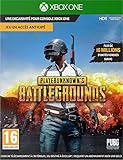
- PLAYERUNKNOWN'S BATTLEGROUNDS is the definitive battle royale experience, pitting 100 players against each other in a struggle for survival across a variety of thrilling and immersive environments Not Just a Game - This is Battle Royale
- Now in Full Product release on Xbox One Xbox live Gold required to play (sold separately)
- Full Product Release game includes 3 maps: the original game map, Erangel, the desert themed map, Miramar and new to the 10 release the 4x4 tropical themed map, Sanhok, featuring all-new weapons and vehicles
- Includes the #10/99 DLC Pack, featuring an exclusive set of clothing and accessories to celebrate the final release of the game on Xbox One
- Xbox One Console launch exclusive and Xbox One x enhanced
When to contact PUBG Support
If the error persists after checking relevant service notices and following the official guidance for your edition and platform, use the PUBG: BATTLEGROUNDS Support portal contact form. Include your platform, game edition, when the error began, whether official notices showed maintenance, and whether the issue persists on another connection. PUBG MOBILE players should use the separate mobile help destination linked from PUBG’s support portal.
Quick Recap
Best Value
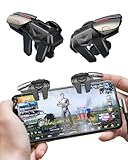
- 【Clip-on Mobile Game Trigger】 Our versatile mobile game triggers feature a unique clip-on design equipped with four zinc alloy buttons, allowing you to seamlessly control your left and right thumbs and index fingers and middle finger for simultaneous movement, aiming, and shooting. Weighing in at just 0.093 lbs , this mobile game controller is perfect for on-the-go gaming during trips or parties.
- 【Almost Zero Latency Physical Mapping】 ACEDAYS Mobile Triggers utilize a copper-silver alloy wire and conductive media combination scheme, effectively minimizing environmental magnetic interference. Experience ultra-sensitive shooting and aiming with almost zero delays, ensuring exceptional game performance. User-friendly with no need for power or drivers, the PUBG mobile controller features a mechanical micro switch with a button lifespan exceeding 5 million presses.
- 【Preventing Accidental Touch】Designed with notches, our cell phone gaming triggers provide a safeguard against accidental touches on the phone's side keys during gameplay, preventing scratches on the side bezel. The notch design seamlessly accommodates tempered film and thickened cases. Additionally, two silicone soft pads on the contact surface protect your screen from scratches.
- 【Ergonomic Design】Crafted from zinc alloy, the buttons on this smartphone game controller have an increased surface area and optimized pressure angles, offering an ergonomic design for extended gaming sessions. Effectively alleviate grip fatigue during prolonged use, ensuring you stay comfortable even after hours of gameplay. This design also addresses issues of sweating, slipping, and poor heat dissipation.
- 【High Compatibility】 Our mobile gaming controller is compatible with iPhone and Android phones, easily clipping onto devices with a thickness ranging from 0.24" to 0.45". Note: If using a phone case with the trigger, ensure the total thickness does not exceed 0.5 inches. Compatible with popular shooter mobile games like PUBG Mobile, Call of Duty Mobile, Fortnite Mobile, and more.
Rank #4

- Not
- Available
- Yet
Product prices and availability are accurate as of the date/time indicated and are subject to change. Any price and availability information displayed on Amazon at the time of purchase will apply.



