Some links on this page are affiliate links: if you buy through them we may earn a commission, at no extra cost to you.
Start by unlinking Xbox from Twitch, restarting the console, and linking the account again through Xbox’s Capture & Share → Live streaming menu. That sequence addresses the most plausible cause of error 995F9A12: an expired or stale Xbox–Twitch authorization. If the code appears only when you broadcast, update Xbox and reset the Twitch stream key only when the symptom clearly indicates a broadcast-authorization failure.
No public Twitch or Xbox document defines 995F9A12 precisely. It does not, by itself, prove a ban, invalid stream key, or network failure.
First, identify which Xbox feature is failing
Current Xbox broadcasting does not depend on the old standalone Twitch broadcasting workflow. Twitch says its Xbox app is for watching; console broadcasting is handled by Microsoft’s built-in feature. Press the Xbox button, choose Capture & Share, then Live streaming. Follow the QR-code or six-digit-code linking flow. See Twitch’s Xbox broadcasting guidance.
Free tools Windows power users keep installed
One-click scans. No signup required.
Use the Twitch app troubleshooting below only when the failure is opening or watching Twitch. If you can watch but cannot go live, troubleshoot the native Live streaming feature instead.
#1 Best Overall

- MODERNIZED DESIGN — Experience the modernized design of the XBOX Wireless Controller with sculpted surfaces and updated geometry that enhances comfort and control during long gaming sessions.
- PRECISION PERFORMANCE — Stay on target with a hybrid D-pad and textured grips on triggers, bumpers, and back case for improved accuracy and handling.
- SHARE BUTTON: Seamlessly capture and share content such as screenshots, recordings, and more with the new Share button.
- VERSATILE CONNECTIVITY — Connect via USB-C for plug-and-play on console and PC, or quickly pair and switch between supported devices with XBOX Wireless and Bluetooth support.
- BUILT-IN AUDIO SUPPORT — Plug in compatible headsets using the 3.5mm audio jack for direct voice chat and immersive in-game sound.
What error 995F9A12 means
Twitch and Xbox have not published a code-specific explanation for 995F9A12. Community reports associate it with failed sign-in, account linking, or broadcast authorization. Reported triggers include a Twitch username change, account deactivation and reactivation, a password or security change, reconnecting an account on another console, expired authorization, temporary service problems, and damaged or outdated app data. These are possibilities, not confirmed causes.
Quick fix
- On a phone or computer, open Twitch and go to Settings → Connections.
- Find the Xbox connection and choose Remove, Disconnect, or Unlink (the label can vary).
- On Xbox, hold the Xbox button and select Restart console. Wait for the full reboot.
- Press Xbox → Capture & Share → Live streaming.
- Choose Twitch, scan the displayed QR code or open its URL, enter the six-digit code if requested, and verify that the intended Twitch account is shown.
The unlink/relink procedure is a community-reported remedy rather than an official diagnosis; it is nevertheless the least disruptive first fix. A practical procedure is documented by WindowsReport.
Fix 995F9A12 in the least destructive order
1. Record the exact failure point
Note whether the code appears while opening Twitch, signing in, linking an account, loading broadcast settings, or pressing Go live. A stream-key remedy cannot repair every sign-in failure.
2. Check Twitch service status
Visit Twitch Status and inspect Login, Web, Video, and Broadcasting. If an incident is active, wait for service recovery before repeatedly removing accounts or changing credentials. Also test Twitch in a browser or on a phone.
3. Confirm the account works elsewhere
Sign in on another device and confirm you have the correct account, can open settings, and are not suspended. If you deliberately disabled the account, Twitch says signing in can reactivate it, but restoration may take 24–36 hours in some cases; do not disable an account as a troubleshooting step. See Twitch’s account disabling guidance.
4. Unlink Xbox in Twitch Connections
In a browser, open Settings → Connections, remove the Xbox entry, and confirm. This clears the old authorization without deleting your channel, videos, or account.
5. Restart Xbox completely
Hold the Xbox button, select Restart console, and wait until the dashboard has loaded. If the console is frozen, a power cycle is a recovery option, not a routine first step.
The Tool Desk
Outbyte PC Repair FREEClear out junk files and repair common Windows errorsFree Scan →Outbyte Driver Updater FREEFix the driver behind crashes, sound loss and screen glitchesFind Drivers →6. Relink through Xbox’s current flow
Use Xbox → Capture & Share → Live streaming, then the QR code or displayed URL and six-digit code. Check the account name before going live. Xbox’s published setup is described in Xbox Wire’s Twitch setup announcement.
Rank #2

- Replacement Gaming Media Remote Control for Xbox Media Players. Compatible With Xbox Xbox One, Xbox Series X, and Xbox Series S.
- This Gaming Media Remote Control can access to all Movies, TV shows, Music, Videos, and Apps with Common Xbox controls A, B, X, Y Keys.
- Backlit Remote Control: Full LED Backlighting-All buttons.
- Easily control your Xbox One system and the channel and volume for your TV.
- Preprogrammed--No need any setup or programming. Putting batteries in and Works. Batteries and User Manual are not included.
7. Install pending Xbox and app updates
On the console, open Settings → System → Updates. In Microsoft Store, check for updates to Twitch or other relevant components, then restart if required. Updating removes an outdated-software variable; it is not a confirmed cure for this code. Microsoft documents the update path at Microsoft Support.
8. Clear Alternate MAC only as a secondary network reset
- Press Xbox and open Profile & system → Settings.
- Choose General → Network settings → Advanced settings → Alternate MAC address.
- Select Clear and restart when prompted.
Record any custom alternate MAC address first. Clearing it can remove that intentional configuration. This is a general Xbox network reset reported by third-party troubleshooting, not a Twitch-confirmed 995F9A12 fix.
9. Reinstall Twitch only for app-specific failures
For a viewing-app problem, highlight Twitch, press the Menu button, choose Manage game and add-ons or Uninstall, and reinstall it from Microsoft Store. Reinstalling the viewing app is not a definitive repair for native Xbox broadcasting, which Twitch says is managed by Microsoft.
Do these 3 things before closing this tab:
1Repair Windows errors before they cause bigger problems2Scan for outdated or missing drivers - takes under a minute3Clear out junk files and repair common Windows errors10. Reset the stream key only for a broadcast-authorization symptom
In Twitch, open Creator Dashboard → Settings → Stream (or Preferences → Channel, depending on the interface) and choose Reset for the stream key. Twitch warns not to reset it more than once in this troubleshooting context because that can cause a 15-minute lockout. Never reveal the key publicly; see the Twitch Stream Key FAQ.
A password change invalidates the stream key and revokes existing third-party credentials, so relinking afterward is expected. See Twitch’s password guidance. A username change normally preserves account history, but Twitch notes that a new stream key may be needed; see its username-renaming policy.
11. Test the network
- Run Xbox’s Test network connection and Test multiplayer connection.
- Restart the router only if other online services are unstable.
- Temporarily remove unusual DNS or VPN settings.
- Try a phone hotspot briefly as a comparison, not as a permanent streaming connection.
If the hotspot works, the likely variable is your router, DNS, ISP path, or home network; it does not prove the console or Twitch account is defective.
Use the symptom to choose the next branch
After a username change
Unlink and relink first, then sign out and back in on Xbox. Reset the stream key once only if broadcasting still reports authorization failure. Do not create a second Twitch account to work around the old link.
After a password change
Relinking is required because Twitch invalidates the stream key and revokes third-party credentials after a password change.
Rank #3
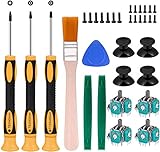
- Needs moderate soldering. Professional installation is highly recommended - Replacement analog joystick for xbox one, repair worn, out of control, not sensitive analog joystic.
- SUPERIOR QUALITY - Made of premium impact resistant ABS material, not easy aging and very durable. Precision design, perfectly fit for your controller, also we have a very strict quality controlling system which promises that goods we produced are always of the best quality.
- Compatibility:Xbox One Wired Controller/Wireless Controller
- Comes with T6 T8 T10 Cross Screwdriver repair tools,12 Replacement "T6" Screws,7 Replacement "T8" Screws,2 x pry tools, 1 x pry bar ,4 Thumbstick Caps,1 x Brush
Twitch works on the web but not on Xbox
Focus on Xbox authorization state, the native broadcasting integration, console software, networking, and possible platform incidents. Browser success rules out some account-access problems, not every account or enforcement issue.
Another Xbox account works on the same console
The problem is more likely tied to the original Twitch account, Xbox profile, or account-link record.
No Xbox account can broadcast
Prioritize status checks, Xbox updates, network tests, a full restart, and Xbox Support.
Recommended Free Tools
You can watch but cannot broadcast
Use Capture & Share → Live streaming. Do not treat reinstalling the viewing app as the definitive broadcast fix.
The account is suspended
A technical workaround cannot remove enforcement. Twitch says a streaming suspension prevents going live while other functions may remain available; check account status and appeal through Twitch where appropriate. See Why Can’t I Stream?
Who should handle the remaining problem?
| Symptom | Contact | Include |
|---|---|---|
| Xbox guide, console streaming, Xbox OS, network, party chat, or hardware | Xbox Support | Console model, OS version, exact code, network-test results, and when it began |
| Twitch login, recovery, password, suspension, username, or stream key | Twitch Support | Account email, recent credential changes, account-status result, and screenshot with private data hidden |
| Streamlabs or Lightstream integration | That service’s support team | Integration name, connection status, and the exact step that fails |
Twitch explicitly directs Xbox-console broadcasting issues to Microsoft because the native feature is managed by Xbox. After unlink/relink, restart, update, network testing, and one conditional stream-key reset, stop cycling through reinstallations or password changes and escalate.
Alternative streaming setups
Streamlabs (streamlabs.com) and Lightstream (golightstream.com) can provide alternative Xbox workflows, while OBS Studio (obsproject.com) requires a computer and normally capture hardware. None is a verified repair for 995F9A12; adding another integration can add another authorization layer. Consider them only after the native Xbox path and support escalation fail.
Before contacting support
- Exact code:
995F9A12. - Xbox model: One, One S, or One X.
- Whether the failure is viewing, sign-in, linking, or broadcasting.
- Date it started and any username, password, email, or account-status change.
- Whether unlinking and relinking changed the result.
- Console OS and app versions, if visible.
- A screenshot with email addresses, QR codes, and stream keys obscured.
Do not factory-reset the console unless Xbox Support specifically advises it and important data is synchronized or backed up.
Rank #4

- Custom designed joysticks to perfectly fit for Xbox Series X/S, for Xbox Core controller (Model 1914) , for Xbox One standard (Model 1537/1697), for Xbox One X/S (Model 1708), for Xbox One Elite V1 (Model 1698) controller; Not compatible with Xbox Elite Series 2 and other controllers. Work exactly like the original thumbsticks
- Unique replacement to add much more personality to your controller. The replacement thumb sticks will make your controller distinct when playing with friends, no more boring standard color
- Made of premium PC & TPE plastic material, durable and practical. Ideal replacement for your broken or cracked controller thumbsticks
- The black color looks great; Would be awesome if you combine it with the custom shell from eXtremeRate (You can find these shells in our store.)
- Easy to install, requires internal fitting, the screwdriver tool included can help you easily open the shell and install the gaming parts
Frequently Asked Questions
Is 995F9A12 proof that my Xbox or Twitch account is banned?
No. The code has no public official definition and does not establish an enforcement action. Check Twitch account status and support messages separately.
Will reinstalling Twitch delete my account?
No. Reinstalling the Xbox app affects local app data; it does not delete your Twitch account or channel.
Do I need to reset my stream key?
Only when the failure is specifically broadcast authorization. Try unlinking and relinking first, and reset the key no more than once in this workflow because Twitch warns of a possible 15-minute lockout.
What’s actually slowing this PC down?
Pick the symptom - the matching free tool is one click away.
Why does Twitch work on my phone but not Xbox?
Web or phone access can succeed while Xbox’s authorization record, native broadcasting integration, console software, or network path is failing.
Does clearing Alternate MAC delete my Wi-Fi password?
It clears the console’s custom alternate MAC configuration, not your Twitch account. Record an intentionally configured alternate address before clearing it.
Can I stream through a browser instead?
A browser does not replace Xbox’s native console capture path. A PC setup with OBS and capture hardware is an alternative, not a direct fix for this error.
Is the Twitch Xbox app still used for broadcasting?
Twitch’s current guidance says the Xbox app is for viewing; broadcasting uses Xbox’s Capture & Share → Live streaming feature.
Windows Errors? Fix Them Before They Spread
Repair common Windows errors and clear accumulated junk for a smoother, more stable PC - no reinstall needed.Free scan · no reinstallCrashes, No Sound, or Screen Glitches?
Random freezes, missing sound and display glitches usually trace back to one bad driver. Find and replace yours safely.Free scan · under a minuteQuick Recap
Product prices and availability are accurate as of the date/time indicated and are subject to change. Any price and availability information displayed on Amazon at the time of purchase will apply.

