First work out whether “lag” means delayed online play, a stuttering or slowed picture, or a freeze/crash: each points to a different fix. Update Valheim and your Switch 2, then use the steps below for the symptom you actually see. As of October 4, 2026, Iron Gate’s latest official patch found is version 1.0.16, released September 25; updates can arrive at different times by platform, so check for newer game and system updates before troubleshooting.
Identify the problem before changing anything
- Online latency: Other players jump around, actions take a long time to register, or the session disconnects after delayed responses. Nintendo identifies internet speed, weak wireless signal, interference, and network-device response as possible factors. Nintendo’s online-latency guidance treats this separately from in-game slowdown.
- Stuttering or slowdown: The image itself becomes irregular or slows down. Note whether this happens only in Valheim and whether you see it in both online and offline play. That comparison is useful diagnostic context, not proof of a particular cause. Nintendo’s Switch 2 slowdown guidance covers this symptom.
- Freeze or crash: Valheim stops responding, exits, or the console must be forced off. Write down any displayed error code; Nintendo recommends looking up the exact code in its support database.
Fix Valheim stuttering and frame-rate drops
- Install the latest available Switch 2 system update and Valheim update, then restart the console. Nintendo’s slowdown steps include updating the system and restarting, as well as checking for software updates.
- Retest the same world and situation. Iron Gate’s September 17, 2026, version 1.0.14 notes report “Multiple GPU performance improvements on Switch 2.” That establishes platform-specific optimization work, but gives no before-and-after measurement and does not promise that all stutter is fixed. Read the version 1.0.14 notes.
- If slowdown is tied to a heavily changed area or began after terrain work, note that context when reporting the issue. Version 1.0.15, released September 18, fixed a terrain-duplication bug that caused decreased performance. The patch note is relevant context, not a diagnosis of an individual world. Read the version 1.0.15 notes.
- If downloaded software still behaves abnormally, follow Nintendo’s instructions to check for corrupt data and, if needed, delete and redownload the game. Before any step that affects local software or storage, make sure important save data is protected. Nintendo’s frozen or crashing software guidance.
- If slowdown also affects other games after software troubleshooting, follow Nintendo’s console repair support path.
Do not apply PC graphics-setting advice to Switch 2: the official Switch 2 material cited here does not establish a universal Valheim setting or accessory that cures persistent stutter.
Quick Recap
Rank #4

- Custom Fan for Switch 2: Precisely engineered for a perfect fit, it clips securely onto the vents of devices for Switch 2 to channel cool air in and push heat out — eliminating thermal lag, maintaining peak performance, and protecting your device from heat-related damage
- High-Efficiency Cooling: This fan drops the temperature of devices for Switch 2 by 36 - 45 °F in just 4–8 minutes, delivering exceptional cooling performance and stepless speed control (so you can fine tune the fan speed exactly how you like it)
- Stay Cool, Game On: Whether you’re gaming outdoors or in a hot room, it keeps your device for Switch 2 icy cool during intense battles, preventing overheating that causes frame drops and ensuring stable peak performance
- Perfect Duration of 3–5 Hours: Provides over 3 hours of cooling at full speed and up to 5 hours on low. Supports charging while playing. Note: Higher fan speeds may generate more noise, which is completely normal
- What you get: JSAUX Cooling Compatible with Switch 2 (2025)*1, JSAUX 90° USB C to USB C Adapter*1, 18 Month worry free period and 24/7 customer service, if you have any questions, we will resolve your issue within 24 hours
Rank #3
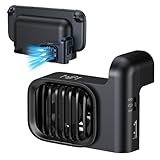
- Efficient Cooling for Switch 2 Dock: Keep your Switch 2 Dock running at optimal temperatures during intense gaming sessions. This dedicated fan features powerful airflow technology that effectively dissipates heat, preventing overheating and ensuring smooth performance for your console, so you can enjoy extended gameplay without interruptions
- Easy Installation & Space - Saving Design: Designed specifically for Nintendo Switch 2 Dock, the fan easily attaches to your dock without any complicated setup. Its compact and sleek form - factor seamlessly integrates with the dock’s aesthetics, taking up minimal space while providing maximum cooling efficiency. You can set up your gaming station neatly and keep it looking clean
- Two-speed adjustable fan mode: Customise cooling performance to suit your needs with adjustable fan modes. Whether demanding robust cooling during operation or requiring only a gentle airflow, you may freely switch between different speed settings. This flexible design allows you to adjust settings at any time according to actual requirements
- Quiet Operation: Don't let a noisy fan disrupt your gaming immersion. Our Switch 2 Dock fan is engineered for quiet operation. Even at higher speed settings, the advanced motor and blade design ensure that the fan runs silently, so you can focus on the game audio and your gameplay experience without any distracting whirring sounds
- Durable Build & Extra USB - Powered Convenience: Constructed with high - quality materials, this fan is built to last through countless gaming marathons. It’s powered via USB, which means you can easily connect it to your Switch 2 Dock or any other USB - enabled power source. The USB power delivery ensures a stable and reliable power supply, so you never have to worry about battery replacement or running out of power for your cooling solution.
Rank #2

- 【Dedicated Cooling Fan for Switch 2】When connected to the Switch 2 charging dock, the cooling fan automatically operates at full speed. Press the button to switch between three cooling levels, allowing cooling to start simultaneously as the game begins.
- 【Powerful Cooling with Dual Fans】The Switch 2 cooling dock features a 3-stage cooling level adjustment function and 2 cooling coolers to promote heat dissipation and extend the lifespan of your Switch 2 .Enjoy longer gaming without lag or crashes Designed for stable performance and body protection.
- 【6-Card Game Slot】The Switch 2 cooling stand is equipped with 6 game card slots, allowing you to insert game cards into the slots Aim for the game card at a glance, and you can play different games immediately.
- 【3 USB Expansion Ports】This Switch 2 cooling station is equipped with 2 USB-A output ports and 1 USB-C output port, allowing you to easily connect and charge controllers, smartphones, headsets, and other accessories. Unleash the power of the switch 2 dock with no extra space.
- 【Equipped with 9 RGB Light Modes】 With 9 vibrant RGB light modes, you can customize it to match the scenes of the game and improve your gaming experience with cool effects. Press and hold to turn off the light, perfect for Nintendo Switch 2 accessory lineup.
#1 Best Overall

- 【PREVENT SWITCH FROM OVERHEATING】 The cooling fan keeps your Nintendo Switch 1/2 stay cool in the original dock station, it is good enough to lower the temperature and protect the Switch from overheating, now you don't have to worry about having to pause due to overheating during the game, you can play for multiple hours as much as you want.
- 【LED DISPLAY WITH FAN SPEED & TEMPERATURE】The digital LED display shows both the current rpm of the fan and the temperature of the air exiting the console in degrees celsius. There are three buttons for easy control: Increase the fan speed, power on/off the fan, decrease the fan speed.
- 【ADJUSTABLE FAN SPEED】The adjustable fan speed from min 510rpm up to max 6000rpm of the radiator for Nintendo Switch is perfect for heat-exhaust and ventilation. When the fan speed is under 2400rpm, it is nearly no noisy, unless the fan speed is above 2400rpm, it will produce some fan spinning sound.
- 【MICRO USB CABLE & FIXED PAD & JOYSTICK CAPS】The package contains a Micro USB cable, a fixed Pad and 2 pieces joystick caps, just plug the USB cable into the back of the console stand in-between the HDMI and power cord to get power, insert the fixed Pad between the Switch and the docking console base to stable the cooling fan, the sponges on both sides of the pad are not only for anti-slip effect but also prevent your Switch from being scratched.
- 【LIFETIME WARRANTY】We strive for excellence with our products and our customer service. If there is any quality problem with our cooling fan for Nintendo Switch or you are not happy with your purchase in our store, please feel free to contact us and we will solve it for you in 24 hours.
Fix online lag or disconnections
- On the console, open System Settings → Internet → Test Connection. Record the connection, NAT type, download speed, and upload speed shown; test again after changing network conditions. These results help describe the problem but do not, by themselves, establish its cause. Nintendo’s latency troubleshooting steps.
- Test with a strong wireless signal. Move the Switch 2 closer to the router, and move metal objects or electronic devices that may interfere away from the console and router.
- When docked, try a wired diagnostic connection: connect an Ethernet cable from the Switch 2 dock to the router or gateway, then select the wired connection in Internet Settings. This is for online-latency testing only; it will not improve local frame rate or prevent crashes.
- If the problem persists, note whether other games work online, the Valheim version, the connection-test and NAT results, and whether other players or the server use a different platform. Iron Gate announced restored crossplay compatibility in a September 11, 2026, hotfix notice; that dated announcement does not guarantee every server or connection is trouble-free. Read the hotfix notice.
Recover from freezes and crashes
- Restart the console. If it is unresponsive, hold the POWER button for twelve seconds to force shutdown, then turn it on again, as Nintendo directs for downloaded software that freezes.
- Check for available Switch 2 system and Valheim updates, then use Nintendo’s corrupt-data check for the game.
- If the digital game continues to freeze, Nintendo lists deleting the software and redownloading it as a possible step. Look up any error code exactly as displayed in Nintendo’s support database.
- Use patch notes as clues only when the circumstances match. Version 1.0.16 fixed a potential crash in the online-session Player List and a terrain-related crash case involving rolling distant snowballs. These targeted fixes do not explain unrelated crashes. Read the version 1.0.16 notes. Version 1.0.12 also lists a zone-loading crash fix in its Steam-only section, so that entry is not evidence of a Switch 2 fix. Read the version 1.0.12 notes.
- If the same slowdown or failure continues across games, use Nintendo’s repair support path. If only Valheim is affected after updating and reinstalling, report the game version, world context, online/offline status, and when the crash occurs to the game publisher’s support channel.
What to include in a useful support report
- The Switch 2 system version and Valheim version.
- Whether the issue is latency, visual slowdown, a freeze, or a crash, and when it occurs.
- Whether it happens in one world or several, and whether it occurs online, offline, or both.
- For online issues, the Internet Test Connection and NAT results, whether other games work online, and whether other players use a different platform.
- Any error code shown, plus the steps already tried.
Product prices and availability are accurate as of the date/time indicated and are subject to change. Any price and availability information displayed on Amazon at the time of purchase will apply.



