Recommended Free Tools
For most iPhone owners, install Delta – Game Emulator from the App Store. Delta supports Super Nintendo (SNES) games without a jailbreak. After installing it, place a legally obtained SNES game backup in the Files app and open it in Delta. If Delta is not offered in your storefront, eligible users in the European Union, Japan, or Brazil can install it through AltStore PAL instead.
What you need
- An iPhone running iOS 18 or later.
- App Store access, or an eligible region and Apple Account for AltStore PAL.
- Delta – Game Emulator.
- A legally obtained SNES game backup that your local law allows you to use.
- Free storage for Delta and your game files.
- Optional: a Bluetooth or wired controller.
“SNES Emulator iOS 18” is not the name of a separate app. It describes an iOS emulator with SNES support. Delta is the simplest current choice for most users. Its official listing documents support for SNES, NES, Nintendo 64, Game Boy, Game Boy Color, Game Boy Advance, and Nintendo DS, plus save states, fast-forwarding, artwork, and controllers. See the official App Store listing.
The easiest method: install Delta from the App Store
- Open the App Store on your iPhone.
- Search for Delta – Game Emulator.
- Check that the listing and developer match the official Delta app from Riley Testut/AltStore.
- Tap Get, then authenticate with Face ID, Touch ID, or your Apple Account password.
- Open Delta after installation.
Delta should open to its game library. An empty library is normal until you import a game. Do not install random “Delta IPA” files, configuration profiles, enterprise certificates, or so-called premium copies when the official listing is available. Delta is an independent app and is not affiliated with or endorsed by Nintendo.
Availability depends on your Apple Account storefront. If the app does not appear, use the troubleshooting section below rather than changing your region casually; a region change can affect subscriptions, payment methods, and existing purchases.
Windows Errors? Fix Them Before They Spread
Repair common Windows errors and clear accumulated junk for a smoother, more stable PC - no reinstall needed.Free scan · no reinstallOutdated Drivers Are Slowing You Down
One free scan finds every outdated or missing driver and matches the right update for your exact hardware.Free scan · exact hardware match#1 Best Overall

- Color: Black red
- - 3 types of connection: Bluetooth connection, wireless connection (for devices without Bluetooth), wired connection
- - 4 modes: joystick mode, operate mode (mouse + media), third-party operating mode for IOS, iCade mode
- #NAME?
- #NAME?
Import an SNES game into Delta
Delta is the emulator; it does not give you permission to download copyrighted games. Obtain a game backup from a source you are authorized to use under the law where you live.
- Save the game file to the iPhone’s Files app, preferably in On My iPhone or iCloud Drive.
- If the download is a ZIP archive, tap it in Files to extract it. Try the uncompressed game file if Delta does not accept the archive.
- Press and hold the file, tap Share, and choose Open in Delta, Copy to Delta, or Delta itself if it appears.
- If the share sheet does not show Delta, use the app’s add/import control. The exact label varies by Delta version and file type.
- Wait for the artwork and title to appear in Delta’s library, then tap the game to launch it.
Common SNES backup extensions include .smc and .sfc; some backups arrive as .zip files. Compatibility is not universal. ROM hacks, translation patches, damaged downloads, and games using special enhancement hardware can behave differently from clean, standard titles.
Configure touch controls or a physical controller
Use the on-screen layout
Delta supplies touch controls by default. Rotate the iPhone to landscape orientation for a larger play area. Tap the screen during a game to open the pause menu, where you can access save states and other controls. Available controller skins and layout options can vary between Delta releases.
Pair a controller
- Put the controller into pairing mode.
- On the iPhone, open Settings → Bluetooth and select the controller.
- Return to Delta and test the buttons. Adjust the mapping in Delta if the installed version exposes controller settings.
Delta’s listing names support for Nintendo Switch Pro controllers, Joy-Con controllers, Nintendo Switch Online controllers, PlayStation 4 and PlayStation 5 controllers, Xbox One S and Xbox Series X controllers, MFi controllers, and Bluetooth or wired keyboards. Compatibility with a specific button layout or feature can still vary by controller and Delta version.
Free tools Windows power users keep installed
One-click scans. No signup required.
Rank #2

- 🎮 EasySMX X05 controller compatible with Black Myth: Wukong. 🎁 Includes a pair of thumb grips 🎁 This EasySMX X05 PC game controller supports Bluetooth & 2.4G & Wired.
- 🎮【RGB Lights】 The X05 game controller features RGB lighting effects, allowing you to change the lighting to your preferences and creating an immersive gaming experience.
- 🎮【Hall Effect Joysticks and Triggers】Enjoy enhanced joystick control with our four hall effect sensors. These sensors provide precise and reliable input detection, allowing for smoother and more accurate movement in-game. Whether you're navigating through virtual worlds or aiming with precision, our hall effect technology ensures a seamless gaming experience.
- 🎮【750mAh Battery with 10‑Hour Playtime】This wireless game controller features a 750mAh NMC lithium‑ion battery, with 1.5× longer life than regular polymer batteries, supporting up to 10 hours of continuous gameplay on a full charge.
- 🎮【Ceramic Charging Cable】 Your X05 PC controller's ceramic charging cable ensures a stable and reliable wireless connection, minimizing signal interference and providing a seamless gaming experience. It also offers low power consumption, extending the usage time.
Save progress safely
In-game saves
Use the game’s own save system whenever possible. These saves are part of the game’s normal behavior and are generally more portable than a single emulator snapshot.
Delta save states
Delta also supports save states: snapshots of the exact point at which you paused. Keep more than one state for an important playthrough, and do not make a single state your only copy of progress.
Back up before updates or migrations
Back up Delta data before deleting the app, changing distribution channels, or testing a beta. Delta’s migration guidance specifically refers to copying the Database folder in On My iPhone → Delta when moving between versions. Delta’s official materials also describe syncing or transferring data with Dropbox and Google Drive; verify the current menu names in your installed build before relying on sync. See the Delta data-migration guidance.
If Delta is unavailable in your region: AltStore PAL
Apple’s alternative app distribution is currently available only in Brazil, Japan, and countries in the European Union, subject to Apple Account country/region and physical-location requirements. AltStore PAL is an independent marketplace, not Apple software. Its official download page requires iOS/iPadOS 18.0 or later for installation. The site currently states that updating AltStore PAL requires iOS 18.4 or later, so initial eligibility and update requirements are not the same.
Quick wins for a faster PC:
Clear out junk files and repair common Windows errorsFree Scan →Fix the driver behind crashes, sound loss and screen glitchesFind Drivers →Repair Windows errors before they cause bigger problemsFix Now →Rank #3

- ✅1. It is designed for mobiles iCade VR games, also compatible with MID, TV box, smart TV, PC, Tablet, laptop, etc. It can be used as a gamepad, VR remote, wireless mouse, music control, E-book pages flipping, PPT presentation, a remote controller for playing Anki APP, etc. If you are looking for a TikTok controller or an Instagram controller, there an upgraded version with Asin B09QJLV6JJ that could control videos of Tiktok, Instagram, Likee, etc., play Xinput games, play iCade games, etc.
- ✅2.For the iOS system device, use the controller to 1). Play Arcade VR or non-VR games; 2). Play video, VR video, film, music; 3). Be a shutter for selfies or take photos; 4). Flip E-book page in kindle or PPT; 5). Adjust iOS devices’ Volume. 6). Compatible with limited iPhone games such as Crowdy City, Clean Road and Crossy Road etc. due to the iOS system sealed reason. (Search ASIN: B09Q1X8SV1 to get a gamepad to play over 1,000 MFI games if you only want to play iPhone games with a remote.)
- ✅3. For Android system Phones, this controller could do below remote controlling: 1). Adjusting and muting volume; 2). Playing video or music; 3). As a shutter for selfie or taking photo; 4). E-book flip in iReader such as kindle, nook, ppt; 5). Mouse operation; 6). Fully remote control functions will be available in VR games.
- ✅4. Very Easy to power On or Off: hold on 2 Seconds to turn on and hold on 5 Seconds to turn off, one button press to control smartphone’s shutter, 2-AAA-type size batteries are needed for power on. ✅5. 360 Degree Movement Location with High precision control of the rocker, Arc shape design, slip-free and sweat-free, this could avoid the wrong operation of the finger shaking.
- On the iPhone, open Safari, Chrome, or Vivaldi and visit AltStore’s official download page.
- Tap Download.
- When iOS opens Settings, select Allow Marketplace From AltStore LLC under the Apple Account area.
- Tap Allow, then return to the AltStore download page.
- Tap Download again and choose Install App Marketplace.
- Open AltStore PAL, find Delta, and install it from the marketplace.
AltStore PAL is different from AltStore Classic. Classic uses AltServer on a Mac or Windows PC; PAL uses Apple’s permitted alternative-marketplace flow and does not require a computer for this installation route. Apple explains the regional rules at its alternative-app-distribution support page and provides an overview at this guide.
App Store Delta or AltStore PAL?
| Consideration | App Store Delta | AltStore PAL |
|---|---|---|
| Best for | Users whose storefront lists Delta | Eligible users whose storefront does not |
| Installation | Search, authenticate, install | Enable marketplace permission, then install through PAL |
| Region | Depends on Apple Account storefront | Brazil, Japan, or the European Union, with location and account requirements |
| Computer required | No | No for PAL installation |
| Maintenance | Standard App Store updates | Separate marketplace and iOS eligibility requirements |
| Main drawback | May not be listed in your region | More setup and region checks |
Fix common problems
Delta does not appear in App Store search
- Search the exact name, Delta – Game Emulator, and verify the developer and listing.
- Check the Apple Account country/region and whether Screen Time or device management hides the app.
- Consult Delta’s official region guidance.
- If you meet the regional requirements, use AltStore PAL instead of installing an unofficial copy.
“Allow Marketplace From AltStore LLC” is missing
- Confirm that the phone is physically in an eligible country and the Apple Account region matches.
- Use iOS 18 or later and start from the official AltStore site in Safari, Chrome, or Vivaldi.
- Check whether a school or employer management profile blocks alternative marketplaces.
The game file will not import
- Confirm the download completed and extract the ZIP in Files.
- Try the uncompressed
.smcor.sfcfile. - Use Delta’s own import control if the share sheet cannot open it.
- Test a clean, legally obtained backup. Do not rename an unrelated file merely to change its extension.
- Update Delta through the same channel used for installation.
The game crashes or shows graphical glitches
Disable fast-forward, try a clean unmodified backup, and test another SNES game. If only one title fails, its dump, patch, or enhancement hardware may be the issue. After backing up normal saves, remove only the affected game’s corrupted save state if necessary.
Save data disappeared
Common causes include deleting the app without a backup, switching between App Store and AltStore versions, incomplete sync, or moving or renaming the game file. Restore your backed-up Delta data and verify that syncing has completed before deleting anything.
The controller connects but does not work correctly
Forget and re-pair it in Settings → Bluetooth, close and reopen Delta, and check the game’s button mapping. A controller can be supported while a particular mapping or extra feature is not.
What’s actually slowing this PC down?
Pick the symptom - the matching free tool is one click away.
Rank #4

- Bluetooth Mobile Game Controller for Nintendo Switch 2 & iOS & Android & Tablets, Wireless Gamepad Grip with Hall Effect Trigger Joystick, Ergonomic Phone Controller for iPhone, iPad Pro, Samsung
- TURBO FUNCTION This MFi wireless controller has a turbo function, you can adjust the turbo button according to your needs and achieve one-click bursts, programming buttons are designed on the behind of the stretched gamepad, support macro programming, customise personalised game. making it easier for you to win in FPS games, and it is a good helper for you to play games.
- Hall effect joystick and linear trigger: mobile controller is with hall effect joystick, high precision, stable performance, faster response speed and long service life. Linear trigger has such high fluidity and response speed that gives you a competitive advantage in any game.
- ERGONOMIC DESIGN: Game accessory controllers are ergonomically designed to ensure flawless control and execution. The shape of the gamepad fits naturally in the hand, so you can better immerse yourself in the fun even during prolonged use. 360° rotating joystick analog sticks and trigger buttons ensure precise accuracy and comfort as well as increased sensitivity so you can better control your gaming remote control.
- Supports controllers up to 11 inch: Scalable design supports most tablets such as 11 inch iPad Pro (M5), 11 inch iPad Air (M3), iPad (A16), iPad mini (A17 Pro), 11 inch iPad Pro (M4), 11 inch iPad Pro 4/3/2/1, for Samsung, Lenovo, Amazon, Huawei tablets etc. (Not compatible with the 12.9-inch iPad Pro and 13-inch iPad Air)
Are SNES ROMs legal?
Emulators and game files are separate legal questions. An emulator is not automatically illegal, but game files may be copyrighted. Rules about cartridge dumping, personal backups, downloading, and possession differ by country and sometimes by state. Use only files you are authorized to use, and do not download “free ROM packs” or use sites that distribute games without permission. Apple’s App Store guidelines require emulator developers to comply with applicable law; they do not make every ROM download lawful.
Security rules worth following
- Prefer the official App Store listing or the official AltStore PAL site.
- Avoid random IPA sites, enterprise-certificate services, unknown configuration profiles, and websites requesting Apple Account credentials.
- Do not install apps claiming to include Nintendo games or requiring major iPhone security features to be disabled.
- Keep Delta and iOS updated through their normal distribution channels.
Apple describes App Store review and malware scanning in its developer guidelines. Alternative distribution has its own notarization process, but it is not identical to ordinary App Store review.
Frequently Asked Questions
Does installing Delta require a jailbreak?
No. The normal App Store route and the eligible AltStore PAL route both install Delta without jailbreaking an iPhone.
Can Delta use a PS5 or Xbox controller?
Yes. Delta’s listing includes PlayStation 4/5 and Xbox One S/Xbox Series X controller support, although button mapping can vary by game and app version.
Best Value
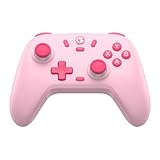
- Multi-Platform Compatibility: The GameSir Nova Lite is designed to work seamlessly with Windows 10/11, Nintendo Switch, Android, iOS, and Steam Deck. It includes a 2.4G wireless dongle for a stable connection, making it a versatile choice for various gaming platforms.
- Precision Hall Effect Joysticks: Experience accurate and drift-free performance with the GameSir Hall Effect joysticks. Engineered for zero dead zones and smooth control, these joysticks enhance your gameplay with consistent and precise movements.
- Tri-Mode Connectivity: Enjoy ultimate flexibility with three connectivity options: Bluetooth, 2.4G Wireless Dongle, and USB-C. Easily switch between devices for a hassle-free gaming experience, adapting to your preferred setup.
- Long Battery Life & Multi-Function M Button: Equipped with a 600mAh battery, the Nova Lite offers up to 10 hours of playtime on a full charge, which takes only 2 hours. The multi-function M button allows you to adjust vibration intensity, ABXY layout, and joystick deadzone settings, giving you complete control over your gaming experience.
- Enhanced Gaming Features: The Nova Lite features a 20Hz Turbo function with customizable buttons (A/B/X/Y/LB/LT/RB/RT), which can be activated or deactivated using the M button. This feature allows for rapid input and improved gameplay, letting you focus fully on the action.
Can Delta open ZIP files?
Some versions or file types may import an archive, but extracting the ZIP in Files and opening the resulting .smc or .sfc file is the more reliable troubleshooting step.
Can I install Delta on an iPad?
Delta’s App Store listing supports iPhone and iPad. The same storefront, file-import, and regional availability conditions still apply.
Does Delta work offline?
After Delta and your game file are installed, playing normally does not require an internet connection. Internet access is needed for downloads, updates, and any cloud-sync operation.
The Bottom Line
Install Delta from the App Store whenever it is listed, import an authorized SNES backup from Files, and use AltStore PAL only when your region and Apple Account meet its requirements. Keep normal saves and backups separate from save states, and avoid unofficial installers and ROM sources.
Quick Recap
Product prices and availability are accurate as of the date/time indicated and are subject to change. Any price and availability information displayed on Amazon at the time of purchase will apply.

