What’s actually slowing this PC down?
Pick the symptom - the matching free tool is one click away.
To join or create a clan in Call of Duty: Mobile, first reach Level 5, then tap Clans at the bottom of the home screen. Choose an existing clan and tap Join, or select Create Clan to set up your own. Depending on a clan’s access rules, joining may be immediate or require approval.
What clans do—and when they unlock
Activision describes clans as groups of players who party up to play Call of Duty: Mobile together. They can play Multiplayer, Battle Royale, Zombies, or a mix of modes. The Clans feature unlocks at Level 5, according to the Activision Help Center.
How to join an existing clan
- Reach Level 5, then tap Clans at the bottom of the home screen.
- Browse the available clans. Use the game-mode dropdown to filter by a preferred mode, or choose All.
- Select a clan and review its clan master, recruitment announcement, and any minimum level requirement.
- Highlight the clan and tap Join. With no restrictions, you are added automatically. If the clan requires an application, the clan master must approve it.
After approval, you receive a notification in the in-game mailbox. Open it using the envelope icon at the top of the home screen. Activision’s joining instructions are in its How do I join a Clan? article.
How to create a clan
- Tap Clans at the bottom of the home screen, then tap Create Clan.
- Choose an emblem from the available in-game options. Activision’s instructions say custom emblems cannot be uploaded.
- Enter a clan name.
- Optionally set a minimum player level and choose a favorite game mode, or select All.
- Set the access rule:
- No Restrictions: players who meet the level limit can join.
- Application Required: the clan master can approve or deny applications and receives a message when someone applies.
- Closed: the clan is private and members can join by invitation only.
- Add a recruitment announcement and tap OK to finish.
To adjust clan selections later, Activision says to tap the emblem on the clan’s main screen to reopen its editor. Settings may also be changed in the Invitation tab. The area below the emblem is the Clan Notice space for announcements or other relevant information. See Activision’s clan creation instructions.
The Tool Desk
Outbyte PC Repair FREEClear out junk files and repair common Windows errorsFree Scan →Outbyte Driver Updater FREEScan for outdated or missing drivers - takes under a minuteDriver Scan →#1 Best Overall

- Bluetooth Controller for iPhone & Android: Mocagen mobile gaming controller Compatible with all iPhone models (including 18/17 series) and Android devices. Pairing steps: 1. Turn on Bluetooth on your phone and go to the pairing screen. 2. Press and hold the Home button for 3 sec until LED4 flashes. 3. Find "XBOX Wireless Controller" on your phone and tap to pair. Quick reconnect: After first pairing, simply press the Home button once (with Bluetooth on) to reconnect
- Play Most Controller-Compatible Games: This iPhone game controller supports cloud gaming (e.g., Xb*x Game Pass, GeForce NOW), Xbox Remote Play, emulator games, and native mobile games (e.g., Apple Arcade). Enjoy effortless control and play Fortnite, Call of Duty, Roblox, Genshin Impact, and many more anytime, anywhere. Note: Controller only works with games that support controller input, and does not support PS Remote Play
- 5M-Cycle Lifespan & Zero Drift: MC1 mobile gaming controller features a Hall-effect joystick with a 5M cycle lifespan, 2.5x longer than standard carbon-film sticks. Its innovative electromagnetic induction technology ensures drift-free operation, enabling precise character control in intense games and significantly extending this phone game controller durability
- Ergonomic Grip Design: The handle is ergonomically shaped with a l*ser-engraved texture for anti-slip and enhanced grip, effectively reducing fatigue during long gaming sessions. The scientifically designed joystick and button layout ensures smooth operation. Whether for personal use or as a gift, it delivers a more comfortable and healthier gaming experience
- 7-Color RGB Light Ring & 600mAh Battery: The mobile game controller features a 7-color adjustable light ring on the joystick(ABXY button lights can be turned off, but their colors are not adjustable). The lighting is vibrant yet eye-friendly. The built-in 600mAh battery provides up to 6 hours of battery life in brightness mode — enough for a full day of gaming
How to invite friends
Open your clan with the Clan button at the bottom of the main screen, then tap Invite Friends in the bottom-right corner. Only players already on your Friends list can be invited, according to Activision’s invitation guidance.
What to check before choosing a clan
Compare a clan’s mode preference, minimum level, recruitment announcement, and access rule with what you want. A clan with no restrictions may let you join right away; an application-based clan means waiting for the clan master’s decision, while a closed clan requires an invitation.
Rank #2

- ✅【Using Tips】These Mobile Game controllers are using the sensitive real mouse micro switch inside. So there are several phones which have the electromagnetic problems. This will cause the triggers touch the screen automatically. Please do not worry about this and you just need to turn off the screen and turn on again. This issue will solved right away.
- ✅【Max Phone Thickness: 13mm】These L2R2 Mobile Game controllers are compatible with iPhonesand most Android Phones, without even remove your case.(The thickness of the compatible mobile phone should be less than 13mm.) These 6-fingers-operation mobile game controllers are suitable for a variety of shooting games, including PUBG Mobile, Call of Duty Mobile, Fortnite Mobile, Knives Out Mobile, Rules of Survival, Apex Legends Mobile, Survivor Royale, Critical Ops etc. As long as the game allows customizing and draging the keys.
- ✅【Small and Lightweight】The PUBG game triggers are portable and tiny for you to put them into your pocket, and have them for gaming when in office, school, trip, camping and play games anywhere and anytime. With this 4 triggers PUBG mobile controller, you can simultaneously move, turn, aim and shoot by using the six fingers to press the buttons, which can eliminate the trouble that use thumbs only to make all operations.
- ✅【Mechanical Touch】4 triggers PUBG mobile controller designed for longevity with greater durability and responsiveness, more than 2 million click. Fast mechanical keys with medium resistance, precise actuation, audible click sound, and tactile bump feedback. Easy To Use, High Sensitive, Physical Button Feedback. Using this PUBG mobile game controller, you can move, angle adjust, aim and shoot at the same time with the thumbs and index fingers of the left and right hand.
- ✅【Super Gaming Experience】This PUBG game triggers is made of ABS and alloy, durable and ergonomic. 6 trigger PUBG mobile controller electroplated alloy materials, mouse buttons, smooth touch, six-finger linkage, auxiliary pressure grab, one-second burst, dominate the game battlefield, and enjoy the ultimate gaming experience. Call of Duty mobile controller are sensitive to shoot and aim, no Power supply and driver needed, easy to use and high precision, increase your game score!
Clan size and what happens if you leave
Activision Help Center guidance says a Level 1 clan can have up to 20 members and can add five more members each time it levels up, reaching a maximum of 65 members at Level 10. The capacity page does not display a publication or update date, so treat these as Help Center figures rather than a newly verified change. See Activision’s clan capacity page.
Before leaving, note the cooldown: Activision says you cannot join another clan for 24 hours after leaving one. To leave, tap Clan, open the Member tab, tap the Open Door icon on your row, then confirm with OK. The cooldown and exit steps are described in the Activision Help Center.
Crashes, No Sound, or Screen Glitches?
Random freezes, missing sound and display glitches usually trace back to one bad driver. Find and replace yours safely.Free scan · under a minuteWindows Errors? Fix Them Before They Spread
Repair common Windows errors and clear accumulated junk for a smoother, more stable PC - no reinstall needed.Free scan · no reinstallRank #3

- ✅【4 Fingers-Operation】 Just use your index and middle fingers to press the L1R1 triggers, that shooting, aiming, left/ right tilted head, moving, jumping, squatting and and lying operations can be performed at the same time, It will be a breeze to defeat the thumb-hold players, also a massive advantage in close range combat because difference in milliseconds can be life or death. No disconnection, response delay, root request or system incompatibility issues.
- ✅【Ergonomic Grip Controller】People may get hands cramps after playing hours of battle royal games with cellphone. DELAM gamepad is specially designed for mobile shooting games, it extends your phone into a traditional Xbox or PS controller, more comfortable for big hands. Phone body and controller are firmly fixed through three contact points covered of rubber pads to prevent the phone sliding, and won't press your on off button and volume keys, or scratch your phone.
- ✅ 【Wide Range Applicable for 4.7-6.5" iPhones & Android Phones (Max Phone Length: 16.8cm include Phone case) 】 Work for PUBG Mobile/ Call Of Duty Mobile/ Free Fire/ Critical Ops/ Rules of Survival/ Knives Out/ Cross Fire/ Terminator 2 Judgment Day/ Survivor Royale as long as the game allows customize and drag the touch points. Please feel free to contact us at the first time.
- ✅【High Sensitive Finger Sleeves】100% brand new. With copper fiber covered, finger sleeves for gaming ensures your every touch is accurate and effective. More sensitive than silver fiber.
- ✅【Sweat-Absorbent & Breathable】High-quality copper fiber mobile gaming sleeves is lightweight, breathable and has good sweat absorbing ability. They allow you to separate your thumb with the touch screen, fast sweat kick-away and fast dry.
Activision’s support articles describe these steps, but the retrieved pages do not show a consistent recent update date. If an option or limit is different in your game, rely on the live in-game interface for the current behavior.
Quick Recap
Rank #4
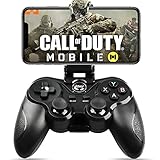
- 🎮NO SIMULATOR NEEDED – Adopt Key Mapping function (just download a APP), login and play game from the original game App instead other unauthorized platforms or simulators, never worry about your gaming account got banned by using OTHER controller.
- 🎮COD & APEX FULLY SUPPORT – The gamepad supports most controller supported Action/Racing/Fighting/Shooting/Athletics games from Android App store. Such as Call of Duty Mobile, APEX Legends Mobile, Summoners War, War Dragons, NBA 2K Mobile Basketball, NBA LIVE Mobile Basketball,Madden NFL Overdrive Football, MLB 9 Innings 18 and so on.
- 🎮COMPATIBLE MODELS - Requires Android 6.0+ version. Compatable with Samsung Galaxy S23/S23+/S23 Ultra, Galaxy S22 Ultra/S22+/S22, Galaxy S21/S21+/S21 Ultra, Galaxy S20/S20+, Samsung Galaxy S10+ S10 S9 S8 S7 Note 10+ 9 8 A9 C9, LG, Moto, Google, Nokia Lumia, Huawei, Xiao MI, Table [BUT do not support Android device with MediaTek CPU].
- 🎮LONG BATTERY LIFE - The bluetooth controller for android comes with 400mAh large capacity rechargeable battery enables you playing the games more than 18 hours after full charge. The holder for device can be adjustable from 2.16 - 3.66 in, support 4 - 7 inch phone screens.
- 🎮NOTICE – The gamepad is 100% compatible with COD/ Diablo Immortal, problem such as can not press 2 buttons simultaneously or key doesn't work with settings, it is due to your game setting problem, please contact us first, we will guide you to solve problem.
Product prices and availability are accurate as of the date/time indicated and are subject to change. Any price and availability information displayed on Amazon at the time of purchase will apply.



