Do these 3 things before closing this tab:
1Repair Windows errors before they cause bigger problems2Scan for outdated or missing drivers - takes under a minute3Clear out junk files and repair common Windows errorsYou can’t create a custom skin and equip it in Fortnite: Epic Games Support says players cannot create their own outfit for use in the game. You can make and share a skin concept as fan art, or use Fortnite Creative and Unreal Editor for Fortnite (UEFN) to build a playable island—but neither is a way to add an outfit to your locker.
Can you make a custom skin and use it in Fortnite?
No. Epic’s support article states, “You cannot create your own outfit to use in Fortnite.” Fortnite uses “outfit” for what players commonly call a skin. Epic does not describe an official player workflow for uploading a custom outfit or equipping one in the Battle Royale locker. A skin maker, image export, mod, or third-party injector should not be treated as a supported route to wearing your design in the official game.
What you can do with a Fortnite skin idea
Draw or share it as fan concept art
You can create an original design as a drawing or render and share the idea with other players. Epic Support suggests using its social channels and player discussions to share outfit ideas. Sharing a concept does not make it an official Fortnite item, and Epic does not promise to adopt submitted ideas. Epic Games Support: Can I create my own outfit and use it in Fortnite?
Build a playable island instead
Fortnite Creative and UEFN let you make Fortnite projects and experiences, not custom Battle Royale locker outfits. Creative is a sandbox for creating, editing, and saving projects in Fortnite. UEFN is a PC application for designing, developing, and publishing games directly into Fortnite; its tools cover areas such as lighting, visual effects, animation, worldbuilding, gameplay, multiplayer, and backend systems. Fortnite Creative and UEFN overview
Windows Errors? Fix Them Before They Spread
Repair common Windows errors and clear accumulated junk for a smoother, more stable PC - no reinstall needed.Free scan · no reinstallOutdated Drivers Are Slowing You Down
One free scan finds every outdated or missing driver and matches the right update for your exact hardware.Free scan · exact hardware match#1 Best Overall

- GILDED TROOPER: Board the Battle Bus and drop in with Fortnite Legendary Skull Trooper (Gilded)!
- FORTNITE: 6-inch action figure is inspired by the video game Fortnite
- ARTICULATED: Feature 28 points of articulation to win any Battle Royale
- ACCESSORIES: Comes equipped with Back Bling and Harvesting Tools
- BONUS CODE: Code for virtual item included: Mecha-jolly
| Goal | What to use | What it does not do |
|---|---|---|
| Show an original outfit idea | Make concept art and share it through social channels or player discussion, as Epic Support suggests. | It does not add the outfit to your Fortnite locker or make it an official item. |
| Create a Fortnite project or island | Use Fortnite Creative or UEFN. Creative is available in Fortnite on PC, mobile, and console; UEFN is a PC application. | These creation tools are not an outfit-upload feature. |
| Publish an island | Enroll in the Fortnite Developer Program, then use the Creator Portal publishing workflow. | Publishing an island does not publish a custom locker outfit. |
How to publish an island made with Creative or UEFN
- Choose your creation tool. Use Fortnite Creative in Fortnite, or UEFN on PC, depending on the project and workflow you want.
- Enroll in the Fortnite Developer Program. Epic’s Creator Portal identifies enrollment as a prerequisite to publishing an island.
- Use the Creator Portal publishing workflow. Follow the portal’s steps for submitting your island. Creator Portal: Fortnite Creative and UEFN publishing
Rules and payment considerations for UEFN creators
Creating or publishing an island is subject to UEFN terms and other applicable Epic policies, including the Terms of Service, Fortnite Developer Rules, Content Guidelines, Community Rules, and Fan Content Policy. You need the rights required to use the content in your project, and you may not imply that your work is developed or endorsed by Epic.
Publishing alone does not guarantee payment. UEFN terms say developers will not receive compensation for Developer-Made Content unless they apply to and are accepted into the Fortnite Publishing Program and/or Support-A-Creator. UEFN Supplemental Terms
Quick Recap
Rank #2
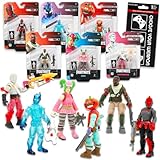
- Fortnite Action Figures Legendary Series Set for Kids - Bundle of 6 Figurines of Red Knight, Zero, and More, Plus Stickers | Fortnite Figures for Boys, Girls, Styles May Vary.
- This Fortnite set includes 6 figurines from the popular video game, Fortnite. Charactes can include Red Knight, Zero, Tomatohead, Love Ranger, and more.
- These Fortnite Legendary Series figures will be great for boys and girls! Perfect for fans and collectors, watch as you assemble your squad with these memorable characters.
- Great for play & display, imaginative storytelling, showcasing, and more. This action figure set is great as party favors, party supplies, goodie bag fillers, loot bag stuffers, and more. Each action figure is 2.5 inches tall.
- Officially licensed Fortnite action figure pack for boys and girls, ages 8 and up. Set also includes a Choose Your Weapon decal sticker.
Product prices and availability are accurate as of the date/time indicated and are subject to change. Any price and availability information displayed on Amazon at the time of purchase will apply.



