Some links on this page are affiliate links: if you buy through them we may earn a commission, at no extra cost to you.
Make hardstyle with AI by generating a kick-led instrumental in short sections, then refining the kick, reverse-bass movement, build and lead in an editor. The tools listed here support beat or instrumental creation and editing, but their supplied product details do not confirm a dedicated hardstyle mode or guarantee hardstyle-specific results. Check each tool’s current genre options and terms before building a track around them.
What To Build Into A Hardstyle Track
Hardstyle depends on a forceful kick and a clear contrast between tension and release. Plan the track around a driving kick, bass movement that answers or follows it, a rising build, and a prominent synth lead at the drop. Treat these as arrangement targets for your prompts and edits; the tools’ descriptions do not establish that they generate these elements correctly on their own.
Which AI Tools Fit This Workflow
| Tool | Useful For | What To Check |
|---|---|---|
| Beat Shaper | Generating editable drums, basslines, synths, loops and arrangements, with piano-roll editing and export options. | Hardstyle-specific support is not stated. Starter downloads are limited to MP3 and non-commercial use; Ableton Live project export and real-time MIDI require Producer. |
| Soundverse AI Beat Maker | Generating complete instrumentals and exporting WAV mixes, separated stems and MIDI for further editing. | Hardstyle-specific support is not stated. The Free Tier starts with 1,000 signup tokens; commercial licenses are listed for Creator & Pro. |
| InsMelo AI Beat Maker | Prompting for beats with genre, BPM, mood and structure controls, then exporting MIDI or stems for edits. | Hardstyle-specific support is not stated. The Free plan is limited to 3.9 credits, and commercial rights depend on subscription or license terms. |
| Aimi | Working in editable multitrack sessions with manual editing, MIDI, effects and arrangements. | Hardstyle-specific support is not stated. Commercial releases carry restrictions for sample library and uploaded content. |
How To Make A Hardstyle Track With AI
- Choose an instrumental workflow. Start with Beat Shaper, Soundverse AI Beat Maker or InsMelo AI Beat Maker if you want a generated beat or full instrumental to shape. Choose Aimi if you want to work in an editable session. Confirm that the tool’s current controls and export options suit your setup before committing to a workflow.
- Write a prompt around arrangement and sound. Describe the kick-led drive, bass movement, rising build and forceful synth lead you want, and specify instrumental if you do not want vocals. Example: “Instrumental hardstyle-inspired dance track: pounding distorted kick, pulsing reverse-bass feel, tense riser into a bright wide synth-lead drop, tight repeating rhythm, clear build and release.” This is a creative brief, not a confirmed feature list: hardstyle recognition, reverse-bass generation and specific sound controls are not established for these products. Check whether the tool accepts the style and details you request.
- Set tempo and structure where controls allow. If the chosen tool exposes BPM or structure controls, set them to match your intended hardstyle arrangement and create a build followed by a drop. InsMelo’s listed controls include BPM and structure; Beat Shaper offers controls for genre, mood, energy and syncopation. The supplied details do not specify a hardstyle BPM range or say these tools provide hardstyle arrangement templates, so choose values by ear and verify the available controls.
- Generate an instrumental draft. Ask for a short, focused section first if the tool lets you control length; otherwise generate a draft and listen for the kick, bass, build and lead. Keep the parts that serve the arrangement and regenerate or edit sections that do not. Section-level generation or editing is not established for every tool here, so check its current workflow.
- Refine the groove and drop. Use piano-roll editing in Beat Shaper, MIDI or stem exports from Soundverse or InsMelo, or Aimi’s manual multitrack editing where those options fit your workflow. Tighten the kick-and-bass pattern, make the build lead clearly into the drop, and simplify competing parts if the main synth lead is hard to hear. These are production choices; the listed tool details do not promise automatic hardstyle-specific corrections.
- Export for your next production step. Choose an export format that your editor or streaming workflow accepts. Beat Shaper lists MIDI, WAV, MP3, stems and DAW project export options, subject to plan limits. Soundverse lists WAV mixes, stems and MIDI; InsMelo lists MP3, WAV, MIDI and separate stems; Aimi lists editable sessions and stems. Verify which exports your selected plan currently includes.
- Listen through the full arrangement. Check that the kick stays prominent, the build creates a clear transition, and the drop arrives with the lead you intended. If the draft misses those targets, return to the prompt or edit the parts you can access; do not assume a genre label alone will supply the arrangement.
Rights And Uploads To Check Before Publishing
Before using generated audio in a stream, video or release, check the current terms for your tool and plan. Beat Shaper’s Starter downloads are non-commercial; its listed Creator plan includes commercial usage rights. Soundverse lists commercial licenses for Creator & Pro, while InsMelo says commercial rights depend on subscription or license terms. Aimi notes restrictions for commercial releases involving its sample library and uploaded content. The supplied details do not establish commercial rights for every other plan or tool.
Use vocals, voice references and uploaded samples only when you have consent and the rights required by the platform’s terms. The tools’ descriptions do not establish permission for a particular voice, sample or reference recording, so check the relevant terms before uploading or publishing.
Quick Recap
Best Value
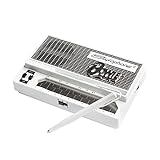
- Limited-edition David Bowie-inspired synthesizer
- Special white design featuring embossed Bowie logo
- Compact & battery-powered
- Unique & simple stylus design
- 3 modes for classic analog synth & bass sounds
Rank #4

- JAPAN'S FAVORITE - One of Japan's most loved musical instrument portable synthesizer toy with more than 30 designs, sold globally, and enjoyed by all ages.
- FUN & EASY TO PLAY - Touch or Slide Your Fingers Along The Stem to Vary The Pitch and Squeeze The Cheeks for Vibrato. Play in a low, medium, or high pitch - get together with friends and create a harmony!
- UNLEASH YOUR CREATIVITY - Express yourself and explore new musical possibilities by creating your very own sounds! Have fun singing and playing along with family and friends at home or outdoors - the lightweight, portable Otamatone is the perfect instrument to bring camping to accompany your campfire singalongs!
- GREAT FOR ALL AGES - Kids, teens, and adults all love the Otamatone! Whether you’re brand new to music or an expert musician, the Otamatone offers a fun, silly new way to make music!
- QUICK AND EASY SET UP - AAA Batteries ×3 Operated (Battery NOT included). Simply turn it on, and you're ready to play! Its compact size (Approximately 10.6" or 27 cm) makes it perfect for travel and music on the move!
Rank #3

- Timeless Intuitive Design - Building upon MOOG's iconic monosynths, Messenger features innovative circuits in a portable format, delivering classic analog sound with modern enhancements
- Iconic Sound, Enhanced - Designed for musicians and producers seeking a portable, powerful monosynth with the legendary MOOG sound, modern touches and intuitive knob-per-function controls
- Unique Wavefolding Oscillators - Featuring two continuously variable-shape VCOs with sync and frequency modulation capabilities, plus a sub-oscillator for added bass weight and powerful low-end
- Next-Gen Ladder Filter with Resonance Bass Compensation - Offering 4- or 2-pole low-pass, band-pass, and high-pass responses; RES BASS switch ensures full-bodied sound across the spectrum
- Full-Size Keys with Expressive Control - 32 semi-weighted full size keys with velocity and aftertouch, suitable for both performance and studio use; robust metal panel with 256 presets
Rank #2
- Used Book in Good Condition
#1 Best Overall

- THE ORIGINAL POCKET SYNTHESIZER - Used by everyone from David Bowie to The White Stripes, this musical instrument is a great addition to your collection. A great gift for experienced musicians and beginners alike!
- ICONIC SOUND - The Stylophone original pocket operator features the same iconic, analog sound as the original, first released in 1968. The Stylophone is an iconic mini synth, known for its super-fun stylus, compact design, and unique retro sound with 3 Octaves and optional vibrato effect,
- EASY TO PLAY - This electronic keyboard operated synthesizer is played by tapping and sliding the connected stylus along the touch-sensitive metal surface. Each segment on the surface plays a different note. It’s easy to play, perfect for beginners and experienced musicians!
- PORTABLE & BATTERY-POWERED - At less than 12cm wide, the Stylophone synthesizer will fit right in your coat pocket. It runs on 3 x AA batteries, and features a built-in speaker and headphone socket – so you can play it everywhere you go.
- CONNECTIVITY - Connect the Stylophone to your computer and other gear to enhance your sound & music possibilities! Use a 3.5mm Stereo cable to connect into the line input on your PC, and use your preferred software to record and manipulate your Stylophone sounds.
Product prices and availability are accurate as of the date/time indicated and are subject to change. Any price and availability information displayed on Amazon at the time of purchase will apply.
Independent reader supportYour contribution helps us test, update, and keep practical guides available for everyone.
