Open Gartic Phone in a browser, create a room, and invite your friends. Then have everyone join a Discord voice channel to talk while playing. You can share the game window in Discord if you want a shared view, but screen sharing is optional: the game runs on the Gartic Phone website, with Discord serving as the group call.
Set up Gartic Phone and Discord
-
Open the official Gartic Phone site and create a room. Choose a character and nickname when prompted.
-
Use the room’s invitation controls to invite friends. Follow the controls displayed in the current room, since the interface may change.
-
In Discord, join a server voice channel where the group can talk. Discord’s voice channel guide says to join by clicking the channel.
What’s actually slowing this PC down?
Pick the symptom - the matching free tool is one click away.
Special offer. See more information about Outbyte and uninstall instructions. Please review EULA and Privacy policy.#1 Best Overall
 New Phone, Who Dis? Offline Text Message Party Game by Relatable
- Games for Adults: This game has mature content and is designed for 2+ players ages 17+. Good for bachelorette party games, board games for adults or adult games for game night, New Phone, Who Dis? is best played with a crowd.
- How To Play: Players take turns drawing an Inbox Card, while the rest of the group tries to play their funniest Reply Cards. After everyone has chosen a response, the judge picks the funniest combo.
- Enjoy Analog Games Again: Put the phones down while still getting all the fun of a hilarious group text thread. IRL card games have never felt so digital, making New Phone, Who Dis? a top game for teens.
-
Keep Gartic Phone open in a browser. Players can each use the game on their own device, or one player can share a browser window with the group.
-
Start the game when everyone is in the room and ready.
Rank #2
Sale Spin Master Games, SolidRoots Game of Phones, Use Your Phone to Get Ahead, Hilarious Cards for Family Game Night, for Teens, Adults & Family, 3-10 Players, for Ages 13 & Up
- Perfect For Your Next Party: Do I need a smartphone? Yep Any new apps needed? Nope All you need is your smartphone to take on creative and unexpected challenges for 3+ players
- Use Your Phone: Game of Phones is a smartphone party game great for travel games, adult games, and camping games. As long as you can use an iPhone or Android, you’re sure to love this fun card game for yourself or as a gift
- How To Play: Respond to challenge cards by finding things on your smartphone like messages, photos, cat memes, dog videos, or anything on the internet. It’s the ultimate digital scavenger hunt
- Funny Random Stuff For Family Game Night: Throw the best party, birthday, game night & Friendsgiving with new party games, family board games & card games for teens & adults
- Spin Master Toys & Games: Looking for kids games, yard games & card games for grown ups, kids or teen? Shop everything from family game night, travel games, puzzles for adults & family games
Choose how the group will view the game
| Setup | What players do | Best for |
|---|---|---|
| Separate game tabs plus Discord voice | Everyone opens the room on their own device and talks in Discord. | Each player wants to interact directly with the game. |
| One shared browser stream plus Discord voice | One player shares the Gartic Phone browser window in the voice channel. | The group wants a shared view or a host is guiding the session. |
Neither setup is required for every group. The game runs on its own page, and Discord provides the conversation around it.
Share the game window in Discord (optional)
-
Join the voice channel where you want to stream. You need permission to share in that channel.
The Tool Desk
Outbyte Driver Updater FREEScan for outdated or missing drivers - takes under a minuteDriver Scan →Outbyte PC Repair FREEClear out junk files and repair common Windows errorsFree Scan →Special offer. See more information about Outbyte and uninstall instructions. Please review EULA and Privacy policy.Rank #3
Sale Game of Phones - What Will You Share Next? Card Game
- It's not an epic fantasy, but it won't disappoint you at the end.
- As much as we at SolidRoots want people to connect we know you love your phones. We get it.
- And in Game of Phones, players present the best response to the prompt card using only their phone.
- It's like the cooler older brother, tech version of Apple-to-Apples.
- Also unlike the book series, this one is complete AND has expansion packs ready to go. No need to wait years to get new content.
-
Click Discord’s screen-streaming icon.
-
Select the Gartic Phone browser window, or choose the entire screen if needed.
-
Start the stream so other people in the voice channel can watch.
Rank #4
![Game of Phones [A Modern Party Game]](https://m.media-amazon.com/images/I/51oIIku+JWL._SL160_.jpg) Game of Phones [A Modern Party Game]
Game of Phones [A Modern Party Game]- Game of phones is a unique card game that brings smartphones to the party. Use apps and your smartphone's web browser to find the weirdest, funniest, and most unexpected responses to game prompts. Don't worry -- it's easy to play!
- It's a party game for adults, teens, and Anybody else with a smartphone.
- Family friendly (but your friends’ responses to prompts may not be).
- No two games are ever The same because the Internet is endless and What's on your smartphone is always changing.
- For 3 or more players. Game contains 112 prompt cards and instructions.
Discord’s Go Live and Screen Share guide says up to 50 people can share video or a screen at a time in a Discord voice chat. That is Discord’s sharing capacity, not a Gartic Phone room-size limit. The guide also notes that audio sharing is unavailable on Linux; the basic game instructions center on voice conversation and drawing rather than game audio.
Independent reader supportYour contribution helps us test, update, and keep practical guides available for everyone.How a round works
-
Each player writes a quirky sentence.
-
Players draw the sentence passed to them.
-
Players describe a drawing they receive.
-
At the end, watch the results unfold and see how the original idea changed as it passed through the group.
Do these 3 things before closing this tab:
1Scan for outdated or missing drivers - takes under a minute2Clear out junk files and repair common Windows errors3Fix the driver behind crashes, sound loss and screen glitchesSpecial offer. See more information about Outbyte and uninstall instructions. Please review EULA and Privacy policy.Best Value
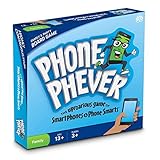 Phone Phever Board Game - New Fun Fast-Paced Family-Friendly Party Board Game - It's a Phonetastic Race to Answer Fascinating Trivia Questions & Complete Hilarious Challenges!
- Perfect gift for board game lovers, adults, teens, tweens and all smartphone addicts!
- Cards offer 1,200 unique trivia questions and challenges across six different trivia categories - TV, music, movies, law and politics, history and technology, and everything else!
- 3 or more players or teams; Ages 13 to adult; 30-60 min. play time
- This award-winning game is compatible with ALL smartphones (smartphone not included); no app required
- The Uproarious Game of Smartphones and Phone Smarts - only your phone needs to be smart!
Gartic Phone describes this sequence in its official instructions. Keep Discord open for conversation while each player follows the prompts in the game.
Should you launch it as a Discord Activity?
Discord supports inviting people to Activities from a voice channel, as described in its guide to apps and Activities. However, that general guide does not establish that Gartic Phone can be launched as an Activity for every account, client, or server. The dependable setup is to open the game on its website and use Discord voice alongside it.
Quick Recap
Product prices and availability are accurate as of the date/time indicated and are subject to change. Any price and availability information displayed on Amazon at the time of purchase will apply.



