PC Slower Than It Used to Be?
A free scan shows the junk files, broken settings and background clutter dragging Windows down - then fixes them in one click.Free scan · Windows 10 & 11Outdated Drivers Are Slowing You Down
One free scan finds every outdated or missing driver and matches the right update for your exact hardware.Free scan · exact hardware matchSome links on this page are affiliate links: if you buy through them we may earn a commission, at no extra cost to you.
Yes—you can play The Elder Scrolls V: Skyrim on a supported iPhone or Android phone through Xbox Cloud Gaming. It streams the game from Xbox servers; it is not a native mobile version you download and run on your phone. You should also plan to use a controller: Xbox’s current listings do not identify either edition as touch-enabled.
There is an important catch before you subscribe: Xbox lists both Skyrim Special Edition and Skyrim Anniversary Edition as cloud-playable, but their game pages also say “Game purchase required.” Check the listing while signed in to your account and set to your region before paying for a subscription just to play Skyrim.
What you need to play Skyrim on a phone
- A supported iPhone or Android device in a supported region. Xbox’s published mobile compatibility details differ across its pages, so check its current mobile guidance and cloud gaming page for your specific device and region.
- Access to the game. You may need an eligible Game Pass plan, a separate game purchase, or both, depending on the current listing for your account and region.
- A compatible controller. Skyrim is not listed as playable with touch controls.
- A supported browser and a reliable connection. Xbox identifies Safari, Google Chrome, and Microsoft Edge among its supported browser options for Xbox.com.
Xbox recommends at least 10 Mbps for cloud gaming generally, and says some devices may need 20 Mbps for best quality. A 5 GHz Wi-Fi connection is recommended. Cellular play may work, but streaming can use substantial data and performance depends on coverage, congestion, and your plan.
What’s actually slowing this PC down?
Pick the symptom - the matching free tool is one click away.
How to start a Skyrim cloud session
- Check Xbox’s current Game Pass information and the Skyrim listing for your account and region. Confirm both cloud access and game access before subscribing or buying anything.
- On your phone, open a supported browser and go to Xbox.com/play.
- Sign in with the Microsoft account associated with your subscription or game purchase.
- Search for Skyrim Special Edition or Skyrim Anniversary Edition. Read the listing’s access information, including any “Game purchase required” notice.
- Pair a compatible controller over Bluetooth, or connect one by wire if your phone and controller support it. Then start the cloud session.
You do not have to install Skyrim as a phone app. Cloud Gaming sends the game from a remote Xbox and streams its video and audio to your device. Xbox also offers a mobile experience through its app, but going to Xbox.com/play in a supported browser is a direct route and is particularly useful on iPhone.
#1 Best Overall

- Compatible with Xbox wireless Controllers, Xbox One Controllers / Xbox Elite Controllers / Xbox Controllers 2020+
- Expandable Clip to fit large smartphones - Min: 49mm, Max 86mm
- Foldable for easy transport when gaming on-the-go
- Includes all clips for compatibility with all listed Xbox wireless Controllers
Is Skyrim included with Game Pass?
Do not assume that a Game Pass subscription automatically includes Skyrim at no extra cost. Xbox’s current pages for both editions name Game Pass Essential, Premium, and Ultimate for cloud play, but also show “Game purchase required.” Xbox says game availability can vary by plan, region, platform, and time. The live, account-specific listing is the best check; it may distinguish access through a subscription from a required purchase.
Plan names and benefits are not interchangeable. Xbox currently describes cloud gaming with Essential, Premium, and Ultimate, while PC Game Pass is aimed at PC play. Cloud catalog access, quality, and wait times can differ by plan and change over time. Check the current plan page rather than relying on an old price or a general claim that “Game Pass includes Skyrim.” If Skyrim is marked for purchase, compare that cost with your alternatives before starting a recurring subscription solely for this game.
Which edition can you play?
Xbox has cloud listings for both editions:
- Skyrim Special Edition: The remastered game with its official add-ons. Xbox lists it as cloud-playable.
- Skyrim Anniversary Edition: Includes Special Edition content, the three major add-ons, and Creation Club content released on or before November 11, 2021, according to Xbox’s listing. It is also listed for cloud play.
Those descriptions do not mean every later Creation or mod is included, or that mod management works the same way in a cloud session as it does on a locally installed game. Check the specific edition and content listing before choosing.
Rank #2

- MEASURE YOUR PHONE ACROSS, CASE AND ALL, BEFORE YOU ORDER: The clamp opens from 55 mm to 98 mm, which is 2.17 to 3.86 inches, and that figure is the width of whatever you actually drop into it. A slim handset in a thin case usually lands in the middle of that range, while a large model in a rugged case can run past the top of it, so a tape measure across the back of the phone settles the question in about ten seconds.
- THE ARM TILTS THROUGH 270 DEGREES AND LOCKS AT THREE STEPS: The bracket turns at the joint and holds where you leave it, so the screen can face straight up on a desk or angle back toward you in the chair. Three fixed steps rather than free rotation means it stays put once set, instead of drifting down as the phone gets heavy in a long session.
- NOTHING ON THE PAD IS COVERED WHILE THE CLIP IS ON: The arm mounts above the pad and clears the face buttons, the bumpers and the triggers, and it leaves both the USB-C socket and the 3.5 mm headset jack open. That means a cable can stay in while you play and a wired headset still goes where it always did.
- MADE FOR THE SERIES X AND SERIES S PAD, AND NOT FOR AN ELITE SERIES 1: The buckle is shaped for the standard pad shipped with those two consoles. An Elite Series 1 pad is a different shell and is not covered. Check the back of your pad as well, because a third party battery cover changes the shape the mount has to grip.
- IT FOLDS FLAT, AND IT WORKS ON A DESK AS WELL: Folded down the whole thing is 14.5 cm tall and 9 cm deep, small enough to go in the same bag as the pad, and the arm doubles as a stand for watching something with the pad set aside. In the box is the mount and nothing else, moulded in black ABS.
Do you need a controller?
For Skyrim, yes, in practical terms. Xbox’s pages describe both editions as “Playable without touch controls.” Xbox offers touch controls for selected cloud games, but Skyrim is not presented as one of them. Do not count on being able to play it comfortably using only the phone screen.
You can use a compatible Bluetooth controller, such as an Xbox Wireless Controller or a supported PlayStation controller, or a phone-mounted controller such as a Backbone- or Razer Kishi-style device. Wired controllers may also work if they are compatible with your phone and its port. Check device, connector, and case fit for a mounted controller; a full-size controller may need a separate stand or clip.
Cloud Gaming or Remote Play?
They both stream a game to your phone, but the game runs in a different place:
Rank #3

- KIWIFOTOS Magnetic Game Controller Phone Mount is specially designed to be compatible with the Xbox Wireless Controller Model 1914. PLEASE NOTE: It's NOT compatible with Xbox One/S Controllers / Xbox Elite Controllers. This is the Phone Mount ONLY; the controller is not included.
- A soft silicone pad covers the magnetic plate to protect your phone from scratches. Installation is quick and tool-free: simply remove the battery cover of the wireless controller, attach the mount in its place like a battery cover, and then secure your phone onto the magnetic plate for instant use. ensuring a secure connection between your phone and the controller for an immersive gaming experience anytime, anywhere. Made of premium ABS material, the mount is sturdy and durable.
- After removing the phone, the mount can be placed with the magnetic plate facing downward to function as a controller stand, offering versatile and practical use. In addition, the product comes with a metal magnetic ring kit, making it compatible with phones that do not have built-in magnetic functionality, thus expanding its versatility to meet the needs of more users.
- Lightweight and portable; The magnetic plate securely attaches to phones with magnetic functionality, Widely compatible with Magsafe iPhone 18 Pro 17 16 15 14 13 12 Pro Max series /Magsafe cases, or with metal ring for none Magsafe phones such for iPhone 11 XR/XS/XS MAX/iPhone SE 2/ 8 Plus/7 Plus, for Samsung Galaxy S26 S25 S24 S23 Utra/ S22 Ultra/S21/S21 Ultra/S20/S20 Ultra/S20 FE 5G/S10/S10E/S9/S8/Note 20 Ultra/Note10/Note9, for Huawei OnePlus for Pixel 6 7 8 9 10 and, etc.
- The Magnetic Phone Mount includes a complimentary metal magnetic adapter ring, enabling compatibility with non-magnetic phones to expand device support. This thoughtful inclusion ensures universal adaptability across diverse smartphones, making it the ultimate accessory choice for mobile gamers who demand both versatility and premium functionality.
| Option | Where Skyrim runs | Best fit |
|---|---|---|
| Xbox Cloud Gaming | On Xbox servers | You do not own an Xbox, and your account has the required game access and cloud availability. |
| Xbox Remote Play | On your own Xbox console | You own an Xbox, have Skyrim installed, and want to stream that console to your phone. |
| Local play | On a PC or console | You want local responsiveness, offline access, or a setup better suited to mods. |
Remote Play is not the same as cloud gaming and does not make the game run natively on a phone. It streams from your own configured console. If you already own an Xbox and Skyrim, Xbox’s mobile guidance describes Remote Play as an option for games installed on that console. It may be a better fit than subscribing for cloud access, though you still need a controller and a suitable network connection.
Recommended Free Tools
What the experience is like
Cloud play is convenient for a quest, a short session while travelling, or continuing away from your console. It is still a stream, not local play. Input delay and image quality vary with the connection and server conditions. Latency can be noticeable in combat, archery, or lockpicking; a weak or busy Wi-Fi network can cause softness, stutters, or interruptions.
For a steadier session, use 5 GHz Wi-Fi near the router, and pause large downloads or other demanding streams on the same network. Mobile data is an option where supported, but weigh your data allowance and coverage first. Expect the phone’s battery to drain during an extended stream, and remember that maintaining a controller connection uses power too. A larger phone or tablet can make menus and the game world easier to see.
Rank #4
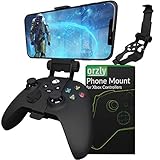
- Custom-Engineered Orzly Xbox Controller Phone Mount: Elevate your mobile gaming setup with this Xbox controller phone mount accessory, custom-designed for Xbox Series X|S and Xbox One controllers. The precision-fit clip locks securely in place with a wrap-around closed structure and soft-grip padding, preventing scratches and wobble. Transform any controller into a versatile mobile gaming station perfect for Xbox Game Pass, cloud streaming, remote play, and Twitch on the go.
- Ergonomic Single-Lock Articulation & Adjustable Viewing Angle: Say goodbye to neck strain and glare with our intuitive ball-joint design that offers a full range of swivel, tilt, and pan movement for glare-free gaming. The robust gear‑lock mechanism and easy quick‑release lever let you pivot, secure, and detach your phone in seconds. Perfectly position your device for peak performance and comfort during marathon Xbox mobile gaming sessions at home or on the move.
- Universal Soft-Grip Phone Clamp with Scratch Protection: Designed to fit Android and iOS smartphones from 1.88″ (48 mm) to 3.34″ (85 mm) wide, this Orzly clamp features plush padding and anti‑slip grips to cradle your device without leaving marks. Even pressure distribution locks your phone firmly in place during rapid motion, while its low-profile design ensures unobstructed access to camera lenses, speakers, and the entire touchscreen for uninterrupted HD gaming on the move.
- Durable, Compact Fold‑Away Design for On‑the‑Go Gaming: Constructed from lightweight, high‑strength polymer and aluminium, this Orzly Xbox controller mount folds flat for effortless storage in backpacks, messenger bags, or even deep pockets. Ideal for travel, commuting, LAN parties, and outdoor gaming, its pocketable, scratch‑resistant design adds virtually no bulk while delivering pro‑grade reliability and lightning‑fast setup in seconds.
- Enhanced Comfort & Reduced Hand Fatigue During Marathon Sessions: Engineered for ergonomic weight distribution, this Orzly phone mount balances the added bulk of your smartphone across the controller body to alleviate wrist and palm strain. The closed‑lock mechanism firmly secures your device without blocking triggers, bumpers, or joysticks, ensuring precise inputs and comfortable gameplay for extended Xbox Game Pass cloud or remote play marathons.
Cloud saves can help you continue on supported Xbox devices, but a dropped or interrupted session is not a reason to assume progress synchronized instantly. Let the game save normally when possible, and use the same Microsoft account on the devices where you play.
Troubleshooting
Skyrim does not appear in search
- Search the full edition names, including Special Edition or Anniversary Edition.
- Confirm you are signed into the Microsoft account that owns the game or subscription.
- Check the listing for your region and plan. Availability can differ, and the game may require a purchase.
The Play button is unavailable
Check whether cloud gaming is supported for your region, device, and account plan, and whether your account has access to that edition. A purchase requirement, unsupported browser, or temporary Xbox service issue can also prevent launch. If the setup otherwise looks correct, try again later.
The controller is not responding
Pair the controller with the phone before starting the session. If it is already paired, disconnect and reconnect Bluetooth, check the controller’s compatibility with your phone, or try a compatible wired connection. Skyrim’s listing does not promise touch controls; look for Xbox’s “Play with touch” indicator before expecting a game to work without a controller.
The stream stutters or looks blurry
Switch to 5 GHz Wi-Fi if available, move closer to the router, and stop large downloads or video streams sharing the connection. Try another supported network to distinguish a connection problem from a device or service issue. Cellular data may help where coverage is strong, but it can use a lot of data.
Is playing Skyrim on a phone worth it?
It is a useful way to access Skyrim when convenience matters more than having the most responsive or visually consistent experience. It makes the most sense if your phone and region are supported, your account has access to the correct edition, and you have a controller and a stable connection. If you mainly want offline play, maximum responsiveness, or a mod-heavy setup, local PC or console play is a better fit. If you already own an Xbox with Skyrim installed, consider Remote Play before paying for another route.
Quick Recap
Product prices and availability are accurate as of the date/time indicated and are subject to change. Any price and availability information displayed on Amazon at the time of purchase will apply.

